Arcade: Servicing exercise for .NET Core 3
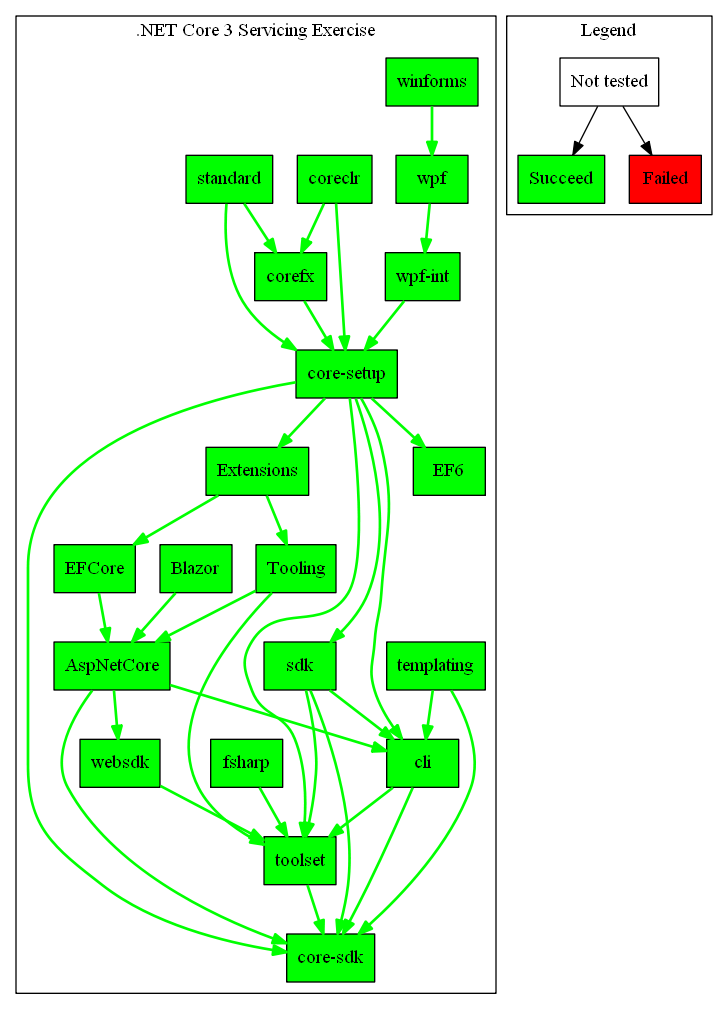
In order to test the new publishing infrastructure that relies on stages, we're performing a servicing exercise to make sure that packages and blobs are published to the correct private feeds/storage, and there isn't a risk of publishing private bits to any of the public locations.
The process for this will be:
- Create internal/servicing-test branch on the repos that will be part of the exercise
- Update to the latest arcade version that enables publishing to private azure devops artifact feeds for internal builds
- Create subscriptions between the repos involved from the internal-servicing channel targetting the internal/servicing-test branch
- Run a build from the test branch and validate that no assets were published to any publicly accessible locations
- Check that Dependency update PRs get created based on the subscription structure
- Repeat on our way up the stack.
Status for PAT-based exercise:
 riarenas
All 49 comments
This is waiting for an Arcade SDK version that includes the changes from https://github.com/dotnet/arcade/pull/3792, which are currently blocked due official build breaks. I'll keep preparing the branches and subscriptions while the issues are resolved.
riarenas
on 5 Sep 2019
Are these the repos (flow) that are going to participate in the exercise, right?
Arcade -> CoreFX -> Core-Setup -> Core-SDK
 JohnTortugo
on 5 Sep 2019
JohnTortugo
on 5 Sep 2019
Is there a reason to include Arcade?
riarenas
on 5 Sep 2019
If we trigger a subscription from Arcade to a new branch in CoreFX then the changes will be propagated automatically, right? We can start it on CoreFX too but we'll need to keep updating the branch in CoreFX anyway. Correct?
JohnTortugo
on 5 Sep 2019
That would involve setting up a branch in Arcade that publishes to the servicing channel. For this first exercise I want to keep it contained to product repos.
riarenas
on 5 Sep 2019
Talked offline. We don't have CI for the internal branches. We'll need to trigger the builds manually.. so starting from CoreFX may be easier.
JohnTortugo
on 5 Sep 2019
Subscriptions and default channels targetting the internal servicing channel have been created for
- CoreFX
- Core-Setup
- Core-SDK
Will start running the builds as soon as the Arcade SDK with the necessary changes is available in the "tools - latest" channel.
riarenas
on 5 Sep 2019
To work around the arcade build break, I'm going to:
- Add the arcade-validation feed to the repos' NuGet.config
- Copy the state of the eng/common folder from arcade master
- Update the global.json to use the newest arcade SDK in the arcade-validation feed
riarenas
on 6 Sep 2019
Builds failed with:
##[error].packages\microsoft.dotnet.arcade.sdk\1.0.0-beta.19455.13\tools\SdkTasks\PublishArtifactsInManifest.proj(65,5): error : Azure DevOps NuGetFeed was not in the expected format 'https://pkgs.dev.azure.com/(?<account>[a-zA-Z0-9]+)/(?<visibility>[a-zA-Z0-9-]+/)?_packaging/(?<feed>.+)/nuget/v3/index.json'
We are attempting to use https://dnceng.pkgs.visualstudio.com/_packaging/dotnet-core-internal/nuget/v3/index.json as the feed URL.
https://pkgs.dev.azure.com/dnceng/_packaging/dotnet-core-internal/nuget/v3/index.json points to the same feed and matches the expected regex, so I'll run more tests with that feed URL.
riarenas
on 6 Sep 2019
successful Core-setup build: https://dev.azure.com/dnceng/internal/_build/results?buildId=341374&view=results
Going to see if any packages or blobs are outside the expected private locations, and will test if core-sdk is able to restore packages from the internal feed
riarenas
on 6 Sep 2019
Core-Setup does not use job.yml at all for their building, so the nugetAuthenticate task is not being ran, causing failures to restore from the internal azure devops feed.
https://dev.azure.com/dnceng/internal/_build/results?buildId=341905&view=results
F:\workspace.1\_work\1\s\artifacts\toolset\restore.proj : error : Unable to load the service index for source https://pkgs.dev.azure.com/dnceng/_packaging/dotnet-core-internal/nuget/v3/index.json
Summary of latest attempts:
- CoreFX internal build published all their packages to the expected private locations
- Core-Setup wasn't able to restore these packages, because they are missing the NugetAuthenticate task (Which we hoped repos would get for free by sticking it in Arcade templates, but the templates are not used in core-setup)
- Core-sdk tries to always download the installers from aspnetcore and core-setup from https://dotnetcli.azureedge.net/dotnet/ For internal builds, these installers should be downloaded from the dotnetclimsrc storage account instead. Investigating the best way to achieve this.
riarenas
on 6 Sep 2019
New build of core-setup with the NuGetAuthenticate task: https://dev.azure.com/dnceng/internal/_build/results?buildId=342082&view=results
All the Linux and OSX legs, and some windows legs (?) failed to restore some of the packages from the feed. Smells like an auth issue. Investigating.
EDIT:
There are a few different failure modes in that build:
Linux builds running in docker containers are failing to authenticate against the feed. My suspicion is that we'll need to pass some environment variables that the nugetAuthenticate task creates to the container.
Windows builds are failing with:
Unhandled Exception: System.Threading.Tasks.TaskCanceledException: A task was canceled.
   at NuGet.Protocol.Plugins.MessageDispatcher.DispatchWithNewContextAsync[TOutgoing,TIncoming](IConnection connection, MessageType type, MessageMethod method, TOutgoing payload, CancellationToken cancellationToken)
   at NuGet.Protocol.Plugins.SymmetricHandshake.HandshakeAsync(CancellationToken cancellationToken)
   at NuGet.Protocol.Plugins.Connection.ConnectAsync(CancellationToken cancellationToken)
   at NuGet.Protocol.Plugins.PluginFactory.CreateFromCurrentProcessAsync(IRequestHandlers requestHandlers, ConnectionOptions options, CancellationToken sessionCancellationToken)
   at NuGetCredentialProvider.Program.Main(String[] args) in E:\A\_work\857\s\CredentialProvider.Microsoft\Program.cs:line 134
   at NuGetCredentialProvider.Program.<Main>(String[] args)
This seems to be a known issue: https://docs.microsoft.com/en-us/azure/devops/pipelines/tasks/package/nuget-authenticate?view=azure-devops#i-get-a-task-was-canceled-errors-during-a-package-restore-what-should-i-do
Will take a look into the alternatives posted there.
riarenas
on 6 Sep 2019
Update:
Corefx: https://dnceng.visualstudio.com/internal/_build/results?buildId=342183&view=results
- Packages are being published to the correct locations. Haven't found issues.
Core-Setup: https://dnceng.visualstudio.com/internal/_build/results?buildId=345789&view=results
- Failing to be able to authenticate against the azdo feed from within docker containers. I'm exploring passing the environment variables documented here to the container
- Windows and OSX builds (and presumably Linux once the above is fixed) failing to restore the test asset projects:
This uses its own restore sources instead of using the feeds from NuGet.config, and also calls the msbuild restore task directly which is causing authentication issues against the feed.
Core-SDK:
- Working on attempting to conditionally restore installers from dotnetclimsrc as a fallback from internal branches if the given installer is not available in the public dotnetcli container
riarenas
on 9 Sep 2019
Update:
- I added a table to the issue description to keep track of which repos & subscriptions were tested.
- Got two problems in the test build for CoreFX: 1) Some 401 issues and 2) some NuGet timeouts. I'm still investigating what's going on here. This is the build.
- Got a problem in the wpf-int test build: 1) the SetupTargetFeeds.proj wasn't able to determine which target feed configuration to create for my test build. This is the build.
- Still pending the merge of this Core-SDK PR to fix download of blobs from MSRC & install CredProvider on Docker containers. This is the PR.
JohnTortugo
on 17 Sep 2019
We should make sure to update arcade dependencies on these branches before running the builds. These all seem like flakiness and reliability bugs we fixed over the last week.
riarenas
on 17 Sep 2019
After an arcade update, the wpf-int build seems to be working well: https://dev.azure.com/dnceng/internal/_build/results?buildId=357911&view=results
CoreFX is still seeing issues during toolset restore. I'm examining if the workarounds we are using to make private feed restoring more sturdy are not being applied for this job (ie, it's not going through the Arcade codepath that sets the env variables and clears the cache)
riarenas
on 18 Sep 2019
Contacted Azure Artifacts team about the failures in CoreFX. I updated Arcade again because the branch was missing some changes, and we got a couple new failure modes when restoring: https://dev.azure.com/dnceng/internal/_build/results?buildId=359307&view=results
riarenas
on 19 Sep 2019
Update:
AspNetCore:
Most of the build legs failed. Some failures are probably just due to adjustments in the way the Docker container is started:
- TaskCanceled exception
- Unauthorized messages (aka 401)
- Problem starting the plugin '/home/vsts/.nuget/plugins/netcore/CredentialProvider.Microsoft/CredentialProvider.Microsoft.dll' -
JohnTortugo
on 19 Sep 2019
AspNetCore branch doesn't have current arcade updates, so it's missing most of the workarounds. Will update the branch and kick off another build.
The arcade subscriptions for the release/3.0 branches have been disabled while we had a good GA build, so it's important to always update the arcade dependencies to get any fixes for the issues we've been seeing and spot fixing in the past weeks.
darc update-dependencies --channel ".NET tools - latest" -- source-repo arcade
(I'm updating from the latest channel as oposed to the 3.0 channel to make sure we have every fix possible available, we'll eventually port any changes that are only in Arcade master to release/3.x)
riarenas
on 19 Sep 2019
New build of aspnetCore still has issues, but they look more in line with what I expected could fail:
https://dev.azure.com/dnceng/internal/_build/results?buildId=360061
- Cannot authenticate against private feeds from docker. Will need the same treatment as the core-setup and core-sdk docker builds to install the credential provider.
- One of the jobs is not using the Arcade job template, so it needs to add the NuGetAuthenticate task.
riarenas
on 19 Sep 2019
Update:
- Provided a repro of the coreFX failures to the NuGet and Azure artifacts teams.
- Along with @JohnTortugo we were able to determine most of the fixes required for ASPNETCore
riarenas
on 20 Sep 2019
There are two remaining issues for AspNetCore builds:
1 - There is a 401 error happening in a leg that execute this file. I think the problem might be that this script spawn subprocesses and said subprocesses don't have a copy of needed authentication env. variables.
- Other issue is in the CodeCheck job. I pinged @dougbu about this and I'm waiting his response. /cc @JunTaoLuo in case he can also help.
JohnTortugo
on 20 Sep 2019
About AspNetCore
The base branch for 'internal/internal/cesar-servicing-exercise' appears to be 'release/3.1' but the last shared commit was pushed on the 12th. Likely missing a number of important fixes since then.
Suggest rebasing on latest. Then we can discuss the possible issues in the build.
FYI 'release/3.1' builds have been pretty solid recently.
 dougbu
on 20 Sep 2019
dougbu
on 20 Sep 2019
Thanks Doug. I'll try that.
Update: Some build legs in core-setup are failing to authenticate. Looks like Docker related stuff. @dagood
JohnTortugo
on 20 Sep 2019
I suspect an Arcade fix didn't go in the way I expected it to (note: that step uses eng/common/msbuild.sh which I recently learned is not a "standard" Arcade script). I'll take a look.
Interesting thing log:
- Looks like the fixes in https://github.com/dotnet/arcade/pull/3928 aren't present in this branch, or in
release/3.1,release/3.0, ormaster. - The last successful build's NuGet.config has the authenticated feed last, this one has some at the beginning, some at the end. Possible the authed feeds weren't being hit at all in the last successful build, and there's something deeper that's wrong.
- The initialize toolset step doesn't have
--cipassed, so the local http cache isn't cleared. I think this could be a cause. The two toolset init steps share a home directory, and it seems like the second tool init step is always the one that fails. (The first one always has a fresh home directory, second one always has a dirty http cache.) - Yep, adding
--cifixed it. (Along with manually adding the Arcade common script fix.) The NuGet.config order masked the problem in the original build and I didn't notice back then.
 dagood
on 20 Sep 2019
dagood
on 20 Sep 2019
The unknown missing piece was a --ci flag on the tool init step--the http cache wasn't being cleared, leading to the auth error upon the second time tool init runs. I added notes to my last comment.
Submitting the fix to Core-Setup branches. (The Arcade fix will still be missing, though.) Test build with fix: https://dev.azure.com/dnceng/internal/_build/results?buildId=361711
/cc @dleeapho
dagood
on 20 Sep 2019
The build I started (https://dev.azure.com/dnceng/internal/_build/results?buildId=361711) got past the build and failed on Signing Validation while trying to access the feed in sdk-task.ps1. I only applied the sh fixes from https://github.com/dotnet/arcade/pull/3928 to my branch, so I imagine this is due to missing the ps1 fixes.
I kicked the upgrade PR https://github.com/dotnet/core-setup/pull/8272 along to get the Arcade fixes into Core-Setup master. However, I don't see a release/3.1 Arcade => Core-Setup update PR. @JohnTortugo can you look at this?
(You might also want to port over the ps1 changes manually to kick off your own build that gets to the very end, I'm not 100% sure what the goal of your branch is.)
dagood
on 20 Sep 2019
However, I don't see a release/3.1 Arcade => Core-Setup update PR. @JohnTortugo can you look at this?
We haven't finished setting up the subscriptions / publishing for arcade for the 3.x branches, and the builds in that channel don't have all the needed fixes yet.
riarenas
on 20 Sep 2019
@dagood I already started my test build and it passed the point where it was failing before: https://dnceng.visualstudio.com/internal/_build/results?buildId=361843&view=results The error now seems to be the known private AzDO feeds issues.
Your build failed because of the errors fixed by these PRs, BTW: https://github.com/dotnet/arcade/pull/3962 https://github.com/dotnet/arcade/pull/3994
JohnTortugo
on 20 Sep 2019
Updating:
Core-Setup
AspNet-Core
Toolset
JohnTortugo
on 24 Sep 2019
I used a private branch from AspNetCore to try and create a minimal case for some of the failure scenarios that we are facing. I got a pretty small sample case for the Timeout and Task Cancelled errors.
Both builds tries to restore the same .csproj file. The only difference is that in one the csproj has a PackageReference which has a version attribute and in the other the PackageReference doesn't have the attribute. Although I don't think the problem is the missing version attribute I think this sample case should be helpful to nail down what's the root cause of the problem.
/cc @markwilkie @riarenas
JohnTortugo
on 25 Sep 2019
This this repro on a dev box @JohnTortugo ?
 markwilkie
on 25 Sep 2019
markwilkie
on 25 Sep 2019
It's a Dockerfile + Hosted agents. I can migrate it to one of our build pools.
JohnTortugo
on 25 Sep 2019
Moving this to Tracking until we get a fix/workaround for the NuGet/CredProvider issues or another plan to perform the exercise.
JohnTortugo
on 30 Sep 2019
Update: Starting new tests, now using the PAT approach.
JohnTortugo
on 9 Oct 2019
@mmitche @riarenas - what do you think of this failure in CLI: https://dev.azure.com/dnceng/internal/_build/results?buildId=384877&view=logs&j=2102e824-8139-5a77-22fe-fae16e86028f&t=a527eb89-acf0-510e-eaae-b4ed90b17127&l=56 Looks like the build tried to download the files from DotnetCLI and failed. I don't know if core-setup published the files to DotnetCLI MSRC but AFAIU that should be the right location for these blobs, given that this is an internal build. Right?
JohnTortugo
on 11 Oct 2019
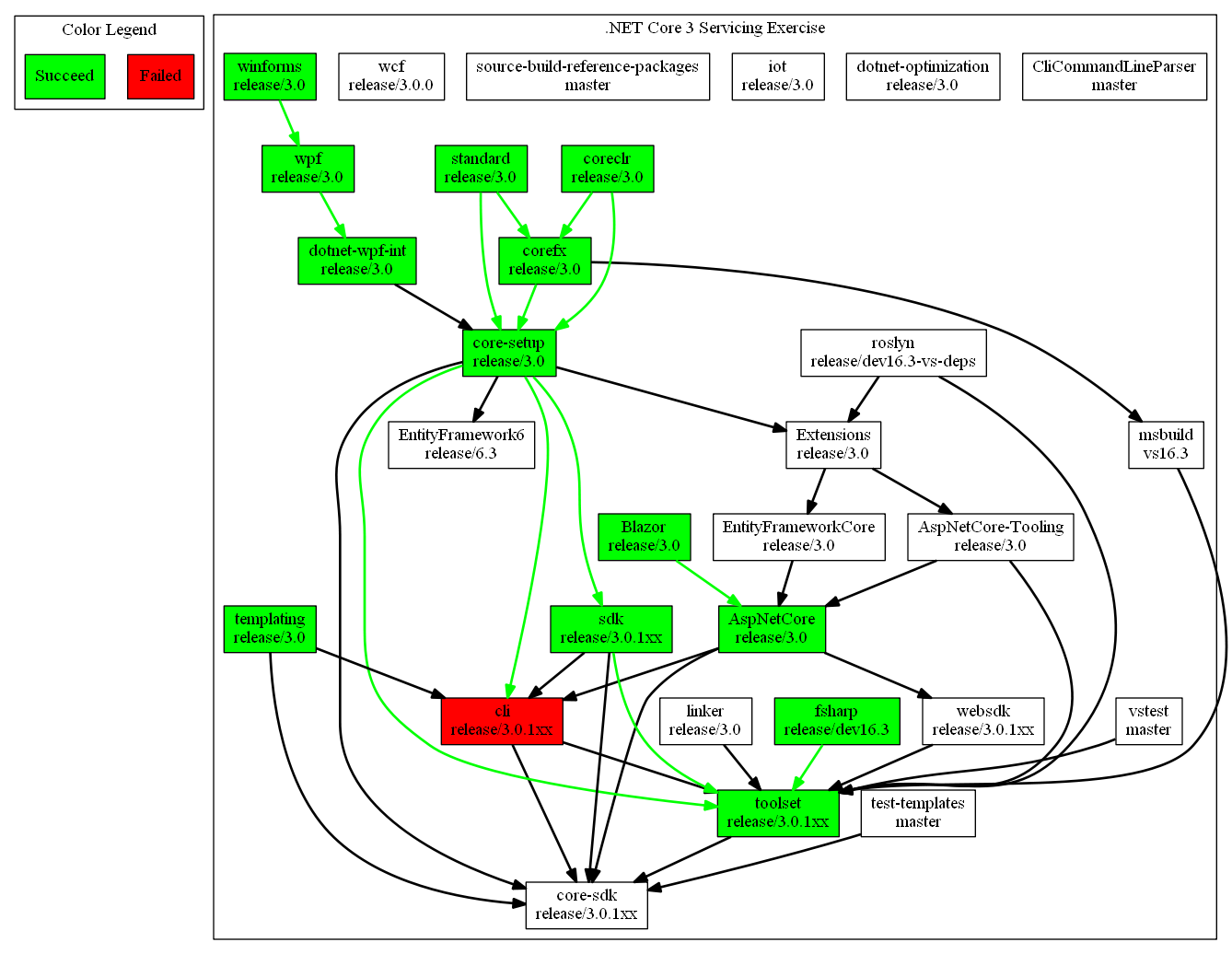
Status update below. Legend
- Green nodes/edges have been tested and passed.
- Red nodes build failed. Only CLI right now, there is a fix in progress.
- White nodes/black edges where not tested yet.
JohnTortugo
on 15 Oct 2019
Awesome!
From: Divino César notifications@github.com
Sent: Tuesday, October 15, 2019 1:45 PM
To: dotnet/arcade arcade@noreply.github.com
Cc: Matt Mitchell mmitche@microsoft.com; Mention mention@noreply.github.com
Subject: Re: [dotnet/arcade] Servicing exercise for .NET Core 3 (#3868)
Status update below. Legend
- Green nodes/edges have been tested and passed.
- Red nodes build failed. Only CLI right now, there is a fix in progress.
- White nodes/black edges where not tested yet.
—
You are receiving this because you were mentioned.
Reply to this email directly, view it on GitHubhttps://nam06.safelinks.protection.outlook.com/?url=https%3A%2F%2Fgithub.com%2Fdotnet%2Farcade%2Fissues%2F3868%3Femail_source%3Dnotifications%26email_token%3DACCSFMVSUTT2ODSNNWGY7STQOYTTFA5CNFSM4IUB7RQKYY3PNVWWK3TUL52HS4DFVREXG43VMVBW63LNMVXHJKTDN5WW2ZLOORPWSZGOEBKFAIA%23issuecomment-542396448&data=02%7C01%7Cmmitche%40microsoft.com%7C5b571cd860f8498612d508d751b07d52%7C72f988bf86f141af91ab2d7cd011db47%7C1%7C0%7C637067690763905389&sdata=q%2Bkn2teMODKn5tNA%2BlGb3EJ4dKZDrV0%2BO9jFpOyZI%2FY%3D&reserved=0, or unsubscribehttps://nam06.safelinks.protection.outlook.com/?url=https%3A%2F%2Fgithub.com%2Fnotifications%2Funsubscribe-auth%2FACCSFMWMOS3ZXFVG2HGHZJDQOYTTFANCNFSM4IUB7RQA&data=02%7C01%7Cmmitche%40microsoft.com%7C5b571cd860f8498612d508d751b07d52%7C72f988bf86f141af91ab2d7cd011db47%7C1%7C0%7C637067690763915385&sdata=k2JVOmgoOZ7bpkvwSi8rQ3avhxey0dEBO1RyiNt0crs%3D&reserved=0.
 mmitche
on 15 Oct 2019
mmitche
on 15 Oct 2019
Status update, servicing builds using PAT:
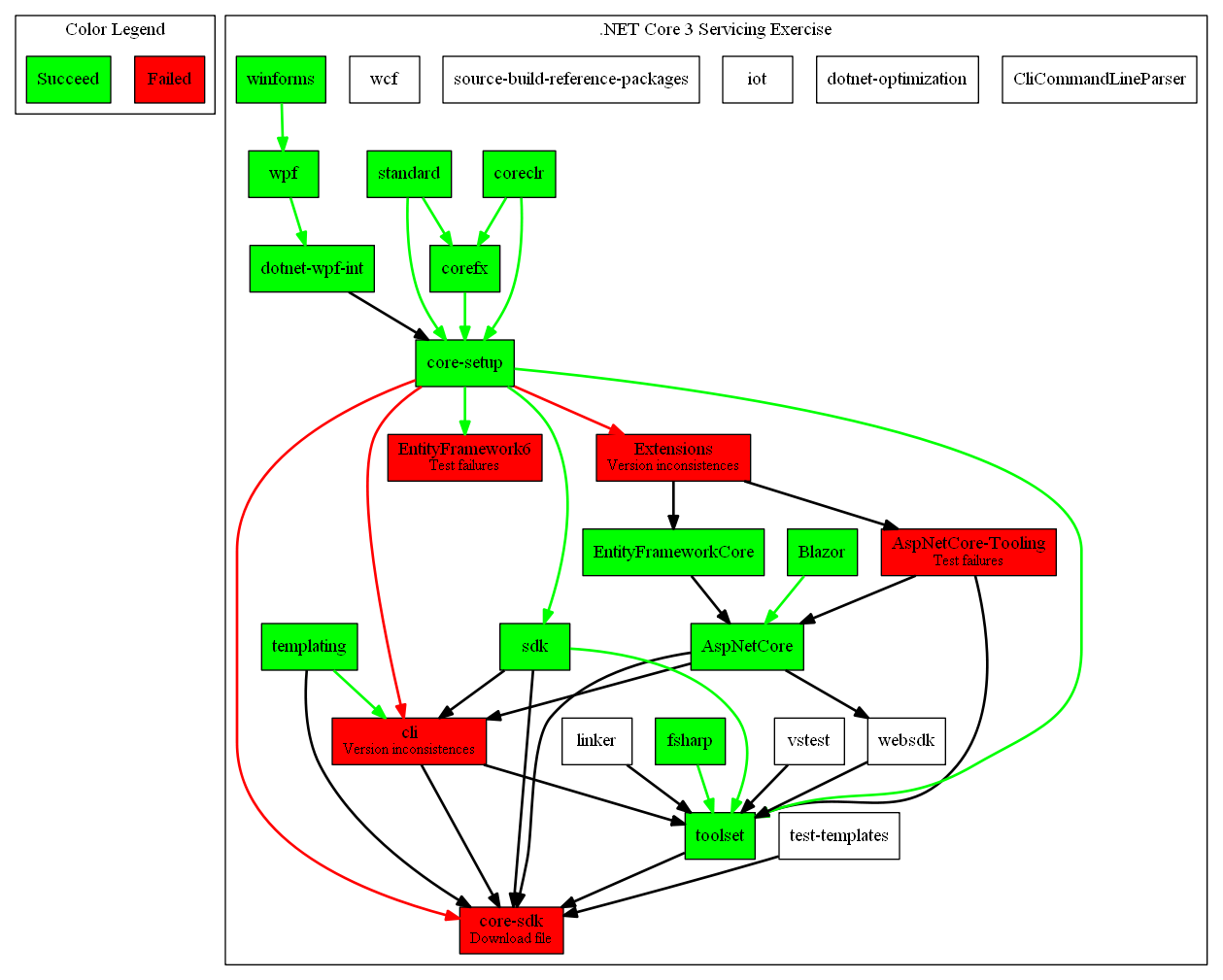
Failures reason and next steps:
- AspNetCore-Tooling
- Reason: problem related to icon file.
- Next step: Talked with @dougbu yesterday, he thinks @wtgodbe might know what this is about.
- EntityFramework6
- Reason: some unit tests failed.
- Next step: Same as _Tooling_;
Extensions
- Reason: conflict between package versions.
- Next step: Talked with @mmitche; I'll update and rebuild involved repos.
CLI
- Reason: conflict between package versions.
- Next step: Same as _Extensions_.
Core-SDK:
- Reason: looking for public Runtime blob file in a private location.
- Next step: I'm working on it #4164
JohnTortugo
on 22 Oct 2019
I'm triggering a new build from AspNetCore-Tooling with the base branch /internal/release/3.1 to see if the icon problem was solved there. Here is the build.
I'm seeing some weirdness with subscription updates. For instance, templating builds aren't creating PRs in CLI. @riarenas is helping investigate that.
JohnTortugo
on 22 Oct 2019
Update:

AspnetCore-Tooling:
- Status: now is building fine.
- Note: It's a clean copy of source branch. i.e., the branch didn't receive update from _Extensions_ yet.
Core-SDK:
- Status: now is building fine and running with the improved DownloadFile task.
- Note: it's a clean copy of source branch. i.e., the branch didn't receive update from any repo.
EntityFramework6:
- Status: same as before.
- Next step: I'll try a clean copy of the source branch. Then wait to get a clean build from Core-Setup.
Extensions:
- Status: same as before.
- Next step: waiting for a clean build from Core-Setup.
CLI:
- Status: same as before.
- Next step: waiting for a clean build from Core-Setup.
Note: Yesterday afternoon I didn't succeed getting a green build from Core-FX because: 1) I started a clean branch and missed to include the PAT fix in one of the stages; 2) later in the afternoon builds were timing out and 3) the builds take hours to finish. After I get a green build from Core-FX I'll need to get one for Core-Setup.
JohnTortugo
on 23 Oct 2019
The grass is looking much greener now:
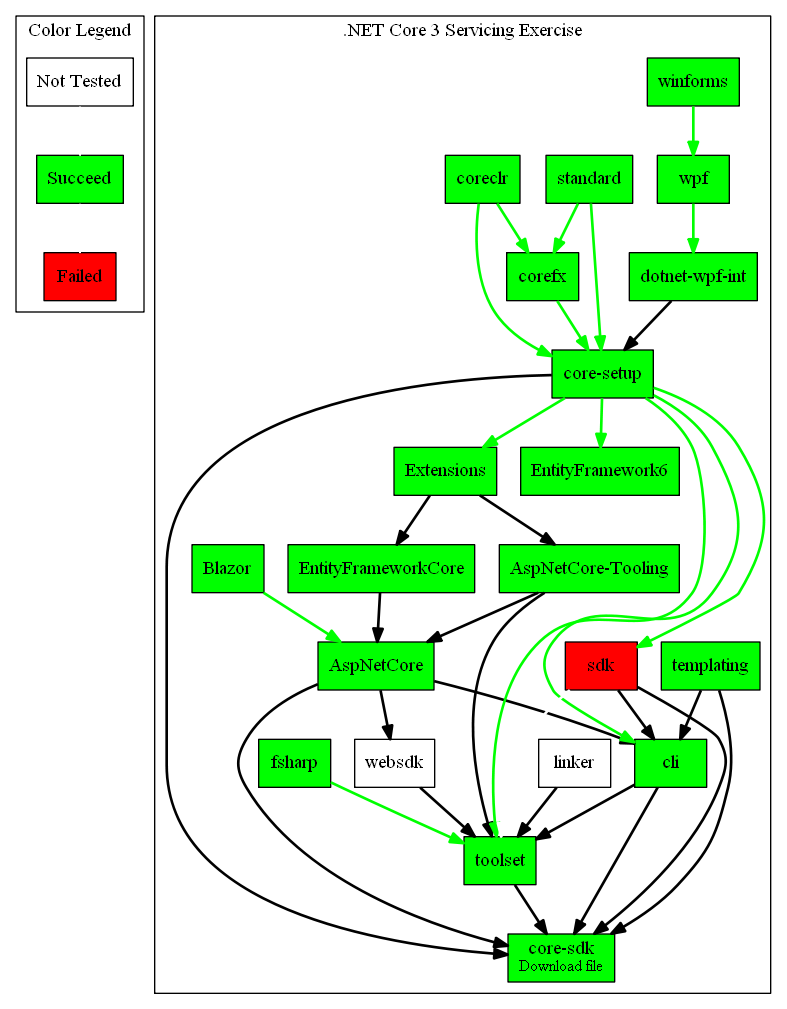
Notes:
SDK
- Status: Failing because the build-def lost permission to sign binaries. Tracking issue here.
Core-SDK, Extensions & EF6 are still building. But are past the critical point.
PRs were created in Core-SDK to fix a bug and to improve the DownloadFile task.
JohnTortugo
on 24 Oct 2019
This is great news - thanks @JohnTortugo !
Who's on point for the mixed (public/private) feed work?
cc/ @mmitche
markwilkie
on 24 Oct 2019
I re-re-named the SDK build definition while we get signing approval for the new name and queued https://dev.azure.com/dnceng/internal/_build/results?buildId=400666&view=results which was green.
Who's on point for the mixed (public/private) feed work?
If you're referring to the work in core-sdk to first check for public blobs before attempting private, Cesar has a PR out for it at https://github.com/dotnet/core-sdk/pull/5310
Or are you referring to something else?
riarenas
on 24 Oct 2019
Is the plan to make the "check public first, then private" generic so it just works for all repos?
markwilkie
on 24 Oct 2019
Let me think about it a bit.
The change we did in Arcade to do that for the runtime benefits everyone, but I believe the way that repos download random blobs is not standard. (Core-SDK uses their own downloadFile task in this isntance).
Maybe we can provide a set of tasks in Arcade and make sure repos use those tasks instead of anything they were previously using. I don't know if I want to mix that with this issue though, and it might overlap with any future plans to use universal packages (if they are actually ever usable by us)
riarenas
on 24 Oct 2019
I think we have concluded the exercise here, at least using PAT tokens:
PR in progress in Arcade to add scripts to add feed credentials on the fly. This is the workaround while we don't have stable restore from AzDO private feeds while authenticating with the Credential Provider.
All repos shown in the graph (description of the issue) have been tested and are building fine.
Issue found while downloading .NET Runtime from private location was found and fixed in Arcade.
Issue found while downloading blobs from private locations was found in Core-SDK and the fix is in PR now. I'll move this issue to "In PR" until we get the Core-SDK PRs merged.
NuGet team is still investigating flakiness while restoring from AzDO private feeds when authenticating using Credential Provider.
JohnTortugo
on 29 Oct 2019
Closing this as the open PRs have their related issues.
JohnTortugo
on 31 Oct 2019
Related issues
 agocke
·
34Comments
agocke
·
34Comments
 bricelam
·
30Comments
bricelam
·
30Comments
 Chrisboh
·
30Comments
Chrisboh
·
30Comments
 natemcmaster
·
27Comments
JohnTortugo
·
29Comments
natemcmaster
·
27Comments
JohnTortugo
·
29Comments