Arcade: x64 bits do not have strong name signing
In MSBuild, we have builds for x86 and x64. Our x64 build is available under a amd64 folder.
Our two executables that are binplaced for both x86 and x64 do not have a strong name signature in the amd64 folder.
One build that can be investigated is here: https://dev.azure.com/devdiv/DevDiv/_build/results?buildId=2479361
The files are properly authenticode signed but are missing strong name signature. And only the files under amd64.
cc @tmat
 livarcocc
All 10 comments
Looks like this might caused be caused by check for crossgen'd assemblies.
The tool likely confuses 64bit assembly with crossgen'd assembly, which we do not strong name sign.
 tmat
on 25 Mar 2019
tmat
on 25 Mar 2019
@JohnTortugo @markwilkie
tmat
on 25 Mar 2019
Please note that this is a blocker bug for 16.0 right now.
livarcocc
on 25 Mar 2019
ACKing that it's a blocker. Let me know @JohnTortugo when you know more.
 markwilkie
on 25 Mar 2019
markwilkie
on 25 Mar 2019
The log shows that the second msbuild.exe is indeed not queued for strong signing:
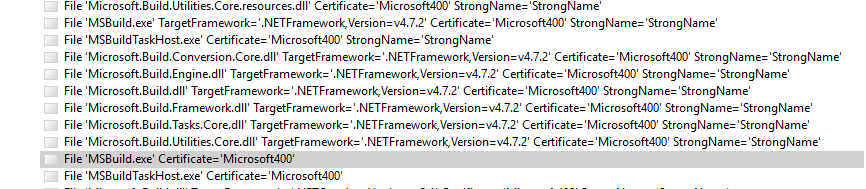
Not sure about the crossgen'd hypothesis now. The CorFlags of the .exe are 0x9, which means StrongNamed | ILOnly.
Does SignTool fail to remove Public Sign from 64bit assemblies?
tmat
on 25 Mar 2019
Might be a red herring: these files also don't have their .PDB file properly published in the build. I have assumed that that's not related, but since it's also only the x64 .exe's, figured it's worth mentioning in case it rings any bells.
 rainersigwald
on 25 Mar 2019
rainersigwald
on 25 Mar 2019
Taking a look into this now.
 JohnTortugo
on 25 Mar 2019
JohnTortugo
on 25 Mar 2019
Update:
Not able to repro the problem locally yet. I was able to build the repo and get some packages to test locally. In my local setup I see MSBuild being signed with. I'm trying to get the original unsigned files from the agent.
[3/25/2019 12:30:30 PM Informational] [xUnit.net 00:00:02.15]       File 'MSBuild.exe' TargetFramework='.NETFramework,Version=v4.7.2' Certificate='Microsoft400' StrongName='StrongName',
[3/25/2019 12:30:30 PM Informational] [xUnit.net 00:00:02.15]       File 'MSBuild.exe' TargetFramework='.NETFramework,Version=v4.7.2' Certificate='Microsoft400' StrongName='StrongName',
[3/25/2019 12:30:30 PM Informational] [xUnit.net 00:00:02.15]       File 'MSBuild.exe' TargetFramework='.NETFramework,Version=v4.7.2' Certificate='Microsoft400' StrongName='StrongName',
@JohnTortugo What was the issue?
tmat
on 28 Mar 2019
Just updating to latest version of SN fixed the problem.
JohnTortugo
on 28 Mar 2019
Related issues
 ericstj
·
6Comments
ericstj
·
6Comments
 riarenas
·
5Comments
riarenas
·
5Comments
 MattGal
·
4Comments
MattGal
·
4Comments
 missymessa
·
7Comments
missymessa
·
5Comments
missymessa
·
7Comments
missymessa
·
5Comments
Most helpful comment
Taking a look into this now.