Ar.js: WebRTC Issue - Navigator.MediaDevice is not presented in your device.
When I'm trying to load the example I see the error:
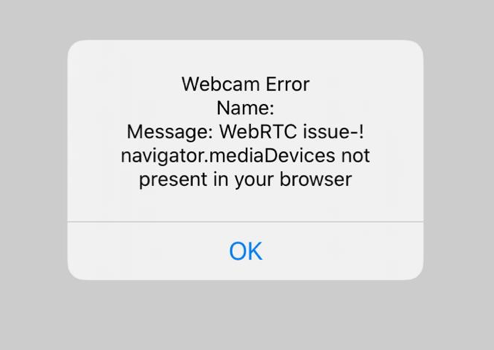
WebRTC Issue-!
navigator.mediaDevice not present in your browser.
I had no this error 2 weeks ago.

- OS: iOS 12.0.1 (16A404)
- Brower: Safari
 lasharela
All 19 comments
maybe you have denied the app the access to your camera when it prompted you ?
 nicolocarpignoli
on 4 Feb 2019
nicolocarpignoli
on 4 Feb 2019
Would there be a way to undo that @nicolocarpignoli, in the Settings app for example?
I have an older iPad here where I get the same error message. It is running iOS 9.3.5 with Safari 9.0 - can this also be caused by older iOS and Safari versions?
 janpio
on 7 Feb 2019
janpio
on 7 Feb 2019
Hi @janpio , searching a little bit on the web, I found that mediaDevices is fully supported on iOS from 11+.
So, if iOS is 11+, Safari (instead of Chrome that not asks every time for camera permissions) will ask the user for camera usage at EVERY refresh of the app. If not, try to clear Safari cache.
That error, anyway, could mean two things: mediadevices is not supported or you have previously denied accesso to that website for your camera. :)
nicolocarpignoli
on 8 Feb 2019
+1 thanks @nicolocarpignoli good call. Safari prompts for authorization whereas Chrome does not.
 raywu
on 14 Feb 2019
raywu
on 14 Feb 2019
Weird I am pretty sure that Safari did promt for camera...
But it is different from Safari and IOS versions I guess.
 commentatorboy
on 14 Feb 2019
commentatorboy
on 14 Feb 2019
This is the same issue as #476.
From your screenshot, I see the back button in the top left corner, which means that the page is open in an embedded WKWebView inside of another app, and is not actually full Safari. You'll need to open the page with the regular Safari app.
For a full explanation see this comment.
 andreyrd
on 21 Feb 2019
andreyrd
on 21 Feb 2019
Just in case it's helpful to anyone I was getting this same error when trying to run an example from my phone (Chrome) from my IP. I was getting this error and there was no prompt to give camera permissions.
Apparently, Chrome won't ask for permissions when running a site from http so I solved this problem by running my example from ngrok using https. Works now.
 keyserfaty
on 19 Jun 2019
keyserfaty
on 19 Jun 2019
@keyserfaty that was exactly my problem. Thanks!
 fmagno
on 4 Jul 2019
fmagno
on 4 Jul 2019
Just in case it's helpful to anyone I was getting this same error when trying to run an example from my phone (Chrome) from my IP. I was getting this error and there was no prompt to give camera permissions.
Apparently, Chrome won't ask for permissions when running a site fromhttpso I solved this problem by running my example from ngrok usinghttps. Works now.
That solved my problem, thanks @keyserfaty !
 jazzyjube
on 31 Jul 2019
jazzyjube
on 31 Jul 2019
Change the file protocol to https:// or something secure. This is because of the new updates from google chrome. I found this to work for me. Just basically adding https:// to the beginning of my link
 bensonsanga
on 17 Dec 2019
bensonsanga
on 17 Dec 2019
same here, adding https solved the issue.
 ImranBug
on 13 Jan 2020
ImranBug
on 13 Jan 2020
After new update, Safari again shows same error on iOS. Https does not help. Any solution?
 urajcic
on 3 Feb 2020
urajcic
on 3 Feb 2020
I'm having the same issue on Chrome on the latest generation of iPhones.
Works on Pixel 3 (Android 10) and older iPhones and iPads on both pre and post iOS13 versions.
Running the demo over https but get WebRTC issue-! on new iPhones. Could this be hardware related?
 roons
on 10 Feb 2020
roons
on 10 Feb 2020
Would it be worth a PR to check for https before displaying the navigator.mediaDevices not present message?
 benallfree
on 10 Feb 2020
benallfree
on 10 Feb 2020
Change the file protocol to https:// or something secure. This is because of the new updates from google chrome. I found this to work for me. Just basically adding https:// to the beginning of my link
Worked for me too.
 the-lost-explorer
on 15 Feb 2020
the-lost-explorer
on 15 Feb 2020
Chrome on ios does not support camera access. Chrome problem. PLease use safari on iphones and ipads
nicolocarpignoli
on 19 Jun 2020
Firefox on iOS is having this problem too!
 jrDev1
on 24 Jun 2020
jrDev1
on 24 Jun 2020
Any browser on iOS that is not Safari will NOT work.
andreyrd
on 25 Jun 2020
In addition to @andreyrd's answer, the reason why all browsers other than Safari have this problem is because all of them (have to) use WebKit. Now WebKit has a bug where gutUserMedia fails. So this AR.js issue cannot be fixed until the WebKit problem is solved.
 dzoech
on 10 Sep 2020
dzoech
on 10 Sep 2020
Related issues
 shigenobu-kondo
·
6Comments
nicolocarpignoli
·
3Comments
shigenobu-kondo
·
6Comments
nicolocarpignoli
·
3Comments
 quistuipater
·
7Comments
quistuipater
·
7Comments
 Suresh3d
·
7Comments
Suresh3d
·
7Comments
 Rawphs
·
6Comments
Rawphs
·
6Comments
Most helpful comment
Just in case it's helpful to anyone I was getting this same error when trying to run an example from my phone (Chrome) from my IP. I was getting this error and there was no prompt to give camera permissions.
Apparently, Chrome won't ask for permissions when running a site from
httpso I solved this problem by running my example from ngrok usinghttps. Works now.