Ar.js: screenshot not working correctly
Hi guys!
Im trying to add a function for make a screenshot of my 3D model rendered in AR, the model is captured but the nackground of the object is always black or white.
Anybody can help me??
Thanks
 MirkoAlo
All 37 comments
@MirkoAlo Can you please share how you got it working? ie: to take a snapshot?
 liyasthomas
on 31 May 2018
liyasthomas
on 31 May 2018
@liyasthomas
I have a button in html that whit a click launch this function:
document.querySelector('a-scene').components.screenshot.getCanvas('equirectangular');
i tried whit perspective also but the background of a cam is always black or white, i can see only the model.
Thank's for help
MirkoAlo
on 1 Jun 2018
@MirkoAlo Will you share your code snippet, so i could evaluate it? I too had same results when i tried to capture screenshot like this: Generate and Download Screenshot of webpage without lossing the styles (https://stackoverflow.com/a/44495166)
(function (exports) {
function urlsToAbsolute(nodeList) {
if (!nodeList.length) {
return [];
}
var attrName = "href";
if (nodeList[0].__proto__ === HTMLImageElement.prototype || nodeList[0].__proto__ === HTMLScriptElement.prototype) {
attrName = "src";
}
nodeList = [].map.call(nodeList, function (el, i) {
var attr = el.getAttribute(attrName);
if (!attr) {
return;
}
var absURL = /^(https?|data):/i.test(attr);
if (absURL) {
return el;
} else {
return el;
}
});
return nodeList;
}
function screenshotPage() {
var wrapper = document.getElementById("capture");
html2canvas(wrapper, {
onrendered: function (canvas) {
canvas.toBlob(function (blob) {
saveAs(blob, "Screenshot.png");
});
}
});
}
function addOnPageLoad_() {
window.addEventListener("DOMContentLoaded", function (e) {
var scrollX = document.documentElement.dataset.scrollX || 0;
var scrollY = document.documentElement.dataset.scrollY || 0;
window.scrollTo(scrollX, scrollY);
});
}
function generate() {
screenshotPage();
}
exports.screenshotPage = screenshotPage;
exports.generate = generate;
})(window);
HTML:
<div onclick="generate()">Take screenshot</div>
The above snippet uses html2canvas.js to capture the contents of an id and writes the same into a canvas, then save image file using FileSaver.js. So basically import those two files to get this code working.
Since html2canvas doesn't supports video tag yet, it wont capture contents for a-scene (in AR.js on A-Frame). Whenever i try to capture screenshot like this, i'm too getting screenshots with black background 😢 .
liyasthomas
on 2 Jun 2018
@MirkoAlo @liyasthomas
Hi! I am also trying to take a screenshot for contents in a-scene using A-frame. Any luck with different methods?
 Jamolinesca
on 4 Jun 2018
Jamolinesca
on 4 Jun 2018
@Esmolan @MirkoAlo Hi guys, lately I found a working example to capture a video frame and download it. Its here: https://tutorialzine.com/2016/07/take-a-selfie-with-js This simple uses a <video> tag along with getUserMedia and a hidden <canvas> tag to write the captured the frame, then download image using toDataURL(); See the demo here: https://jsfiddle.net/dannymarkov/cuumwch5
liyasthomas
on 5 Jun 2018
@liyasthomas Thanks Liyas! I am struggling to get it to work just the code for some reason it tell me the video is null.
Also I asked in another forum how to make this work and they recommended rendering the camera feed as a texture and then automatically the screenshot component will now capture it document.querySelector('a-scene').components.screenshot.capture('perspective')
However, I've had no luck converting the camera to a texture when using A-frame up to this time.
Jamolinesca
on 5 Jun 2018
@liyasthomas Hey! I've been playing around with merging the video tag with A-Frame. Until now I was able to grab the video tag of A-frame and taking a snapshot but for some reason it only takes the webcam now and not the 3D model.
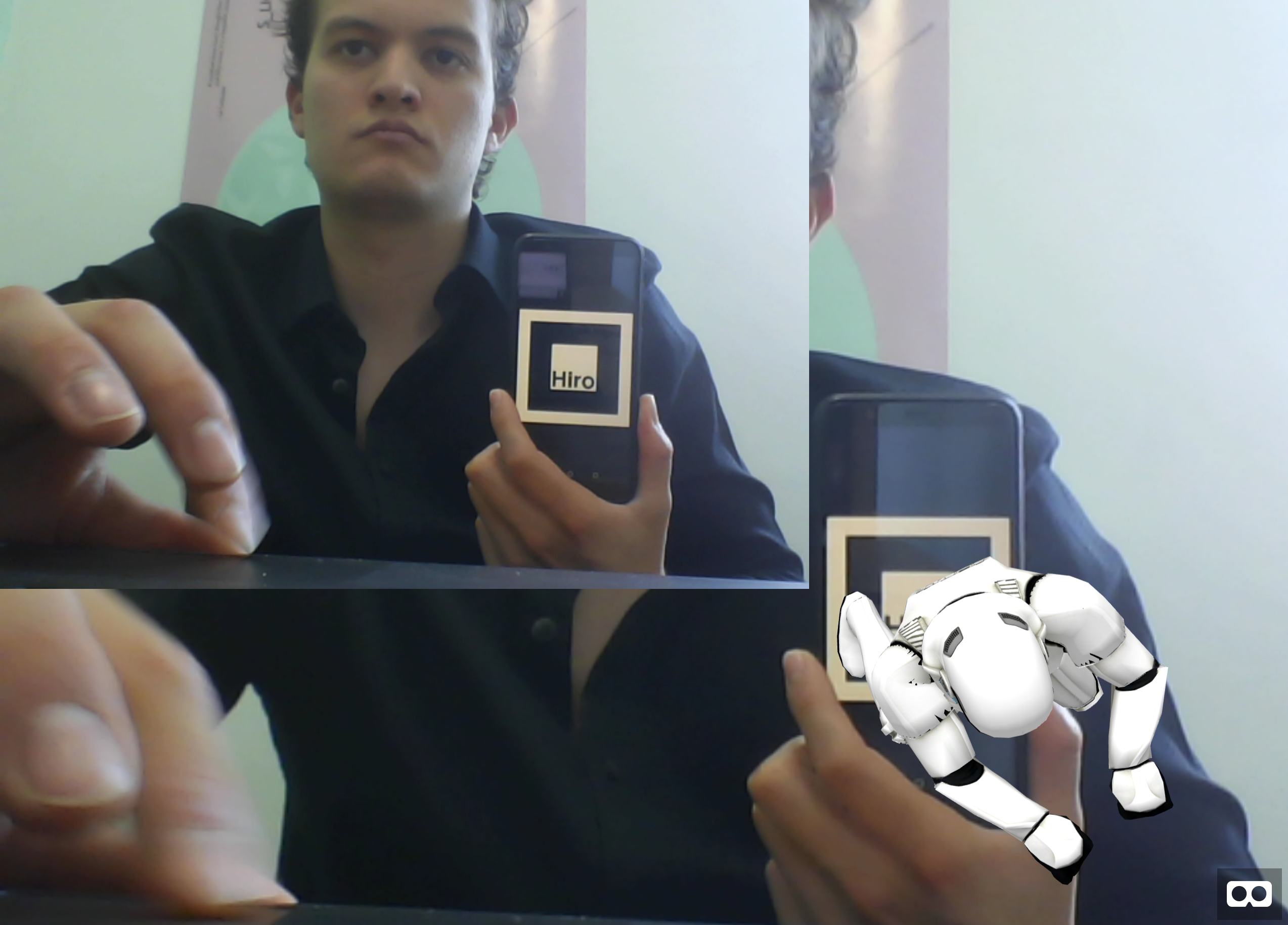
<body>
<a-scene embedded arjs="sourceType: webcam; trackingMethod: best; debugUIEnabled: false;" antialias="true">
<canvas></canvas>
<a-assets>
<a-asset-item id="gltf1" src="model_captain/scene.gltf"></a-asset-item>
<a-asset-item id="gltf2" src="model_stormtrooper/scene.gltf"></a-asset-item>
</a-assets>
<a-marker type="pattern" url="https://raw.githubusercontent.com/Esmolan/Esmolan.github.io/master/juguetron-marker.patt" size="1">
<a-gltf-model src="#gltf1"
position="0 2.5 -1"
rotation="0 0 0"
scale="0.05 0.05 0.05"
animation-mixer="loop:repeat">
</a-gltf-model>
</a-marker>
<a-marker preset="hiro">
<a-gltf-model src="#gltf2"
position="0 0 0"
rotation="0 0 0"
scale="1 1 1"
animation-mixer="loop:repeat">
</a-gltf-model>
</a-marker>
<a-entity camera></a-entity>
</a-scene>
</body>
<div class="container">
<div class="app">
<a href="#" id="start-camera" class="visible">Touch here to start the app.</a>
<img id="snap">
<p id="error-message"></p>
<a href="#" id="delete-photo" title="Delete Photo" class="disabled"><i class="material-icons">delete</i></a>
<a href="#" id="take-photo" title="Take Photo"><i class="material-icons">camera_alt</i></a>
<a href="#" id="download-photo" download="selfie.png" title="Save Photo" class="disabled"><i class="material-icons">file_download</i></a>
</div>
</div>
JS:
`
// References to all the element we will need.,
var image = document.querySelector('#snap'),
//start_camera = document.querySelector('#start-camera'),
controls = document.querySelector('.controls'),
take_photo_btn = document.querySelector('#take-photo'),
delete_photo_btn = document.querySelector('#delete-photo'),
download_photo_btn = document.querySelector('#download-photo');
//error_message = document.querySelector('#error-message');
take_photo_btn.addEventListener("click", function(e){
e.preventDefault();
var video = document.querySelector('video')
var snap = takeSnapshot(video);
// Show image.
image.setAttribute('src', snap);
image.classList.add("visible");
// Enable delete and save buttons
delete_photo_btn.classList.remove("disabled");
download_photo_btn.classList.remove("disabled");
// Set the href attribute of the download button to the snap url.
download_photo_btn.href = snap;
// Pause video playback of stream.
//video.pause();
});
delete_photo_btn.addEventListener("click", function(e){
e.preventDefault();
// Hide image.
image.setAttribute('src', "");
image.classList.remove("visible");
// Disable delete and save buttons
delete_photo_btn.classList.add("disabled");
download_photo_btn.classList.add("disabled");
// Resume playback of stream.
//video.play();
});
function takeSnapshot(video){
// Here we're using a trick that involves a hidden canvas element.
var hidden_canvas = document.querySelector('canvas'),
context = hidden_canvas.getContext('2d');
var width = video.videoWidth,
height = video.videoHeight;
if (width && height) {
// Setup a canvas with the same dimensions as the video.
hidden_canvas.width = width;
hidden_canvas.height = height;
// Make a copy of the current frame in the video on the canvas.
context.drawImage(video, 0, 0, width, height);
// Turn the canvas image into a dataURL that can be used as a src for our photo.
return hidden_canvas.toDataURL('image/png');
}
}
`
Any ideas? I think we are almost there.
My guess is that it only takes a picture of just the webcam. Maybe by merging that one with the one the screenshot component generates of the 3D model is the way to go.
Jamolinesca
on 6 Jun 2018
@Esmolan Have you tried with a simple <a-text> or <a-box> or any other primitives rather than a 3D model? If not, try it. Technically, A-Frame and AR.js render AR content on top of video element aka camera feed, ie: think its like layers, camera feed is the 1st layer, AR content is the 2nd layer(which is positioned on top of camera feed making it seem as a single layer) and our screen is the third layer. And while capturing a video frame, surely we'll get video feed, but trick is to capture the feed along with the AR content which is basically in between our eyes and video feed. Lemme see how I could help.
And by the way, you are right, we are almost there!
"Once drawn to, the XR device will continue displaying the contents of the XRWebGLLayer framebuffer, potentially reprojected to match head motion, regardless of whether or not the page continues processing new frames. Potentially future spec iterations could enable additional types of layers, such as video layers, that could automatically be synchronized to the device's refresh rate."
-WebXR Device API Explained (https://github.com/immersive-web/webxr/blob/master/explainer.md)
liyasthomas
on 6 Jun 2018
@liyasthomas Thanks! Sounds good. Yeah, just tried with a simple<a-box> and I am still getting a still of just my webcam stream, not in mixed reality form. I am curious then if I am technically taking the video element of a-frame why it does not capture all layers. If its how you say its like that its rendered on top.
Let me know if you find anything! I will keep playing with the code a debugging.
Thanks 👍
Jamolinesca
on 7 Jun 2018
I'm having the same problem as well, it's either just a blank canvas with the 3D objects or just the video stream without the 3D elements
 tien
on 8 Jun 2018
tien
on 8 Jun 2018
@crazycat9x Hi. If you don't mind, share your current code snippets & screenshots of output so others could easily debug it.
@Esmolan I'm too playing around it, but still no expected output. I'm still getting either black canvas or video feed without 3D content. I'll look into it, and inform if I've any updates.
liyasthomas
on 8 Jun 2018
guys I got it to work!!!!!
// first get the image of the ascene layer canvas
let aScrene = document.querySelector("a-scene").components.screenshot.getCanvas("perspective")
// then get the video layer canvas
let frame = captureVideoFrame("video", "png");
// resize the ascene to the video scene
aScene = resizeCanvas(aScene, frame.width, frame.height)
// then merge the two base64 image using https://github.com/lukechilds/merge-images
mergeImages([frame.toDataURL(), aScene.toDataURL()]).then(b64 => {
...
});
@crazycat9x Cool!! Would you mind sharing your code! and screenshot!
Also question for you. Have you implemented a way to use image-based markers? Or markerless using AR.js? In other words, not using those white and black border marker generators. Thanks!
@liyasthomas Take a look :D
Jamolinesca
on 9 Jun 2018
function resizeCanvas(origCanvas, width, height) {
let resizedCanvas = document.createElement("canvas");
let resizedContext = resizedCanvas.getContext("2d");
resizedCanvas.height = width;
resizedCanvas.width = height;
resizedContext.drawImage(origCanvas, 0, 0, width, height);
return resizedCanvas.toDataURL();
}
document.getElementById("snap-button").addEventListener("click", function() {
let aScene = document
.querySelector("a-scene")
.components.screenshot.getCanvas("perspective");
let frame = captureVideoFrame("video", "png");
aScene = resizeCanvas(aScene, frame.width, frame.height);
frame = frame.dataUri;
mergeImages([frame, aScene]).then(b64 => {
let link = document.getElementById("download-link", "png");
link.setAttribute("download", "AR.png");
link.setAttribute("href", b64);
link.click();
});
});
The mergeImages func is from https://github.com/lukechilds/merge-images
The captureVideoFrame is from https://github.com/ilkkao/capture-video-frame but i modified it for use in this case, here is my modification:
function captureVideoFrame(video, format, width, height) {
if (typeof video === 'string') {
video = document.querySelector(video);
}
format = format || 'jpeg';
if (!video || (format !== 'png' && format !== 'jpeg')) {
return false;
}
var canvas = document.createElement("CANVAS");
canvas.width = width || video.videoWidth;
canvas.height = height || video.videoHeight;
canvas.getContext('2d').drawImage(video, 0, 0);
var dataUri = canvas.toDataURL('image/' + format);
var data = dataUri.split(',')[1];
var mimeType = dataUri.split(';')[0].slice(5)
var bytes = window.atob(data);
var buf = new ArrayBuffer(bytes.length);
var arr = new Uint8Array(buf);
for (var i = 0; i < bytes.length; i++) {
arr[i] = bytes.charCodeAt(i);
}
var blob = new Blob([ arr ], { type: mimeType });
return { blob: blob, dataUri: dataUri, format: format, width: canvas.width, height: canvas.height };
};
For the image based marker, I think it would be impossible as AR.js use ~20x20 ascii image as a mean of detection, it would simply be too pixelated to use anything besides simple marker with fat border.
tien
on 9 Jun 2018
There is a bug in my code
resizedCanvas.height = width;
resizedCanvas.width = height;
suppose to be
resizedCanvas.height = height;
resizedCanvas.width = width;
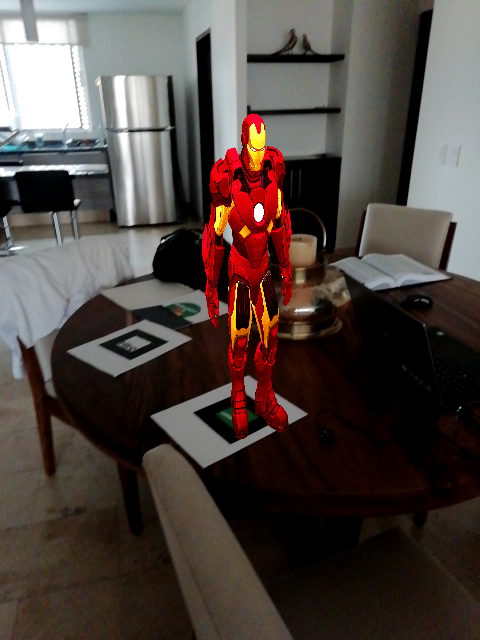
@crazycat9x Thank you so much! and for the info. Fixed your bug as well. One thing that happens with mine is that the screenshot component that takes perspective when merged shows the 3D element kind of squeezed. I do this in a mobile device. Any ideas why?
Jamolinesca
on 9 Jun 2018
Yeah i got that as well, only on mobile thou , my laptop seem to work fine. The a-scene actually have width larger than the mobile display, so when you merge it got squeezed. I tried to force the a-scene width to 100% of display, but every element inside a-scene got squish instead.
I would be happy to hear if you can come up with a fix for this.
tien
on 9 Jun 2018
@crazycat9x Likewise. Laptop seems to work fine. I will let you know, maybe if we try to resize the a scene with the video size.
Jamolinesca
on 9 Jun 2018
How about we try to implement screen record and download the video?? That would be super cool!
This might help: https://webrtc.github.io/samples/
this too: https://stackoverflow.com/questions/18509385/html-5-video-recording-and-storing-a-stream
liyasthomas
on 16 Jun 2018
@liyasthomas Hey! That sounds cool. But I have another question. Is there a way to have image based markers in web VR? Perhaps not using A-frame but three.js, etc?
Jamolinesca
on 19 Jun 2018
I afraid its still not possible. Anyway its a core feature. I hope @jeromeetienne and team may consider it in near future.
liyasthomas
on 20 Jun 2018
@crazycat9x Hi Crazycat were you able to solve this?
Jamolinesca
on 3 Jul 2018
@Esmolan you mean the image being squeezed? then no, I havn't solved it yet.
tien
on 4 Jul 2018
@crazycat9x Thats right! I am checking that with other programmers bc I cant seem it to work it out. Will keep you posted
Jamolinesca
on 4 Jul 2018
@crazycat9x Hey! when you capture the video frame. Does it take the width and height of where its being captured? We should resize the a-scene to the width and height of the video capture first. And then merge them.
Jamolinesca
on 11 Jul 2018
@crazycat9x @Esmolan Hi~both! I modified resizeCanvas function. It looks normal ! Because a-scene's frame is 4096 x 2048 by default. So you need to deal with this by calibrating its frame size.
Have fun ! :)
function resizeCanvas(origCanvas, width, height) {
        let resizedCanvas = document.createElement("canvas");
        let resizedContext = resizedCanvas.getContext("2d");

        resizedCanvas.height = height;
        resizedCanvas.width = width;

        if (width > height) {
            // Landscape
            resizedContext.drawImage(origCanvas, 0, 0, width, height);
        } else {
            // Portrait
            var scale = height / width;
            var scaledHeight = origCanvas.width * scale;
            var scaledWidth = origCanvas.height * scale;
            var marginLeft = ( origCanvas.width - scaledWidth) / 2;
            resizedContext.drawImage(origCanvas, marginLeft, 0, scaledWidth, scaledHeight);
        }

        return resizedCanvas.toDataURL();
    }
 Yufan-Lin
on 12 Jul 2018
Yufan-Lin
on 12 Jul 2018
哈哈哈
 henvy
on 13 Jul 2018
henvy
on 13 Jul 2018
@Yufan-Lin - Using your code, the landscape works great, but portrait only shows the video capture, not the 3D model. Any thoughts on how to debug this?
 kthornbloom
on 3 May 2019
kthornbloom
on 3 May 2019
for me was working better the 'old' resizeCanvas. anyway guys, thanks for this!
 nicolocarpignoli
on 22 May 2019
nicolocarpignoli
on 22 May 2019
@kthornbloom
@Yufan-Lin - Using your code, the landscape works great, but portrait only shows the video capture, not the 3D model. Any thoughts on how to debug this?
I just swapped width and height for portrait mode like below
if (width > height) {
// Landscape
resizedContext.drawImage(origCanvas, 0, 0, width, height);
} else {
// Portrait
resizedContext.drawImage(origCanvas, 0, 0, height, width);
}
 axelraymundo
on 17 Jun 2019
axelraymundo
on 17 Jun 2019
Hi, can someone post the complete example of working screenshot taking+downloading mechanism, in glitch, please?
I tried, but had no success :/
 artemistint
on 29 Nov 2019
artemistint
on 29 Nov 2019
Hi, can someone post the complete example of working screenshot taking+downloading mechanism, in glitch, please?
I tried, but had no success :/
Actually this is complete code: https://github.com/jeromeetienne/AR.js/issues/358#issuecomment-395911581
Just
1) link this script to any basic example for AR.js and A-Frame
2) and add to html-page this:
<button id="snap-img">SNAPSHOT</button>
<a href="#" id="download-link">DOWNLOAD</a>
That's all!
 taime
on 24 Dec 2019
taime
on 24 Dec 2019
I'd like to make a contribution to this thread. I've improved the captureVideoFrame method to automaticaly resize and crop the video image to how it is presented on the screen to the user.
function captureVideoFrame(video, format) {
if (typeof video === 'string') {
video = document.querySelector(video);
}
format = format || 'jpeg';
if (!video || (format !== 'png' && format !== 'jpeg')) {
return false;
}
const canvas = document.createElement("CANVAS");
canvas.width = screen.width;
canvas.height = screen.height;
const imageWidth = video.videoHeight * (screen.width / screen.height);
canvas.getContext('2d').drawImage(
video,
(video.videoWidth - imageWidth) / 2,
0,
imageWidth,
video.videoHeight,
0,
0,
screen.width,
screen.height,
);
var dataUri = canvas.toDataURL('image/' + format);
var data = dataUri.split(',')[1];
var mimeType = dataUri.split(';')[0].slice(5)
var bytes = window.atob(data);
var buf = new ArrayBuffer(bytes.length);
var arr = new Uint8Array(buf);
for (var i = 0; i < bytes.length; i++) {
arr[i] = bytes.charCodeAt(i);
}
var blob = new Blob([ arr ], { type: mimeType });
canvas.remove();
return { blob: blob, dataUri: dataUri, format: format, width: screen.width, height: screen.height };
};
 tchesa
on 29 Aug 2020
tchesa
on 29 Aug 2020
I think I've fixed the code. Maybe it can be useful:
`
$("#screenshot_btn").click(function()
{
document.querySelector("video").pause();
let aScene = document
.querySelector("a-scene")
.components.screenshot.getCanvas("perspective");
let frame = captureVideoFrame("video", "png");
aScene = resizeCanvas(aScene, frame.width, frame.height);
frame = frame.dataUri;
mergeImages([frame, aScene]).then(b64 =>
{
let link = document.getElementById("download-link", "png");
link.setAttribute("download", "AR.png");
link.setAttribute("href", b64);
link.click();
});
document.querySelector("video").play();
});
function resizeCanvas(origCanvas, width, height)
{
let resizedCanvas = document.createElement("canvas");
let resizedContext = resizedCanvas.getContext("2d");
if (screen.width < screen.height)
{
var w = height * (height / width);
var h = width * (height / width);
var offsetX = -(height - width);
}
else
{
var w = width;
var h = height;
var offsetX = 0;
}
resizedCanvas.height = height;
resizedCanvas.width = width;
resizedContext.drawImage(origCanvas, offsetX, 0, w, h);
return resizedCanvas.toDataURL();
}
function captureVideoFrame(video, format, width, height)
{
if (typeof video === 'string')
{
video = document.querySelector(video);
}
format = format || 'jpeg';
if (!video || (format !== 'png' && format !== 'jpeg'))
{
return false;
}
var canvas = document.createElement("CANVAS");
canvas.width = width || video.videoWidth;
canvas.height = height || video.videoHeight;
canvas.getContext('2d').drawImage(video, 0, 0);
var dataUri = canvas.toDataURL('image/' + format);
var data = dataUri.split(',')[1];
var mimeType = dataUri.split(';')[0].slice(5)
var bytes = window.atob(data);
var buf = new ArrayBuffer(bytes.length);
var arr = new Uint8Array(buf);
for (var i = 0; i < bytes.length; i++)
{
arr[i] = bytes.charCodeAt(i);
}
var blob = new Blob([ arr ], { type: mimeType });
return { blob: blob, dataUri: dataUri, format: format, width: canvas.width, height: canvas.height };
}
`
 JTorrentQuasar
on 25 Oct 2020
JTorrentQuasar
on 25 Oct 2020
hello someone can help me ? I have seen the code above and there is a querySelector ('video') section, where do we get the video tag? I don't use video tags at all when using ar.js
 Alsania14
on 13 Jan 2021
Alsania14
on 13 Jan 2021
@Alsania14
Yes, I have same issue with you. I cannot get video element.
When I tried to get video tag, it returns null. Did you have any solution?
 monkeyMax-SVG
on 22 Mar 2021
monkeyMax-SVG
on 22 Mar 2021
Related issues
 filippomarra
·
5Comments
filippomarra
·
5Comments
 quistuipater
·
7Comments
quistuipater
·
7Comments
 ghost
·
4Comments
ghost
·
4Comments
 omarojo
·
3Comments
nicolocarpignoli
·
3Comments
omarojo
·
3Comments
nicolocarpignoli
·
3Comments
Most helpful comment
@crazycat9x @Esmolan Hi~both! I modified resizeCanvas function. It looks normal ! Because a-scene's frame is 4096 x 2048 by default. So you need to deal with this by calibrating its frame size.
Have fun ! :)