Ar.js: iOS 11.2 Webcam error: WebRTC issue-! Navigator.mediaDevices not present in your browser
Hello, I just tried it in the example (demo-firefox-release) with a iPhone 6 and I get the error "WebRTC issue-! Navigator.mediaDevices not present in your browser", I'm working with the Chrome browser, I've also tested on an iPhone 6s with safari browser and it works without problems. Both are actualized to iOS 11.2. I leave the error image that is seen in the browser.


Any kind of help would be great, greetings!
 zerojuls
All 19 comments
The same error in Wechat.
Maybe only safari support webtrc? Or other browsers use old version Navigator.getUserMedia as webrtc API, we should test it~
 lslzl3000
on 6 Dec 2017
lslzl3000
on 6 Dec 2017
According to this Google support link Chrome on iOS is using WKWebView which is basically a limited Safari version controlled entirely by Apple.
On iOS 11 Apple implemented the WebRTC protocol for Safari, but they didn't do it for WKWebView.
It's a shame because all non Safari browsers (Chrome, Firefox, etc) has to use WKWebView and even inApp browsers are constrained to this engine (ex: Facebook, WhatApp, etc). The only thing left for us is to press Apple to activate WebRTC in their WKWebView engine. From AR.js's point there's nothing we can do about it.
 ZoltanVeres
on 6 Dec 2017
ZoltanVeres
on 6 Dec 2017
Dear all
From what I read on Apple's site, there is no plan to integrate shortly WebRTC support in WKWebView.
And I guess this lack of support is the reason why AR.js does not work under WeChat, which is certainly using this component as its browser.
By any chance, is there any alternative of web-based AR framework which does not use WebRTC ? we have a game to develop, but if we ask our customer to put aside all iOS users ... I am not sure they will welcome this information :-/
Thanks if you have any idea ! :-)
CDS
 chtidusud
on 16 Dec 2017
chtidusud
on 16 Dec 2017
works totally fine if you open safari on ios 11 but not on chrome on ios 11 so use Safari instead which in most cases iphone users use 👍
 x5engine
on 27 Dec 2017
x5engine
on 27 Dec 2017
Does not look like iOS 11.2 has started supporting WebRTC on Safari... It still gives the error...getUserMedia() failed !!!
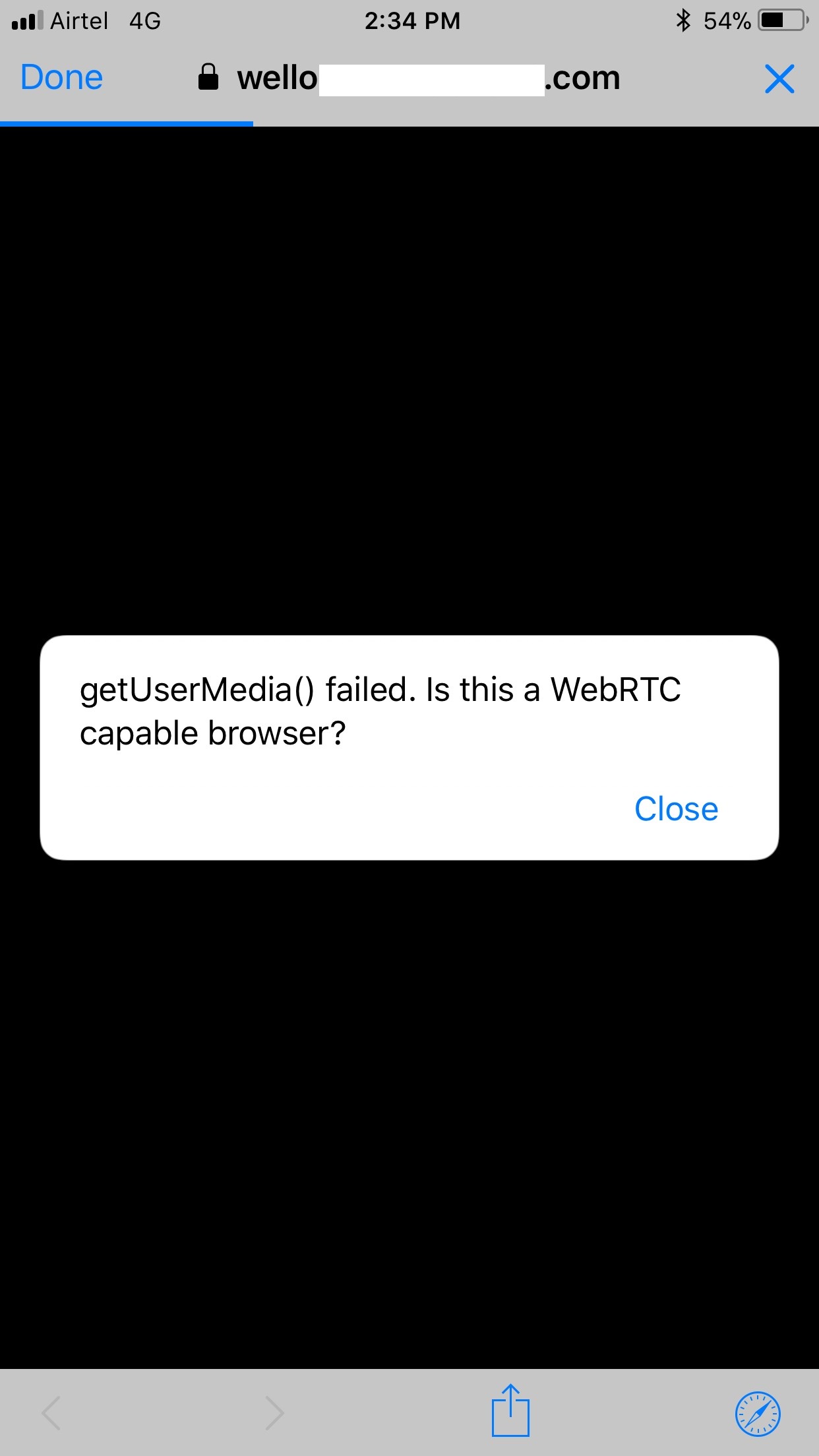
 dusmant
on 2 Jan 2018
dusmant
on 2 Jan 2018
@meteorplus
@ZoltanVeres
I am on iOS11 standalone safari browser and i still cant get this working. same error as mentioned above.
I m using some very simple code only, as taught in the ar.js landing page to load my model:
<!doctype HTML>
<html>
<script src="https://aframe.io/releases/0.7.0/aframe.min.js"></script>
<script src="https://cdnjs.cloudflare.com/ajax/libs/jquery/3.2.1/jquery.min.js"></script>
<script src="aframe-ar.js"></script>

<body style='margin : 0px; overflow: hidden;'>
    <a-scene stats embedded arjs='sourceType: webcam;'>

        <a-assets>
            <a-asset-item id="model" src="models/manekiinu.gltf" />
        </a-assets>
        <a-gltf-model src="#model" scale="0.01 0.01 0.01"></a-gltf-model>
        <!--<a-box material='color: black;'></a-box>-->
        <a-marker-camera preset='custom' type='pattern' patterUrl='ar.patt' url='ar.patt'>

        </a-marker-camera>
    </a-scene>
</body>

</html>
however, the example on https://jeromeetienne.github.io/AR.js/three.js/examples/mobile-performance.html does work (apart from some distortion) on my device, which is strange. However I noticed that it's a lot different from the simple tutorial and i couldnt figure out how to load my gltf into that.
So I m hoping to do this the simple way like the tutorial did.
what i might hv missed?
 ultradyran
on 16 Jan 2018
ultradyran
on 16 Jan 2018
using iPhone SE with latest update of iOS 11 does not work in Safari nor Chrome
 karneaud
on 16 Feb 2018
karneaud
on 16 Feb 2018
yeah I'm on ios 11.2.6 and am getting a WebCam Error on Safari trying to hit glitch.me
WebCam Error
Message: The requst is not allowed by the user agent or the platform in the current context, possibly because the user denied permission
 cindyloo
on 12 Mar 2018
cindyloo
on 12 Mar 2018
@cindyloo what glitch website are you trying to navigate to? One error that used to trip me up a lot was the site not using https, maybe check for that? @ultradyran same for you - it looks like your A-Frame + AR.js code is fine, but make sure you're accessing your website using https://, as only secure sites can access WebRTC so that they can ensure you aren't exposed to man-in-the-middle attacks
 cwervo
on 5 Apr 2018
cwervo
on 5 Apr 2018
It does not work on IOS 12.1 and its a IPhone X
I am a bit confused.
Is webrtc not already compatible with most browsers?
or am I looking at the wrong one?
https://caniuse.com/#feat=rtcpeerconnection
https://caniuse.com/#feat=objectrtc
Or is it this one?
http://iswebrtcreadyyet.com/ (<- notice that it does not work on https:)
Also make sure you test it.
https://test.webrtc.org/
Another solution might be to implement a shimmer:
https://github.com/webrtc/adapter
Mine is setup like this:
<!doctype HTML>
<html>
<script src="https://aframe.io/releases/0.8.0/aframe.min.js"></script>
<script src="https://cdn.rawgit.com/jeromeetienne/AR.js/1.5.0/aframe/build/aframe-ar.js"> </script>
<script src="https://rawgit.com/donmccurdy/aframe-extras/master/dist/aframe-extras.loaders.min.js"></script>
  <body style='margin : 0px; overflow: hidden;'>
    <a-scene embedded arjs>
      <a-assets>
        <a-asset-item id="tree" src="bench.glb">
      </a-assets>
    <a-marker preset="hiro">
        <a-entity rotation="-90 0 0" material="shader: flat; color: red;" scale="0.01 0.01 0.01" gltf-model="#tree">
            <a-animation attribute="rotation"
                       dur="10000"
                       fill="forwards"
                       to="0 360 0"
                       repeat="indefinite"></a-animation>
        </a-entity>
        </a-marker>
    <a-entity camera></a-entity>
    </a-scene>
  </body>
</html>
 commentatorboy
on 15 Nov 2018
commentatorboy
on 15 Nov 2018
On iOS WebRTC is only available through Safari, is that what you've been
using?
On Thu, Nov 15, 2018 at 4:11 AM Hamun notifications@github.com wrote:
I am a bit confused.
is webrtc not already compatible with most browsers?
or am I looking at the wrong one?
https://caniuse.com/#feat=rtcpeerconnection
https://caniuse.com/#feat=objectrtc—
You are receiving this because you commented.
Reply to this email directly, view it on GitHub
https://github.com/jeromeetienne/AR.js/issues/273#issuecomment-439019412,
or mute the thread
https://github.com/notifications/unsubscribe-auth/AFjoTjqyIZZKHYKsbIGCSvYvgdEsgqzEks5uvVnVgaJpZM4Q2d1F
.
cwervo
on 15 Nov 2018
Yes. Rather, it was one of my colleges' Iphone
The weird thing is that it worked before he updated to 12.1.
He also said that the "default" hiro marker with the 3D knot works.
But when he use the code above, it does not work.
commentatorboy
on 15 Nov 2018
So are you saying AR.JS doesn't work with Ionic on iOS?
 thecoconutstudio
on 20 Jan 2019
thecoconutstudio
on 20 Jan 2019
@thecoconutstudio depends on the version of iOS.
commentatorboy
on 20 Jan 2019
@commentatorboy I'm using cordova to build a ionic-angular app with some components made with ar.js,
when i try to run it with my iphone on ios 11.4 it shows me the "Navigator.mediaDevices not present in your browser" is there a solution to this problem?
 rpalmese
on 23 Jan 2019
rpalmese
on 23 Jan 2019
@Lastcall95 No
No other than just upgrading your Iphone. It is kind of weird. It works on my friends Iphone 4, version 12.1
Or perhaps try another browser. Like Firefox or brave.
commentatorboy
on 23 Jan 2019
@rpalmese Did you find any solution?
I am running it on IPhone XR with iOS 13.x.x and getting the same error.
Ionic-react-app.
 adi237
on 6 Mar 2020
adi237
on 6 Mar 2020
same here with iPhone 8 13.3
 mslitto
on 23 Mar 2020
mslitto
on 23 Mar 2020
same issue here
 Azleal
on 2 Jun 2020
Azleal
on 2 Jun 2020
Related issues
 nicolocarpignoli
·
4Comments
nicolocarpignoli
·
4Comments
 ghost
·
4Comments
ghost
·
4Comments
 pvnr0082t
·
4Comments
pvnr0082t
·
4Comments
 usama-ghufran
·
5Comments
usama-ghufran
·
5Comments
 Samsy
·
5Comments
Samsy
·
5Comments
Most helpful comment
@commentatorboy I'm using cordova to build a ionic-angular app with some components made with ar.js,
when i try to run it with my iphone on ios 11.4 it shows me the "Navigator.mediaDevices not present in your browser" is there a solution to this problem?