Ar.js: Detecting a click on an specific video element within aframe triggered by ar.js
good day, my marker when detected activates and shows a video (I use a-frame with ar.js, so aframe-ar),
I want to detect a click on that video element (a mouse or touch click), not on the whole screen, for some reason yes I can detect a click but its detected in the entire whole screen, instead of just
in the video element itself, how can I make sure that it happens on the video element itself?
Also I am using onclick events now because this used to work:
AFRAME.registerComponent('javi1', {
init: function () {
var el = this.el;
el.addEventListener('click', function (evt) {... etc
but now its not working anymore for some reason,
what's your recommended way to detect a click on the specific video element?
btw, in console Im receiving these 2 warnings, do they have any relation to the issues with clicks?
"THREE.WebGLRenderer 87
pictoar1js.min.js:3 extras:primitives:warn Mapping keys should be specified in lower case. The mapping key minConfidence may not be recognized
pictoar1js.min.js:3 extras:primitives:warn Mapping keys should be specified in lower case. The mapping key hit-testing-renderDebug may not be recognized "
thanks a lot
 javismiles
All 41 comments
I was also facing a similar issue and I wanted to play and pause a video on click. So, I tried attaching the event listener on the canvas. Here's how I did:
AFRAME.registerComponent('artoolkit', {
init: function () {
var sceneEl = document.querySelector('a-scene').querySelector('a-assets');
var video = sceneEl.querySelector('video');
var canvas = document.getElementsByClassName('a-canvas');
canvas[0].addEventListener('click', function () {
if (video.paused == true) {
video.play();
} else {
video.pause();
}
}, false);
}
});
 hvardhanx
on 23 Nov 2017
hvardhanx
on 23 Nov 2017
Hey @royalharsh thank you very much for your message, I tried your code but its not working, and I don't have any a-canvas on my code, I have a-scene, a-assets and a-video and id "video" sure but no a-canvas,
can you show me how do you actually put the a-video on your code? that part of my code is below
<a-scene embedded arjs='sourceType: webcam;debugUIEnabled: false'>
<a-assets>
<video id="video" preload="none" poster="xxxxxxx" src="ar/IMG/xxxxxxx"></video>
thanks very much :)
javismiles
on 23 Nov 2017
a-canvas was just a class of the canvas element. You can inspect element and select the appropriate class for your canvas. Here's the documentation for a-video. In your case, it can be like:
<a-scene embedded arjs='sourceType: webcam;debugUIEnabled: false'>
<a-assets>
<video id="video" preload="none" poster="xxxxxxx" src="ar/IMG/xxxxxxx"></video>
</a-assets>
then, you can use the video in your scene like:
<a-video src="#video" width="5" height="5" position="0 0 0" rotation="0 0 0"></a-video>
hey, @royalharsh , yes I am doing all that already, but where is that canvas, where is it defined? all you wrote Im already using, I have all of that, a-video, video, a-assets, etc, but I have no canvas, where is that canvas defined and how is it connected with the rest? thank you very much
javismiles
on 23 Nov 2017
Im using a-video exactly like that, all good, but where is that canvas defined and how?
javismiles
on 23 Nov 2017
When your app launches just right click on the screen and click on inspect element. The chrome devtools will show you the canvas element.
hvardhanx
on 23 Nov 2017
i just did it, and yes i get this
<canvas class="a-canvas" data-aframe-canvas="true" width="2532" height="1898" style="width: 1266px; height: 949px;"></canvas>
so what do I do with that now, because I used your code and it didnt work, mmmm
although I have to say for some reason the standard code for detecting a click like the one below used to work for me but not anymore also
`AFRAME.registerComponent('yeah', {
init: function () {
this.el.addEventListener('click', function (evt) {
console.log ("CLICK ON");
});
}
});`
javismiles
on 23 Nov 2017
for some reason
the `AFRAME.registerComponent('artoolkit',
is not triggering, where do you put the artoolkit, or you don't need to put it anywhere?
javismiles
on 23 Nov 2017
if I use this
AFRAME.registerComponent('yeah', {
init: function () {
this.el.addEventListener('click', function (evt) {
console.log ("CLICK ON CURSOR LISTENER");
//lightning.play();
});
}
});
and then
<a-video visible="true" yeah id="videntity" class="video" src="#video" webkit-playsinline playsinline width=1 height=1 position="0 0 0" rotation="0 0 2" autoplay="true"></a-video>
this used to work but its not working either, why would it fail?
in this case i put the yeah component on the a-video element, where do you put your artoolkit component?
thanks a lot
javismiles
on 23 Nov 2017
Make sure you have same component name on both a-scene and AFRAME.registerComponent. More about it here: Scenes
hvardhanx
on 23 Nov 2017
here more of my code:
`
<video id="video" preload="true" src="ar/IMG/<?php echo $mp4;?>"></video>
<a-video visible="true" yeah id="videntity" class="video" src="#video" webkit-playsinline playsinline width=1 height=1 position="0 0 0" rotation="0 0 2" autoplay="true"></a-video>
</a-marker>
<a-entity camera mouse-cursor>
<a-cursor fuse="false" color="yellow"></a-cursor>
</a-entity>
`
and then either your
AFRAME.registerComponent('artoolkit', {
init: function () {
var sceneEl = document.querySelector('a-scene').querySelector('a-assets');
var video = sceneEl.querySelector('video');
var canvas = document.getElementsByClassName('a-canvas');
canvas[0].addEventListener('click', function () {
console.log("YEAH HERE NOW")
// if (video.paused == true) {
// video.play();
// } else {
// video.pause();
// }
}, false);
}
});
or just this
AFRAME.registerComponent('yeah', {
init: function () {
this.el.addEventListener('click', function (evt) {
console.log ("CLICK ON CURSOR LISTENER");
//lightning.play();
});
}
});
but none of those 2 is working, any clues? thanks a lot
javismiles
on 23 Nov 2017
I did put the name yeah and also artoolkit on the a-video element, but not working, do I have to put it on a-scene instead?
javismiles
on 23 Nov 2017
ok I have good-bad news,
I put them on a-scene and now clicks are triggered, good, it works, BUT, same issue i used to have
clicks are triggered when i click on video but also on other parts of the screen that are not the video, same problem i used to have in the past
any ideas?
javismiles
on 23 Nov 2017
yes your code is working now, click triggered, but same problem as in the past,
clicking on video triggers the click but clicking on background around video also triggers the click, this is the big problem i always had,
I want click to be triggered only by the video, not but the rest of screen,
any ideas?
AFRAME.registerComponent('artoolkit', {
init: function () {
var sceneEl = document.querySelector('a-scene').querySelector('a-assets');
var video = sceneEl.querySelector('video');
var canvas = document.getElementsByClassName('a-canvas');
canvas[0].addEventListener('click', function () {
console.log("YEAH HERE NOW")
// if (video.paused == true) {
// video.play();
// } else {
// video.pause();
// }
}, false);
}
});
javismiles
on 23 Nov 2017
Yeah, since you have attached the event listener on the canvas element, so the video will be triggered by clicking on anywhere on the screen. I think there isn't any way yet to click a particular component on the screen.
hvardhanx
on 23 Nov 2017
really?? pfff, well clicking on whole screen I had already achieved in 5 different ways previously....
what i needed was click on only the video, so sad its not possible..
javismiles
on 23 Nov 2017
Yeah, not yet, unfortunately. There was another issue which was also opened by you and is similar to this (https://github.com/jeromeetienne/AR.js/issues/237).
hvardhanx
on 23 Nov 2017
yes i know, its frustrating, as there are a lot things i want to do that are not possible if i cannot detect clicks on specific elements, this seems like it should be easy to do, its quite a basic thing, a pity really, hopefully somebody comes with an idea to make this work soon, thank you for your help and suggestions
javismiles
on 23 Nov 2017
so is this an ar.js specific issue? because in theory this is really easy to do in AFrame by itself:
https://www.npmjs.com/package/aframe-mouse-cursor-component
I can even attach the click handler to the video element directly, no probs, but again the whole screen triggers it and in the event handler variable the data is the same no matter where you click, very weird
javismiles
on 23 Nov 2017
Yeah, this is an ar.js specific issue.
hvardhanx
on 23 Nov 2017
If this is aframe-ar.js specific, Im willing to try to see if I can fix it somehow myself, but I would like to confirm that the solution could be within aframe-ar.js . It's urgent for me to fix this one.
javismiles
on 7 Dec 2017
Just started to explore AR.js noticed the issue around handling events. Any progress on this pls?
 jvijaybhaskar
on 17 Jan 2018
jvijaybhaskar
on 17 Jan 2018
I've been doing more experiments about this but no luck, @jeromeetienne , any hints, help etc in being able to detect clicks / touches on elements activated within ar-aframe ? this is really super super key to developing so many things, thank you sooo much
javismiles
on 19 Feb 2018
@javismiles :
Do you try get a video position / size and create your owner event :
```
document.AddEventListener( e => {
// Where assume to target.left return a left side position of your video
if( e.pageX >= target.left && e.pageX <= target.right
&& e.pageX >= target.top && e.pageX <= target.bottom {
myVideo.click(); // or run you needed code
});
```
Sorry I haven't answer to your need.. unless enjoy :-)
Ygg
 Yggdragstyle
on 20 Feb 2018
Yggdragstyle
on 20 Feb 2018
hey @Yggdragstyle , thank you for your message, I tried to do something similar, the problem is that i cannot get the position of the video because the video gets integrated into an a-frame canvas or something like that, I hope somebody can find out how to do this, it would open so many possibilities... , thank you again
javismiles
on 21 Feb 2018
I also am trying to trigger a video via a click using aframe and ar.js with no luck.
I'm trying to trigger the video through the A-Frame Mouse Cursor Component i've set a-scene cursor="rayOrigin: mouse"> & a-entity camera look-controls mouse-cursor>
and my video is set to a plane pulling from assets. I can get it to autoplay, but can't get it to click. (I've also tried putting begin="clicks" in assets)
.a-entity geometry="primitive: plane"
material="src: #drones"
begin="click"
scale="3 2 2"
position="0 0 0"
rotation="-90 0 0" >
/a-entity>
The javascript solutions listed above do not work either.
Update: I was able to get a click to recognize by adding this Javascript:
But this only seems to work with a mouse and does not work on mobile. (Works on mobile if you click on a div, but not on a-scene) Anyone know how to get this to work on mobile?
 Vektorz3D
on 30 Mar 2018
Vektorz3D
on 30 Mar 2018
Hey guys, I just ran into the same problem but after reading your notes was able to cobble something together extending on this post: #335 that seems to work well for me.
The process is:
detect the marker
find the 3d elements
add interactivity
I'm using a basic HIRO marker for now but should work ok with a custom maker. Will let you know how that goes!
<script>

var scene
var AR-Object01
var AR-Object02
var AR-VideoScreen

AFRAME.registerComponent('markerhandler', {

  init: function() {

    // Set up the tick throttling. Will check if marker is active every 500ms
    this.tick = AFRAME.utils.throttleTick(this.tick, 500, this);
  },

  tick: function(t, dt) {

    if (document.querySelector("#hiroMarker").object3D.visible == true && playing == false) {
      // MARKER IS PRESENT
      //alert("MARKER IS PRESENT")

        scene = document.querySelector('#a-scene');
      AR-Object01 = document.querySelector('#Object01');
        AR-Object02 = document.querySelector('#Object02');
      AR-VideoScreen =  document.querySelector('#videoScreen');

      AR-Object01.addEventListener('click', function () { console.log("object01 clickable in AR") });
      AR-Object02.addEventListener('click', function () { console.log("object02 clickable in AR") });
      videoScreen.addEventListener('click', function () { playPauseVideo(); console.log("Video Play Toggle") });
      playing = true;

    }

    }else {
      // MARKER IS HIDDEN, do nothing (up to you)
    }

});

function playPauseVideo(){

if (video.paused)
    video.play();
  else
    video.pause();
}


</script>

<a-scene id="a-scene" cursor="rayOrigin: mouse" embedded arjs="sourceType:webcam; maxDetectionRate:30; debugUiEnabled:false;">

      <a-assets>

      <video id="video" loop="true" src="yourvideo.mp4" webkit-playsinline>

   </a-assets>

   <a-marker preset='hiro' markerhandler emitevents="true" id="hiroMarker">


    <a-entity id="AR-Object01" (info about this object)></a-entity>
    <a-entity id="AR-Object02" (info about this object)></a-entity>

    <a-video id="videoScreen" src="#video" width="16" height="9" autoplay=true></a-video>


   </a-marker>

<a-entity camera></a-entity>

  </a-scene>
 JunkYardRobotBoy
on 2 Jun 2018
JunkYardRobotBoy
on 2 Jun 2018
great stuff, Im gonna test it to see if it works for me, thank you!
javismiles
on 12 Jun 2018
hey friends,
when trying to use cursor="rayOrigin: mouse"
I get these errors, any tip?
aframe.min.js:21938 Uncaught TypeError: Cannot read property 'count' of undefined
at Mesh.raycast (aframe.min.js:21938)
at intersectObject (aframe.min.js:45999)
at Raycaster.intersectObjects (aframe.min.js:46072)
at NewComponent.module.exports.Component.registerComponent.tick (aframe.min.js:69697)
at HTMLElement.value (aframe.min.js:76597)
at HTMLElement.value (aframe.min.js:76645)
at HTMLElement.bound [as render] (aframe.min.js:79931)
at startRender (aframe.min.js:76537)
at HTMLElement.
at Object.module.exports.fireEvent (af
Uncaught TypeError: Cannot read property 'count' of undefined
at Bt.raycast (three.js:16209)
at cr (three.js:40270)
at or.intersectObjects (three.js:40343)
at i.
at HTMLElement.value (a-scene.js:586)
at HTMLElement.value (a-scene.js:634)
at HTMLElement.render (bind.js:12)
at e (a-scene.js:526)
at HTMLElement.
at Object.module.exports.fireEvent (index.js:120)
javismiles
on 12 Jun 2018
If anyone is interested, my solution has been to bind click events in JavaScript to my 3D entities and and a cursor attribute to the a-marker-camera: <a-marker-camera preset='custom' type='pattern' url='/other/fave-pattern-marker.patt' cursor="rayOrigin: mouse" >
</a-marker-camera>
This has allowed me to pick up the correct events, with the targetEl value being that of the entity that was clicked and events not being fired when other entities are clicked. I really wanted a 'follow the nose' cursor implementation but this will suffice.
 ak-uow
on 6 Aug 2018
ak-uow
on 6 Aug 2018
@javismiles you have to use it on a marker that wraps an <a-entity>, for example:
  <a-marker markerhandler cursor="rayOrigin: mouse" emitevents="true" id="animated-marker" type='barcode' value='6'>
            <a-entity
                id="animated-model"
                gltf-model="#animated-asset"
                scale="2 2 2">
            </a-entity>
        </a-marker>
if you use it directly on a 'non' <a-entity> element it will give you that error
 nicolocarpignoli
on 7 Aug 2018
nicolocarpignoli
on 7 Aug 2018
I collect what i learned about events on ar.js in this article. It contains a full working example for click events. Hope it helps!
https://medium.com/chialab-open-source/how-to-handle-click-events-on-ar-js-58fcacb77c4
nicolocarpignoli
on 8 Aug 2018
Hi, I'm learning about the subject, I'm not a programmer
I have this video option to play but I can not advance
can you give me something info or help
this code:
var video1 = document.getElementById("video-handler");
AFRAME.registerComponent("control-play", {
init: function() {
this.el.addEventListener('click', function(evt) {
console.log("CLICK ON");
video1.play();
});
}
});
 kmytor
on 19 Sep 2018
kmytor
on 19 Sep 2018
So I've hit this roadblock myself. The issue, at least as far as I can see it, is that I can only click on elements within the physical boundaries of the marker. That's really not ideal because All you're clickable content needs to be scaled to fit within the marker, just so that you can click the whole thing.
Drawn on screen capture to illustrate my point:
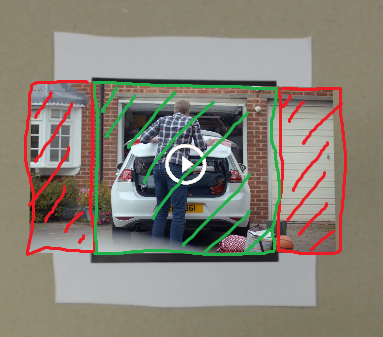
Clicking in areas of red result in no click. Clicking in green area results in a click.
Now I know I've set up my components correctly on the video element, because if I, for example, make that element smaller than the marker, clicking outside of it (but still within the marker physical bounds) doesn't affect video playback.
@nicolocarpignoli you don't face this issue in your example from your article because you put the click event on the marker itself.
This isn't good unless you can manipulate the height and width of the marker size beyond the physical dimensions (i.e. hack it to work).
 LaurenceNairne
on 27 Sep 2018
LaurenceNairne
on 27 Sep 2018
@javismiles
I am new to AR.js and have same issue now. ( can not play video when marker is detected).
If everything is working well on your side, then can you share me your code here?
 delphinoluiz
on 13 Nov 2018
delphinoluiz
on 13 Nov 2018
@LaurenceNairne nice point, thanks for your study :)
Do you have reached better results with this approach or in another ways in order to handle click events on AR.js?
nicolocarpignoli
on 27 Mar 2019
@nicolocarpignoli I believe I did find a suitable solution, but I have to check my code as it's been quite some time since I built it.
I remember now. I basically hacked it by increasing the value of the marker size attribute to 10 so a larger area around the physical boundaries of the printed marker was clickable.
Not a robust solution by any means but it suited my uses at the time.
LaurenceNairne
on 31 Mar 2019
@LaurenceNairne thanks! and you put the cursor on the the marker a-entity or on the a-entity representing the 3D model to show?
nicolocarpignoli
on 31 Mar 2019
@nicolocarpignoli it's on the a-scene element in mine.
<a-scene
  cursor="fuse: false; rayOrigin: mouse"
  raycaster="objects: .clickable"
  ...
>
Closing this issue due to dismission of this repository. New repository of AR.js will be up at https://github.com/AR-js-org/AR.js/
Feel free to re-open the issue there if still valid.
nicolocarpignoli
on 3 Mar 2020
Related issues
 evaristoc
·
5Comments
evaristoc
·
5Comments
 filippomarra
·
5Comments
filippomarra
·
5Comments
 omarojo
·
3Comments
omarojo
·
3Comments
 quistuipater
·
7Comments
nicolocarpignoli
·
3Comments
quistuipater
·
7Comments
nicolocarpignoli
·
3Comments
Most helpful comment
Hey guys, I just ran into the same problem but after reading your notes was able to cobble something together extending on this post: #335 that seems to work well for me.
The process is:
detect the marker
find the 3d elements
add interactivity
I'm using a basic HIRO marker for now but should work ok with a custom maker. Will let you know how that goes!