Apps-android-commons: Share button color should be changed from white to black in About Activity.
Summary:
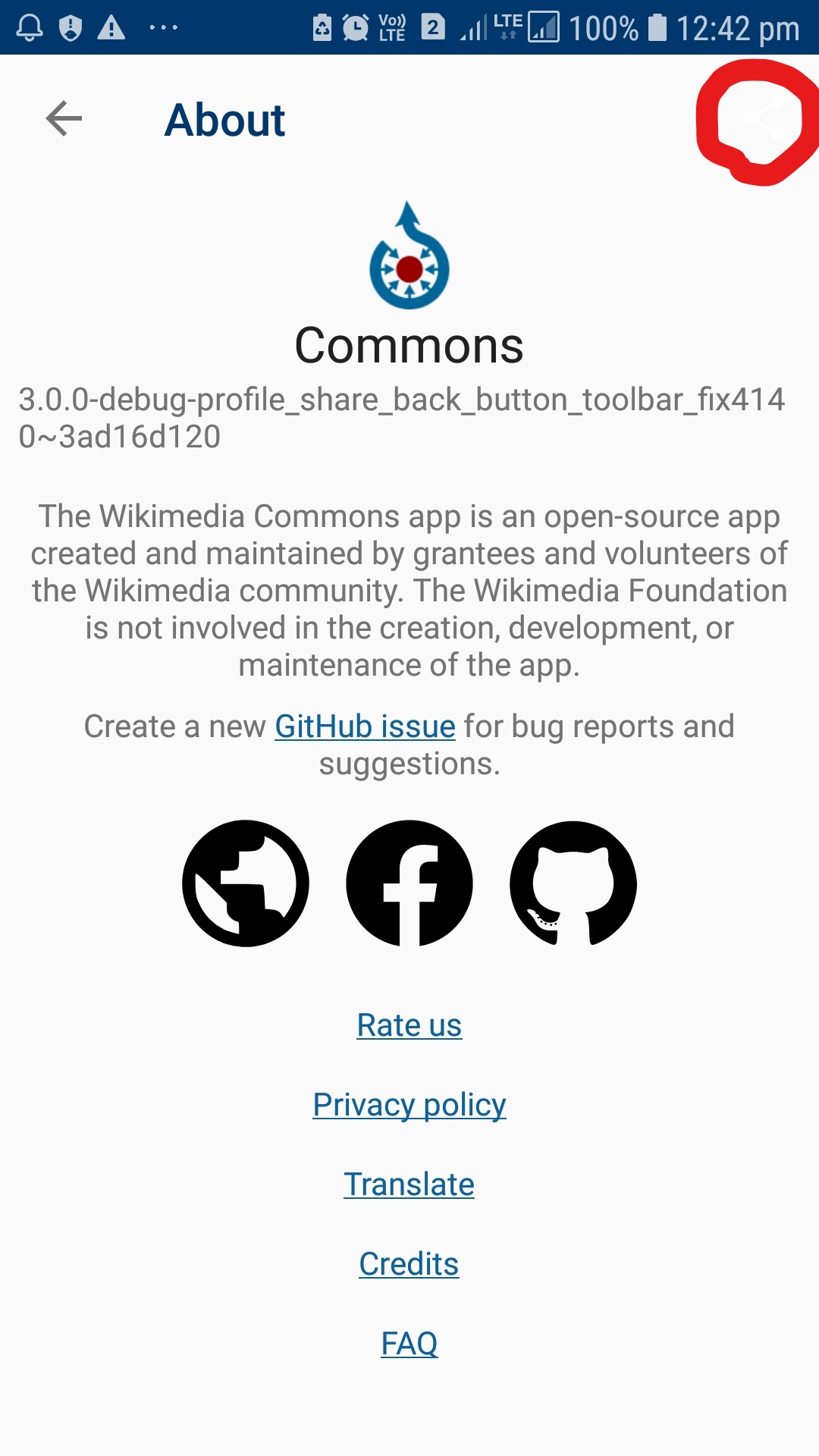
In the About Activity screen, a share button is present at the top right corner but not visible due to its white color. To make it visible its color should be changed to black.
Steps to reproduce:
Open About section in Menu Bar.
There is a share button at the top right corner of the toolbar.
What did you expect the app to do, and what did you see instead?
The share button should be visible in black color.
*Device and Android version: *
Samsung J7 Prime
Commons app version:
Latest Master
Screen-shots:
Would you like to work on the issue?
Yes
 Roshan13046
All 13 comments
I would like to fix this issue by raising a PR.
Roshan13046
on 7 Feb 2021
@Roshan13046 Feel free to work on this issue
 madhurgupta10
on 7 Feb 2021
madhurgupta10
on 7 Feb 2021
is this issue fixed?
 Vikash174
on 9 Feb 2021
Vikash174
on 9 Feb 2021
is this issue fixed?
@Vikash174 yes.
Roshan13046
on 9 Feb 2021
can i fix the issue?
 mithun2020ait
on 12 Mar 2021
mithun2020ait
on 12 Mar 2021
can i fix the issue?
Partially fixed. changes suggested. working on it.
Roshan13046
on 12 Mar 2021
Hi, @madhurgupta10 I would like to work on this issue, can you suggest me the way to get started?
 Krshivam25
on 23 Mar 2021
Krshivam25
on 23 Mar 2021
@Krshivam25 Hi, thanks for your interest, this issue is already assigned. @Roshan13046 can you confirm if you are still working on it? If not we can reassign this issue to someone else.
madhurgupta10
on 23 Mar 2021
Thanks for your interest @Krshivam25 , it is already assigned. @Roshan13046 should be working on it. Are you still workin on reviews @Roshan13046 ?
Ups, sorry for repeating the same response, haven't seen it :)
 neslihanturan
on 23 Mar 2021
neslihanturan
on 23 Mar 2021
Since there is no response from @Roshan13046
@Krshivam25 you can work on this issue if you want :)
madhurgupta10
on 30 Mar 2021
Yes, @madhurgupta10 thanks I will definitely do this.
Krshivam25
on 30 Mar 2021
Can I fix this issue please? I see it hasn't been worked on in 15 days. I am looking to contribute for a university class. Thank you in advance.
 AaronAven
on 16 Apr 2021
AaronAven
on 16 Apr 2021
@AaronAven It seems like @Krshivam25 isn't working on this issue anymore so feel free to create a PR. Thanks!
madhurgupta10
on 17 Apr 2021
Related issues
 misaochan
·
3Comments
misaochan
·
3Comments
 jidanni
·
3Comments
misaochan
·
4Comments
jidanni
·
3Comments
misaochan
·
4Comments
 whym
·
3Comments
neslihanturan
·
3Comments
whym
·
3Comments
neslihanturan
·
3Comments