Apps-android-commons: Field tip truncated on small screen / big font
If the (older) user has larger fonts enabled, then the numbers after "limit 2" are truncated.
2.13.1.838~9202c3a
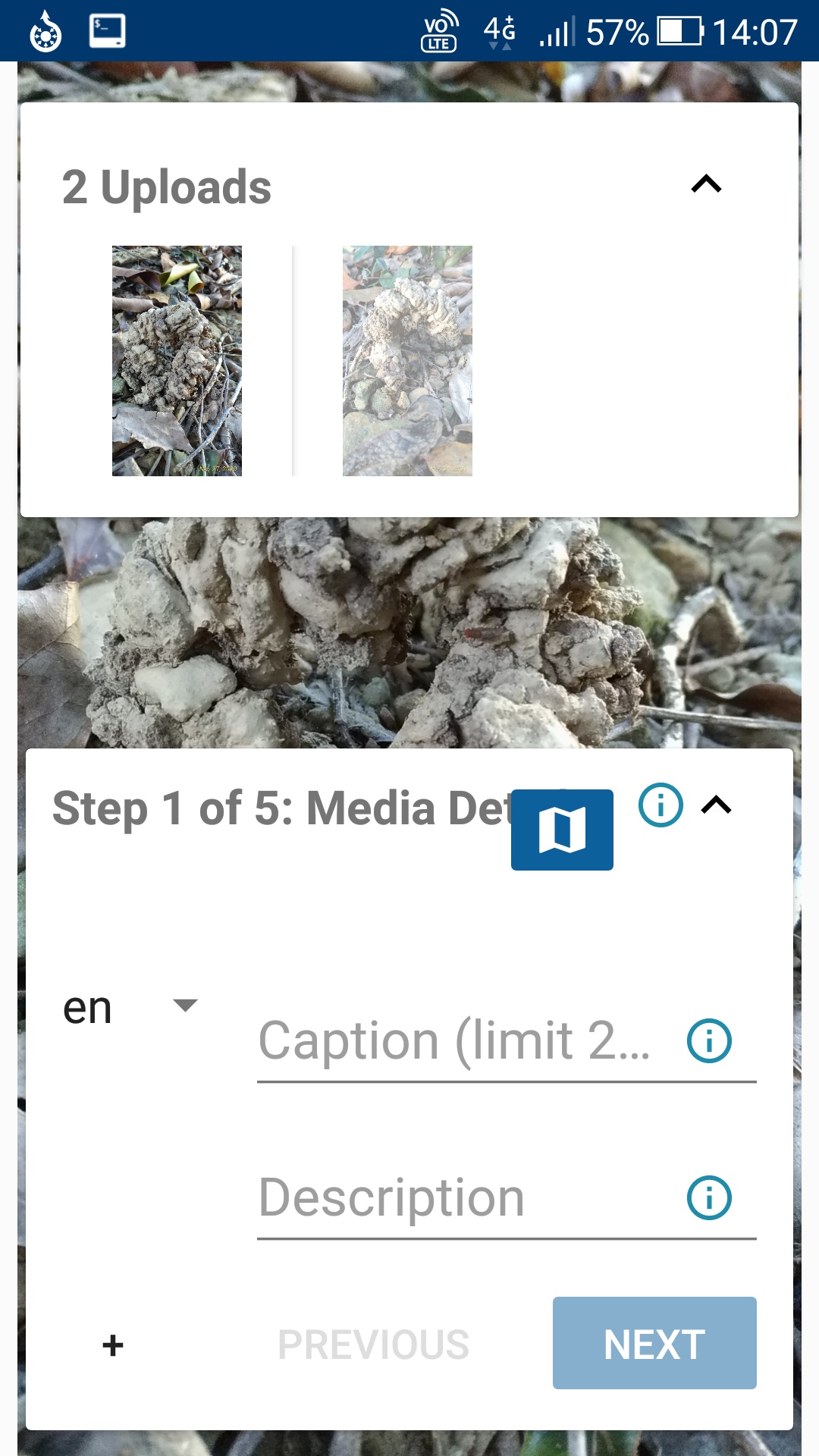
We also note a logo, covering up the word after "media".
 jidanni
All 19 comments
Curious to hear what the UX experts think about this.
Could you please post a screenshot of 2 or 3 other similar apps to show how other apps handle a field tip too long to fit?
 nicolas-raoul
on 30 Nov 2020
nicolas-raoul
on 30 Nov 2020
Mmmm, I don't know. Maybe related: https://developer.android.com/guide/topics/ui/look-and-feel/autosizing-textview
jidanni
on 30 Nov 2020
jidanni
on 30 Nov 2020
I was also going to mention
https://material.io/design/usability/accessibility.html#implementing-accessibility
but due to https://bugs.chromium.org/p/chromium/issues/detail?id=1153673
it takes some work to get exactly there.
jidanni
on 30 Nov 2020
jidanni
on 30 Nov 2020
In the first picture on https://github.com/commons-app/apps-android-commons/pull/4055#issuecomment-736014504
the "Limit 2..." looks a whole lot better!
jidanni
on 1 Dec 2020
The first picture in that comment is what happens when you tap on the text field. It would be great if you could post a screenshot from your phone of a long text field that works for you in another app.
 misaochan
on 1 Dec 2020
misaochan
on 1 Dec 2020
Well, just here using the GitHub app it seems everybody's comments on these issues are nicely wrapped and folded or whatever, never going off the screen, even though they are one long line.
jidanni
on 1 Dec 2020
@jidanni Important content is wrapped of course, but have you seen many major apps wrapping field tips?
nicolas-raoul
on 2 Dec 2020
If that their official name?
https://www.google.com/search?q=android+%22field+tips%22
can't find them.
jidanni
on 2 Dec 2020
Hey,
I'm a newbie here and would like to contribute.
@jidanni They are called hint in Edit Text as far as I know.
According to me if this is to be fixed, instead of writing there about the limit we can just limit the edit text to allow no more than 255 characters.
android:maxLength="255"
Considering the fact that the text is too long to be displayed completely over normal device "Caption (limit 255 characters)" could then be reduced to "Caption".
Furthermore if it is required to inform about the limit, we can do so under the info icon right next to it.
Thanks.
 4D17Y4
on 9 Dec 2020
4D17Y4
on 9 Dec 2020
Interesting idea @4D17Y4 ! I'm good with moving the info about the character limit to the info tooltip. We should also limit the EditText, but users do still have to be informed.
misaochan
on 16 Dec 2020
but users do still have to be informed.
Should we add a down counter to show the number of characters left like in stackoverflow and in whatsapp ?
@misaochan
4D17Y4
on 18 Dec 2020
I think for the time being, this issue can be handled by simply moving the info. Adding a counter would be a separate enhancement IMO. :)
misaochan
on 21 Dec 2020
@4D17Y4 I think you deleted your comment by accident? Sure, I can assign you this issue. Generally speaking issues tagged enhancement tend to be a bit iffy, but as the discussed solution for this is quite simple (and you are not adding any features) I will additionally tag this as "good first issue".
misaochan
on 21 Dec 2020
@4D17Y4 I think you deleted your comment by accident?
Nope,
Actually I thought same, tagging it as good first issue.
And decided to work on other bugs, letting beginners handle this one ;)
4D17Y4
on 21 Dec 2020
Works for me. :)
misaochan
on 21 Dec 2020
Hey, I'm new here and would like to contribute. This looks like a good place to get started, is it available for me to work on?
 trdillon
on 22 Dec 2020
trdillon
on 22 Dec 2020
@trdillon It is yours, thanks! Please post about your progress once in a while :-)
nicolas-raoul
on 22 Dec 2020
Related issues
misaochan
·
4Comments
 whym
·
3Comments
nicolas-raoul
·
3Comments
whym
·
3Comments
nicolas-raoul
·
3Comments
 domdomegg
·
3Comments
domdomegg
·
3Comments
 Opsylac
·
3Comments
Opsylac
·
3Comments
Most helpful comment
I think for the time being, this issue can be handled by simply moving the info. Adding a counter would be a separate enhancement IMO. :)