Apps-android-commons: Adding a tiny UI element to depictions screen to distinguish from category
Summary:
Our new depictions screen seems very similar to the category selection screen. I think our long term users can find this confusing. We can add some UI element to distinguish it from category screen.
My suggestion is displaying a text before user enters any input, saying "We have a new feature to enter depictions, yaaay!" or some more proper explanation :)
 neslihanturan
All 23 comments
I was wondering if we should display the name of the step at the top of the screen (i.e. "Step 2 of 4: Depicts", "Step 3 of 4: Categories"), along with associated tooltips (as an "i" icon at the side).
 misaochan
on 20 May 2020
misaochan
on 20 May 2020
I agree, we should display names.
neslihanturan
on 22 May 2020
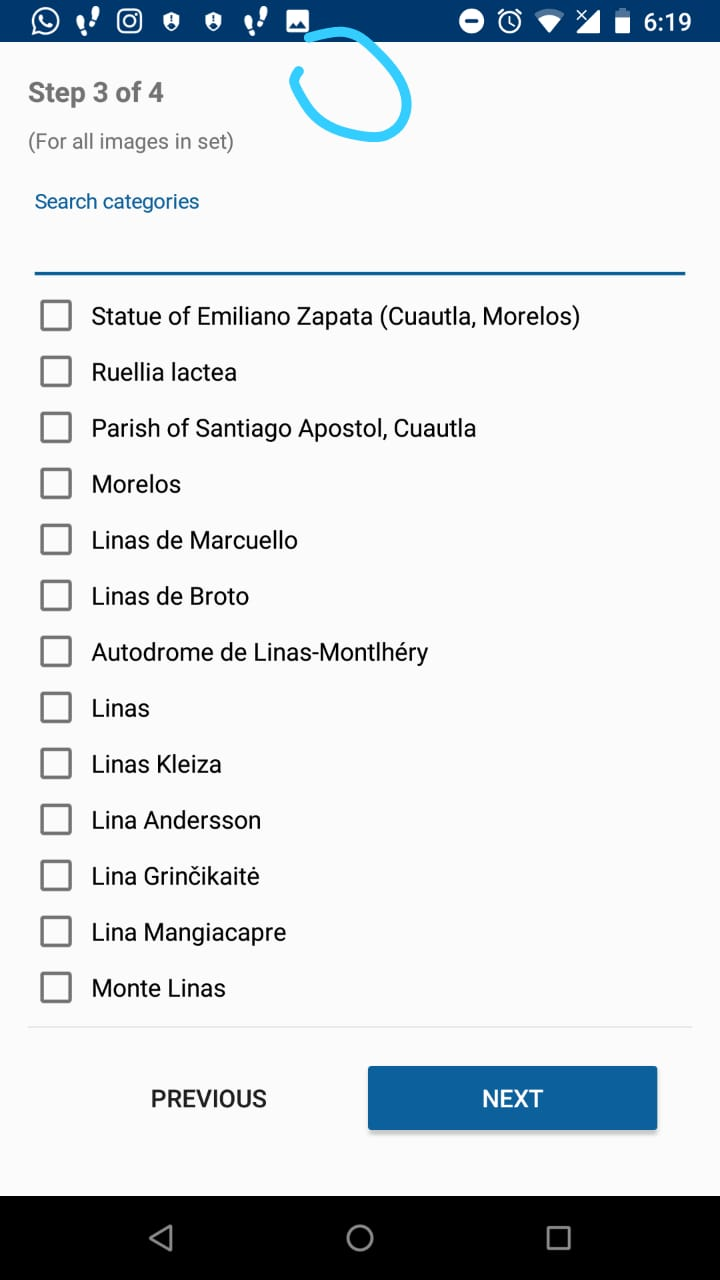
From what I understood, you want to add an icon "i" of tooltips that explains what each step does, if nobody has done it, could I do it?
 PaulinaQuintero
on 13 Jun 2020
PaulinaQuintero
on 13 Jun 2020
@PaulinaQuintero We want the name of the step and then a tooltip. So for instance in your screenshot, the title would have "Step 3 of 4: Categories ["i"]".
You are most welcome to take it up. :)
misaochan
on 22 Jun 2020
Hi @PaulinaQuintero , do you have an update on this?
misaochan
on 31 Aug 2020
Hi, I would like to try and solve this issue. @misaochan
Also, for adding "Categories" there is already a tag inside strings.xml but for "Depicts" I could not find one. I could find "Depictions" though.. So I was wondering, if I add an extra string in strings.xml, won't we need to add that for all the translations? Do some steps need to be followed for that?
 anadi198
on 15 Oct 2020
anadi198
on 15 Oct 2020
Hi @anadi198 thanks for your interest. No we don't need to add translations for all these languages. They are translated explicitly, we only edit the default file.
neslihanturan
on 15 Oct 2020
Okay thank you for clarifying. @neslihanturan
tvTitle.setText(getString(R.string.step_count, callback.getIndexInViewFlipper(this) + 1,
                callback.getTotalNumberOfSteps()));
So from what I've understood, I need to add ": Categories" and such inside those, and then put tvTitle inside a horizontal LinearLayout on the end side of which is the tooltip icon. Is that the correct way?
@PaulinaQuintero We want the name of the step and then a tooltip. So for instance in your screenshot, the title would have "Step 3 of 4: Categories ["i"]".
Also what do I show when the tooltip is clicked? @misaochan
anadi198
on 15 Oct 2020
Also what do I show when the tooltip is clicked? @misaochan
@sivaraam @nicolas-raoul Any thoughts on what text we should put in the "depicts" tooltip?
misaochan
on 26 Oct 2020
I see the following description for depicts in Commons:Structured data
Under the Structured data tab, you can indicate what is portrayed ("depicted") in the file.
... and Commons:Depicts seems to have more detail about it.
Combining that information with the way in which we phrase the other tooltips in the upload flow, the following would be my suggestion:
Please choose all the items that this image portrays. Be as specific as you can. If the image portrays multiple items, choose them all within reason. Do not choose generic tags if more specific tags are available.
 sivaraam
on 26 Oct 2020
sivaraam
on 26 Oct 2020
Thanks @sivaraam , that looks good to me. :) @anadi please feel free to use the above text for the tooltip.
misaochan
on 28 Oct 2020
Hi @anadi198 , are you still working on this?
misaochan
on 6 Nov 2020
Hi @misaochan, I got caught up with some work after my last comment. But I would like to give this a try. I'll try to fix it tonight and then let you know.
anadi198
on 6 Nov 2020
Thanks @anadi198 , please let us know how it goes. :)
misaochan
on 6 Nov 2020
@misaochan I had a look and have a few questions:
- How do I update
R.string.step_countto, for example, have: %3$ssince it starts giving me ~100 errors in all the translation files(I really hope the answer is not what I'm thinking it is :D) - What text do I show when tooltip is pressed for Categories and such? Is there something already available somewhere?
- Just to confirm, the steps other than Depicts are: Categories, Media License and Upload Media Details, right?
I'm new so I don't know much about the project, sorry!
anadi198
on 6 Nov 2020
@anadi198 If it is warnings you can safely ignore them. If it is errors, have you tried https://stackoverflow.com/a/11444141/226958 maybe?
You are right about the 4 steps.
Here are tooltips for each:
- Media details:
Please write a short caption that says what your picture shows. In the description, say what makes the picture interesting or typical or rare, and explain the context, visible or not. Use exact terminology as much as you can. - Depictions:
Please find and select all concepts that this image portrays. Be as specific as you can. If the image portrays multiple items, choose them all within reason. Do not choose generic tags if more specific tags are available.(thanks sivaraam for the great wording!) - Categories:
Please select the appropriate categories. Unlike depictions, categories are only in English.(it would be great to explain how categories differ conceptually from depictions (which are perpendicular rather than a tree) but I could not find the right word, this can be improved in the future. - License:
Commons makes your pictures reusable and adapted by everyone. Do you want to waive all rights? Do you want to be attributed? Do you want adaptations to use the same license?
I don't remember whether we have a policy about using "please". Anyway that can easily be changed later.
 nicolas-raoul
on 7 Nov 2020
nicolas-raoul
on 7 Nov 2020
Okay thank you for the clarifications. The "errors" were indeed just warnings.
There are two ways of adding a "tooltip" icon at the end of a TextView(as far as I know), one is to use the drawableEnd property and the other is using a separate ImageView inside a parent layout. Since setting the onClick isn't simple for the first choice and the second one adds layers to the UI, I would like to know which one I should go with. @misaochan @nicolas-raoul
anadi198
on 7 Nov 2020
If we were to use TextInpuLayout endIcon then I think it might overlap with the progress indication so if you think that looks better we might have to move the progress indication elsewhere
@nicolas-raoul @neslihanturan we can place the icon inside the TextInputEditText and on the side of progress bar like this.
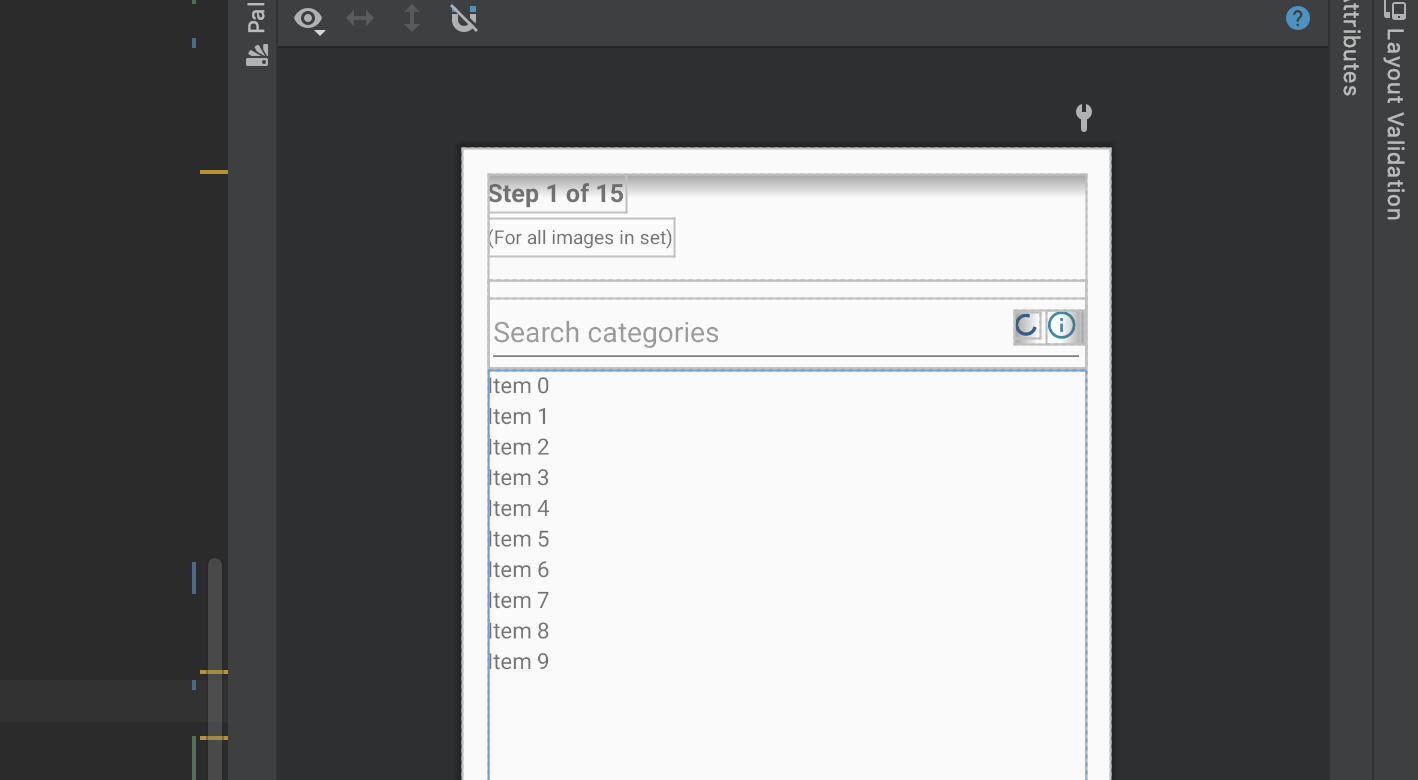
If no one works now then I want to take this issue.
 gouri-panda
on 9 Nov 2020
gouri-panda
on 9 Nov 2020
Hi @gouri-panda , I guess @anadi198 is working on this task currently. You can fin a new task to work on if you like to:) The it comes to the question of @anadi198 , you can implement the solution you liked most, any changes can be made during PR review stage.
neslihanturan
on 11 Nov 2020
I can't log in to my Commons Beta account, it keeps giving a 502 under maintenance message. It hasn't fixed for the past few hours. Did I do something wrong? Sign up or forgot password, none seem to work.
Request from - via deployment-cache-text06.deployment-prep.eqiad.wmflabs, ATS/8.0.8
Error: 502, Next Hop Connection Failed at 2020-11-11 17:05:31 GMT
Sorry for posting this here if there's some better place for it.
anadi198
on 11 Nov 2020
@anadi198 can you login via web interface? Can you login to prod account? Are you sure you are not blocked and password is correct?
neslihanturan
on 11 Nov 2020
I can log in to the prod version (from Google Play) just fine. @neslihanturan
anadi198
on 12 Nov 2020
I had a look and although not exactly the same as mine I found a similar closed issue, recommending to install the prod debug build which I did and now I've tested that my changes indeed to work. I think further questions/corrections will be best made in the PR so I'll be opening one.
anadi198
on 12 Nov 2020
Related issues
 whym
·
3Comments
whym
·
3Comments
 psh
·
3Comments
psh
·
3Comments
 Opsylac
·
3Comments
Opsylac
·
3Comments
 4D17Y4
·
3Comments
neslihanturan
·
3Comments
4D17Y4
·
3Comments
neslihanturan
·
3Comments
Most helpful comment
Hi @gouri-panda , I guess @anadi198 is working on this task currently. You can fin a new task to work on if you like to:) The it comes to the question of @anadi198 , you can implement the solution you liked most, any changes can be made during PR review stage.