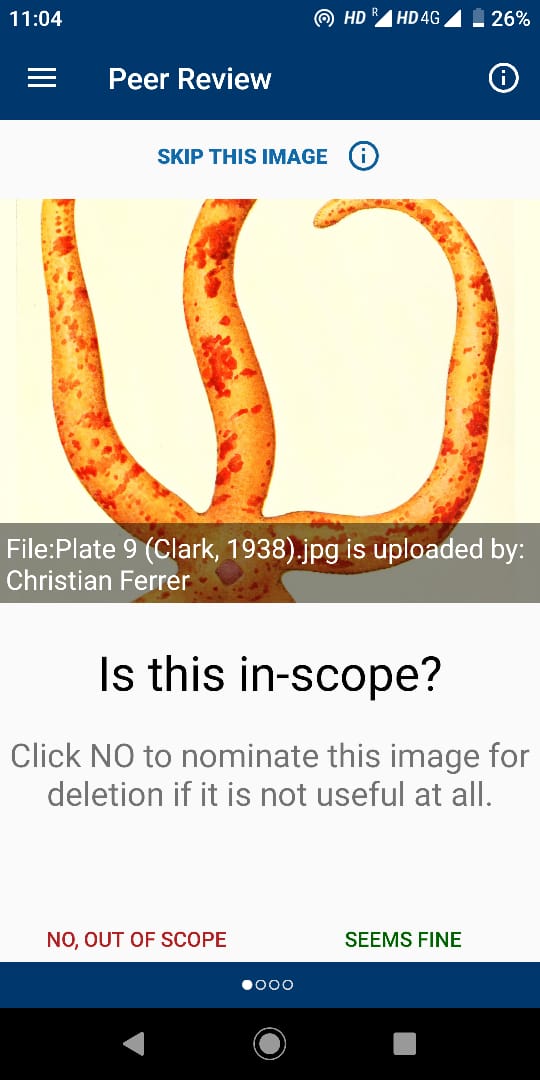
Apps-android-commons: Improvement of UI by using symbols(thumbs up and down symbol) to review an image and decrease in the size of text "Click No to nominate this image for deletion if itis not useful at all""
Summary:
I expect symbols to be used to review an image(thumbs up and down) instead of using the text directly. This can be resolved by adding corresponding symbols and make it as "image button" so that the user can review it by clicking those image button.
Green color thumbs up for "seems fine"
Red color thumbs down for "No,out of scope"
Reduction of size for the text and little changes to the text as we are migrating from text to image "Click NO to nominate this image for deletion if it is not useful at all"
Device and Android version:
Android version : 9
API Level : 28
Model device: Redimi MI A2
Commons app version:
2.12.3-debug-master~af97e40
Screen-shots:
Would you like to work on the issue?
Yes
 TejaswiKarasani
All 8 comments
Yes, I want to work on this issue.
 bishtmanish739
on 23 Feb 2020
bishtmanish739
on 23 Feb 2020
Tagging @neslihanturan to get inputs on the design change.
@TejaswiKarasani In the meanwhile if you want you can check other issues.
 maskaravivek
on 23 Feb 2020
maskaravivek
on 23 Feb 2020
Tagging @neslihanturan to get inputs on the design change.
@TejaswiKarasani In the meanwhile if you want you can check other issues.
Ok
TejaswiKarasani
on 23 Feb 2020
@TejaswiKarasani In future, when mentioning the app version mention the version you see in the "About" page of the app (e.g., 2.12.3-my-feature-branch~8bdc773f1). That would be more precise information. The build variant alone doesn't tell anything about the particular version of the app in which you have faced an issue. It just gives the information about which variant of a particular version of the app you've built. 🙂
 sivaraam
on 23 Feb 2020
sivaraam
on 23 Feb 2020
@sivaraam ok. I will follow it :)
TejaswiKarasani
on 23 Feb 2020
@TejaswiKarasani In future, when mentioning the app version mention the version you see in the "About" page of the app (e.g.,
2.12.3-my-feature-branch~8bdc773f1). That would be more precise information. The build variant alone doesn't tell anything about the particular version of the app in which you have faced an issue. It just gives the information about _which variant_ of a particular version of the app you've built.
Changed now ! Will follow it in future as well. Thanks for the valuable suggestion
TejaswiKarasani
on 23 Feb 2020
Changed now ! Will follow it in future as well. Thanks for the valuable suggestion
Wow! That was real quick. 😄
sivaraam
on 23 Feb 2020
Changed now ! Will follow it in future as well. Thanks for the valuable suggestion
Wow! That was real quick.
:p
TejaswiKarasani
on 23 Feb 2020
Related issues
 nicolas-raoul
·
4Comments
nicolas-raoul
·
3Comments
nicolas-raoul
·
4Comments
nicolas-raoul
·
3Comments
 neslihanturan
·
3Comments
neslihanturan
·
3Comments
 psh
·
4Comments
psh
·
4Comments
 misaochan
·
3Comments
misaochan
·
3Comments
Most helpful comment
@TejaswiKarasani In future, when mentioning the app version mention the version you see in the "About" page of the app (e.g.,
2.12.3-my-feature-branch~8bdc773f1). That would be more precise information. The build variant alone doesn't tell anything about the particular version of the app in which you have faced an issue. It just gives the information about which variant of a particular version of the app you've built. 🙂