Apps-android-commons: Can't login into my Commons beta account
Summary:
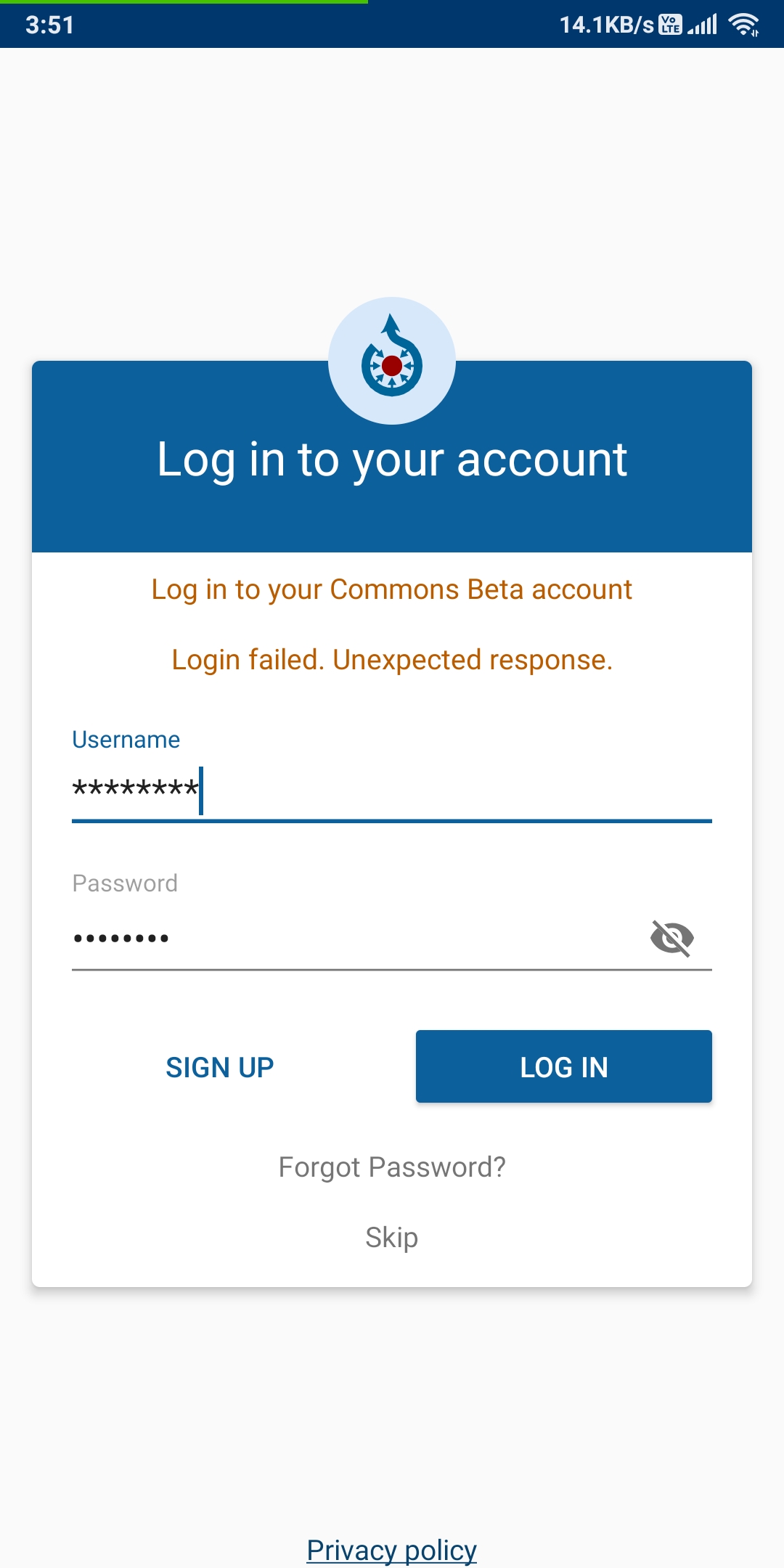
From the last 24 hours, I have not been able to login to the commons app built from source using Android Studio. I cannot log in on the web either.
I read the past issues that signaled to me that this is probably a server problem. I just wanted to make sure that it's not at my end.
The app displays Login Failed. Unexpected response. on every login attempt. Even if I enter a random username and password, it does not display any username/password related error.
In every case, only Login Failed. Unexpected response. is being displayed.
Please note that non-beta account login i.e. commons production app is working fine.
System logs: Only relevant shown
2020-02-14 04:24:35.470 25241-25241/fr.free.nrw.commons.beta E/LoginActivity: java.io.IOException: Login failed. Unexpected response.
at org.wikipedia.login.LoginClient$2.onResponse(LoginClient.java:94)
at retrofit2.DefaultCallAdapterFactory$ExecutorCallbackCall$1.lambda$onResponse$0$DefaultCallAdapterFactory$ExecutorCallbackCall$1(DefaultCallAdapterFactory.java:81)
at retrofit2.-$$Lambda$DefaultCallAdapterFactory$ExecutorCallbackCall$1$3wC8FyV4pyjrzrYL5U0mlYiviZw.run(Unknown Source:6)
at android.os.Handler.handleCallback(Handler.java:873)
at android.os.Handler.dispatchMessage(Handler.java:99)
at android.os.Looper.loop(Looper.java:201)
at android.app.ActivityThread.main(ActivityThread.java:6810)
at java.lang.reflect.Method.invoke(Native Method)
at com.android.internal.os.RuntimeInit$MethodAndArgsCaller.run(RuntimeInit.java:547)
at com.android.internal.os.ZygoteInit.main(ZygoteInit.java:873)
Device and Android version:
Redmi Note 5 Pro Android Pie
Commons app version: 2.12.3-debug-master
Screen-shots:
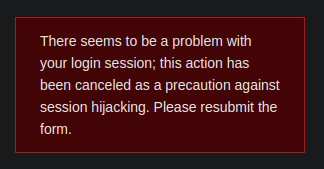
When trying to login or create a beta account on the web I get this message:
 Glitch101
All 48 comments
@Glitch101 Can you enable BODY level logs in OkHttpConnectionFactory and check the response that you are receiving.
 maskaravivek
on 14 Feb 2020
maskaravivek
on 14 Feb 2020
I cannot log in on the web either.
That is probably the root problem. Near the login form I think you can find a way to contact an administrator to unblock you or check what is the problem.
 nicolas-raoul
on 14 Feb 2020
nicolas-raoul
on 14 Feb 2020
I am having the same issue, can someone else verify if he is able to login (even via web app)?
 ashishkumar468
on 14 Feb 2020
ashishkumar468
on 14 Feb 2020
As noted in a comment in my PR, this is a known issue that affects the Commons beta website.
Refer the following phabricator ticket for more information:
https://phabricator.wikimedia.org/T244951
 sivaraam
on 14 Feb 2020
sivaraam
on 14 Feb 2020
@Glitch101 Can you enable
BODYlevel logs inOkHttpConnectionFactoryand check the response that you are receiving.
Yes, I did that and it seems it's related to cookies. I am getting an Invalid CSRF token.
{"errors":[{"code":"badtoken","text":"Invalid CSRF token.","module":"clientlogin"}]
Complete logs can be found in the file below
commons_logs.log
Glitch101
on 14 Feb 2020
I am having the same issue, can someone else verify if he is able to login (even via web app)?
Hey @ashishkumar468, Did you managed to solve the issue? If yes then please share how you did it.
Glitch101
on 14 Feb 2020
As noted in a comment in my PR, this is a known issue that affects the Commons beta website.
Refer the following phabricator ticket for more information:
https://phabricator.wikimedia.org/T244951
So, if I am getting this right, all I can do is wait to be able to login again in the app? Is there anything that I can do on my part to be able to login again. I need to test my fix of #3397.
Glitch101
on 14 Feb 2020
So, if I am getting this right, all I can do is wait to be able to login again in the app?
Yeah. That's the case for the beta version of the app.
Is there anything that I can do on my part to be able to login again. I need to test my fix of #3397.
You can do the testing using the prod* flavours of the app. There aren't any issues with logging in to the prod servers.
sivaraam
on 14 Feb 2020
@sivaraam Thanks for the tip. I will surely do that!
Glitch101
on 14 Feb 2020
@sivaraam did you login to the app?
 TejaswiKarasani
on 19 Feb 2020
TejaswiKarasani
on 19 Feb 2020
@TejaswiKarasani No luck till now. Still can't login or create a beta commons account on both the app and the website. I am completely locked out. It seems you are facing the same issue. Is that the case?
Glitch101
on 19 Feb 2020
Yeah true!
TejaswiKarasani
on 19 Feb 2020
Yes, it seems the beta server is having issues. Please use the prod flavor of the app for testing.
maskaravivek
on 19 Feb 2020
@maskaravivek Stupid question maybe but can you tell us how can we build a production version in android studio. If I am correct, we can't build a production version(since the code isn't public) and hence can't really do any code changes. This is really confusing me. I just need to fix an issue in the source code and I can't do that on a production version.
Glitch101
on 19 Feb 2020
@Glitch101 Its okay to ask questions if something is not clear. :)
You can build the prod debuggable app. I have added the steps for building the app here:
https://github.com/commons-app/apps-android-commons/wiki/Quick-start-guide-for-Developers#building-the-source-code
Let me know if you still have any issues in building the app.
PS: In fact you can also build the prod release app using your own keys.
maskaravivek
on 19 Feb 2020
If I am correct, we can't build a production version(since the code isn't public) and hence can't really do any code changes.
What made you think that? :thinking:
This project is an open-source project and all code is available in this repository.
This is really confusing me. I just need to fix an issue in the source code and I can't do that on a production version.
Unless your fix is specific to the beta servers I don't see why you cannot verify any fix using the production server. In case you are confused about the terminology feel free to ask. We're here to clarify! 🙂
sivaraam
on 19 Feb 2020
@Glitch101 Its okay to ask questions if something is not clear. :)
You can build the prod debuggable app. I have added the steps for building the app here:
https://github.com/commons-app/apps-android-commons/wiki/Quick-start-guide-for-Developers#building-the-source-code
Let me know if you still have any issues in building the app.
PS: In fact you can also build the prod release app using your own keys.
Just what I needed. Thanks @maskaravivek . You are awesome!
Glitch101
on 19 Feb 2020
Thanks :)
On Wed, 19 Feb, 2020, 11:20 PM Aryan Tyagi, notifications@github.com
wrote:
@Glitch101 https://github.com/Glitch101 Its okay to ask questions if
something is not clear. :)You can build the prod debuggable app. I have added the steps for building
the app here:https://github.com/commons-app/apps-android-commons/wiki/Quick-start-guide-for-Developers#building-the-source-code
Let me know if you still have any issues in building the app.
PS: In fact you can also build the prod release app using your own keys.
Just what I needed. Thanks @maskaravivek https://github.com/maskaravivek
. You are awesome!—
You are receiving this because you were mentioned.
Reply to this email directly, view it on GitHub
https://github.com/commons-app/apps-android-commons/issues/3409?email_source=notifications&email_token=AK75QGFC65Q25EV2W6KI34LRDVWO5A5CNFSM4KU5CLE2YY3PNVWWK3TUL52HS4DFVREXG43VMVBW63LNMVXHJKTDN5WW2ZLOORPWSZGOEMIZBLY#issuecomment-588353711,
or unsubscribe
https://github.com/notifications/unsubscribe-auth/AK75QGGIYU3ONACOMRB3M23RDVWO5ANCNFSM4KU5CLEQ
.
TejaswiKarasani
on 19 Feb 2020
@sivaraam did you login to the app?
As the others have mentioned, the issue still exists in the beta servers. Unfortunate indeed.
In case you're curious you can learn more about the issue and follow the progress of the resolution in the following phabricator ticket:
sivaraam
on 19 Feb 2020
What made you think that? thinking
I guess I was under the impression that some info might be added later to the prod version that cannot be displayed publically like some sensitive credentials, api keys etc. But, I guess I was wrong. Thanks for clarifying that:)
Unless your fix is specific to the _beta servers_ I don't see why you cannot verify any fix using the production server. In case you are confused about the terminology feel free to ask. We're here to clarify! slightly_smiling_face
Thanks @sivaraam . We appreciate that:)
Glitch101
on 19 Feb 2020
I guess I was under the impression that some info might be added later to the prod version that cannot be displayed publically like some sensitive credentials, api keys etc. But, I guess I was wrong. Thanks for clarifying that:)
Yes, the actual play store credentials are not part of the repo and only the project maintainers have access to it but as I mentioned in the wiki, you can use your own signing keys to build the release version of the app.
maskaravivek
on 19 Feb 2020
I guess I was under the impression that some info might be added later to the prod version that cannot be displayed publically like some sensitive credentials, api keys etc. But, I guess I was wrong. Thanks for clarifying that:)
Yes, the actual play store credentials are not part of the repo and only the project maintainers have access to it but as I mentioned in the wiki, you can use your own signing keys to build the release version of the app.
Understood. Thanks a lot.
Glitch101
on 19 Feb 2020
I guess I was under the impression that some info might be added later to the prod version that cannot be displayed publically like some sensitive credentials, api keys etc. But, I guess I was wrong. Thanks for clarifying that:)
Yes, the actual play store credentials are not part of the repo and only the project maintainers have access to it but as I mentioned in the wiki, you can use your own signing keys to build the release version of the app.
I actually see some misunderstanding here. I'll just try to go into the different build variants in a little detail to see if everyone is on the right page.
There are 4 variants of the app that could be built from the combination of two build types:
releasedebug
and two product flavours:
prodbeta
The four build variants:
betaDebug: This version connects to the beta server and can be used for debugging the app during development.prodDebug: This version points to the production server and can also be used for debugging the app during development.betaRelease: This is the release version of the app which connects to the beta server. This cannot be used for debugging the app. You would have to sign this version of the app using your signing keys.prodRelease: This is the release version of the app which connects to the production server. This cannot be used for debugging the app. You would have to sign this version of the app using your signing keys.
To clarify, when I say debugging I don't mean it in the general sense. I actually mean the ability to use the debugger provided by Android studio.
Typically, the debug variants are sufficient to test changes you make to the app.
All this said, when I mentioned all source code is available in this repository I was trying to tell that the code required to build the prodDebug and betaDebug variants is available publicly. That would be sufficient to test your changes in the production and the beta servers.
As mentioned by @maskaravivek, the only thing which is not available publicly is the signing keys used to build the release variants of the app which are released to play store. As a contributor, you really doesn't have to worry about this as you can alternatively use different signing keys if you really want to build the release variants. I'm going to gloss over a fine point here to avoid confusion.
Hope this is helpful and I didn't confuse anyone more in the name of clarifying. 🙂 If you're confused, let me know. I'll try to clarify.
sivaraam
on 19 Feb 2020
I guess I was under the impression that some info might be added later to the prod version that cannot be displayed publically like some sensitive credentials, api keys etc. But, I guess I was wrong. Thanks for clarifying that:)
Yes, the actual play store credentials are not part of the repo and only the project maintainers have access to it but as I mentioned in the wiki, you can use your own signing keys to build the release version of the app.
I actually see some misunderstanding here. I'll just try to go into the different build variants in a little detail to see if everyone is on the right page.
There are 4 variants of the app that could be built from the combination of two build types:
releasedebugand two product flavours:
prodbetaThe four build variants:
betaDebug: This version connects to the beta server and can be used for debugging the app during development.prodDebug: This version points to the production server and can also be used for debugging the app during development.betaRelease: This is the release version of the app which connects to the beta server. This cannot be used for debugging the app. You would have to sign this version of the app using your signing keys.prodRelease: This is the release version of the app which connects to the production server. This cannot be used for debugging the app. You would have to sign this version of the app using your signing keys.To clarify, when I say _debugging_ I don't mean it in the general sense. I actually mean the ability to use the debugger provided by Android studio.
_Typically_, the
debugvariants are sufficient to test changes you make to the app.All this said, when I mentioned all source code is available in this repository I was trying to tell that the code required to build the
prodDebugandbetaDebugvariants is available publicly. That would be sufficient to test your changes in the production and the beta servers.As mentioned by @maskaravivek, the only thing which is not available publicly is the signing keys used to build the
releasevariants of the app which are _released to play store_. As a contributor, you really doesn't have to worry about this as you can alternatively use different signing keys if you really want to build thereleasevariants. I'm going to gloss over a fine point here to avoid confusion.Hope this is helpful and I didn't confuse anyone more in the name of clarifying. If you're confused, let me know. I'll try to clarify.
Yup!! Thanks and reverted back to the prod debug though :)
TejaswiKarasani
on 19 Feb 2020
Thanks, @sivaraam for the excellent explanation. It does clarify things.
Sharing the steps I used to switch build variants on Android Studio in case someone needs help.
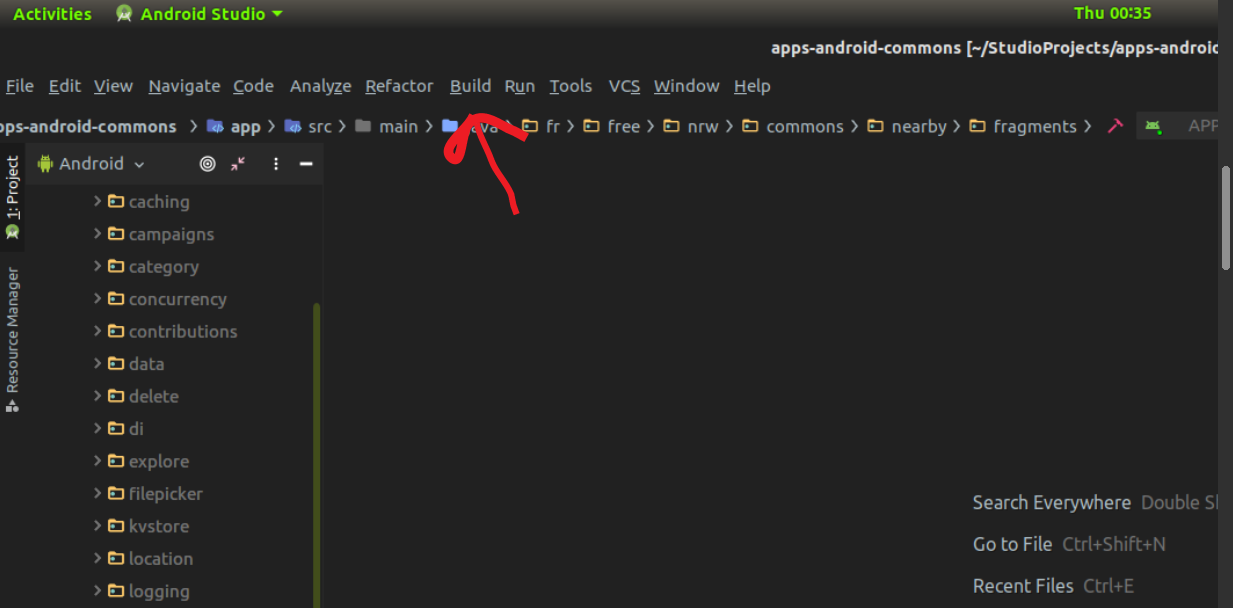
Step 1: Go to Build on the toolbar.
Step 2: Click on Select Build Variant
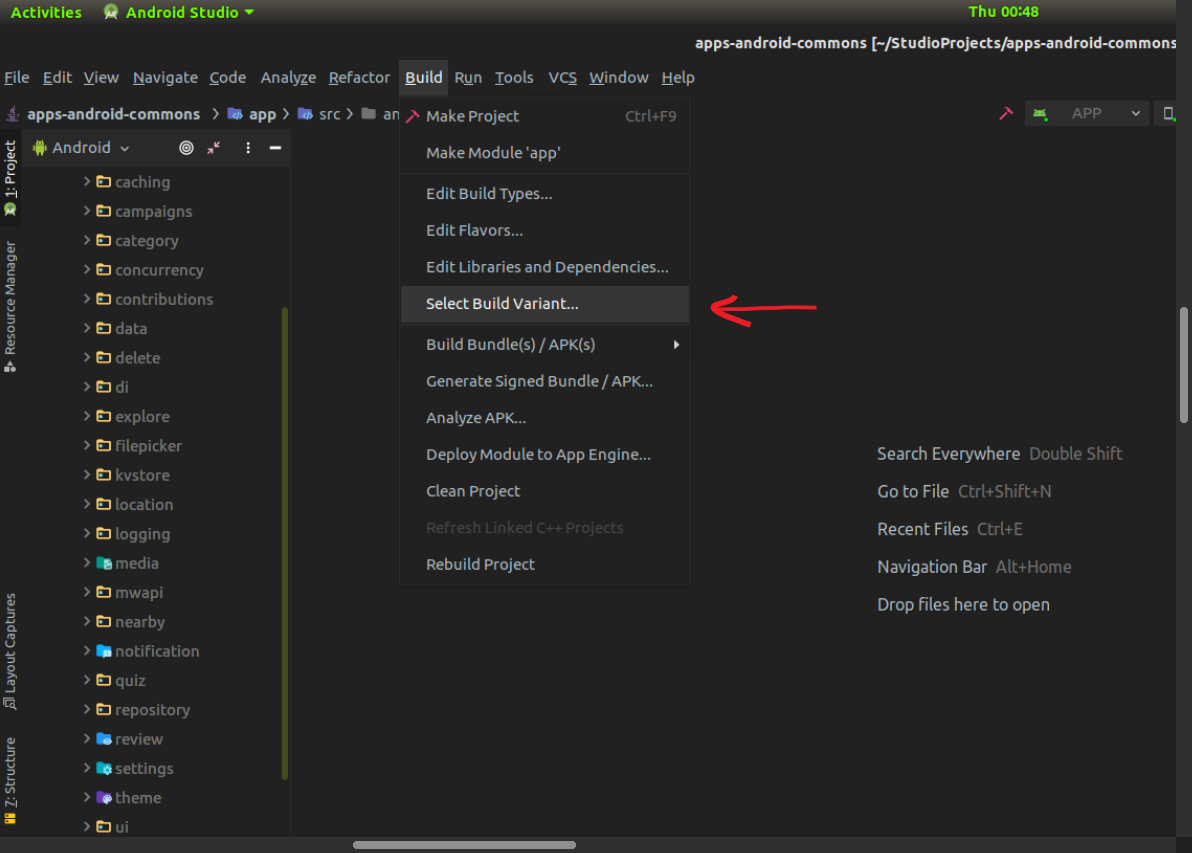
Step 3: Select prodDebug from the list for prod flavor and build the app.
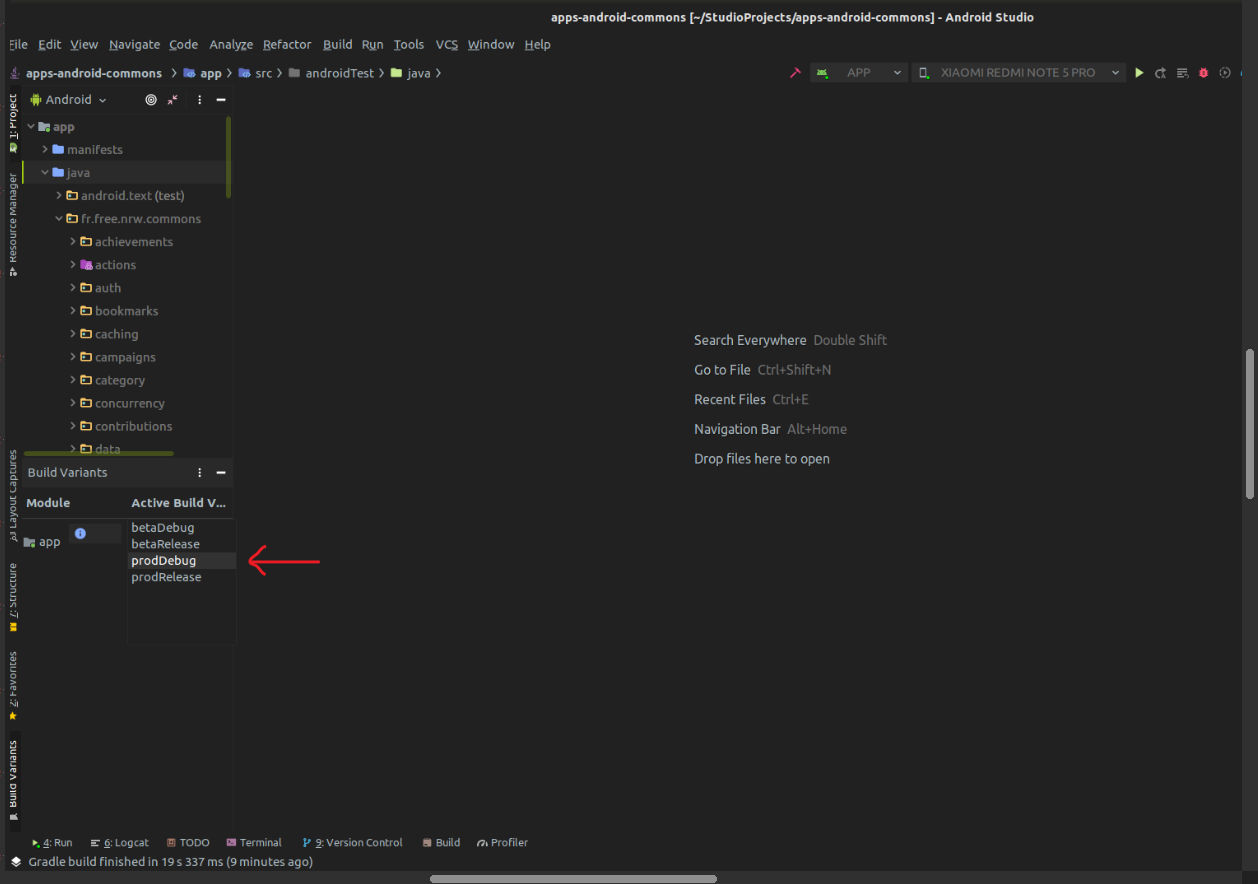
That's it. You are good to go. Run the app and you should be able to use the production servers.
Glitch101
on 19 Feb 2020
Thanks, @sivaraam for the excellent explanation. It does clarify things.
Sharing the steps I used to switch build variants on Android Studio in case someone needs help.
Step 1: Go to Build on the toolbar.
Step 2: Click on Select Build Variant
Step 3: Select prodDebug from the list for prod flavor and build the app.
That's it. You are good to go. Run the app and you should be able to use the production servers.
Cool @Glitch101
TejaswiKarasani
on 19 Feb 2020
Glad it was useful! 😄
You can build the prod debuggable app. I have added the steps for building the app here:
commons-app/apps-android-commons/wiki/Quick-start-guide-for-Developers#building-the-source-code
@maskaravivek On a related note, the link in the following text seems to be broken in the wiki page. Can you fix it?
You can also build and test the release variant for both beta and prod but you would need to use your own signing keys for it. Read up more about signing keys https://developer.android.com/studio/publish/app-signing.
sivaraam
on 20 Feb 2020
Thanks for the detailed explanation @sivaraam and @Glitch101. Do you mind if I copy-paste some of the content and images to our wiki?
maskaravivek
on 21 Feb 2020
Do you mind if I copy-paste some of the content and images to our wiki?
Not at all. Pray proceed. :slightly_smiling_face:
sivaraam
on 22 Feb 2020
Do you mind if I copy-paste some of the content and images to our wiki?
Glad I could help @maskaravivek.
One more thing. If you are going to use those images in the wiki then I should tell you that the Build Variant option in Build menu can sometimes(quite often, actually) be inaccessible in Android Studio as shown in the image below:

This usually happens after I have already accessed the option from the Build menu. It could be a bug in the android studio although I am not sure about that.
This can confuse new contributors just like it did @TejaswiKarasani.
I found a better way to change the build variants without using the build dropdown menu. There is already a Build Variants option at the bottom of the left side panel of Android Studio and it always stays there. Hence a safer method.
Here are the screenshots for the steps to do the same in case you decide to use them in the wiki. It could be posted along with the steps in my previous comment but that's for you to decide.
Step 1:
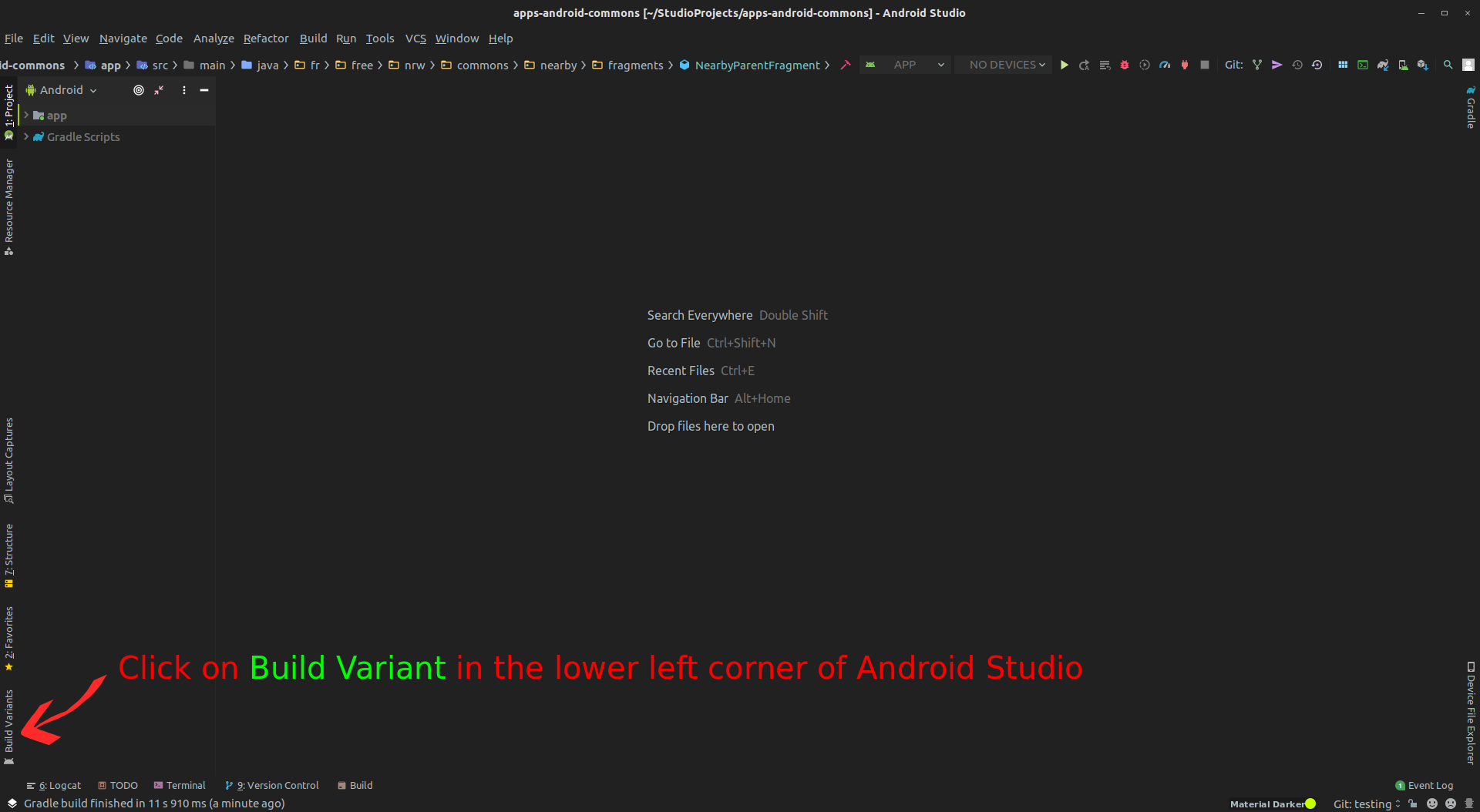
Step 2:
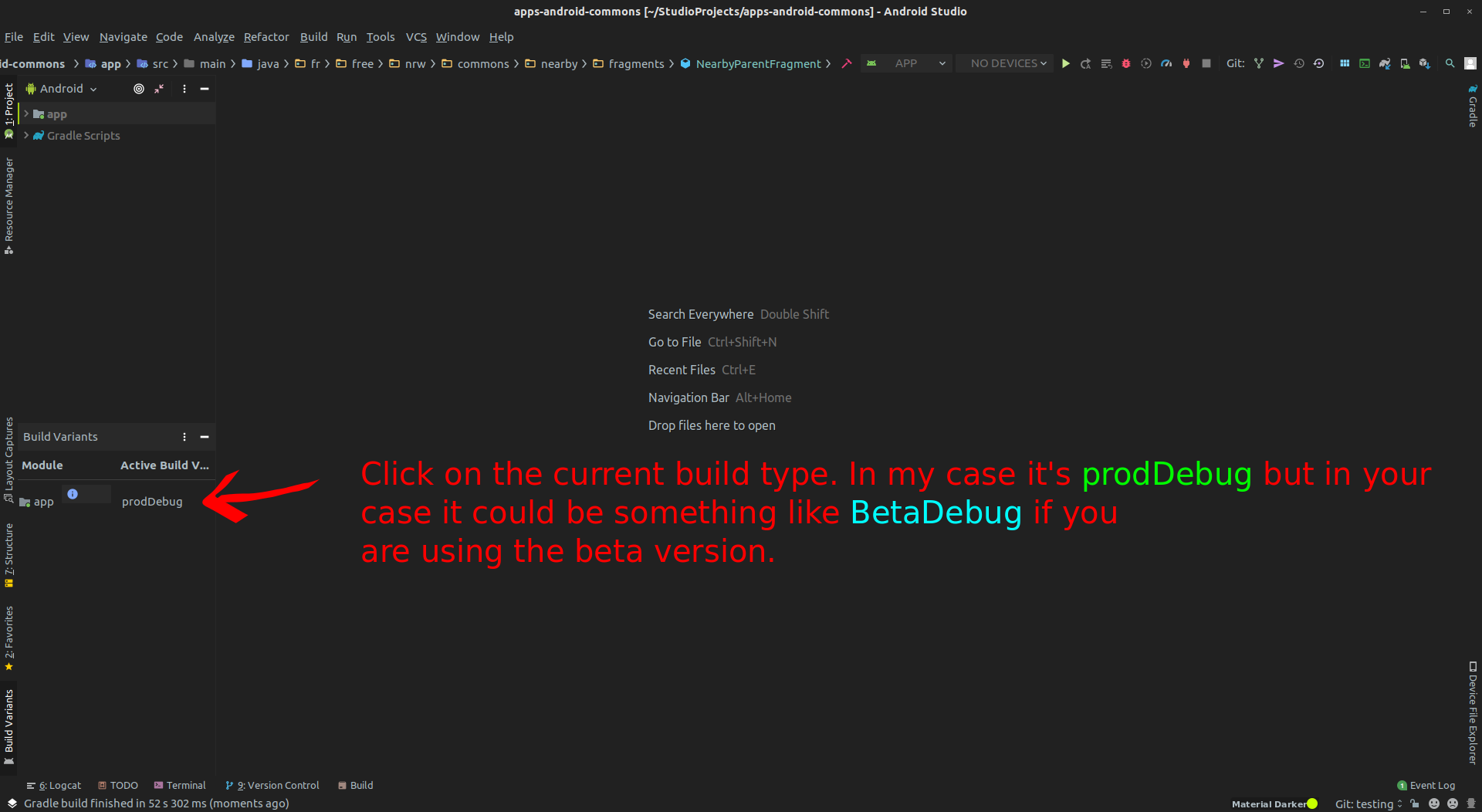
Step 3:
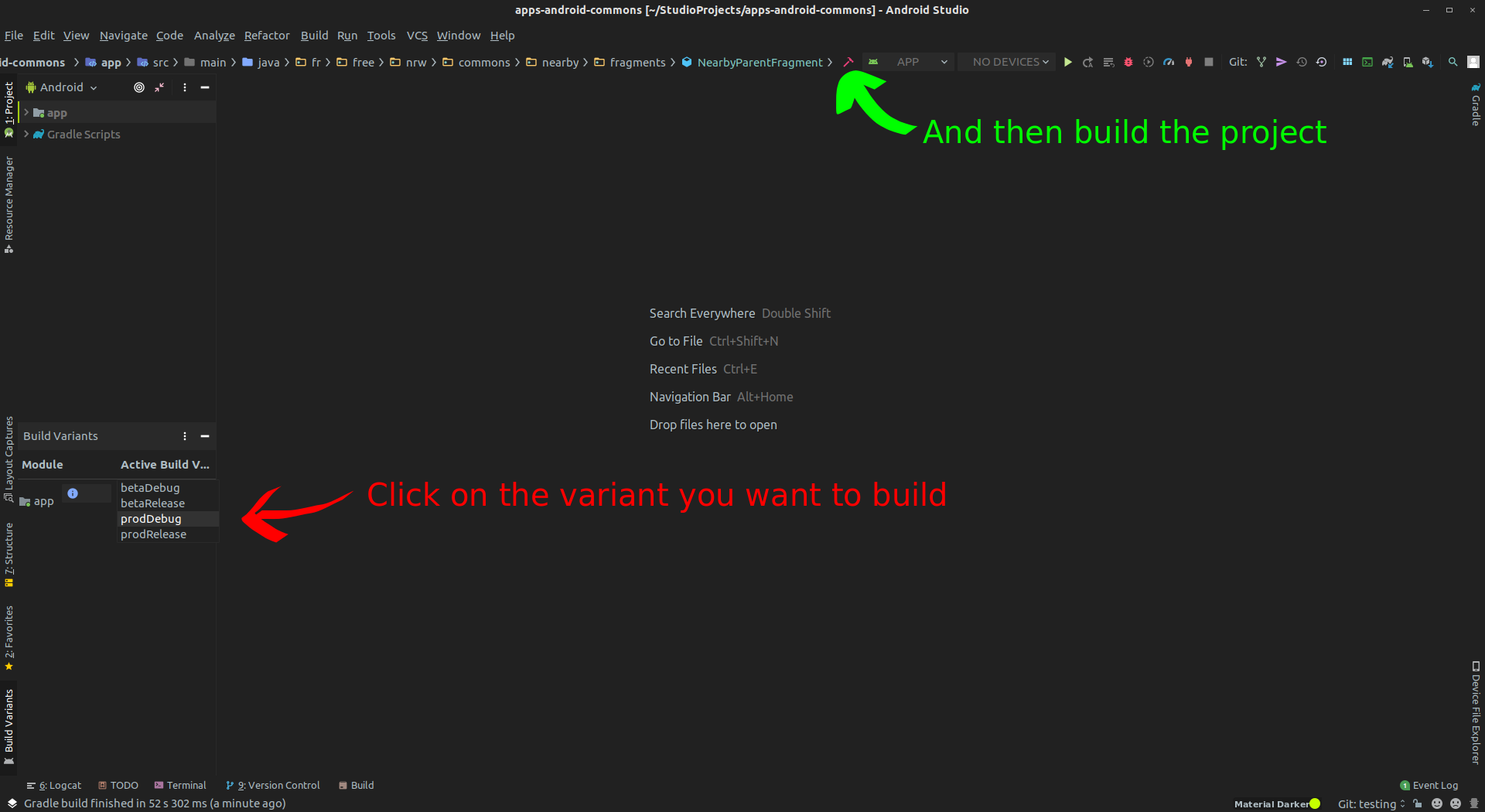
Glitch101
on 22 Feb 2020
One more thing. If you are going to use those images in the wiki then I should tell you that the Build Variant option in Build menu can sometimes(quite often, actually) be inaccessible in Android Studio as shown in the image below:
...
This usually happens after I have already accessed the option from the Build menu. It could be a bug in the android studio although I am not sure about that.
IMO, there are better chances that the menu item is disabled for a valid reason rather than due to a bug in Android Studio. One not-so-straightforward reason could be found in the following SO answer: https://stackoverflow.com/a/49287726/5614968
Another possibility is that a build might've been in progress in which case Android Studio seems to disable menu. This one actually makes sense to me as allowing to change the build variant when a build is in progress could be confusing as it might not be obvious which variant of the app was built.
Just wanted to mention this.
sivaraam
on 23 Feb 2020
IMO, there are better chances that the menu item is disabled for a valid reason rather than due to a bug in Android Studio. One not-so-straightforward reason could be found in the following SO answer: https://stackoverflow.com/a/49287726/5614968
That could be possible. Thanks, @sivaraam for the info.
Another possibility is that a build might've been in progress in which case Android Studio seems to disable menu
That did come to my mind before posting the comment but I checked it and the build variant option was still disabled when no build was in progress.
Glitch101
on 23 Feb 2020
Just wanted to mention that the issue with logging into the Commons beta server has now been fixed!
sivaraam
on 24 Feb 2020
Just wanted to mention that the issue with logging into the Commons beta server has now been fixed!
@sivaraam that's great!
TejaswiKarasani
on 24 Feb 2020
@sivraam I couldn't able to do so :/
TejaswiKarasani
on 24 Feb 2020
@TejaswiKarasani I am able to log-in to the _beta server_ using my _beta account_ via the _beta flavour of the app_. Anyways, we'll find the problem you're facing. Can you share the error message that you get when trying to log-in? A screenshot is fine too. If it says that your username and password is incorrect, it might be because you're trying to login to the beta server using the your production account. You need to create separate accounts for the beta and the production servers. You can sign up for a beta account in the following link:
https://commons.wikimedia.beta.wmflabs.org/w/index.php?title=Special:CreateAccount&returnto=Main+Page&campaign=loginCTA
If it's a different issue, we'll dig more to fix it 🙂
sivaraam
on 25 Feb 2020
@sivaraam it worked, previously I was used same email to register for production and beta and now I tried registering different email. Thanks again :')
TejaswiKarasani
on 25 Feb 2020
@sivaraam it worked,
Good thing it worked.
previously I was used same email to register for production and beta and now I tried registering different email.
IIUC, that shouldn't be an issue. Not sure why this was the case for you.
Thanks again :')
No problem 🙂
sivaraam
on 25 Feb 2020
previously I was used same email to register for production and beta and now I tried registering different email.
IIUC, that shouldn't be an issue. Not sure why this was the case for you.
I just checked and I have the same e-mail in both the production and beta accounts. So, I presume you have faced some other issue 🙂
sivaraam
on 25 Feb 2020
@sivaraam may be different usernames with same mail id?😅 Not sure if this might be the issue that we are searching for :p
TejaswiKarasani
on 25 Feb 2020
Not sure if this might be the issue that we are searching for :p
Yeah, I just wanted to clarify that using the same e-mail address for the production and beta accounts shouldn't be an issue.
sivaraam
on 25 Feb 2020
Would someone like to update our documentation with details about build variants?
You can raise a PR in this repo:
maskaravivek
on 4 Mar 2020
Would someone like to update our documentation with details about build variants?
You can raise a PR in this repo:
Sure. I would be happy to do it. :smiley:
Glitch101
on 5 Mar 2020
I would link to official docs as much as possible, they are less likely to get outdated than our docs
 macgills
on 5 Mar 2020
macgills
on 5 Mar 2020
Yes, I think we can also link the official docs in addition to our app specific instructions.
For a newcomer the official docs might be a bit daunting/confusing. The intent is to get any newcomer started with both beta/prod versions of the app quickly.
maskaravivek
on 5 Mar 2020
For a newcomer the official docs might be a bit daunting/confusing. The intent is to get any newcomer started with both beta/prod versions of the app quickly.
I agree. We can always share the official documentation link below our Wiki page of that topic. I will keep this in mind when I open a PR for this.
Glitch101
on 5 Mar 2020
Yes, I think we can also link the official docs in addition to our app specific instructions.
Yeah, linking to the docs is good.
In case it wasn't noticed, I just wanted to mention that I've linked to some related official docs in my comment about the build flavors. 🙂
sivaraam
on 5 Mar 2020
I believe this issue has served it's purpose now.
sivaraam
on 14 Mar 2020
Related issues
 misaochan
·
4Comments
misaochan
·
4Comments
 neslihanturan
·
3Comments
misaochan
·
3Comments
neslihanturan
·
3Comments
misaochan
·
3Comments
 domdomegg
·
3Comments
nicolas-raoul
·
4Comments
domdomegg
·
3Comments
nicolas-raoul
·
4Comments
Most helpful comment
Thanks, @sivaraam for the excellent explanation. It does clarify things.



Sharing the steps I used to switch build variants on Android Studio in case someone needs help.
Step 1: Go to Build on the toolbar.
Step 2: Click on Select Build Variant
Step 3: Select prodDebug from the list for prod flavor and build the app.
That's it. You are good to go. Run the app and you should be able to use the production servers.