Apps-android-commons: "Locate me" icon in Nearby doesn't prompt user to enable GPS
Summary:
The "Nearby" screen shows a toast when the location is disabled. This is fine. But when I tap on the "Locate me" button in the Nearby, I expect the app to prompt me to turn on GPS when location is disabled. But, as of now, nothing happens when I tap on the "Locate me" icon and location is disabled.
Steps to reproduce:
- Turn off "Location" of your device
- Open the app
- Go to "Nearby"
- Tap on the "Locate me" icon
I expect the app to prompt me to enable the location (GPS).
Device and Android version:
Samsung SM-J111F, Android 5.1.1
Commons app version:
2.12.3.572
 sivaraam
All 31 comments
Below is a summary of how the solution to this issue has been implemented.
Whenever the user presses the Locate Me button, we check if the location is null or not.
If the location is null, we check if the network location provider is enabled or not as Nearby can get the location without gps but not without network provider (once it acquires the location, then it will work fine with any location mode)
if (!locationManager.isNetworkProviderEnabled()) {
                showLocationOffDialog();
            }
If the network provider is enabled, we do nothing. If it's disabled, we prompt the user by calling this method which was added in NearbyParentFragment.java and it uses the already implemented templates in DialogUtil.java
private void showLocationOffDialog() {
        DialogUtil.showAlertDialog(getActivity(), "Turn on location?", "Nearby needs location enabled to work properly",
                "Yes", "No",  this::openLocationSettings, this::disableLocationOffDialog);
    }
The user is then taken to the location settings with a toast as shown in the image below:

 Glitch101
on 9 Feb 2020
Glitch101
on 9 Feb 2020
I'd like to help. Can I start working on this issue? I am starting to contribute to open source projects and this seems like a good first issue for me.
Glitch101
on 9 Feb 2020
Yes, go for it @Glitch101 :)
 misaochan
on 9 Feb 2020
misaochan
on 9 Feb 2020
Hey guys. I just need to discuss something with you all. Now that I can continue working on this issue after learning to use Prod flavor for testing, we have two approaches to solve this bug.
Approach 1: The toast :
In this approach, we can just show a simple toast to the user to let them know that location is turned off and needs to be enabled for nearby to work.
Example:

Approach 2: The dialog:
In this approach, we can show a dialog box to the user if the location is off just like in google maps and then, if the user presses Yes then open GPS settings and if the user presses No then minimize the dialog box. Of course, these buttons don't do anything yet and are for demonstration purposes only.
Example:

Which one to choose?
So, which one should I implement in the app? I thought that it might be better to ask you guys as this is a software design decision and should be made by the mentors. And in case the dialog approach is decided then I have one more thing to discuss regarding the dialog methods in the DialogUtil class.
Glitch101
on 21 Feb 2020
In my opinion option 2 is better. Let us wait to hear from others as well.
 maskaravivek
on 21 Feb 2020
maskaravivek
on 21 Feb 2020
The option 2 sound like the way to go to me too as that would be more helpful than just showing a simple toast.
One odd thing I noticed in the GIF for option 2 is that the "Yes" appears to the left and the "No" to the right. In Android, I suppose it's customary to have it the other way round. So, it would be nice to have them swapped.
sivaraam
on 22 Feb 2020
One odd thing I noticed in the GIF for option 2 is that the "Yes" appears to the left and the "No" to the right. In Android, I suppose it's customary to have it the other way round. So, it would be nice to have them swapped.
I forgot to mention that I've noticed some devices change the custom behaviour and show the positive action in the left and the negative in the right. If the GIF was taken in one of those devices, kindly ignore the quoted comment.
sivaraam
on 22 Feb 2020
I suppose it's customary to have it the other way round
Yes, that's true. Positive buttons should be on the right. Here are some examples-


One odd thing I noticed in the GIF for option 2 is that the "Yes" appears to the left and the "No" to the right. In Android, I suppose it's customary to have it the other way round. So, it would be nice to have them swapped.
This was because they have been programmed that way in the DialogUtils class. I didn't realize it before but after you pointed out, I noticed that the positiveButtonText has been set as "No" and the negativeButtonText has been set as "Yes".

Now, I don't know if this is for a reason or done by mistake but this is the reason the Yes and No appear swapped in the dialog in gif 2.
The same behaviour can be observed in the dialog box below which asks the user to enable Location permission for commons:
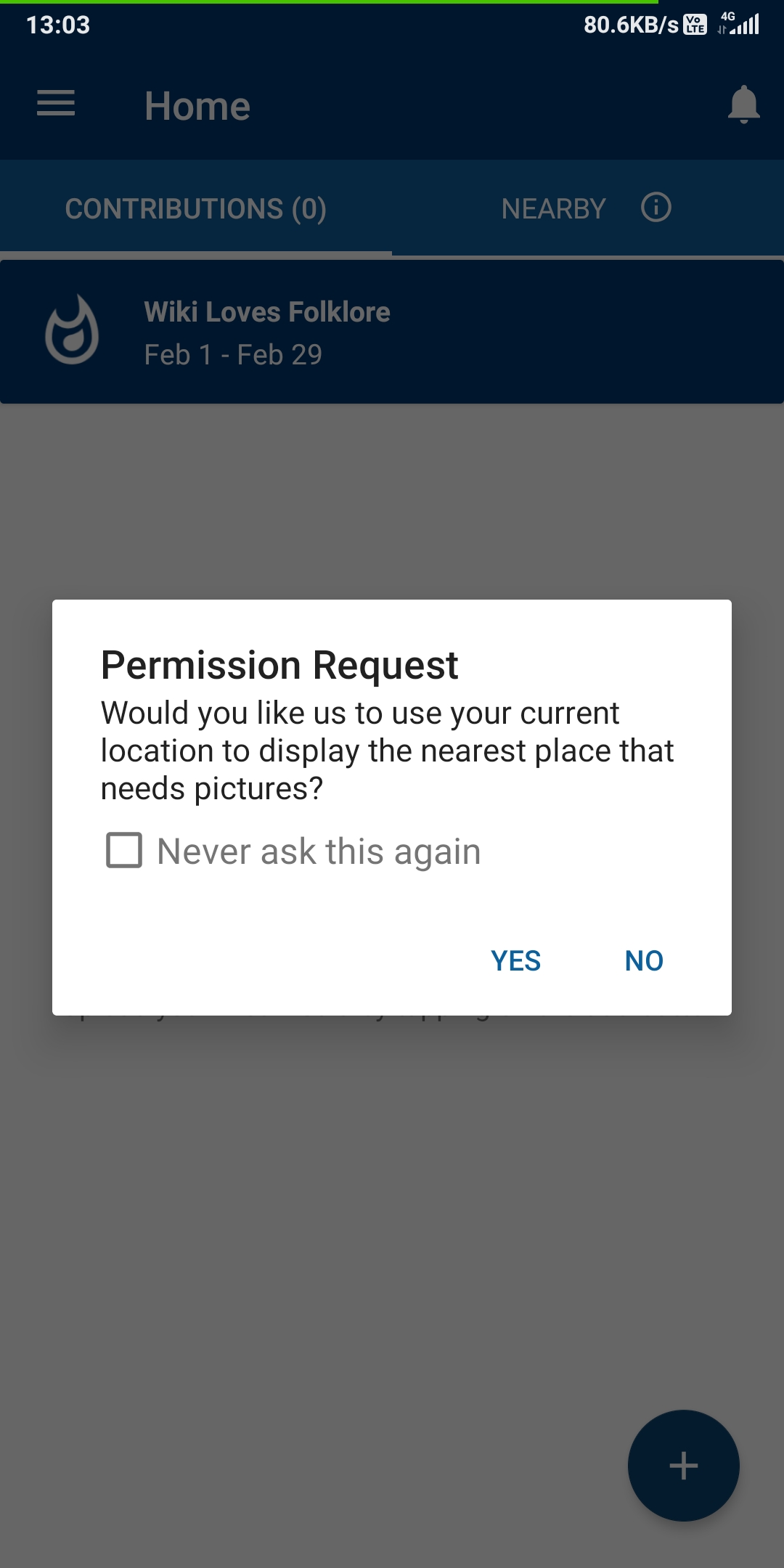
Here is the same dialog box from my gif 2 after I added another method to DialogUtil class that has only one Runnable for Positive button(Set to yes) and the negative button does nothing except close the dialog, so no need of a Runnable for Negative button:

Glitch101
on 22 Feb 2020
The tl;dr version of the previous comment is: The positive and negative buttons have been set as opposed to the Android design conventions in the DialogUtils class and should be swapped to follow common Android conventions as pointed out by @sivaraam.
I think a new issue should be created for this? @maskaravivek What do you think?
Glitch101
on 22 Feb 2020
So, should we go with a Toast or a Dialog? @maskaravivek
Also, I wanted to ask why the positive and negative button's text has been set as opposite in the DialogUtils class?
Glitch101
on 23 Feb 2020
The tl;dr version of the previous comment is: The positive and negative buttons have been set as opposed to the Android design conventions in the DialogUtils class and should be swapped to follow common Android conventions as pointed out by @sivaraam.
I think a new issue should be created for this? @maskaravivek What do you think?
Yes please create a new issue for it. :)
So, should we go with a Toast or a Dialog? @maskaravivek
Lets go with a permission dialog if the location is not enabled. Check PermissionUtils.
Also, I wanted to ask why the positive and negative button's text has been set as opposite in the DialogUtils class?
Lets discuss it on a separate issue thread. :)
maskaravivek
on 23 Feb 2020
Yes please create a new issue for it. :)
Done :)
Lets go with a permission dialog if the location is not enabled. Check PermissionUtils.
But when the permission is disabled and the user taps on the Nearby tab, the app prompts them to enable permission. They can't use the Locate Me icon if the location permission is not enabled.

We only need to check if the location is on or off and then prompt the user accordingly.
Glitch101
on 23 Feb 2020
The way I have been programming the app is this:
1: When the user presses the ReCenter button - > Check if the location is on or off.
2: If on, do nothing.
3: If off, prompt the user a dialog with a Yes and No buttons using the DialogUtils class.
4: Presses Yes - > Open location settings with a toast that says "Please set location mode to High Accuracy"

5: Presses No - > Don't show the dialog box again until and unless the user enables/disables the GPS or if the app is minimized/closed and if the Nearby activity is paused. This was necessary as showing the dialog again and again can be annoying.

As always, any suggestions are always welcome @sivaraam @maskaravivek
Glitch101
on 23 Feb 2020
Okay thats sounds good. I confused it with something else so i was suggesting about permission utils. I assume that location permissions are already given to the app. After the location is turned on, we should also check if location permission is provided or not. If not we should invoke location permission dialog.
maskaravivek
on 23 Feb 2020
4: Presses Yes - > Open location settings with a toast that says "Please set location mode to High Accuracy"
Just wondering, wouldn't it be possible to turn on the location automatically like the way Google maps does it? It would be a more pleasant experience.
5: Presses No - > Don't show the dialog box again until and unless the user enables/disables the GPS or if the app is minimized/closed and if the Nearby activity is paused. This was necessary as showing the dialog again and again can be annoying.
IMO, as we show the dialog only when the user taps on the "Locate me" icon I don't think it would be annoying to show the dialog whenever the user taps on it. Actually, I believe it would be the other way round. When a user taps on the "Locate me" icon and the dialog doesn't appear when the location is turned off, it would be confusing. So, it would be better to show the dialog whenever the user taps on the "Locate me" icon and the location is turned off.
sivaraam
on 24 Feb 2020
Just wondering, wouldn't it be possible to turn on the location automatically like the way Google maps does it? It would be a more pleasant experience.
Completely agree on that one. But, there is a catch.
I also wanted to do it that way but implementing that would involve importing Google Play Service API into the project and since they haven't been used before in the project, I think it would be better to make a solution using the already defined classes of the project.
You can check this SO Q&A for reference https://stackoverflow.com/questions/33251373/turn-on-location-services-without-navigating-to-settings-page
Glitch101
on 24 Feb 2020
IMO, as we show the dialog only when the user taps on the "Locate me" icon I don't think it would be annoying to show the dialog whenever the user taps on it. Actually, I believe it would be the other way round.
Sometimes, the user might not need location-enabled since the last location might be already acquired using Wifi and cell towers and in that case, it will only distract them when they press the Re Center button again. If it helps convey my point, the same behavior can be found in Google Maps.
Note that by location I mean GPS.
When a user taps on the "Locate me" icon and the dialog doesn't appear when the location is turned off, it would be confusing
Well, we could add a count or something. I mean, let's show the user the dialog 3 times and on the 3rd time they press on NO, the dialog won't appear again until the location is turned on/off or if the app is minimized.
Glitch101
on 24 Feb 2020
Just wondering, wouldn't it be possible to turn on the location automatically like the way Google maps does it? It would be a more pleasant experience.
Completely agree on that one. But, there is a catch.
I also wanted to do it that way but implementing that would involve importing Google Play Service API into the project and since they haven't been used before in the project, I think it would be better to make a solution using the already defined classes of the project.
You can check this SO Q&A for reference stackoverflow.com/questions/33251373/turn-on-location-services-without-navigating-to-settings-page
Thanks for the info. Its fine if you would like to implement this without the Play Service API dependency. It would indeed be better to do that change after discussing in a separate issue about whether the dependency is worth introducing.
sivaraam
on 24 Feb 2020
Note that by location I mean GPS.
Ah! So, all this while you were explaining the behaviour of dialog when the GPS is turned off but the location is not. Is that correct? If yes, then it clears some confusion as I've been thinking it would be the behaviour when the location is completely turned off. I think then we need to discuss both the flows:
- Location turned off
- Location on; GPS off
Note: When I refer to "Location", I refer to the "Location" setting in general 🙂
If it helps convey my point, the same behavior can be found in Google Maps.
Just wanted to note this. When I have location on but GPS off tapping on the "Locate me" marker doesn't prompt me at all. It just takes me to the location it has identified using the means other than GPS. FYI, I use Maps version 10.35.2 on an Android 5.1.1 device. I'm not sure why the behaviour is different for you. May be its related to the Android version.
sivaraam
on 24 Feb 2020
Now I am confused too. Let's get this straight together.
Assumption 1: A device has three location modes.
The lowest mode is: Device only which uses GPS
The middle mode is: Battery Saving which uses Wifi, Bluetooth, cell towers
The highest mode is: High accuracy which uses all available sources.
Assumption 2:
When you click on GPS icon from your notification panel to disable the GPS, it drops the level from High accuracy to Battery Saving. This is how it is on my device and it would be helpful if you can verify this.
Side Notes:
On my device, if the location is not set to High Accuracy but it is on Battery Saving or GPS only, Google Maps doesn't prompt me too to turn on location. It only prompts if the location is set to off ie all mode off in which case apps cannot access the location.
Glitch101
on 24 Feb 2020
And I programmed the dialog box to appear in case when the App cannot access the GPS. So, the dialog will prompt the user if the location is on Battery Saver mode in which case it can only access Wifi, Bluetooth, and cell towers but not GPS.
No dialog box will appear if the location is on Mode 1 or Mode 3 ie GPS only or High Accuracy.
Glitch101
on 24 Feb 2020
Note: When I refer to "Location", I refer to the "Location" setting in general
Do note that in my previous two comments, by "Location" I also mean the exact meaning you wrote in the tagged line above:point_up:
Glitch101
on 24 Feb 2020
Let's get this straight together.
Sure.
Assumption 1: A device has three location modes.
Interesting. My device has those modes too but they're not named like that.

Regardless, I think we could use those names for discussion as they seem pretty standard in devices running newer Android versions.
When you click on GPS icon from your notification panel to disable the GPS, it drops the level from High accuracy to Battery Saving. This is how it is on my device and it would be helpful if you can verify this.
I actually don't have the option to turn the GPS alone on/off in my notification panel. I only have the option to turn the "Location" setting on/off.
It only prompts if the location is set to off ie all mode off in which case apps cannot access the location.
Just for confirmation, in this case it prompts you whenever you tap on the "Locate me" button until you hit "Yes", doesn't it?
And I programmed the dialog box to appear in case when the App cannot access the GPS. So, the dialog will prompt the user if the location is on Battery Saver mode in which case it can only access Wifi, Bluetooth, and cell towers but not GPS.
No dialog box will appear if the location is on Mode 1 or Mode 3 ie GPS only or High Accuracy.
What happens when the location is completely turned-off?
Also, I'm not sure how you've achieved this but I wanted to share with you a Android developer page which is particularly about prompting the user to change location settings. Here's the link:
https://developer.android.com/training/location/change-location-settings#prompt
Also, came across an Android training page for building location aware apps which might be useful: https://developer.android.com/training/location
sivaraam
on 25 Feb 2020
Just for confirmation, in this case it prompts you whenever you tap on the "Locate me" button until you hit "Yes", doesn't it?
Yes
What happens when the location is completely turned-off?
In that case, when the user opens Nearby tab they will get a toast saying "Nearby might not work properly. Location not available". This behaviour was already in the App before I started hacking on it.
Now comes the part that I added:
So, the user will stay at the default location i.e Tower of London because in this case the Latitude and Longitude are NULL. Now, if they click on Re Center button, it will show the Dialog and if they press YES, it will take them to location setttings with a toast saying "Please set the location mode to High Accuracy".
But, if they press NO, then in this case, I programmed it in the way that if location is NULL which it is in this situation, the dialog box will never go away on pressing on NO. It will pop up each time they press Re Center until they turn the location on.
Glitch101
on 25 Feb 2020
Also, I'm not sure how you've achieved this
Well, you can take a look at my fork https://github.com/Glitch101/apps-android-commons/tree/add_location_off_dialog_in_nearby
I have only made changes to three files. NearbyParentFragment, LocationManager which has a GPS state listener already impemented in it and it changes a boolean variable in NearbyParentFragment called shwoDialogAgain to true/false based on the conditions and strings.xml for storing the Toast.
I wanted to share with you a Android developer page which is particularly about prompting the user to change location settings. Here's the link:
https://developer.android.com/training/location/change-location-settings#prompt
Also, came across an Android training page for building location aware apps which might be useful: https://developer.android.com/training/location
Thank you very much. I will see if I can find something useful in there. :)
Glitch101
on 25 Feb 2020
https://developer.android.com/training/location/change-location-settings#prompt
Actually, I have read this page before and it is using the Play Services API like we discussed before.

Also, came across an Android training page for building location aware apps which might be useful: https://developer.android.com/training/location
I haven't gone through this one before. So, let's see if it contains some gold.
Glitch101
on 25 Feb 2020
What happens when the location is completely turned-off?
In that case, when the user opens Nearby tab they will get a toast saying "Nearby might not work properly. Location not available". This behaviour was already in the App before I started hacking on it.
Now comes the part that I added:
So, the user will stay at the default location i.e Tower of London because in this case the Latitude and Longitude are NULL. Now, if they click on Re Center button, it will show the Dialog and if they press YES, it will take them to location setttings with a toast saying "Please set the location mode to High Accuracy".
But, if they press NO, then in this case, I programmed it in the way that if location is NULL which it is in this situation, the dialog box will never go away on pressing on NO. It will pop up each time they press Re Center until they turn the location on.
I'm not sure why you're special casing the behaviour when the latitude/longitude is null. In what case is it null?
Well, you can take a look at my fork Glitch101/apps-android-commons@
add_location_off_dialog_in_nearby
I have only made changes to three files. NearbyParentFragment, LocationManager which has a GPS state listener already impemented in it and it changes a boolean variable in NearbyParentFragment called shwoDialogAgain to true/false based on the conditions and strings.xml for storing the Toast.
I have some comments to share regarding the code but I'll save them for the PR review. Speaking of PRs, I suppose we're discussing a lot of implementation related things here which should better be in the PR, IMO. If you're fine with it, please open a PR and we can continue the discussion there. 🙂
sivaraam
on 25 Feb 2020
@Glitch101 Can you update the opening comment of this issue to summarise the final proposed approach so that its easier for everyone to follow.
If the approach looks good to everyone you can go ahead and work on the issue.
maskaravivek
on 25 Feb 2020
@Glitch101 Can you update the opening comment of this issue to summarise the final proposed approach so that its easier for everyone to follow.
If the approach looks good to everyone you can go ahead and work on the issue.
Sure. I will do that!
Glitch101
on 25 Feb 2020
I'm not sure why you're special casing the behaviour when the latitude/longitude is
null. In what case is itnull?
Nearby needs both GPS and cell towers to work properly(High accuracy mode) and if you will open the app when the location is set to *Device only * i.e only GPS, nearby won't work and will stay at the Tower of London as the Latitude and Longitude are NULL(found this using the logs) in this case. This is the case I am referring the location as null.
I have some comments to share regarding the code but I'll save them for the PR review. Speaking of PRs, I suppose we're discussing a lot of implementation related things here which should better be in the PR, IMO. If you're fine with it, please open a PR and we can continue the discussion there. slightly_smiling_face
Now let's continue our discussion over the PR which I will send tomorrow :)
Glitch101
on 25 Feb 2020
@Glitch101 Can you update the opening comment of this issue to summarise the final proposed approach so that its easier for everyone to follow.
If the approach looks good to everyone you can go ahead and work on the issue.
Hey, @maskaravivek! I updated the opening comment on this issue. Could you please take a look at it whenever you are free and let me know if it's explanatory enough or do I need to improve it further :smiley:
Glitch101
on 25 Feb 2020
Related issues
 neslihanturan
·
3Comments
neslihanturan
·
3Comments
 nicolas-raoul
·
4Comments
nicolas-raoul
·
4Comments
 madhurgupta10
·
4Comments
madhurgupta10
·
4Comments
 psh
·
4Comments
psh
·
3Comments
psh
·
4Comments
psh
·
3Comments
Most helpful comment
In my opinion option 2 is better. Let us wait to hear from others as well.