Apps-android-commons: Retry of failed upload uploaded image again
Summary:
I started an upload of an image and put my phone in the pocket. Next time I open it I have a notification that it failed. In the list on the main view of the app I pressed the retry icon in the lower right corner of the image. The image starts the upload again and it seems to succeed. When I later look at my contributions I noticed that the image actually did succeed the first time and it then uploaded the same image again:
- https://commons.wikimedia.org/wiki/File:Timorstraat.jpg
- https://commons.wikimedia.org/wiki/File:Timorstraat_2.jpg
In the app it looks like only the second one has been uploaded.
Steps to reproduce:
I don't know how to reproduce.
Device and Android version:
What make and model device (e.g., Samsung J7) did you encounter this on?
Samsung Galaxy S7 Edge
What Android version (e.g., Android 4.0 Ice Cream Sandwich or Android 6.0 Marshmallow) are you running?
Android version 8.0.0
Samsung Experience version 9.0
Is it the stock version from the manufacturer or a custom ROM ?
The stock version.
Commons app version:
2.11.0~93b948d20
Would you like to work on the issue?
No.
 Ainali
All 23 comments
Thanks for figuring out this bug @Ainali. This must have been one of those cases when the image does get uploaded but one of the other steps fail.
 ashishkumar468
on 24 Nov 2019
ashishkumar468
on 24 Nov 2019
Any newcomer willing to take this? :-)
Tip: To make an upload fail, switch Android to airplane mode just after the upload starts.
 nicolas-raoul
on 25 Nov 2019
nicolas-raoul
on 25 Nov 2019
Hi, can I work on this??
 FernandaCG
on 29 Nov 2019
FernandaCG
on 29 Nov 2019
It is yours @FernandaCG :) This can be a relatively complicated task, so please communicate with us about the steps you have done so that we can share ideas.
 neslihanturan
on 29 Nov 2019
neslihanturan
on 29 Nov 2019
Hi @neslihanturan, I have been debugging the app, and I think that in the method retryUpload in ContributionViewHolder we could validate if the file already exists, but idk which attribute of the contribution could I use. Can you give me some feedback?
FernandaCG
on 13 Dec 2019
Hi guys, can I work in this issue?
 gouri-panda
on 28 Dec 2019
gouri-panda
on 28 Dec 2019
@FernandaCG Are you still working on this?
About this
I have been debugging the app, and I think that in the method retryUpload in ContributionViewHolder we could validate if the file already exists
You can check that using the title, the titles are supposed to be uniques, in fact, there is an existing method that lets you know if the file exists or not.
ashishkumar468
on 28 Jan 2020
Hi! @gouri-panda you can take the issue :D
FernandaCG
on 28 Jan 2020
Thanks @FernandaCG
gouri-panda
on 28 Jan 2020
Any newcomer willing to take this? :-)
Tip: To make an upload fail, switch Android to airplane mode just after the upload starts.
@nicolas-raoul I can't reproduce this issue. I tried several times but it doesn't reproduce. Can you help me?
gouri-panda
on 29 Jan 2020
I am having a similar issue. However, I didn't have an uploading error message and it looks like only one copy of my image uploads commons.wikimedia.org the app showing two.
Summary:
After uploading photos, I see duplicate images in the app's "contributions" screen.
Steps to reproduce:
- Upload an image to Wikimedia Commons using this Android App.
- Look though your photos in the "contribution" for duplicate images (they may not be adjacent to each other in the image feed).
- View your account's "uploads" on https://commons.wikimedia.org and look for any duplicate images.
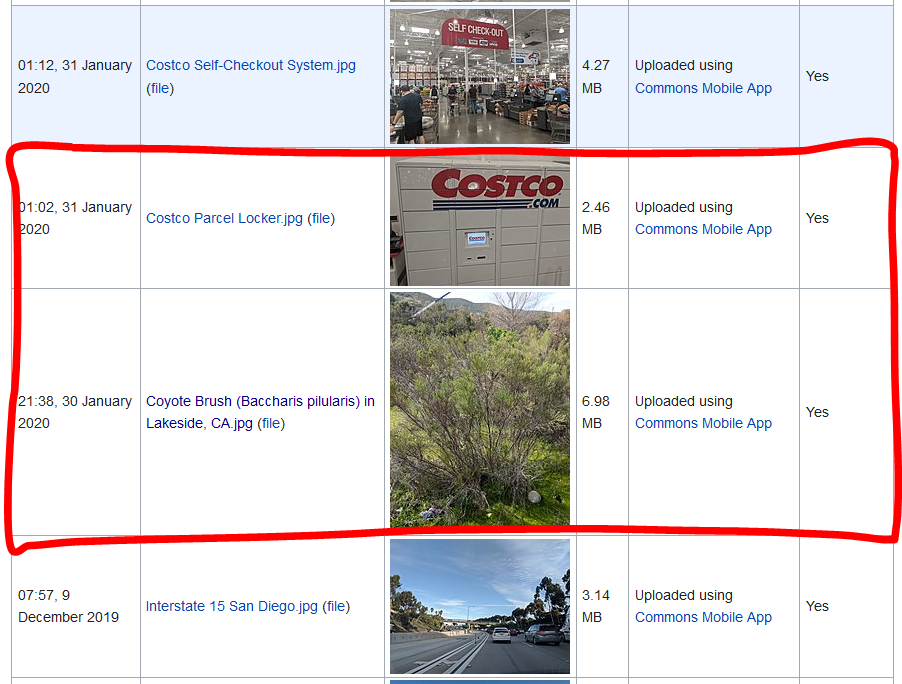
I see duplicate images on the app but the website shows that the photo uploaded correctly (no duplicates).
System logs:
Logs exported from the app: https://privatebin.net/?6ccdcedda9153900#7YwYwPohymf1LZ6iBuUf8jBQBbj9hDzUjiZcwGvejr4i
Device and Android version:
API level: 29
Android version: 10
Device manufacturer: Google
Device model: Pixel 2
Device: walleye
Network type: wifi
App version name: 2.12.3~dc08a5e88
User name: Mds08011
Commons app version:
App version name: 2.12.3~dc08a5e88
I am currently using the Beta version but this issue occurred on the regular/stable version as well.
Screen-shots:
Duplicate photo in app:
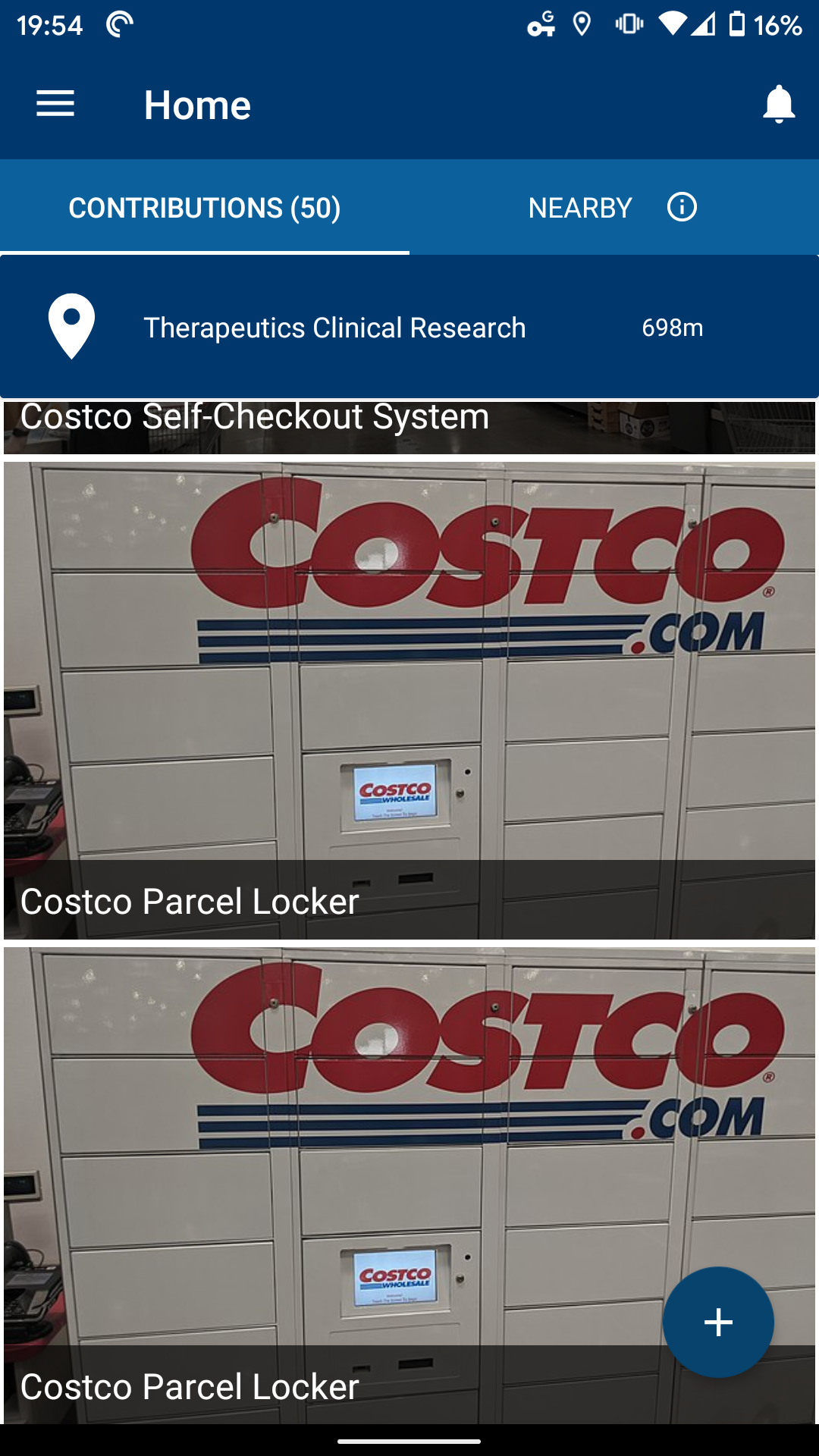
Duplicate photo in app:
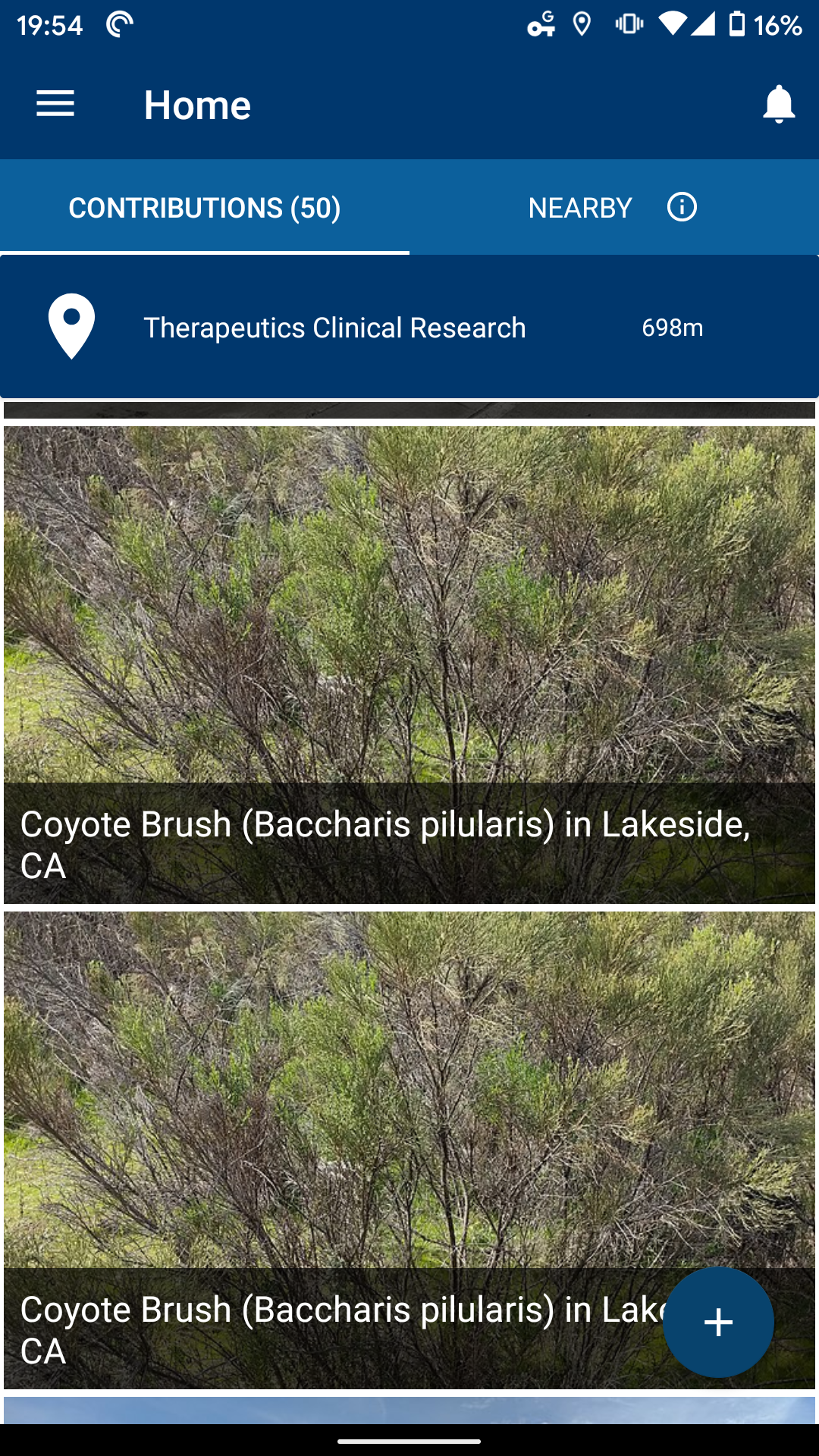
"Uplaods" on website showing only single images:
Would you like to work on the issue?
No. I don't have the technical knowledge to address this.
 mds08011
on 3 Feb 2020
mds08011
on 3 Feb 2020
@Ainali Do you mean all failed uploads show correctly after you retry them? Have many times did you perform the steps? Thanks :-)
nicolas-raoul
on 4 Feb 2020
I think this issue is similar to what I have reproduced. The upload failed, an attempt to upload again failed even after the progress was complete. I restarted the app and noticed the image was uploaded yet it also showed the failed upload. I experienced this on 2 occasions...

 isnirp
on 4 Apr 2020
isnirp
on 4 Apr 2020
Can I take this one on, please?
 michaelnares
on 11 Jul 2020
michaelnares
on 11 Jul 2020
@michaelnares As a first step, can you try to reproduce this issue and list down the steps here.
 maskaravivek
on 11 Jul 2020
maskaravivek
on 11 Jul 2020
@michaelnares As a first step, can you try to reproduce this issue and list down the steps here.
@maskaravivek I get https://stackoverflow.com/questions/38618885/error-rpc-failed-curl-transfer-closed-with-outstanding-read-data-remaining. I have success after git clone https://github.com/commons-app/apps-android-commons.git --depth 1
and cd apps-android-commons/, but the same error after git fetch --unshallow. Is there any issue with working on the repository without doing git fetch --unshallow, please?
michaelnares
on 12 Jul 2020
Has anyone been able to reproduce this issue on the latest commits?
ashishkumar468
on 14 Aug 2020
@ashishkumar468 I am having so many failed upload with recent versions, but retry always works perfectly. I guess this can be closed if nobody manages to reproduce with the latest version.
nicolas-raoul
on 14 Aug 2020
Hi @nicolas-raoul Should we create a new issue for that, as this issue is related to retries?
ashishkumar468
on 17 Aug 2020
There is already an issue about the failures. My comment above was only saying that retry works :-)
nicolas-raoul
on 17 Aug 2020
@nicolas-raoul Ohh, okay, so we can close this issue right?
ashishkumar468
on 17 Aug 2020
I think it is OK to close it, yes.
nicolas-raoul
on 17 Aug 2020
For reference, the issue regarding failed uploads is #3247 .
 misaochan
on 17 Aug 2020
misaochan
on 17 Aug 2020
Related issues
 4D17Y4
·
3Comments
maskaravivek
·
3Comments
4D17Y4
·
3Comments
maskaravivek
·
3Comments
 psh
·
3Comments
misaochan
·
4Comments
psh
·
3Comments
misaochan
·
4Comments
 Saral-code
·
3Comments
Saral-code
·
3Comments