Apps-android-commons: Nearby: Select picture from item's Wikipedia articles
The wikipedia articles for nearby items sometimes already have images. It would be nice if there was an easy way to add this image to the wikidata item from the app.
 bennofs
All 7 comments
It is exactly what I thought when I first started adding images! ("_Why walk 10 kilometers while a picture is actually already available on Commons?_")
Here are strategies we can take to improve that:
Strategy A
I have great news for you: Yes, there is an easy way to add this image to the wikidata item, it is called WDFIST. It is designed for desktop, but it works correctly on mobile too (I just tried).
The second section at https://meta.wikimedia.org/wiki/WDFIST describes how to launch it around a particular latitude/longitude with a given radius. Example in Beijing with a 1km radius.
We could just link to that URL, with a fixed radius of 5km.
Merits: Easy to implement and maintain. Convenient to quickly process all items in the region, for instance before starting to actually walk around.
Strategy B
After the app runs the SPARQL query to get the nearby items, it would start a WDFIST query (or a SPARQL query with the same result)
It would take a lot of time to implement, especially if we implement "Block image" and "Block these files for this item".
Merits: Visible on the map.
Conclusion
I strongly suggest starting with strategy A, and improving it if it proves popular.
 nicolas-raoul
on 10 Jun 2019
nicolas-raoul
on 10 Jun 2019
On the other hand, we've started as an app for uploading pictures to Wikimedia Commons and this stuff seems to be already quite distant from the original purpose. Don't get me wrong - I do think that synchronization between Wikipedia and Wikidata is important - but I think there are better tools for that such as HarvestTemplates or WDFist.
 VojtechDostal
on 18 Jun 2019
VojtechDostal
on 18 Jun 2019
@VojtechDostal True. Would "Strategy A" above be OK? (just a link to WDFIST centered on the right location)
nicolas-raoul
on 18 Jun 2019
@nicolas-raoul Yes that would be acceptable although if I understand WDFIST, it only makes sense to display the link in a minority of cases (items which have Wikipedia sitelink which is not ceb or sv - which are mostly bot-created Wikipedias). In these cases the button would needlessly take up precious space, is that right?
VojtechDostal
on 18 Jun 2019
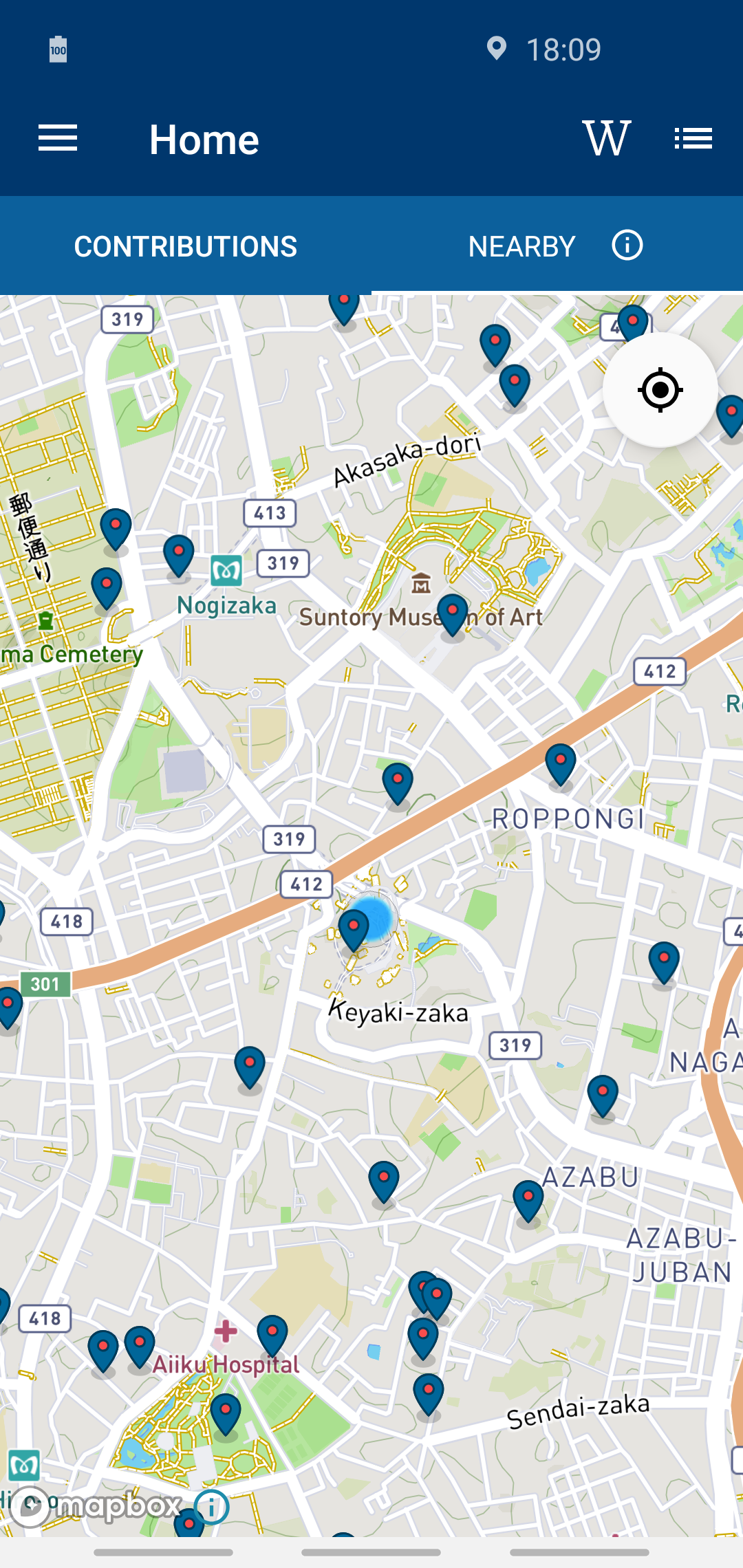
I believe such a W button would not take up precious space:
It would open a page such as this one with the default WDFIST settings. I am a heavy WDFIST user and I have always found the default settings to be sensible.
nicolas-raoul
on 18 Jun 2019
I agree with this one. All of the places around me that supposedly need a picture actually already have one on Wikimedia Commons and it's used in the relevant Wikipedia article. So, I think this should be implemented somehow. Existing pictures should be correctly linked to their article's Wikidata entry, and new ones could be uploaded as well.
 j9d3it
on 28 Jan 2020
j9d3it
on 28 Jan 2020
Warning: Most images displayed in Wikipedia articles are not good illustrations for their topic. That's because a lot of images are miniatures at the bottom, or show related things. For instance an article about a 12th century castle might only have a picture of the 18th century castle that was built after the original castle was destroyed. Or it could be the subject's mother, or a portrait _painted by_ them. I do a lot of WDFIST and these cases happen very often, so we have to be extra careful and make sure users have all of the information needed to decide. Even with WDFIST it is often not easy to decide, each image needs to be researched in detail, which might be difficult to do on mobile. Example in WDFIST:

We should also reuse WDFIST's list of false positives (images that are embedded in many different articles, for instance in infoboxes or bottom templates, and thus are not good illustrations for the article they are in).
nicolas-raoul
on 21 Mar 2020
Related issues
 whym
·
3Comments
whym
·
3Comments
 misaochan
·
3Comments
misaochan
·
4Comments
misaochan
·
4Comments
misaochan
·
3Comments
misaochan
·
4Comments
misaochan
·
4Comments
 Saral-code
·
3Comments
Saral-code
·
3Comments
Most helpful comment
It is exactly what I thought when I first started adding images! ("_Why walk 10 kilometers while a picture is actually already available on Commons?_")
Here are strategies we can take to improve that:
Strategy A
I have great news for you: Yes, there is an easy way to add this image to the wikidata item, it is called WDFIST. It is designed for desktop, but it works correctly on mobile too (I just tried).
The second section at https://meta.wikimedia.org/wiki/WDFIST describes how to launch it around a particular latitude/longitude with a given radius. Example in Beijing with a 1km radius.
We could just link to that URL, with a fixed radius of 5km.
Merits: Easy to implement and maintain. Convenient to quickly process all items in the region, for instance before starting to actually walk around.
Strategy B
After the app runs the SPARQL query to get the nearby items, it would start a WDFIST query (or a SPARQL query with the same result)
It would take a lot of time to implement, especially if we implement "Block image" and "Block these files for this item".
Merits: Visible on the map.
Conclusion
I strongly suggest starting with strategy A, and improving it if it proves popular.