Apps-android-commons: Description field uses outdated code iw for Hebrew
Summary:
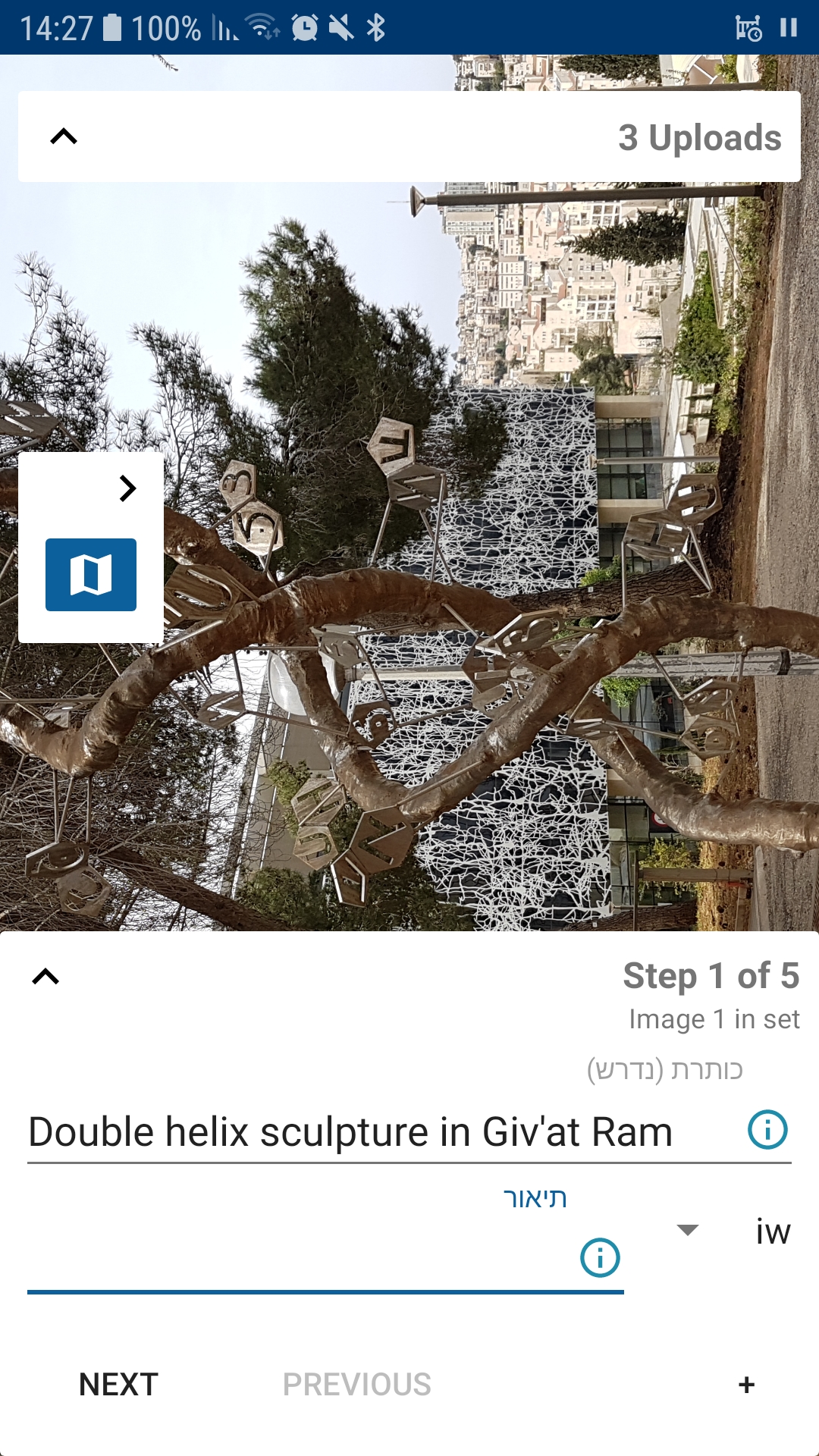
When uploading a file, in the file name and description form the Hebrew language is identified by the code "iw".
This is a deprecated code. The current ISO 639-1 code is "he". Despite being deprecated, the code "iw" is often used internally in Google products and Java libraries, but it must never be shown to users. It must always be aliased internally to "he". End users must only see the code "he". It would be even better to show the name of the language: "עברית" or perhaps "Hebrew".
While you are at it, you should also check how Indonesian and Yiddish are displayed. They also have deprecated codes: "in" and "ji". The current codes are "id" and "yi".
 amire80
All 14 comments
Thanks for the tip!
 nicolas-raoul
on 15 Apr 2019
nicolas-raoul
on 15 Apr 2019
Are we currently using ISO codes? Should we move to ISO 3?
 maskaravivek
on 16 Apr 2019
maskaravivek
on 16 Apr 2019
Internally, you should definitely use the same codes that are used on Commons.
You should use "iw", "in", and "ji", only when it is required by Android software libraries. On this screen you _probably_ don't need to use them at all, but I don't know enough about Android to be certain.
To users you should ideally show the language name and not the language code.
amire80
on 17 Apr 2019
Hello, I'm looking to make my first contribution in an Open Source project. Can I take this issue?
 CAVillalobos
on 23 Apr 2019
CAVillalobos
on 23 Apr 2019
@CAVillalobos Yes sure, it is yours! Please let us know about your progress every few days or so, thanks :-)
nicolas-raoul
on 23 Apr 2019
Hello and sorry for the delay. I've reading the code looking where the language list is obtained and I found this line. I was not sure, but after consulting it it seems that the app gets the codes from all the languages currently installed, which means that Java or Android themselves are managing the codes wrong.
So, I think the only thing I can do is just hide the codes from the user as @amire80 stated before, but I don't think it's a good idea to try to change the actual codes.
So now I'm going to start working on that.
CAVillalobos
on 24 Apr 2019
Hello again. I've modified the language spinner's TextView to only show each language by name completely hiding the codes to the user. Is this what you asked for?
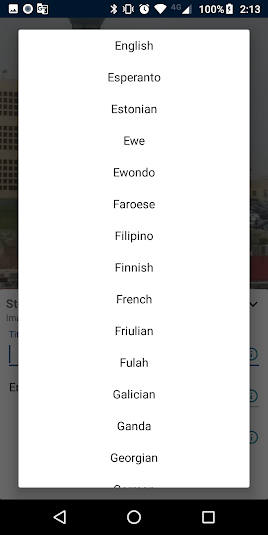
The only problem I'm seeing now is that the spinner's size has increased more than it should have.
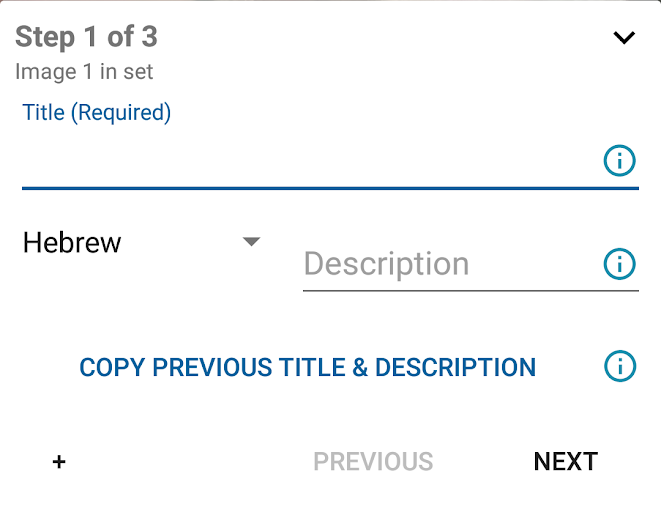
This doesn't seem too bad since the size keeps almost the same for most languages, but there are a few that may occupy more space that they should:

I think we can go with one of these options:
- Go back and set the TextView to show the codes again hardcoding the ones that are wrong.
- Impose a character limit and replace those who exceed this limit with something else (similar to ellipsis in css)
- Show the spinner and the description text-area in different lines
CAVillalobos
on 24 Apr 2019
Hi @CAVillalobos , firstly congratz for your first time contribution:) I think what we wanted for this issue is mapping deprecated language codes with new ones, and using new ones instead. I think using the whole language name is not efficient in terms of space.
I don't have much knowledge about this formats but, found such thing: https://gist.github.com/SeanZoR/9152167 and seems like can be beneficial for us too. What do you say?
 neslihanturan
on 25 Apr 2019
neslihanturan
on 25 Apr 2019
A couple of things:
- Whatever you show on the screen, make sure that you send a valid code when you save the template. Commons templates use "he", not "iw".
- Being efficient in terms of space shouldn't be the only consideration. Being convenient to the user is important, too. For people it is more natural to read a name and not a code of two or three letters. "Standard Moroccan Tamazight" is an outlier. Most languages have a much shorter name.
amire80
on 25 Apr 2019
Thanks @amire80
- Whatever you show on the screen, make sure that you send a valid code when you save the template. Commons templates use "he", not "iw".
So we need to map deprecated version to up to date version in any case.
- Being efficient in terms of space shouldn't be the only consideration. Being convenient to the user is important, too. For people it is more natural to read a name and not a code of two or three letters. "Standard Moroccan Tamazight" is an outlier. Most languages have a much shorter name.
I think displaying whole language name and the up to date language code between parentheses on language selection list, and displaying only the language code after selection would be enough for convenience. Since the user already saw the code next to the language during selection, they will know what it means.
But I would like to hear from others too.
neslihanturan
on 25 Apr 2019
Hello everyone!
I also detected this issue and wanted to join to conversation.
For the point 1.
My understanding is that internally the code uses "iw" for the Hebrew language, and makes sense because it's based in the OS. We can just detect that "iw" in the dropdown and replace it with "he".
Since it's just a replacement in the UI, but internally stills uses "iw", the rest of the code shouldn't fail.
For the point 2
As a final user, I think the best for usability is to see the full name while the dropdown is open (making it easier to identify and select the desired language) and, once selected, just see the code (in this case "he")
I hope this helps with the discussion 😄
 fhernandezn
on 25 Apr 2019
fhernandezn
on 25 Apr 2019
Hello again. Looking at your comments I decided to go for what I previously suggested as the first option to solve the problem so I changed the codes in the UI to show the correct codes while keeping the deprecated ones in the background basing in the gist that @neslihanturan shared before.
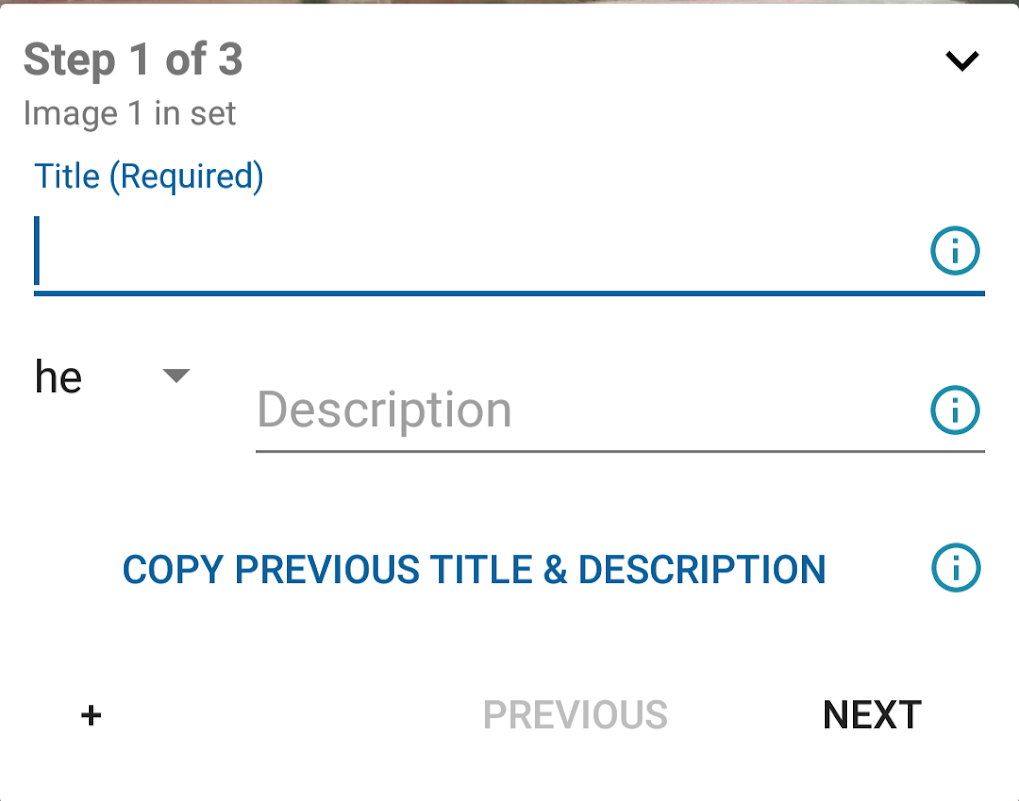
EDIT: Apparently my phone was rendering the language names in lowercase but now it's displaying them always capitalized so I'm removing the last part of this comment.
CAVillalobos
on 25 Apr 2019
Hi @CAVillalobos seems like we defined our scope after the discussion. Sorry but I couldn't understand your edit, since I didn't see the previous comment before the edit.
I mean this:
EDIT: Apparently my phone was rendering the language names in lowercase but now it's displaying them always capitalized so I'm removing the last part of this comment.
neslihanturan
on 25 Apr 2019
Oh, sorry if I wasn't clear. You see, the first times I compiled the app the list with all the available languages was displayed only in lowercase and I thought this didn't looked good so I changed the display to show the names capitalized with something like:
String languageName = languageNamesList.get(position).substring(0,1).toUpperCase() + languageNamesList.get(position).substring(1);
So I made the mention but after checking again the names were being properly displayed so I deleted the last part of the comment and replaced it with that edit.
Actually I just found out while writing this the reason for my confusion. I happens that if you have your phone's language settled to other one (in my case, Spanish) the names are displayed in lower case.
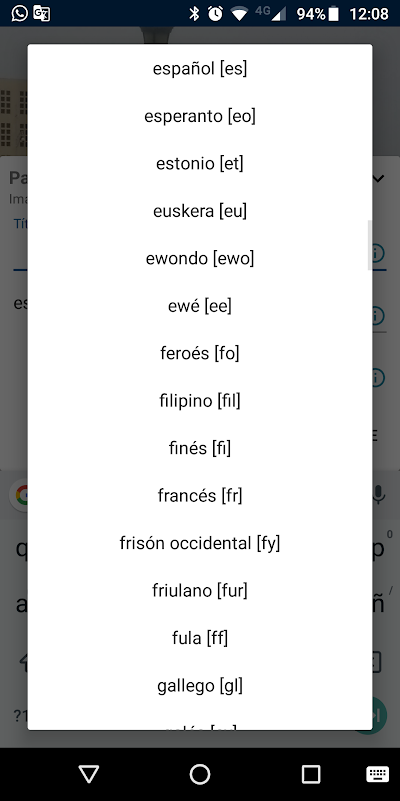
I got confused since I was changing my phone's language to English in order to take the screenshots.
CAVillalobos
on 25 Apr 2019
Related issues
nicolas-raoul
·
3Comments
 Opsylac
·
3Comments
neslihanturan
·
3Comments
maskaravivek
·
3Comments
Opsylac
·
3Comments
neslihanturan
·
3Comments
maskaravivek
·
3Comments
 Saral-code
·
3Comments
Saral-code
·
3Comments
Most helpful comment
Hello everyone!
I also detected this issue and wanted to join to conversation.
For the point 1.
My understanding is that internally the code uses "iw" for the Hebrew language, and makes sense because it's based in the OS. We can just detect that "iw" in the dropdown and replace it with "he".
Since it's just a replacement in the UI, but internally stills uses "iw", the rest of the code shouldn't fail.
For the point 2
As a final user, I think the best for usability is to see the full name while the dropdown is open (making it easier to identify and select the desired language) and, once selected, just see the code (in this case "he")
I hope this helps with the discussion 😄