Apps-android-commons: Fix all users' uploads damaged by former Exif Date Bug
I am very pleased that you have fixed #1971,
however it behooves you now to create a bot
to repair all the damage caused by the bug.
Your bot should check all the files in
https://commons.wikimedia.org/wiki/Category:Uploaded_with_Mobile/Android
and fix the ones that need fixing.
An example is
https://commons.wikimedia.org/wiki/File:Taiwan_white_caterpillar2018.jpg
which in fact I will leave a note inside, reminding me not to fix it by
hand, as your bot will fix it.
Please don't close this bug until every last damaged file is fixed.
Thank you.
 jidanni
All 13 comments
Indeed we need to fix these images (by "we" I mean as a community, not naming anyone in particular).
Uploads are tagged with the app version, so the first thing we need is to identify what versions had this bug.
As for the fix, would it be acceptable to just delete the date= line or its value?
Thanks!
 nicolas-raoul
on 25 Feb 2019
nicolas-raoul
on 25 Feb 2019
You would also need to fix, for my above example
- "Hidden categories: Photographs taken on 2018-11-01"
- Replace '''date={{According to EXIF data|2018-11-01}}''' with correct date, not just deleting it!
Yes, leave the words 'According to EXIF data' there too. Also maybe add
some hidden marker noting that "fixed on ... bot pass cycle 14, etc."
jidanni
on 25 Feb 2019
One approach that I can think of is that the bot can:
- Scan all images uploaded using Commons app(not just images from a few app versions)
- Compare the date in "date={{According to EXIF data|2018-11-01}}" with the actual EXIF date present in the file
If EXIF date is not present
- replace "date={{According to EXIF data|2018-11-01}}" with normal date format "{{date|2009|1|9}}"
If EXIF date is present
- and EXIF date matches with "date={{According to EXIF data|2018-11-01}}" >> we are good
- EXIF date doesnt match with "date={{According to EXIF data|2018-11-01}}" >> replace it with the correct date, getting the value from EXIF.
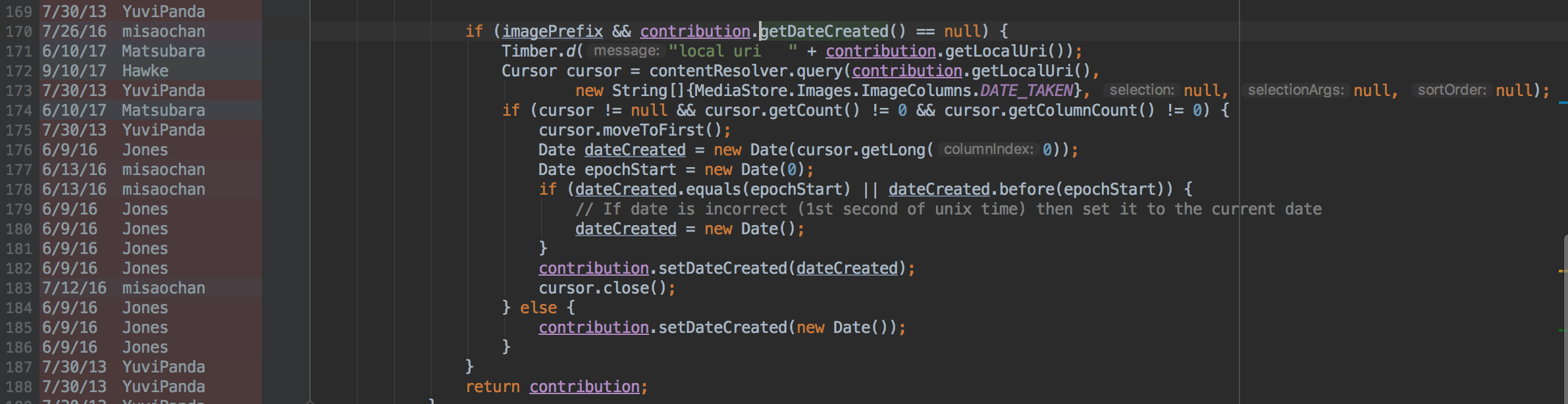
I am suggesting to scan all images because git annotate shows that the erroneous logic has been present in the app for a long time.
 maskaravivek
on 25 Feb 2019
maskaravivek
on 25 Feb 2019
@maskaravivek That would require the bot to download all of these images, right? Even if done little by little, that's a big amount of data.
nicolas-raoul
on 25 Feb 2019
Question to everyone: Imagine a person had not configured the date in their digital camera and their pictures are all dated 1970-01-01 or similar. In such a case, the EXIF date would be even more wrong than the upload date. Should consider such cases too rare/improbable? Or should we somehow detect (how?) and process (how?) such cases? Thanks!
nicolas-raoul
on 25 Feb 2019
@maskaravivek That would require the bot to download all of these images, right? Even if done little by little, that's a big amount of data.
Which part would require downloading all images? In the solution I proposed, I was thinking one could rely on whats visible on the page.
For eg in the image @jidanni referenced,
This is what we show in the summary(based on what the app sets):

And this is what Commons extracts automatically from the image's EXIF(ie the app doesn't send any special parameter to populate the following section):

maskaravivek
on 25 Feb 2019
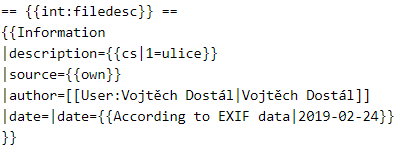
On a related note, I noticed my recent images are categorized as "Pages using duplicate arguments in template calls" because of the following glitch in "date" parameter. Should I start a separate issue?
 VojtechDostal
on 25 Feb 2019
VojtechDostal
on 25 Feb 2019
Yes, different issue, thanks for noticing!
On Mon, Feb 25, 2019, 22:36 VojtechDostal notifications@github.com wrote:
On a related note, I noticed my recent images are categorized as "Pages
using duplicate arguments in template calls" because of the following
glitch in "date" parameter. Should I start a separate issue?
[image: bez nazvu]
https://user-images.githubusercontent.com/21329813/53341012-af004f00-390a-11e9-946d-8eb75cc751cc.png—
You are receiving this because you commented.
Reply to this email directly, view it on GitHub
https://github.com/commons-app/apps-android-commons/issues/2511#issuecomment-467013307,
or mute the thread
https://github.com/notifications/unsubscribe-auth/AAGFBjo57Yn9j79OGMkrACXBHEDC3oCSks5vQ-bPgaJpZM4bO76l
.
nicolas-raoul
on 25 Feb 2019
Yup, no need to access the images, the dates are already here:
$ w3m -no-cookie -dump https://commons.wikimedia.org/wiki/File:Taiwan_white_caterpillar2018.jpg | grep 2018
File:Taiwan white caterpillar2018.jpg
File:Taiwan white caterpillar2018.jpg
caterpillar2018.jpg  https://github.com/commons-app/apps-android-commons/issues
Date                 1 November 2018 (according to Exif data)
        2018       November 2018          (1.06 MB)  contribs)   App
  • User:Didym/Mobile upload/2018 November 1-5
     Date and time of data      12:51, 6 October 2018
   File change date and time    12:51, 6 October 2018
  Date and time of digitizing   12:51, 6 October 2018
           GPS date             6 October 2018
File:Taiwan_white_caterpillar2018.jpg&oldid=340445960"
  • Photographs taken on 2018-11-01
@jidanni Please check these bot edits, and tell us whether they are good or not:
https://commons.wikimedia.org/w/index.php?diff=346096980
https://commons.wikimedia.org/w/index.php?diff=346098103
https://commons.wikimedia.org/w/index.php?diff=346098138
https://commons.wikimedia.org/w/index.php?diff=346098140
https://commons.wikimedia.org/w/index.php?diff=346098616
https://commons.wikimedia.org/w/index.php?diff=346098625
https://commons.wikimedia.org/w/index.php?diff=346098629
https://commons.wikimedia.org/w/index.php?diff=346098631
https://commons.wikimedia.org/w/index.php?diff=346143159
https://commons.wikimedia.org/w/index.php?diff=346143166
If good, all files in the category will be fixed in a similar way.
Cheers!
nicolas-raoul
on 17 Apr 2019
@nicolas-raoul Looks good. Let 'er rip.
jidanni
on 19 Apr 2019
Fixed by TheSandDoctor (still running regularly).
Thanks for the report and feedback!
nicolas-raoul
on 3 Jun 2019
Thanks all! And apologies for the inconvenience. :)
 misaochan
on 3 Jun 2019
misaochan
on 3 Jun 2019
Related issues
 Saral-code
·
3Comments
Saral-code
·
3Comments
 neslihanturan
·
3Comments
misaochan
·
3Comments
neslihanturan
·
3Comments
misaochan
·
3Comments
 madhurgupta10
·
4Comments
jidanni
·
3Comments
madhurgupta10
·
4Comments
jidanni
·
3Comments