Apps-android-commons: Upload limit: Display helpful error when input is malformed
Upload Limit 0 or special characters shouldn't be allowed:
In the Settings Activity there is an option of setting the upload limit which should accept numbers fro 0 to 9 and some special characters shouldn't it display an error and disable ok button if the user has typed any such character.
Steps to reproduce:
Go to settings Activity
Tap the option SetUploadLimit
Currently if you type something irrelevant than it discards the current entered value and keeps the previous one. Instead we can display a message indicating that such numerals or characters are not allowed.
Device and Android version:
vivo 1713 API 24
Commons app version:
2.9.0-debug-sub_categories~677e0099
Would you like to work on the issue?
Yes
 vanshikaarora
All 14 comments
@nicolas-raoul @albendz KIndly review and share your feedback's :)
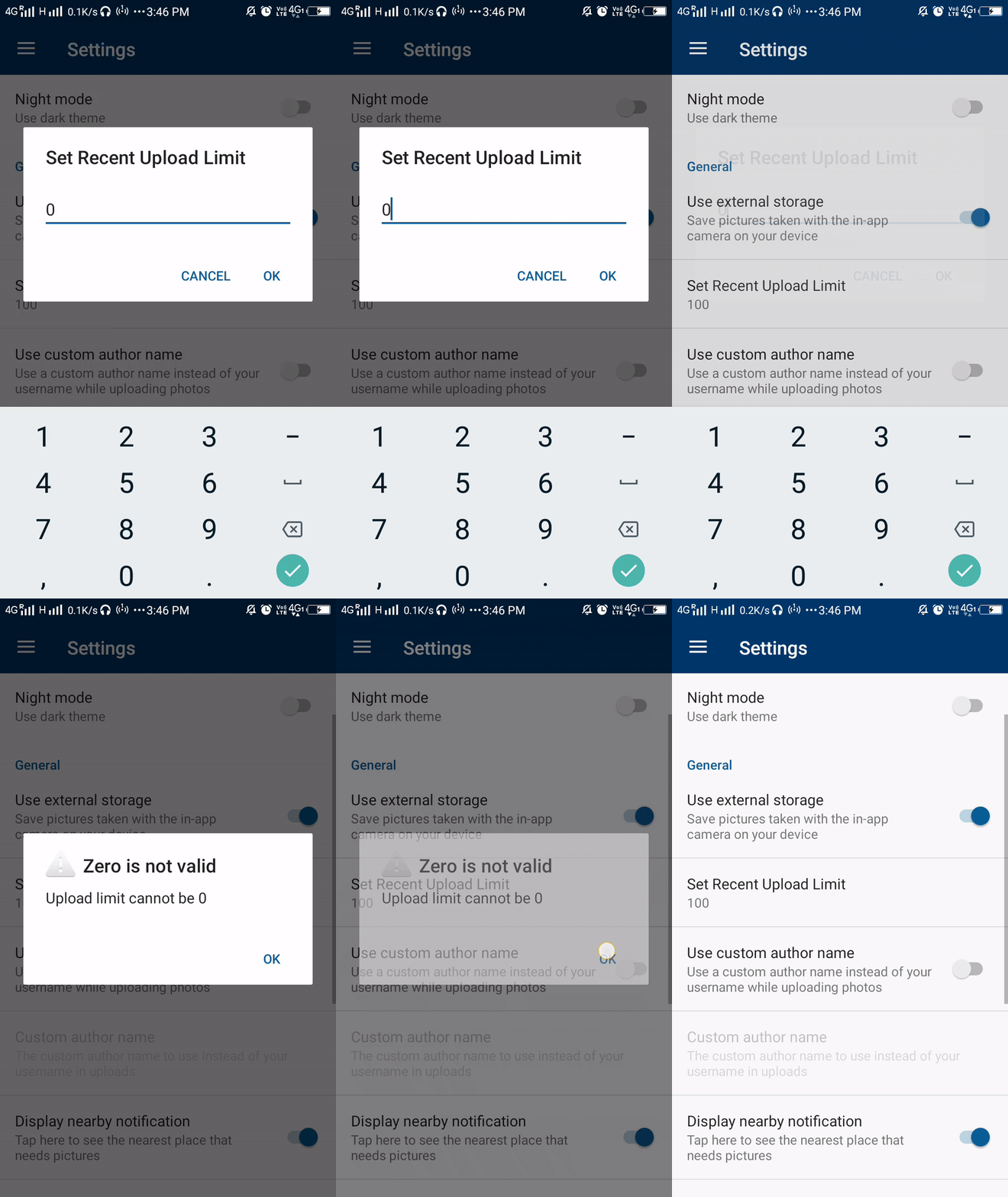
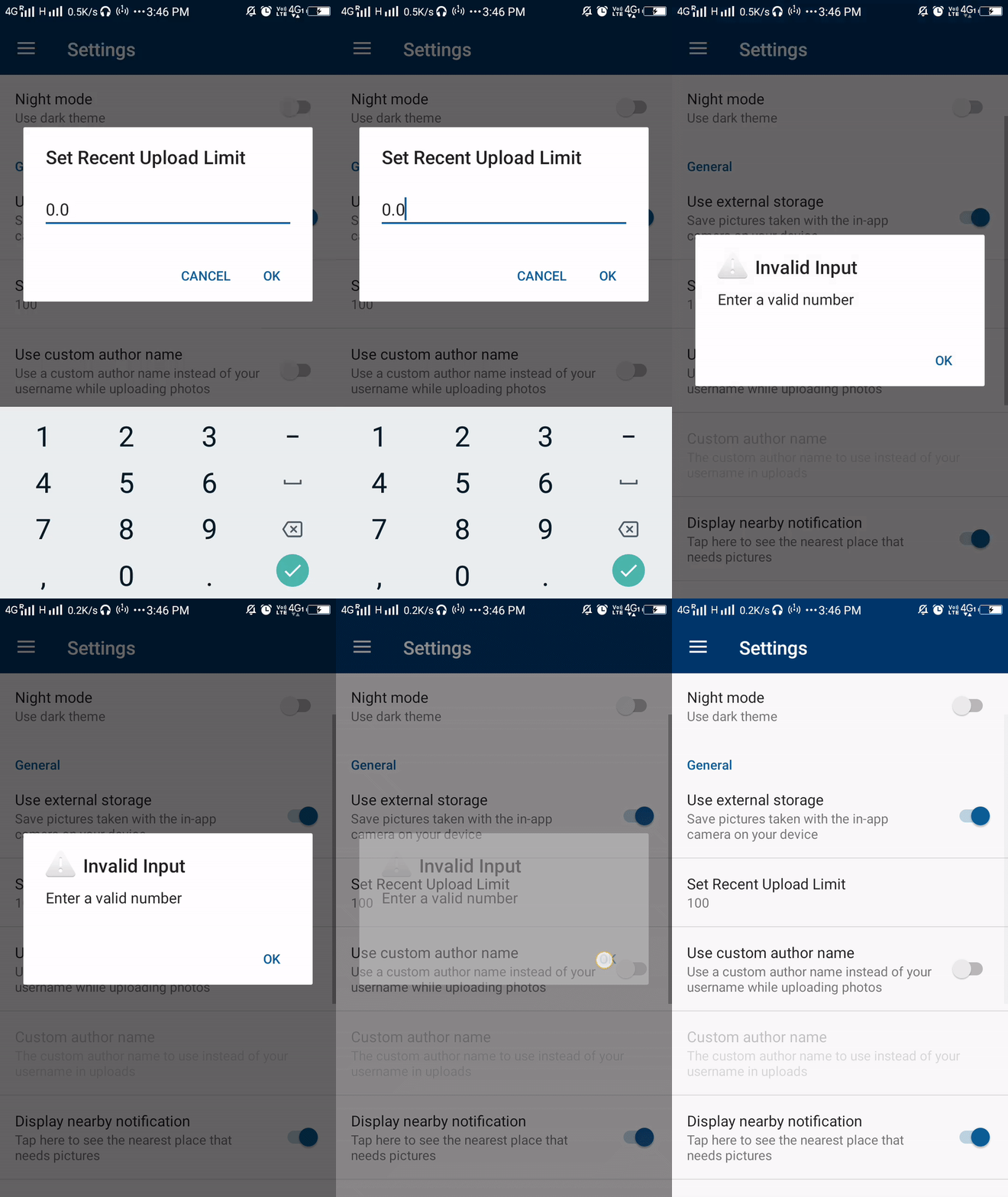
Here is a glimpse of what got changed in the UI due to this PR
On entering 0
On entering any other invalid input
vanshikaarora
on 27 Jan 2019
IMO, inline verification would be a better experience for the user. Maybe you could show an error text below the Edittext.
 maskaravivek
on 27 Jan 2019
maskaravivek
on 27 Jan 2019
Ok I'll modify this accordingly
vanshikaarora
on 27 Jan 2019
Maybe you could show an error text below the Edittext
@maskaravivek I just tried doing it this way but I found that this preference in settings fragmnet is a fr.free.nrw.commons.ui.LongTitlePreferences.LongTitleEditTextPreference
I couldn't get the text entered in the EditText until the Ok button is pressed after which the editing dialog diasppears.
Do you have some other suggestions for this?
vanshikaarora
on 27 Jan 2019
@maskaravivek @nicolas-raoul For adding additional changes, that we desire to this PR we need to edit EditTextPrefernece the custom class created in the Project.
- Need to a TextWatcher to the entered text
- And an additional TextView to display error text
This might effect the other cases where we are using this class
Shall I make changes to the Widget or there can be other suggestions in the current improvement :)
vanshikaarora
on 7 Feb 2019
Instead of adding another TextView below the edit text, you could use the method setError to show the error, also if EditTextPreference is used in a lot of places, you could may be extend the EditTextPreference and add the TextWatcher in this class to show the appropriate error.
 ashishkumar468
on 7 Feb 2019
ashishkumar468
on 7 Feb 2019
TextView below the edit text, you could use the method setError
@ashishkumar0207 setError function which class have you metioned here?
vanshikaarora
on 9 Feb 2019
TextView below the edit text, you could use the method setError
@ashishkumar0207 setError function which class have you metioned here?
@vanshikaarora EditText in android has a function setError(), actually two, using which you could specify the error message(and maybe the appropriate icon), to show error messages.
ashishkumar468
on 9 Feb 2019
@vanshikaarora EditText in android has a function setError(), actually two using which you could specify the error message(and maybe the appropriate icon), to show error messages.
Now that's clear :). So shall I modify the wrapper class to add a setError() method to the EditText?
vanshikaarora
on 9 Feb 2019
@vanshikaarora Any one having a reference to the wrapper class (by which I am assuming you mean the wrapper for the EditTextPreference class), will be able to directly access the setError function, right?, so I guess there would not be the need to modify the wrapper class for at least this thing.
ashishkumar468
on 9 Feb 2019
by which I am assuming you mean the wrapper for the EditTextPreference
Yes I am talking about this Wrapper class EditTextPreference. Currently this class does not overrides the function setError().
So shall I modify the wrapper class to add a setError() method to the EditText?
Here I mean shall I override the setError() function of the class? :)
vanshikaarora
on 9 Feb 2019
@vanshikaarora You could either write your own function ,or use the method, EditTextPreference$getEditText().setError for the same, similar to the way you would have added the TextWatcher
ashishkumar468
on 10 Feb 2019
EditTextPreference$getEditText().setError
Thanks @ashishkumar468 :) I have used the same function and modified the code. Here is the preview of the final PR

vanshikaarora
on 12 Feb 2019
Awesome!
maskaravivek
on 12 Feb 2019
Related issues
maskaravivek
·
3Comments
 misaochan
·
4Comments
misaochan
·
4Comments
 nicolas-raoul
·
3Comments
nicolas-raoul
·
3Comments
 neslihanturan
·
3Comments
neslihanturan
·
3Comments
 psh
·
4Comments
psh
·
4Comments
Most helpful comment
Instead of adding another TextView below the edit text, you could use the method setError to show the error, also if EditTextPreference is used in a lot of places, you could may be extend the EditTextPreference and add the TextWatcher in this class to show the appropriate error.