Apps-android-commons: ACRA reporting dialog looks old
Summary:
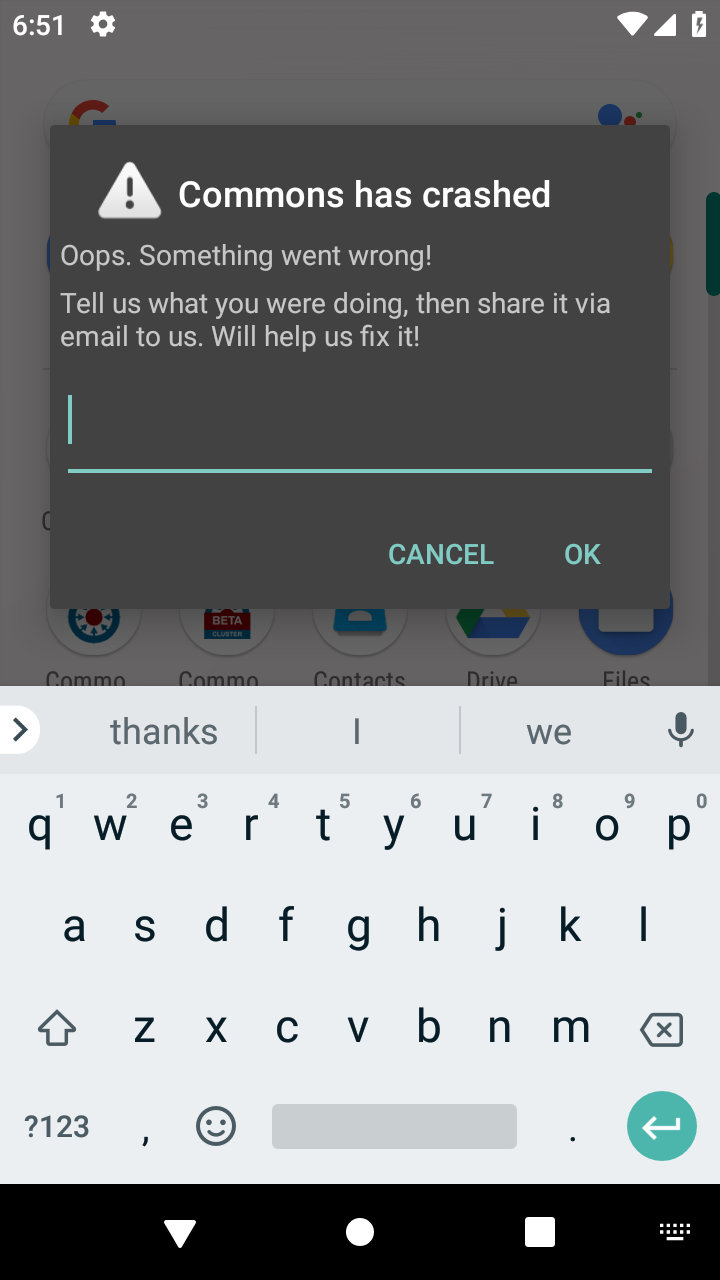
Now we've got beautiful material design in the rest of the app, the crash reporting dialog does look pretty outdated. While of course we hope as few users as possible see it, I think it'd be nice if it did look good.
You'll likely want to create a custom dialog theme in styles.xml. It might help to see the current theme, which is the default Theme.Dialog from the support library: https://chromium.googlesource.com/android_tools/+/e429db7f48cd615b0b408cda259ffbc17d3945bb/sdk/platforms/android-24/data/res/values/themes.xml#680
Steps to reproduce:
You can force a crash by adding
if (true) throw new Error("Test ACRA error");
Into some activitiy's onCreate method. The if (true) allows it to compile without complaining that it will always error (even though it will).
Screen-shots:

 domdomegg
All 9 comments
Could I work on this issue please?
Thanks.
 JasonObeid
on 20 Dec 2018
JasonObeid
on 20 Dec 2018
Assigned to @JasonObeid
domdomegg
on 20 Dec 2018
Could you provide me with some guidance? This is my first time working with Android development.
I have set up my environment and got the crash to reproduce, but I'm having trouble changing the actual theme.
I created a simple style in styles.xml for testing purposes, and I applied this style to the ACRA activity in AndroidManifest.
Styles.xml:
<style name="CustomDialogTheme" parent="@style/Theme.AppCompat.Light.Dialog.Alert">
        <item name="buttonBackground">@color/button_background_dark</item>
        <item name="textColorAlertDialogListItem">@color/white</item>
</style>
AndroidManifest.xml
<activity android:name="org.acra.CrashReportDialog"
            android:theme="@style/CustomDialogTheme"
Thanks.
JasonObeid
on 21 Dec 2018
Going to have a proper look in a second, but you might want to try adding tools:replace="android:theme" in AndroidManifest.xml
domdomegg
on 21 Dec 2018
Actually maybe in CommonsApplication.java you can set the resDialogTheme attribute of the @ReportsCrashes annotation.
domdomegg
on 21 Dec 2018
Doing a bit of testing, adding
resDialogTheme = R.style.Theme_AppCompat_Dialog
to CommonsApplication in the @ReportsCrashes annotation gives this result.
While I think it definitely looks better I think it would be ideal if:
- It showed either a flat warning icon (note the slight grey gradient currently), or just no icon at all
- There was padding on the left and right (so the "Oops. Something went wrong!" text was further from the left").
For the second point, I'm not even sure that's possible, might be upstream in ACRA. Would be good to investigate.
domdomegg
on 21 Dec 2018
Re padding, maybe open an issue like this explaining it better https://github.com/ACRA/acra/issues/596?
domdomegg
on 21 Dec 2018
Actually it looks like we're using an old version of ACRA. Would be a big change but maybe try updating it? https://github.com/ACRA/acra/wiki/BasicSetup
domdomegg
on 21 Dec 2018
Sure, I can get working on it tomorrow
JasonObeid
on 22 Dec 2018
Related issues
 Saral-code
·
3Comments
Saral-code
·
3Comments
 nicolas-raoul
·
3Comments
nicolas-raoul
·
3Comments
 neslihanturan
·
3Comments
nicolas-raoul
·
4Comments
neslihanturan
·
3Comments
nicolas-raoul
·
4Comments
 misaochan
·
4Comments
misaochan
·
4Comments
Most helpful comment
Could I work on this issue please?
Thanks.