Apps-android-commons: Automatically increment the version number and commit to master
Summary:
After implementing #1056, our alpha releases have been automated but yet the version name and version code don't update automatically.
This could cause some confusion as users might not realize that they are on the latest version while checking app's About page.
This link might be helpful for fixing the issue: https://medium.com/@IlyaEremin/npm-version-for-gradle-android-9137a7dc273c
 maskaravivek
All 13 comments
Or maybe append the 6 first characters of the commit SHA to the version in About?
For instance it could show 2.9.0.102b2d.
That number would not be automatically written into the source code by Gradle and not committed into Git, but it would still be easily findable via URL: https://github.com/commons-app/apps-android-commons/commit/102b2d
The advantage is that it keeps the Git commits readable and easier to bissect.
 nicolas-raoul
on 17 Dec 2018
nicolas-raoul
on 17 Dec 2018
@nicolas-raoul Good point! I can add the SHA of the commit in about. But it will then start appearing for all builds and not just alpha releases.
If we want the SHA to be visible just for alpha releases, we will need to create a alpha flavor and replicate prod configs for this flavor.
Both the things are easily doable. Let me know which approach do you prefer.
cc. @misaochan
maskaravivek
on 17 Dec 2018
It would not shock me to have this long version number for everyone.
After all, Windows version number are super long, example:
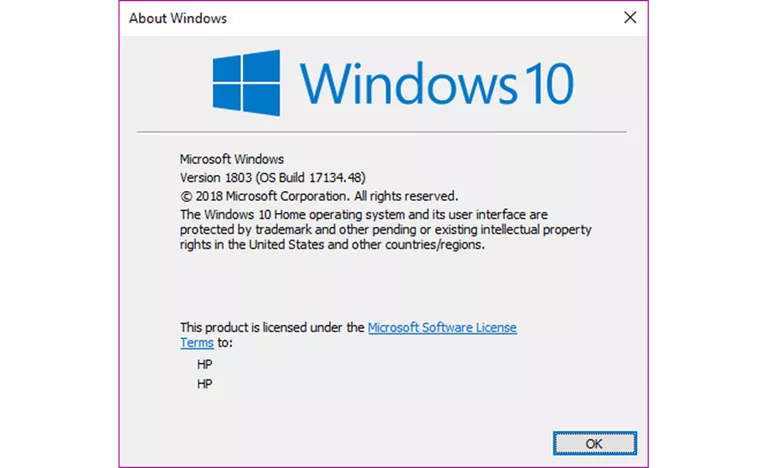
nicolas-raoul
on 17 Dec 2018
Windows has incremental version codes. An increasing number makes it easier for a nontechnical user as well.
Personally, I would prefer the version number in About to match what the play store shows. For alpha builds we can probably show the SHA as well.
maskaravivek
on 17 Dec 2018
Any solution that does not double the number of commits in master is fine, I would say ^_^
nicolas-raoul
on 17 Dec 2018
It's a bit ugly but this does work to get the full version number (AboutActivity:66):
try {
    String version = getPackageManager().getPackageInfo(getApplicationInfo().packageName, 0).versionName;
    versionText.setText(version);
} catch (PackageManager.NameNotFoundException e) {
    versionText.setText(BuildConfig.VERSION_NAME);
    e.printStackTrace();
}
However this doesn't allow us to see the commit hash which could be useful for debugging, as don't have access to Google Play dashboard.
Alternatively we could update it in Gradle (app/build.gradle:137):
versionNameSuffix "-alpha~" + getBuildVersion()
However this doesn't show the incrementing number which would also allow us to link to a specific release on Google Play, plus has the benefits mentioned above for users.
I think it would be valuable to have both. Maybe a combination of the above two methods (but could be ugly - hopefully you can come up with a better way)?
 domdomegg
on 18 Dec 2018
domdomegg
on 18 Dec 2018
As @domdomegg mentioned in #1056 , ACRA reports are able to obtain the correct version number (that corresponds to the Play Store number). I think that would be most intuitive for users, and also easier for us to know which version everyone is talking about. Could we just use a similar method for About?
 misaochan
on 19 Dec 2018
misaochan
on 19 Dec 2018
@misaochan The first method above basically does what ACRA does. I still think the commit hash could be useful - or another way to find the commit from the versionCode.
domdomegg
on 19 Dec 2018
Edit: Actually, I thought about it a bit more, and realized that using the SHA would probably make debugging easier indeed, since we don't otherwise have a clear documentation of which version number was released after which commit (unlike manual releases which utilize build.gradle). So perhaps this solution may be best after all:
If we want the SHA to be visible just for alpha releases, we will need to create a alpha flavor and replicate prod configs for this flavor.
I would definitely say that we don't want or need the SHA for non-alpha releases.
An additional suggestion (which may potentially take more time to implement) - an issue with using SHA in About, even for alpha, is that now we have TWO "version numbers" that correspond to a single release. The first is the SHA that is visible in About, and the second is the incremental one that is visible in Google Play and in ACRA. This would be very confusing.
Given that the version number does not actually HAVE to be incremental, and AFAIK does not even need to be all numbers (the build.gradle equivalent is actually a "version name"), why not use the SHA for both?
misaochan
on 19 Dec 2018
How about concatenating version_sha ?
An increment is still useful, for instance if I see a bug and Alice can not
reproduce it then I can say I am using version 2.9.0.246_a5d79b and Alice
can easily tell whether she is using a prior or later version compared to
246.
On Wed, Dec 19, 2018, 18:41 Josephine Lim <[email protected] wrote:
Edit: Actually, I thought about it a bit more, and realized that using the
SHA would probably make debugging easier indeed, since we don't otherwise
have a clear documentation of which version number was released after which
commit (unlike manual releases which utilize build.gradle). So perhaps this
solution may be best after all:If we want the SHA to be visible just for alpha releases, we will need to
create a alpha flavor and replicate prod configs for this flavor.I would definitely say that we don't want or need the SHA for non-alpha
releases.An additional suggestion (which may potentially take more time to
implement) - an issue with using SHA in About, even for alpha, is that now
we have TWO "version numbers" that correspond to a single release. The
first is the SHA that is visible in About, and the second is the
incremental one that is visible in Google Play and in ACRA. This would be
very confusing.Given that the version number does not actually HAVE to be incremental,
and AFAIK does not even need to be all numbers (the build.gradle equivalent
is actually a "version name"), why not use the SHA for both?—
You are receiving this because you were mentioned.
Reply to this email directly, view it on GitHub
https://github.com/commons-app/apps-android-commons/issues/2127#issuecomment-448531983,
or mute the thread
https://github.com/notifications/unsubscribe-auth/AAGFBuCN3pq6V4iEARr87ltETPXMipBMks5u6gm_gaJpZM4ZVMcl
.
nicolas-raoul
on 19 Dec 2018
@nicolas-raoul Great idea!
misaochan
on 19 Dec 2018
Am taking this up and would be using a version number as suggested by @nicolas-raoul
maskaravivek
on 19 Jan 2019
Eep. Let's carry on the discussion there, I think I might not have worded that comment clearly, lol.
@misaochan The only way I can think of showing SHA only for alpha users and not for other users is to have #2270 in place.
As of now alpha and actual prod use the build flavor and there's no way to differentiate between alpha and prod users. Having an alpha flavour would mean that in app/build.gradle we would have another block of properties named alpha similar to beta and prod. alpha flavor would have all properties the same as prod.
Then the ConfigUtils:getVersionName function can be modified to check for flavor and return version number accordingly.
BuildConfig.FLAVOR.equals("alpha")
Related issues
misaochan
·
4Comments
domdomegg
·
3Comments
misaochan
·
4Comments
 neslihanturan
·
3Comments
neslihanturan
·
3Comments
 Saral-code
·
3Comments
Saral-code
·
3Comments
Most helpful comment
It's a bit ugly but this does work to get the full version number (
AboutActivity:66):However this doesn't allow us to see the commit hash which could be useful for debugging, as don't have access to Google Play dashboard.
Alternatively we could update it in Gradle (
app/build.gradle:137):However this doesn't show the incrementing number which would also allow us to link to a specific release on Google Play, plus has the benefits mentioned above for users.
I think it would be valuable to have both. Maybe a combination of the above two methods (but could be ugly - hopefully you can come up with a better way)?