Apps-android-commons: Date "according to Exif data" is sometimes wrong
In https://commons.wikimedia.org/wiki/File:Taiwan_white_caterpillar2018.jpg
you will observe "Date 1 November 2018 (according to Exif data)".
But if you scroll down to Metadata, you will find that is not the case.
App version: noted already on the page.
Please use the actual exif data date, not the upload date.
Nowhere in the exif data does it contain the upload date.
 jidanni
All 31 comments
Hi @jidanni , thanks for reporting this. This is a known issue (see #1854 ) and should be fixed in v2.9. :)
 misaochan
on 6 Nov 2018
misaochan
on 6 Nov 2018
Hi @jidanni , we just released this bugfix with v2.9 in beta. Could you please let us know if the problem is solved for you?
misaochan
on 27 Nov 2018
This is a big problem and it still exists in 2.9.0.196~52ab393:
https://commons.wikimedia.org/w/index.php?title=File:%E3%82%A2%E3%83%AB%E3%83%95%E3%82%A1%E5%85%83%E9%BA%BB%E5%B8%83.jpg&oldid=337653865
I shot that image on December 4 (as can be seen in the EXIF section) but the metadata wikitext created by our app wrongfully contains date={{According to EXIF data|2019-02-04}} which is the date at which I _uploaded_ the picture.
This could bring us bad publicity, I received this on my talk page:
Please upload D5300 images from a desktop computer, not from your mobile phone
Hello, you might have already noticed, but the files you had taken with a Nikon D5300 camera had incorrect date information in {{information}}. For examples, File:アルファ元麻布.jpg and File:菊池家住宅 entrance.jpg had been actually taken on 4 December 2018, but the files initially showed 4 February 2019 as the date taken. These are, I believe, fatal errors, and it requires a hefty workload to remedy them manually. The reason such errors occur is that the Commons Mobile Application you are using is not smart enough to determine the appropriate dates. By using a desktop computer and Upload Wizard on commons, failures as such can be easily avoided, as it automatically adds dates based on the Exif of the images. As a user who added Category:December 2018 in Tokyo to your files, I ask you to do so, or you have to correct the date information by yourself. Please be aware that when an image was taken is as important as what it depicts. Regards,
We are already taking information from EXIF, I believe it is rather easy to fix, so I add the beginner-friendly tag.
 nicolas-raoul
on 8 Feb 2019
nicolas-raoul
on 8 Feb 2019
I would like to pick this up as I believe my recent changes might have broken it. We will include it in 2.10.0.
 maskaravivek
on 8 Feb 2019
maskaravivek
on 8 Feb 2019
Luckily the recent changes should not be on any published version of the app, just the alphas. Will hold 2.10 for the fix.
(Glad to see the alpha version is proving very useful, too! :))
misaochan
on 10 Feb 2019
Note: I am having this issue but I never use Google Photos.
nicolas-raoul
on 12 Feb 2019
Sorry, I named the PR Incorrectly. It fixes the issue for all uploads. Will edit the title when I get to my laptop.
maskaravivek
on 12 Feb 2019
I just uploaded a picture taken on January 28, and it displays January 29:
https://commons.m.wikimedia.org/wiki/File:Otafukuzaka%2C_Roppongi_5_chome.jpg
nicolas-raoul
on 13 Feb 2019
The problem is that we do not extract the date/time from EXIF so the summary is misleading.
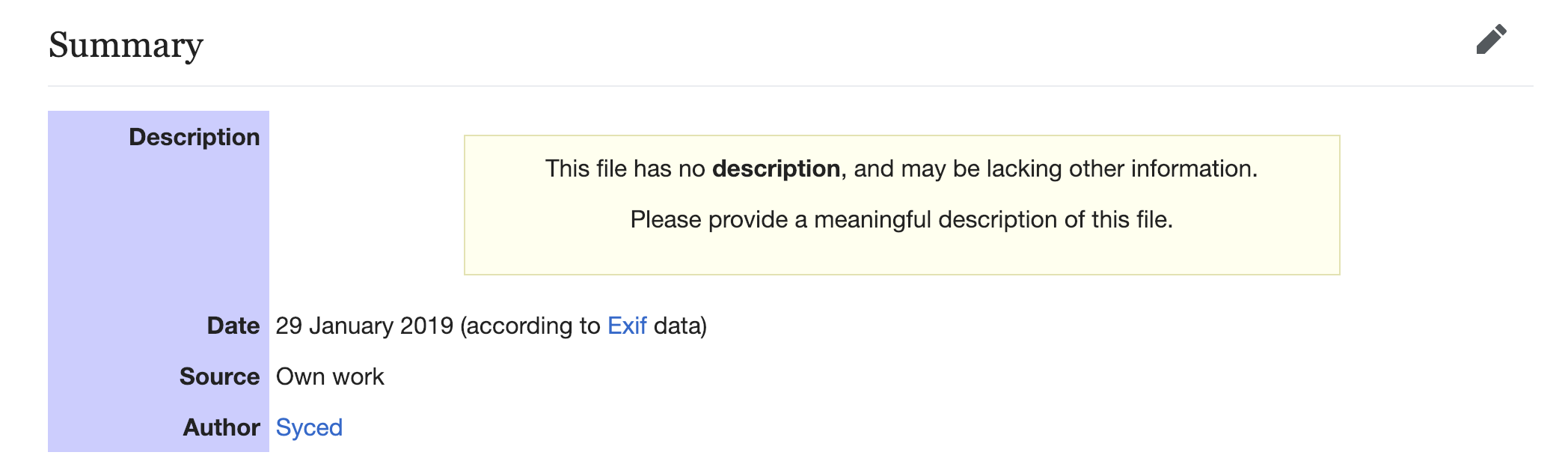
As Google Photos do not return EXIF information(i tried a few 3rd party EXIF viewer apps to cross-check this), we started using ContentResolver to extract date/time. Sadly, we started doing it for all images and not just Google Photo images. For the above image EXIF had the date/time but as mentioned, we use ContentResolver for all images.
Most of the time this date would match the actual EXIF date so no one would complain but differences can be noticed for different time zones. This is because EXIF doesn't specify the timezone. http://www.exiv2.org/tags.html
References to code to understand the flow:
Extracting date time:
https://github.com/commons-app/apps-android-commons/blob/master/app/src/main/java/fr/free/nrw/commons/filepicker/UploadableFile.java#L70
Setting page contents:
https://github.com/commons-app/apps-android-commons/blob/master/app/src/main/java/fr/free/nrw/commons/contributions/Contribution.java#L156
Sending page contents while uploading:
https://github.com/commons-app/apps-android-commons/blob/52ab39381eccb1d55231338b8c8ce7d6e57c4d29/app/src/main/java/fr/free/nrw/commons/upload/UploadService.java#L248
IMO, what we have been doing is incorrect and we should not use the words "according to EXIF" in the summary if its not coming from EXIF
Please suggest, how to go about it.
- Do not show file creation date if EXIF doesn't contain it.
- Try to extract EXIF date and fallback to
ContentResolverif EXIF is not present - Change the wording from "according to EXIF" to something relevant.
cc @misaochan @ashishkumar468 Please correct me if my understanding of the flow is incorrect.
maskaravivek
on 13 Feb 2019
I am also aware of the issue of not getting upload dates from the EXIF when uploaded via google photos. IMO as @maskaravivek suggested, we should try to extract EXIF date and fallback to ContentResolver if EXIF is not present and similarly update the the display text "according to EXIF", based on the source of extraction.
 ashishkumar468
on 13 Feb 2019
ashishkumar468
on 13 Feb 2019
Agreed with @ashishkumar468
misaochan
on 13 Feb 2019
Okay, thanks for the feedback. Will make these changes. :)
maskaravivek
on 13 Feb 2019
we should try to extract EXIF date and fallback to ContentResolver if EXIF is not present and similarly update the the display text "according to EXIF", based on the source of extraction.
If we have a fallback based on which we modify the display text then we need to introduce a timestampSource parameter in Contribution. That would require a schema update. That would mean it would be a bigger change. Do you want me to do it in one go?
maskaravivek
on 16 Feb 2019
Hmm, I just re-read the issue, and it seems we have 2 problems:
- The Google Photos EXIF issue. IME, EXIF has always been a problem with Google Photos, i.e. this is not a bug that was introduced by our recent changes. In that case, it is not crucial to have the fix in 2.10.1 (good to have, but we shouldn't hold up the release)
- @nicolas-raoul 's issue. He says he has never used Google Photos, yet the date/time issue for him is persisting. This means that #2438 did not cover his use case. Is this correct?
I think (1) can wait, but (2) needs to be looked into. @nicolas-raoul could you give us details on the steps you use to upload? Are you using Android stock gallery? Images stored on SD card or phone memory?
misaochan
on 18 Feb 2019
I am at work so I can not research in detail, but checking my last few uploads, it seems like the dates look OK? https://commons.wikimedia.org/w/index.php?title=Special:ListFiles/Syced&ilshowall=1 Maybe it depends on the time of day?
I am using a Nexus 5, which does not have an external SD card, and recently I am mostly uploading pictures from a directory called /storage/emulated/0/nico/from-pc, example: https://commons.wikimedia.org/wiki/File:Y.S._Park_building_in_%E8%8A%8B%E6%B4%97%E5%9D%82.jpg
A picture uploaded from /storage/emulated/0/DCIM/OpenCamera: https://commons.wikimedia.org/wiki/File:Pink_lights_and_bubble_machine_in_Roppongi_Hills_Arena.jpg
I always either use the app's built-in folder selection, or share from Android's stock gallery application (LineageOS 7.1.2). I don't remember what picture I sent with each methods, but I can upload a picture with each method and link to them from here later this evening if you want.
nicolas-raoul
on 18 Feb 2019
If the date is extracted from a source other than EXIF I will use this template for displaying the date:
{{date|2009|1|9}} → 9 January 2009
Ref: https://commons.wikimedia.org/wiki/Template:Date
This will appear as:
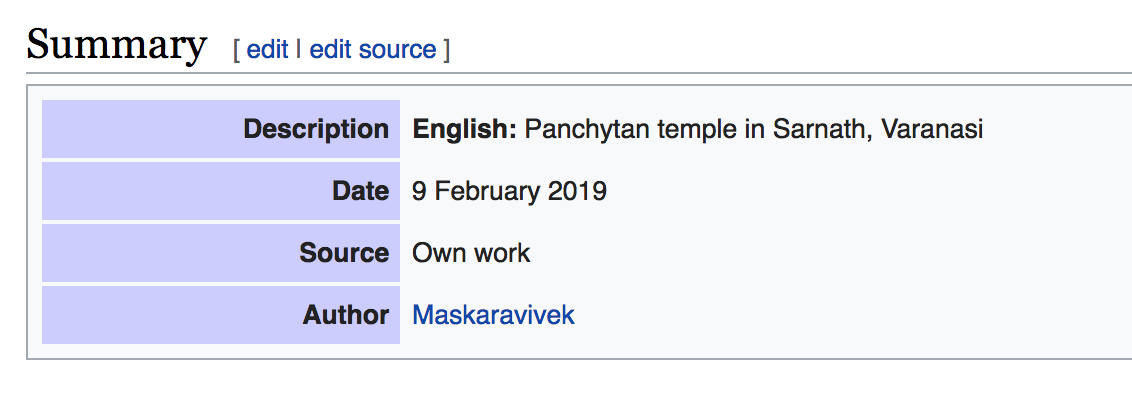
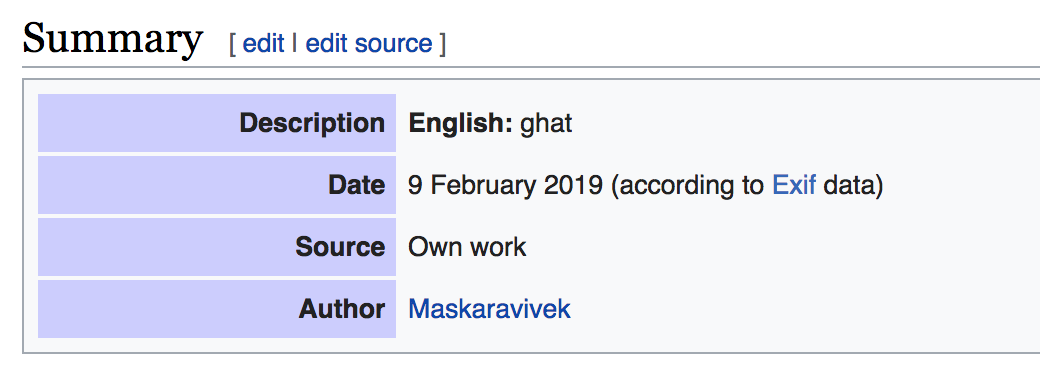
If it comes from EXIF I will use continue using the existing template.
{{According to EXIF data|2009-01-09}}
Ref: https://commons.wikimedia.org/wiki/Template:According_to_Exif_data
This will keep appearing in the same old way.
maskaravivek
on 18 Feb 2019
@maskaravivek Sounds good.
misaochan
on 18 Feb 2019
@nicolas-raoul It would be great if you can confirm if this is fixed for you. It should be available in the latest alpha. :)
maskaravivek
on 20 Feb 2019
I just uploaded one picture and it looks OK: https://commons.wikimedia.org/wiki/File:Artists_workshop_closed_down,_in_Imoaraizaka_%E8%8A%8B%E6%B4%97%E5%9D%82.jpg
Thanks! :-)
nicolas-raoul
on 20 Feb 2019
Are you sure it is fixed? The SandBot just came across fixing a date of a file that i uploaded not long ago with the latest beta version (2.10.2~66e1539a1) : https://commons.wikimedia.org/w/index.php?title=File:Raspberry_Pi_3_Wikidata.jpg&action=history. Maybe there is also a problem with the timezone?
 Aschroet
on 1 Jun 2019
Aschroet
on 1 Jun 2019
@Aschroet Thanks for reporting!
The original issue of this report was for date that were wrong by several months, so I guess it might be different, but still a problem of course.
nicolas-raoul
on 1 Jun 2019
Is this still available? I'd like to work on it
 madisoncfallin
on 14 Oct 2020
madisoncfallin
on 14 Oct 2020
@madisoncfallin Thanks! Please first try to reproduce the issue by uploading a picture and let us know (including at what exact time/timezone you took a picture, uploaded the picture, what its EXIF contained, and what metadata appears on the image's page at https://commons.wikimedia.org)
nicolas-raoul
on 15 Oct 2020
@nicolas-raoul That will be difficult, I don't actually have an Android device easily available....Is there a way I could fake it in Android Studio?
madisoncfallin
on 16 Oct 2020
In Android Studio, just download any picture from https://drive.google.com/drive/folders/1T5wfM16qb78XCvnf1Zunww4neg8BXJj6?usp=sharing and use for upload in the app. Thanks! :-)
nicolas-raoul
on 17 Oct 2020
I believe that I've repro'd the issue: https://commons.wikimedia.beta.wmflabs.org/wiki/File:MCF_Test_Photo.jpg
The "Date" shown in the "Summary" box isn't a date at all.
madisoncfallin
on 21 Oct 2020
Ah, the beta server does not have this template.
Please compile the app again with the "prodDebug" flavor, thanks!
nicolas-raoul
on 22 Oct 2020
@nicolas-raoul I just uploaded a photo on the prodDebug flavor: https://commons.wikimedia.org/wiki/File:MCF_Test_Photo_1.jpg
Is this the intended behavior? I would assume that the date of the photo should be the date it was taken, not the date it was uploaded.
madisoncfallin
on 22 Oct 2020
Thanks! All of the dates on that page actually seem correct to me. Upload dates are really the date the picture was uploaded, while shooting dates are really the date the picture was shot.
The problem is shown by this past upload (which has been corrected since):
https://commons.wikimedia.org/w/index.php?title=File:Raspberry_Pi_3_Wikidata.jpg&oldid=352178950
I highlighted the correct date in green and the erroneous dates in red:
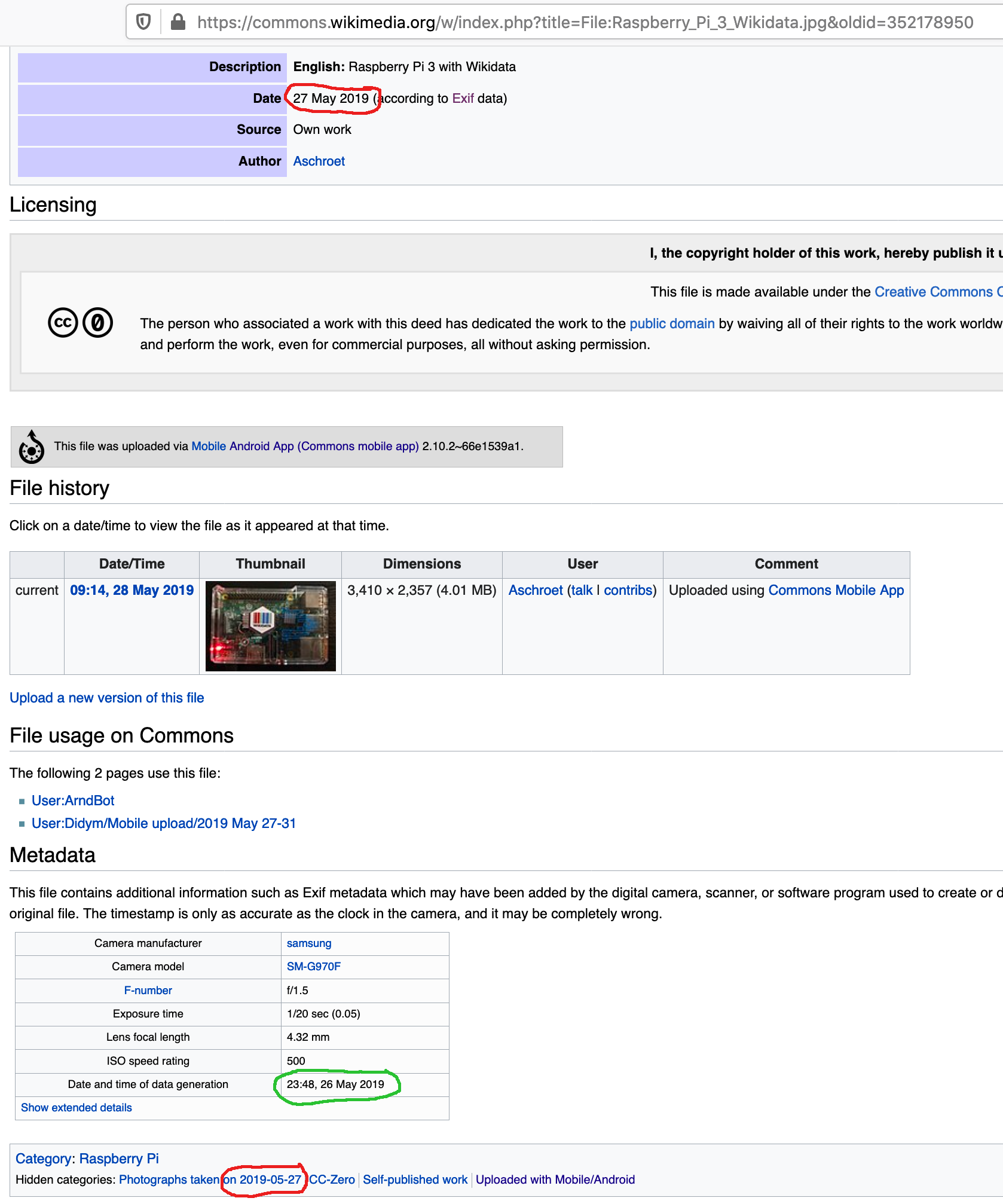
I notice that the picture was taken shortly before midnight: Maybe the app is rounding to the next hour or something similar? Would you mind trying again with a picture taken shortly before midnight?
nicolas-raoul
on 23 Oct 2020
Just checking if anyone is still able to reproduce this issue?
misaochan
on 26 Oct 2020
@madisoncfallin Could you please try to reproduce using this pic that I shot shortly before midnight? https://drive.google.com/file/d/1vfTRupGatxi0W3TlGl8mF4-5Hk5vt4Fb/view I don't think the EXIF embeds any timezone information.
nicolas-raoul
on 26 Oct 2020
Related issues
nicolas-raoul
·
4Comments
 madhurgupta10
·
4Comments
madhurgupta10
·
4Comments
 4D17Y4
·
3Comments
4D17Y4
·
3Comments
 whym
·
3Comments
nicolas-raoul
·
3Comments
whym
·
3Comments
nicolas-raoul
·
3Comments
Most helpful comment
I just uploaded one picture and it looks OK: https://commons.wikimedia.org/wiki/File:Artists_workshop_closed_down,_in_Imoaraizaka_%E8%8A%8B%E6%B4%97%E5%9D%82.jpg
Thanks! :-)