Apps-android-commons: Show media talk page
Each media on Commons has a talk page.
While not as active as on Wikipedia or Wikivoyage, they can still be useful.
We could include the media's talk page discussion (if any) at the bottom of the media details.
Not sure what is the bast way to include:
- Take the wikicode and show it as is?
- Take the wikicode and attempt to make it human-friendly?
- Take the HTML of the page and display the whole thing (that would probably include too much cruft, though)
- Find a Mediawiki API that gives us the rendered conversation part (best)
 nicolas-raoul
All 24 comments
@nicolas-raoul I would like to give it a try.
 Mansi449
on 24 Aug 2018
Mansi449
on 24 Aug 2018
@nicolas-raoul what exactly must be displayed in the talk section of media details? Let, for example, consider the links that you added in the issue #1851 each contain two messages. So have we to show both the messages in the Talk section (to be added) in Media Details?
Links:
https://commons.wikimedia.org/wiki/File_talk:Zhu_(Julian_Zhu).jpg
https://commons.wikimedia.org/wiki/File_talk:Concept_usages_technologie_identit%C3%A9_adapt%C3%A9_de_l%27%C3%A9cole_de_design_de_Nantes.jpg
And if there exists a media which has a good number of messages on its talk page, how must we go about displaying them?
Also, could you please elaborate where can the wikicode that you mentioned be found and how could we use it?
Thanks
Mansi449
on 25 Aug 2018
For https://commons.wikimedia.org/wiki/File_talk:Zhu_(Julian_Zhu).jpg here is the part that should be shown in the app:
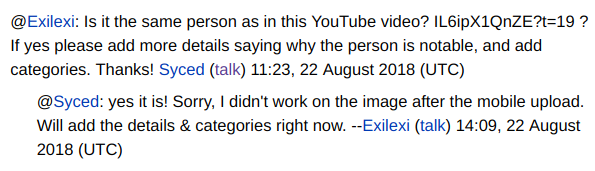
You can get the wikicode via the Mediawiki API, I don't remember the exact syntax. There might be an option for rendering templates that are contained within the wikicode.
This would still require some pattern replacing before being displayable.
I don't think any media talk page is longer than 1MB, and I am sure that 99.9% of them are less than 10KB, so no need to worry about that for now, I would say :-)
nicolas-raoul
on 27 Aug 2018
Thanks for the clarification @nicolas-raoul.
Okay, I would browse the Mediawiki API for the wikicode if required.
Mansi449
on 27 Aug 2018
@nicolas-raoul I found the WikiCode for the part that needs to be shown in the app. So, would you please tell me how can I render it on the app in the desired format?
For eg:
The WikiCode for https://commons.wikimedia.org/wiki/File_talk:Zhu_(Julian_Zhu).jpg is:
{{Ping|Exilexi}} Is it the same person as in this YouTube video? IL6ipX1QnZE?t=19 ? If yes please add more details saying why the person is notable, and add categories. Thanks! [[User:Syced|Syced]] ([[User talk:Syced|<span class=\"signature-talk\">{{int:Talkpagelinktext}}</span>]]) 11:23, 22 August 2018 (UTC)
:{{Ping|Syced}} yes it is! Sorry, I didn't work on the image after the mobile upload. Will add the details & categories right now. --[[User:Exilexi|Exilexi]] ([[User talk:Exilexi|<span class=\"signature-talk\">{{int:Talkpagelinktext}}</span>]]) 14:09, 22 August 2018 (UTC)
Mansi449
on 29 Aug 2018
@Mansi449 This is quite promising: https://www.mediawiki.org/wiki/API:Expandtemplates
nicolas-raoul
on 30 Aug 2018
@nicolas-raoul I tried using action=expandtemplates with different parameters.
For example, using this, I am getting an output amost similar to the wikicode that I had got earlier. But this can't be displayed in the app directly.
Is there any module in the code which can parse wikitext to displayable format? If not, how should I go about rendering it in the app?
Mansi449
on 2 Sep 2018
- Display it in a WebView or similar.
- Use regular expressions or String.replaceAll to replace things that did not get transformed by expandtemplates :-)
nicolas-raoul
on 3 Sep 2018
Is there any module in the code which can parse wikitext to displayable format?
The Wikipedia app uses Parsoid but its not clear how they have integrated it.
 maskaravivek
on 3 Sep 2018
maskaravivek
on 3 Sep 2018
I have found out the way to render media talk in the app in a displayable format. I have tested it on some sample text and it is working perfectly fine :-)
Now I would be implementing the code for making API requests to get the required text from the corresponding pages.
Mansi449
on 7 Sep 2018
I would like work on this
@Mansi449 are you still working on this issue?
 cypherop
on 25 Feb 2019
cypherop
on 25 Feb 2019
@sp2710 You can pick up this issue. There have been no updates from @Mansi449 from the past few months. :)
maskaravivek
on 25 Feb 2019
@maskaravivek I found the WikiCode and used https://www.mediawiki.org/w/api.php?action=help&modules=flow-parsoid-utils to convert it in html and parsed it to displayable format
Now it is looking like this
@Exilexi:Is it the same person as in this YouTube video? IL6ipX1QnZE?t=19 ? If yes please add more details saying why the person is notable, and add categories. Thanks! Syced (talk) 11:23, 22 August 2018 (UTC)\u00a0:@Syced: yes it is! Sorry, I didn't work on the image after the mobile upload. Will add the details
Any suggestions on what should should be done with \u00a0 character?
Should I replace it with a new line or something else need to be done?
cypherop
on 6 Mar 2019
@sp2710 Yes a newline or two would be the best here I guess :-)
nicolas-raoul
on 7 Mar 2019
@nicolas-raoul @maskaravivek What should be the node or x-path to this api call for converting wikicode to html?
I got the following results in API Sandbox
{
"flow-parsoid-utils": {
"format": "html",
"content": "" @Thibdx:: Est-ce toi qui as dessin\u00e9 cette image ? Ou tu l'as t\u00e9l\u00e9charg\u00e9e depuis un autre site ou autre ? Merci ! Syced (talk) 11:38, 22 August 2018 (UTC)\u00a0:@Syced::Je confirme qu'elle est de moi. Dessin\u00e9e il y a plus de 10 ans pour un blog destin\u00e9 \u00e0 la sensibilisation sur le design. -- Thibdx (talk) 20:46, 22 August 2018 (UTC)
}
}
`
cypherop
on 7 Mar 2019
Just extract the text you can get easily, and ignore the rest.
nicolas-raoul
on 8 Mar 2019
@nicolas-raoul I have made the changes and sent the PR
Kindly review the PR and share your feedbacks:)
cypherop
on 9 Mar 2019
@sp2710 Nice work with extracting readable text from the wikitext. :)
I was wondering if we should show the talk page on the same page or should it open a separate activity. Theoretically, the discussions can be quite long(although I agree that it would be quite small for most images).
Would it be better to launch a new activity ie GenericTalkPageActivity. Later the same can be used to show other talk pages.
maskaravivek
on 9 Mar 2019
Thanks @maskaravivek :)
I also agree that it would be better to launch a new activity for showing the talk page
cypherop
on 9 Mar 2019
@sp2710 it would be great if you could wait for @nicolas-raoul @misaochan opinions before making the change. They have a better understanding of the Wikimedia world. :)
maskaravivek
on 9 Mar 2019
Sure @maskaravivek. I have not done any changes yet. Will wait for @nicolas-raoul @misaochan opinions :+1:
cypherop
on 10 Mar 2019
I think there is no need to create a separate activity.
While Wikipedia talk pages can be extremely long, I have never seen a media talk page with more than a few lines.
nicolas-raoul
on 11 Mar 2019
@nicolas-raoul I suggested a separate activity as this could be reused for other talk pages as well ie for any talk page. Some talk pages open from Notifications page as well. If we do it well, it can be reused(or extended) for those purposes as well.
For the scope of this task, it might not be required but I feel the media detail page is already bloated with a lot of content. We can probably show the first couple of lines on the same page and launch a new activity if the content is bigger than that.
maskaravivek
on 11 Mar 2019
Also if we want to add edit functionality later in media talk page it would be better to make a separate activity.
 ujjwalagrawal17
on 11 Mar 2019
ujjwalagrawal17
on 11 Mar 2019
Related issues
 4D17Y4
·
3Comments
4D17Y4
·
3Comments
 misaochan
·
4Comments
misaochan
·
4Comments
 Saral-code
·
3Comments
Saral-code
·
3Comments
 psh
·
3Comments
psh
·
3Comments
 domdomegg
·
3Comments
domdomegg
·
3Comments
Most helpful comment
I have found out the way to render media talk in the app in a displayable format. I have tested it on some sample text and it is working perfectly fine :-)
Now I would be implementing the code for making API requests to get the required text from the corresponding pages.