Apps-android-commons: At each commit to master, automatically build an APK and send it to Google Play alpha
Since we are using branches, the master branch should always work. In other words, if a bug appears in the master branch then we want to know it immediately.
We have a good number of beta testers (Commons users with no development skills), but betas are rather rare because building and uploading them wastes a lot of the maintainer's time.
Solution:
Whenever something is committed to master:
- Increase the beta minor version number
- Build the APK
- Sign it with the real keys
- Upload it to Google Play's beta
It might sound a bit challenging, but I believe all of the pieces to set this up exist:
- Use Travis to build and save an APK: https://gist.github.com/domenic/ec8b0fc8ab45f39403dd
- Use Google's API to upload the APK: https://developers.google.com/android-publisher/#publishing
 nicolas-raoul
All 59 comments
Wow, interesting. I had no idea we could automate that! If we could get it to work, indeed it would benefit us tremendously - less work for me uploading betas and easier testing of the master branch.
The only issue I'm seeing with this is that there will be a LOT of versions being uploaded without changelogs so it may be difficult to keep track of all of them?
 misaochan
on 11 Jan 2018
misaochan
on 11 Jan 2018
Edit: Also, if we decide to do this we will probably need to ask WMF if they will be okay with the very frequent releases. I know it notifies me in the dev console every time the Wikipedia app is updated, so they might find themselves getting spammed by our updates if they don't adjust their notifications (and I'm not sure if it's possible to turn off notifications for one particular app).
misaochan
on 11 Jan 2018
With a beta for each commit, the changelog is available without any effort: It is just the list of Git commits.
It makes it very easy to spot what commit introduced a bug. Testers can proceed by dichotomy and tell us exactly what commit triggers the problem, that too saves a lot of developer time.
I don't see any problem with "too many" releases. https://en.wikipedia.org/wiki/Release_early,_release_often
nicolas-raoul
on 12 Jan 2018
We don't use Crashlytics for beta releases but otherwise Crashlytics is a very good option for such frequent beta releases. I guess using Crashlytics would have privacy concerns, right?
 maskaravivek
on 12 Jan 2018
maskaravivek
on 12 Jan 2018
Using Fabric Beta to distribute the app is different than using the _Crashlytics_ crash reporting tool. The privacy concerns are different in this case and offer people a clear opt-in / opt-out - users can still use the real app, but if they have concerns about getting test builds then they have a clear path for avoiding them.
There would be no runtime component baked into the Commons app if we used Beta for distribution. That said, there's a minimal build.gradle change to give you the crashlyticsUploadDistributionDebug build task that does the work and some keys to manage.
My current project team uses Fabric Beta to distribute QA builds of the app as it's a one-stop-shop for comparing different built versions and simple for the QA team to receive builds. Plus it plays nice with CI servers for automated builds (we use Bitrise). Prior to production releases we push to the Google Play "alpha channel" to smoke test the app before it rolls out to anyone external. Finally, the Google Play "beta channel" is used for friends & family beta testing before a wide release goes out containing newsworthy new features.
 psh
on 12 Jan 2018
psh
on 12 Jan 2018
Yes, I was also suggesting usage of Fabric Beta for distribution of test builds. If we get a go ahead that it wont violate any of our privacy policies for users then the integration would be quite simple and can be automated.
maskaravivek
on 12 Jan 2018
Can I take this up?
 tshradheya
on 21 Jan 2018
tshradheya
on 21 Jan 2018
@psh Interesting! Fabric Beta doesn't actually use the Google Play channels, right? The entire system appears to be self-contained. I would personally be OK with this, but would probably need to check with WMF.
If we don't use Fabric Beta, and elect to use a script to upload to Google Play Store instead... I wonder if we should create an alpha testing group for this purpose? There are a few reasons why I think this might be preferable to uploading to the Play Store's beta:
We have 300+ beta testers, and master is not always stable. Theoretically it SHOULD be, but realistically not always. :) I always try to thoroughly test manually-released versions, so there is an extra check between master and the users in manually-released versions. I'm not sure if we really want to release code that hasn't been double-checked to 300 users (10% of our userbase)?
Such frequently-released betas will result in no single version getting more than a day or two of testing time. I think ideally we would like to have the 300 beta testers as a buffer between the alpha users (who will get almost-daily builds) and production users.
So if we go with alpha testing, I figured we can invite people within our close group to join that, and do the automatic build/upload with that. That will still help us hugely with testing, as it will allow the non-devs to help us test the current master, and is also easier than building from master all the time. Then I will do the beta and production releases as per normal. @nicolas-raoul what do you think?
misaochan
on 21 Jan 2018
Yes, Google Play's alpha is perfect for this use :-)
Personally I would choose the alpha even if it means constants updates, but most testers would probably choose beta.
nicolas-raoul
on 22 Jan 2018
Reposting from @ujjwalagrawal17 at #1482
We can also add Fastlane for automatic deployment of the beta App. (Maybe on successful merge to release branch or master branch)
Link: https://docs.fastlane.tools/getting-started/android/beta-deployment/
misaochan
on 3 May 2018
Google Play provides API access to automate the release process. Here's the documentation for the same: https://developers.google.com/android-publisher/
To work on this task I would require Release Manager access to the Google Play developer console. Would it be possible to grant me the access?
maskaravivek
on 14 Oct 2018
As mentioned in our conversation earlier, I doubt WMF will grant it. The last time I asked for access for Neslihan, not only did we not get access, but also we ended up all needing to sign NDAs, attempt OAuth for the app, etc. ;)
Please feel free to test the API on a dummy app as you suggested, and I will handle the integration with the dev console.
misaochan
on 14 Oct 2018
I was trying to make required changes for this task but we just ran into a blocker. @misaochan Doesn't have access to enable Google Play console API access that is required for automatic publishing setup. This was the error message:
Only the account owner can configure API access. Please contact them to update API settings
In @misaochan's words, this leaves us with 2 options:
1) ask for permission and we pray real hard
2) We use an external service for the alpha distributions
(1) I really doubt that WMF will grant us API access for the Play account. The keys are sensitive and someone else having access to those keys won't make them feel comfortable. With those keys, potentially anyone can upload a newer version of the Commons app. Even if they give us access, I guess the turnaround time would be too high.
Considering the above, I feel it would be appropriate to go with (2) given the time constraints that we have. With alpha track, we are anyways targeting very few users(mostly contributors and testers), and they should be okay using an external service for alpha builds.
As suggested above, Fabric looks to be a decent option that we can use for alpha releases. Just to add, Fastlane is a CI just like Travis and Jenkins that would enable us to automate the process. We don't need to use Fastlane in particular as Travis or any other CI would serve the purpose.
@misaochan @nicolas-raoul @VojtechDostal Would it be okay if we use Fabric for automatic publishing? It would be great if we could take an early call on this as it would give us more time to actually implement the integration.
As of now, one unresolved issue with this task is:
- managing the signing keys for the project. We can't put the keys in the repo as its public and the CI would need these keys for making a release(even Fabric releases are signed APKs). I still need to figure out how to manage these keys.
maskaravivek
on 7 Dec 2018
Yeah, sorry guys, I was unaware that this required additional permissions that I do not have. :/
I vote for using an external service like Fabric for automated builds. If we go with (1), we would likely require permission from Legal before the account owner can allow us access. The last time I tried to get Neslihan read-only access just for her to read the crash logs, it was denied, so with something this sensitive I am not optimistic about our chances.
An additional benefit of an external service is that testers can uninstall the test build and use the official build whenever they desire without needing to have their account removed or added to the list of alpha testers, which would be more convenient for them. If it doesn't break policy, this would be ideal IMO.
managing the signing keys for the project. We can't put the keys in the repo as its public and the CI would need these keys for making a release(even Fabric releases are signed APKs). I still need to figure out how to manage these keys.
If we go with Fabric, can't we just use different keys? For instance our distribution on F-Droid does not use my key.
@nicolas-raoul What do you think?
misaochan
on 7 Dec 2018
Can we set up auto-update with an external service, though?
On Sat, Dec 8, 2018, 02:30 Josephine Lim <[email protected] wrote:
Yeah, sorry guys, I was unaware that this required additional permissions
that I do not have. :/I vote for using an external service like Fabric for automated builds. If
we go with (1), we would likely require permission from Legal before the
account owner can allow us access. The last time I tried to get Neslihan
read-only access just for her to read the crash logs, it was denied, so
with something this sensitive I am not optimistic about our chances.An additional benefit of an external service is that testers can have both
the alpha build AND the beta/prod build on the same device, which would be
more convenient for them. If it doesn't break policy, this would be ideal
IMO.—
You are receiving this because you were mentioned.
Reply to this email directly, view it on GitHub
https://github.com/commons-app/apps-android-commons/issues/1056#issuecomment-445305813,
or mute the thread
https://github.com/notifications/unsubscribe-auth/AAGFBik7z6GI9z4yvKOm5eC6A47TiLrDks5u2qWlgaJpZM4RajZ5
.
nicolas-raoul
on 8 Dec 2018
Yes. If from auto update you mean build triggers whenever a commit is made to master, then yes it can be done. The gradle task can be triggered on a variety of actions.
Also, if from auto update you mean, can the user have the app automatically updated whenever a new build is available, then too the answer is yes. The Beta Crashlytics can be configured to have the latest build installed over your existing app.
maskaravivek
on 8 Dec 2018
I meant the second. Play Store updates apps in the background, and all I see is a notification such as "2 applications updated":

I don't know any other app store that can do this (update apps in the background whenever a new APK is available on the server). The F-Droid client app has started implementing this, but as far as I know it is quite complex to set up and requires having root on your phone.
nicolas-raoul
on 10 Dec 2018
@nicolas-raoul Any other app would not be able to do that, play store would ban any such app which tries to download apk. The user has to manually do it
 ashishkumar468
on 10 Dec 2018
ashishkumar468
on 10 Dec 2018
Then it is a very severe drawback of not hosting alphas on Play Store.
Telling alpha testers to install an APK from an external website would probably be counter-productive, as they will forget about it after a few weeks, and maybe most of the alpha users will keep using old versions even after a beta or stable version is released.
Or we could implement (in externally-hosted alpha APKs only) a version check inside the app, that checks the newest version on the external server and notifies the user that they should either update or uninstall and then install from Play Store.
nicolas-raoul
on 10 Dec 2018
Then it is a very severe drawback of not hosting betas on Play Store.
Telling beta testers to install an APK from an external website would probably be counter-productive, as they will forget about it after a few weeks, and maybe most of the beta users will keep using old versions even after a stable version is released.Or we could implement (in externally-hosted beta APKs only) a version check inside the app, that checks the newest version on the external server and notifies the user that they should either update or uninstall and then install from Play Store.
Am I missing something here? Won't we continue hosting beta versions on the play store? I suppose beta versions would be uploaded manually and would be relatively stabler and are tested end to end before pushing to play store.
The automatic releases were supposed to be alpha releases and would happen at each commit on master. This would not be as stable as beta releases.
Fabric notifies the user automatically whenever a new build is available. Also, a user can see all the new builds available with its changelog and choose to install any of those. It won't automatically update. :(
So basically we will have 3 tracks:
- Production via play store
- Beta via play store [many people have already signed up for this]
- Alpha via fabric [people will have to follow a link to opt in][IMO only contributors and testers might want to opt in for a potentially unstable version]
If we finalize Fabric, I can start working on it(there are a couple of challenges that needs to be worked upon). If we really need Play Store for the alpha track, we will have to initiate a conversation with WMF. Please advice on next steps. @misaochan @nicolas-raoul @VojtechDostal
maskaravivek
on 10 Dec 2018
@maskaravivek Sorry I meant alphas, I edited my comment.
nicolas-raoul
on 10 Dec 2018
Telling alpha testers to install an APK from an external website would probably be counter-productive, as they will forget about it after a few weeks, and maybe most of the alpha users will keep using old versions even after a beta or stable version is released.
If the production, beta, alpha track all use the same package name and signature, the user will automatically get updated to the latest beta/prod app even if he didn't update using the alpha track.
Our plan is to use the same signature.
maskaravivek
on 10 Dec 2018
As far as I know, Google Play does not update apps that were installed from APK, even if they have the same namespace and signature:
https://stackoverflow.com/a/28135853/226958
I have not tried recently, though, so that would be worth trying (for instance before the next beta release).
nicolas-raoul
on 10 Dec 2018
Fabric:
@nicolas-raoul @maskaravivek Correct me if I'm wrong, but I think that in the case of using Fabric, the user would likely have two different "Commons app"s on their device. One is the test/"alpha" version (not a true Play Store alpha) that is obtained and updated via Fabric. The other is the usual beta/prod version from Play Store. AFAIK both apps can coexist at the same time. (Optional: we can consider a 3rd build flavour so that we can change the logo to signify clearly to the user that they are looking at the test version).
Play Store Alpha:
I agree that the user needing to update their own test version manually via Fabric (even though Fabric notifies them and makes it easy) is less optimal than the automatic updates enjoyed by a true Play Store alpha. However we also need to consider that there is no easy way for users to have 2 different versions of the app on their device in the Play Store method. If master breaks (which does happen...), they would need to opt out of alpha if they want to use the app at all, and then opt back in to alpha. I think this would restrict the number of people that are willing to help us test.
Perhaps a more urgent issue is that we will only have funding for this task until Christmas. WMCZ is funding this task and AFAIK they need to report their expenditure to WMF by the end of the year, and 2018 expenses cannot easily be pushed to 2019. So if we don't do it by Christmas, we would be reliant on volunteer effort for this. The last time I requested additional permissions from WMF, the discussions took over a month, and the end result was still a no. I can still email them today and see, but I doubt we will get an answer in time, and I doubt the answer would be yes, since the additional permissions requested are sensitive.
3rd option?
I actually thought of a 3rd option. We can release an entirely "new" app on the Play Store - the Commons Alpha app (similar to how Wikipedia has Wikipedia and Wikipedia Beta). This would be done on a separate account that we have full ownership of and will thus have API access to. However I am not familiar with the procedure to release an entirely new app - does it take a long time for the Play Store to approve it? I also don't think I currently have a developer account that is set up to publish apps. @nicolas-raoul could you host it on your account first if we go this route, and then later on if we set up a "Commons app" organization we can transfer it to that account?
misaochan
on 10 Dec 2018
@nicolas-raoul The stackoverflow link that you shared has a comment(just below the question). It also states that installing on top of the play store build would be possible if we use the same signing keys.
If you install the apk manually signed with the same keystore the market will detect it as installed and your client will be able to update it.
I also confirmed with a co-worker, that the app from fabric can be installed over the play store build.
I have not tried recently, though, so that would be worth trying (for instance before the next beta release).
If you try this option, you will have to use the same signing keys that @misaochan uses while making a release. Also, you need not wait till the next release. You can simply uninstall the current app, manually install a signed APK for an older version like 2.8.0 and then check if you are able to update it to 2.9.0 using play store.
maskaravivek
on 10 Dec 2018
@misaochan We can choose to either have a different package like .alpha if we want to keep a separate installation for it or else if we want to install it over the prod version then that's also possible.
maskaravivek
on 10 Dec 2018
@misaochan Having two parallel Commons apps is possible only if they use different namespaces, for instance .alpha as Vivek mentions. Namespace replacement can be performed by a script as part of the automated build.
When master breaks, often it does not build at all, in which cases an APK is not uploaded, so no impact. As an alpha tester, I would only be bothered enough if the app crashes at startup and is not fixed for like a week (I would miss Nearby mostly).
@maskaravivek The important question is: If I install an APK from Fabric, and then never care about it anymore, will Google Play automatically update that app? And unfortunately it seems that the answer to that is no.
nicolas-raoul
on 10 Dec 2018
@nicolas-raoul irrespective of the source, if we are able to maintain the signing keys, the play store will prompt the user for an update, if the version has been updated
ashishkumar468
on 10 Dec 2018
@nicolas-raoul Yes, as @ashishkumar468 also mentions, Google play will update the app automatically.
maskaravivek
on 10 Dec 2018
Cool, so if we use the same signing keys, the auto-update issue with Fabric should be sorted? In that case, it seems like Fabric would work as long as we can get over the hurdle of where to store the release keys?
misaochan
on 10 Dec 2018
@misaochan I will try to find a solution for storing release keys securely.
maskaravivek
on 10 Dec 2018
the auto-update issue with Fabric should be sorted?
There are two separate issues:
- Alpha testers being stuck with an old version. https://stackoverflow.com/a/28135853/226958 suggests that it is a problem, but the consensus here seems to be that that stackoverflow thread is mistaken.
- Alpha testers having to update manually at every commit, effectively almost negating the benefits of automatic alpha builds.
So I would still prefer a Google Play-based solution, personally. The only answer at https://stackoverflow.com/questions/53699709/restrict-google-play-developer-api-to-single-app-and-only-alphas-betas says that it is possible to restrict our API user to a single app and to only alpha/beta releases, which is something WMF is much more likely to accept. I will research this solution a bit more.
nicolas-raoul
on 11 Dec 2018
Validating (1) is quite easy. So let's not stick with it as an issue. I and @ashishkumar468 have been using Fabric on a daily basis at our workplace and are pretty confident about this particular question.
As far as (2) is concerned, yes people will have to update the app manually. Personally, I would prefer manual updates after reading the changelog instead of discovering that my app all of a sudden stopped working. But yes, I agree that people might have a different opinion on this.
For the scope of the task,
can we start using Fabric for the time being? The in-app changes that we do for fabric won't be a lot. Also, the CI integration both for Fabric and Google play will exactly be the same.
Also, initiate a thread with WMF requesting permissions. Once we get the permissions, we can switch to Google play alpha if Fabric doesn't work out for everyone.
maskaravivek
on 11 Dec 2018
@nicolas-raoul Fair point. Shall I email WMF today and CC you? In the meantime, I think @maskaravivek can start work on Fabric, especially the CI integration part that can be reused. It would not be fair to him to make him wait further when he only has 13 days left for the task. :)
misaochan
on 11 Dec 2018
We have some good news. We now have the service account setup on play store and can now make alpha releases automated. :)
Thanks to @dbrant and @misaochan for making this happen.
I am finishing up the app side changes and am also doing the CI setup. I and @misaochan will test the whole flow once everything is setup.
maskaravivek
on 12 Dec 2018
Can someone with Play Store Dev Console access check if an alpha build was pushed? The last master build shows successful so ideally something should have been uploaded and published to Play Store. @nicolas-raoul @misaochan
maskaravivek
on 14 Dec 2018
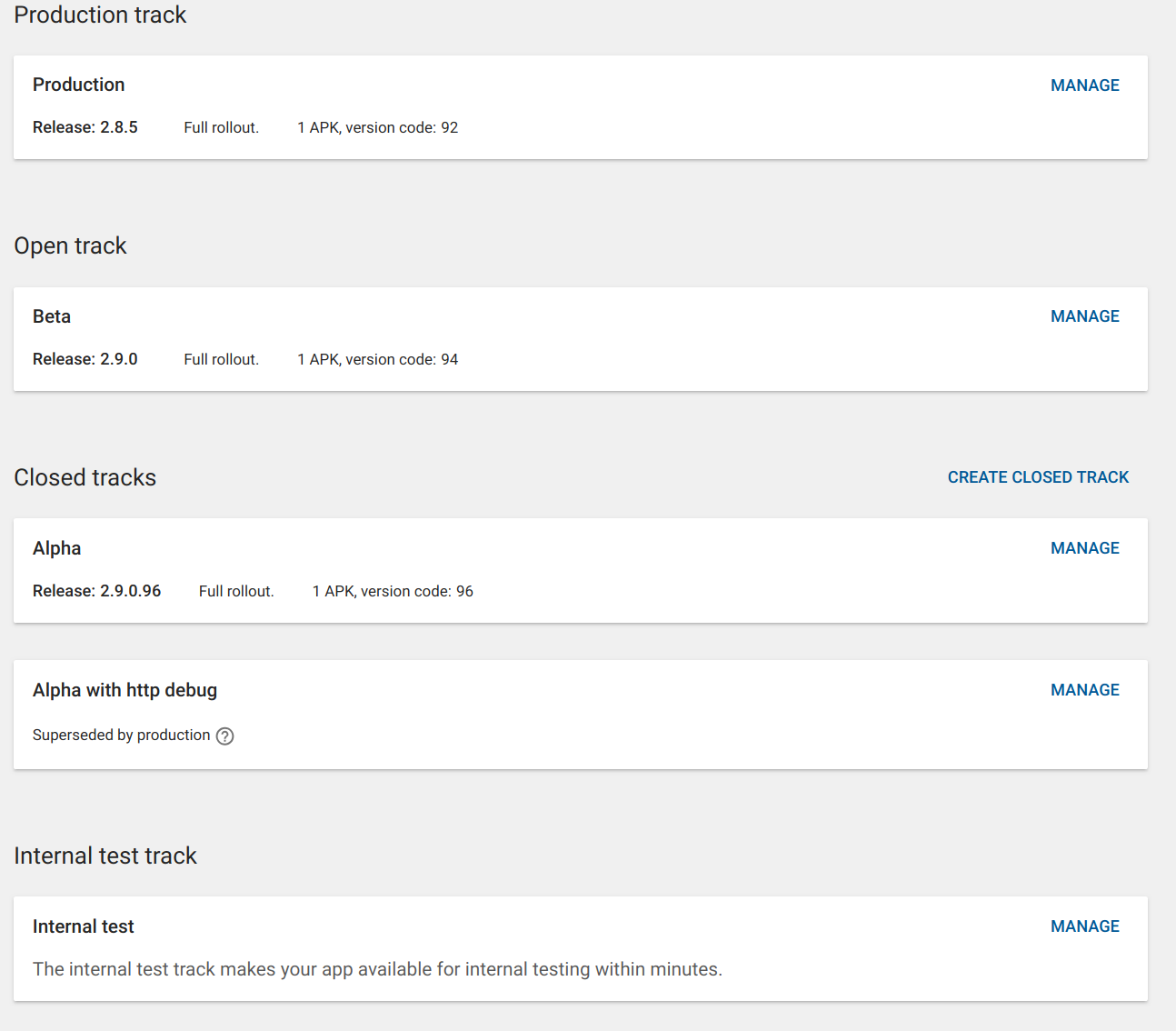
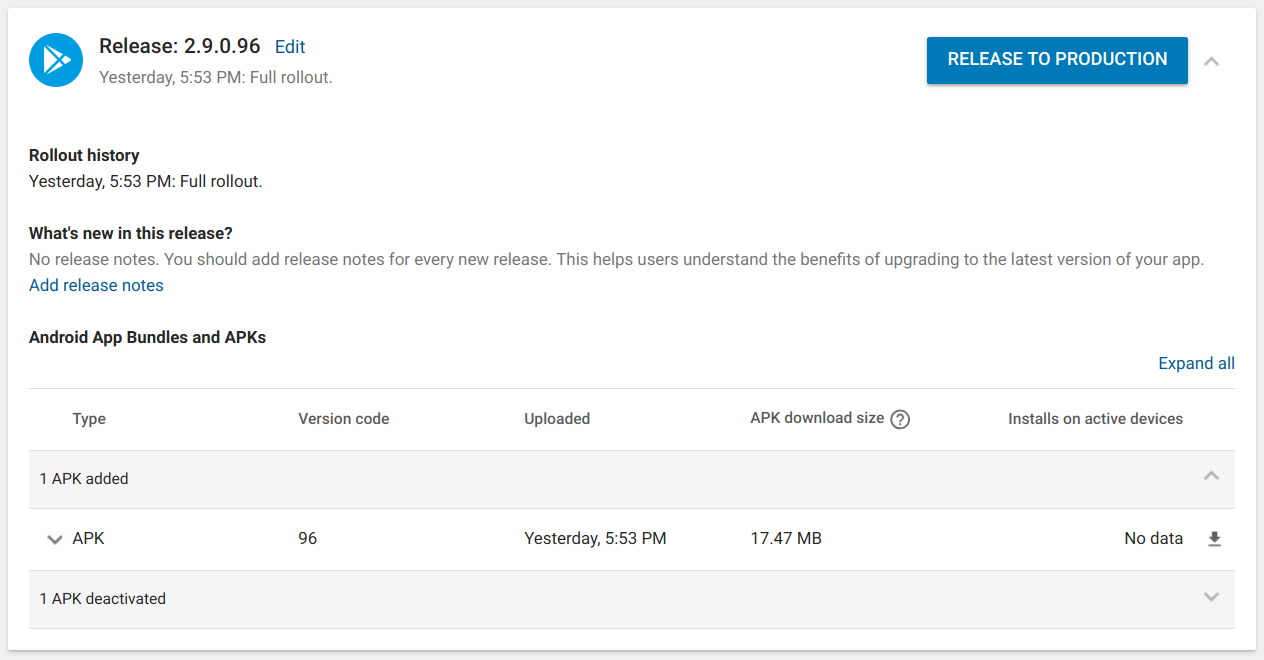
Clicking on "Alpha":
nicolas-raoul
on 15 Dec 2018
Awesome! So automatic releases work perfectly. Every time a commit is pushed to master, a new alpha release would be made automatically. :)
maskaravivek
on 15 Dec 2018
@nicolas-raoul Can you also verify if multiple alpha releases were made. After I integrated the Gradle play publisher yesterday, one more commit was made to master today. So ideally there should be 2 alpha releases.
@misaochan I suppose we will have to manually append the versionCode when we are making beta releases. After an automatic release, our gradle file is not updated automatically to reflect the latest version code. (For eg. our gradle file still has 94 but the latest released version code is already 96.)
maskaravivek
on 15 Dec 2018
I see only what the screenshots show. 😓
On Sun, Dec 16, 2018, 00:54 Vivek Maskara <[email protected] wrote:
@nicolas-raoul https://github.com/nicolas-raoul Can you also verify if
multiple alpha releases were made. After I integrated the Gradle play
publisher yesterday, one more commit was made to master today. So ideally
there should be 2 alpha releases.@misaochan https://github.com/misaochan I suppose we will have to
manually append the versionCode when we are making beta releases. After an
automatic release, our gradle file is not updated automatically to reflect
the latest version code. (For eg. our gradle file still has 94 but the
latest released version code is already 96.)—
You are receiving this because you were mentioned.
Reply to this email directly, view it on GitHub
https://github.com/commons-app/apps-android-commons/issues/1056#issuecomment-447578014,
or mute the thread
https://github.com/notifications/unsubscribe-auth/AAGFBukKXNh0eI40h8HAfllu3-0Bg0NUks5u5RtHgaJpZM4RajZ5
.
nicolas-raoul
on 15 Dec 2018
You can check the Archived artifacts in the Artifact library section. It would have an APK with version code 95 as well 96.
maskaravivek
on 15 Dec 2018
Ah sorry:

nicolas-raoul
on 16 Dec 2018
@nicolas-raoul Thanks for checking. :)
IMO, as an enhancement, we should also add release notes. Will create a new issue for it.
maskaravivek
on 16 Dec 2018
Strangely About still shows 2.9.0 I think I am not using the alpha despite belonging to the mailing list https://groups.google.com/d/forum/commons-alpha
Play Store notified me about an update this morning but tapping the update button did nothing special it seems.
Maybe I have to leave the beta so that alphas start coming?
nicolas-raoul
on 16 Dec 2018
@nicolas-raoul It seems that after joining the Google Group, users need to manually opt in for Alpha. Similar to beta, the play console would have a link that the users can use to opt it.

maskaravivek
on 16 Dec 2018
Oh you are right the URL is https://play.google.com/apps/testing/fr.free.nrw.commons

nicolas-raoul
on 16 Dec 2018
I am a member of https://groups.google.com/d/forum/commons-alpha and at https://play.google.com/apps/testing/fr.free.nrw.commons I see "You are a tester". I uninstalled then reinstalled, and it still got me 2.9.0.
Strangely the Google Play app tells me "You're a beta tester for this app. Awesome!" so something is definitely wrong.
nicolas-raoul
on 16 Dec 2018
I switched the alpha testers method to using email lists instead, just to see if that's the problem. I also deactivated the old (unused) alpha thread.
For the long term Google Groups would be ideal (because AFAIK people can join that without me manually adding them), but for now this will help us figure out what the problem is. If anyone wants to help solve this, feel free to post your email and I'll add you.
misaochan
on 16 Dec 2018
Thanks for adding me to the list, still 2.9.0 here, I will check again tomorrow.
If it still does not work it might be worth posting a question on StackOverflow explaining the whole thing.
nicolas-raoul
on 16 Dec 2018
I signed myself up for alpha testing and downloaded the app from Play Store. Testing Nearby shows "search this area" when I move the map. This means that I am actually using an automated release from master branch, because that feature #2051 does not exist in the real 2.9.0. :)
So what this means is that:
- It works!!! Yay!!!!
- About shows the wrong version name. Should we fix that?
- Users need to be reminded that it's normal for them to see "You're a beta tester for this app. Awesome!" in the app listing even if they are an alpha tester. I think it's a Play Store bug. We can ask around but I doubt it will ever say "alpha tester".
- Once others (@maskaravivek and @nicolas-raoul ) can confirm that this works for them, we should try switching back to using a google group so people can join by themselves.
misaochan
on 16 Dec 2018
I also have that "search this area" :-)
nicolas-raoul
on 16 Dec 2018
Going smoothly now :-) (the bottleneck just being Google Play which takes time to roll out releases)

nicolas-raoul
on 18 Dec 2018
I made the switch to Google Groups using the address [email protected] . I am a bit worried though, because I was not able to search for that address in the dev console (whereas our other google group addresses were searchable). If someone who wasn't in the list (maybe @ashishkumar468 or @neslihanturan ) could join the group and see if the alpha works for them, that would be great.
misaochan
on 18 Dec 2018
I've tried joining the alpha group - was in the beta previously, which I've now left. While Google Play says I'm a tester I think I've still got the beta as none of the recent changes seem to present in the app.
EDIT - Just tried waiting a bit longer and reinstalling. On alpha now
Just to confirm, is the process?
- Join the Google group at https://groups.google.com/forum/#!forum/commons-alpha
- Sign up to be a tester at https://play.google.com/apps/testing/fr.free.nrw.commons/join
 domdomegg
on 18 Dec 2018
domdomegg
on 18 Dec 2018
Yes, that is the process. :) Does it work for you? You would likely not have the LATEST change (releases take a few hours to propagate) but you should have "Search this area" when you go to a new place on the Nearby map.
misaochan
on 18 Dec 2018
Yep, all working here.
Interestingly, ARCA does know what build I'm using (2.9.0.113) so it must be possible to get it on the about page.
domdomegg
on 18 Dec 2018
Fantastic! Thanks @domdomegg . :)
misaochan
on 19 Dec 2018
Hmm, #3976, as beta is same as main (Play Store version), might as well make alpha beta. I.e., instead of three things, two of which are the same... Just offer two things, on Play store.
 jidanni
on 23 Oct 2020
jidanni
on 23 Oct 2020
Beta is not always the same as production, as I mentioned. Alpha and beta serve 2 different purposes, beta is tested by thousands of users and is already mostly stable (we are just ferreting out the final few bugs), alpha is tested by very few users who have been warned that it may be unstable.
misaochan
on 26 Oct 2020
Related issues
misaochan
·
4Comments
 madhurgupta10
·
4Comments
madhurgupta10
·
4Comments
 neslihanturan
·
3Comments
nicolas-raoul
·
3Comments
maskaravivek
·
3Comments
neslihanturan
·
3Comments
nicolas-raoul
·
3Comments
maskaravivek
·
3Comments
Most helpful comment
We have some good news. We now have the service account setup on play store and can now make alpha releases automated. :)
Thanks to @dbrant and @misaochan for making this happen.
I am finishing up the app side changes and am also doing the CI setup. I and @misaochan will test the whole flow once everything is setup.