Apps-android-commons: Keypad overlaps on Wikimedia Commons policies Link
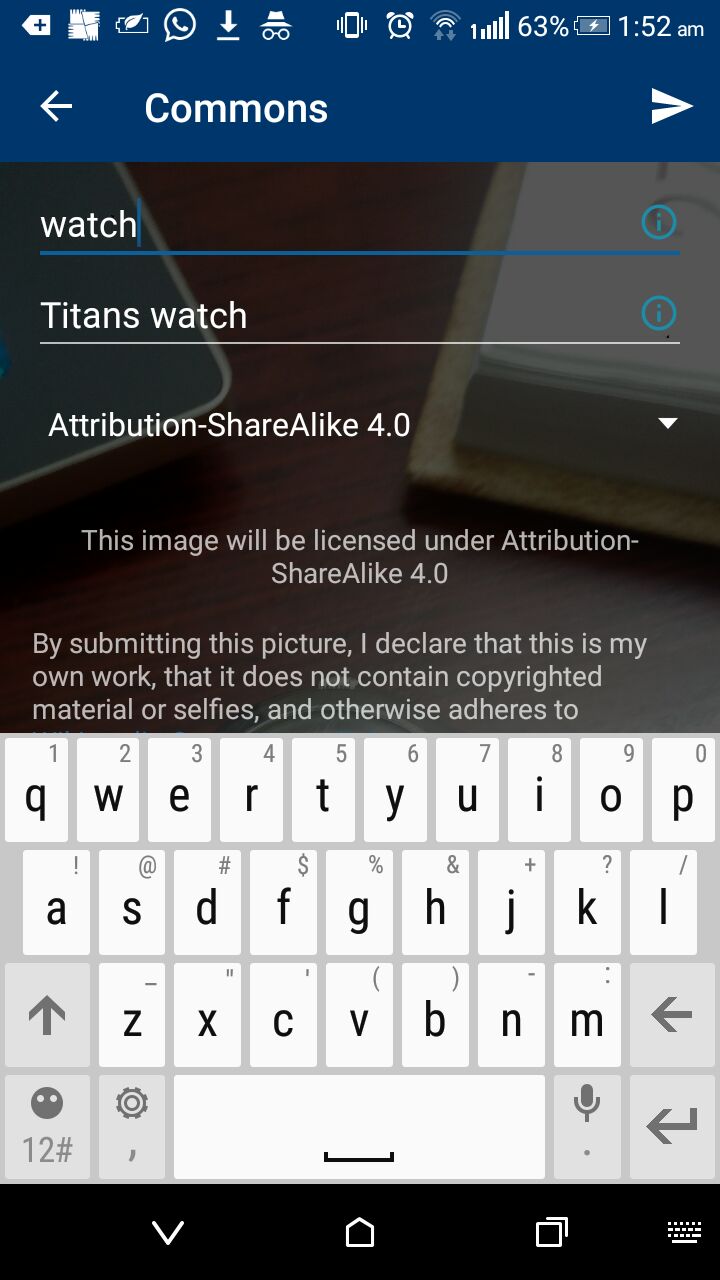
The keypad in the Commons Activity overlaps with the Wikimedia Commons Links .
 tanvidadu
All 11 comments
I will like to work on the issue.
tanvidadu
on 2 Jan 2018
@tanvidadu , thanks:)
 neslihanturan
on 3 Jan 2018
neslihanturan
on 3 Jan 2018
@tanvidadu Any progress? :-) How do you plan to fix it?
 nicolas-raoul
on 10 Jan 2018
nicolas-raoul
on 10 Jan 2018
Can I start working on this issue #1041?
 mithlesh4257
on 10 Jan 2018
mithlesh4257
on 10 Jan 2018
There is only one way fix this.
Sir @nicolas-raoul I have to keep the button ("USE PREVIOUS TITLE/DESCRIPTION") below of the TextView containing Wikimedia Commons policies.
It might work but not the best solution.
mithlesh4257
on 10 Jan 2018
Actually after re-reading this I am not sure what @tanvidadu is trying to achieve.
To me, it seems unavoidable that part of the screen is hidden when the keyboard is visible.
@tanvidadu could you please explain a bit more? Thanks!
nicolas-raoul
on 10 Jan 2018
Sir @nicolas-raoul , I have an idea , If I adjust the views I can be able to make the user to see the links.
One of the possible way is to
- Bring the spinner to the top
- Bring the TextView containing Attribution text to just below of spinner
- Bring the Button to bottom.
This might be helpful. Is it ?
mithlesh4257
on 10 Jan 2018
Sorry for not being a little specific earlier. We can adjustResize the Xml components each time the keypad is opened so the Wikimedia Commons policies Links is visible.
Please refer these resources
https://android-developers.googleblog.com/2009/04/updating-applications-for-on-screen.html
https://stackoverflow.com/questions/3295672/android-soft-keyboard-covers-edittext-field
tanvidadu
on 10 Jan 2018
Not being able to see the field you are typing in would be a problem, but I don't see why the keyboard overlapping the policy link is a problem.
We can not show everything at all times, otherwise things will become painful for people with very small screens.
nicolas-raoul
on 11 Jan 2018
I think we can close this.
 ujjwalagrawal17
on 7 Aug 2018
ujjwalagrawal17
on 7 Aug 2018
Closing per https://github.com/commons-app/apps-android-commons/issues/1041#issuecomment-356782907
 sivaraam
on 10 Apr 2020
sivaraam
on 10 Apr 2020
Related issues
 misaochan
·
4Comments
misaochan
·
4Comments
misaochan
·
4Comments
misaochan
·
4Comments
 Saral-code
·
3Comments
Saral-code
·
3Comments
 psh
·
3Comments
misaochan
·
3Comments
psh
·
3Comments
misaochan
·
3Comments
Most helpful comment
Not being able to see the field you are typing in would be a problem, but I don't see why the keyboard overlapping the policy link is a problem.
We can not show everything at all times, otherwise things will become painful for people with very small screens.