Apps-android-commons: Category search sometimes hangs
The spinner spins forever. I can continue typing or even delete the whole field's text, it does not stop spinning and zero suggestions appear.
Second time today.
 nicolas-raoul
All 33 comments
I've noticed this for quite a long time, too (though I didn't report it because I thought it was my faulty connection - oops).
 misaochan
on 26 May 2017
misaochan
on 26 May 2017
Today I uploaded about 10 pictures, and this bug happened 3 times. Despite a good connection.
nicolas-raoul
on 25 Jun 2017
Yeah, we should probably look into this. Still happens occasionally for me too.
misaochan
on 25 Jun 2017
It happens to me very often too. I worked on it today but it it very random and hard to debug. Anyway I think I will figure it out until tonight
 neslihanturan
on 25 Jun 2017
neslihanturan
on 25 Jun 2017
Reposting from neslihan's PR:
I can't be sure, but I don't think the issue is caused by typing fast. The reason is that I never "type" on my phone - I use Swype (Samsung feature), which brings up the entire word instantly, not letter-by-letter. Yet I have experienced this issue sometimes.
My suspicion is that this happens when we search for a category that doesn't exist. Then it stays stuck forever even after clearing the search or initiating a new search. But this needs more testing to confirm it. @nicolas-raoul what about you, do you notice a pattern with its occurrences for you?
misaochan
on 26 Jun 2017
I have not noticed any particular pattern.
I often search for categories that do not exist, for instance I try "Microscopes in Ueno museum" then "Microscopes in Ueno" then "Microscopes in Tokyo" then "Microscopes in Japan".
In the screenshot below, I just typed "kotta".

nicolas-raoul
on 27 Jun 2017
After several tests, I am pretty much sure about the reason:
On every filter input changes, a new async task is working to update category results. When a new input comes (very fast) and the old one is still not ready (because of api call), we cancel old thread because we don't need its results any more (instead, we need results for new input). However, cancelling a thread doesn't kill the network operation. So, if network operation hangs, new tasks in the pool can't never run.
The solution is interrupting the network call on thread is cancelled. However, our api call code is quite unfamiliar to me, there is no request object and I couldn't find a way to get it (to cancel later). We just have one singletone api object and a client. So, I don't know how to cancel api call. Maybe there is a way to set timeout.
Related classes are PrefixUpdater and MethodAUpdater and MWApi (class written by @addshore maybe he knows) Does anyone has an idea about it @nicolas-raoul @misaochan @whym ?
neslihanturan
on 29 Jun 2017
I managed to get a logcat: https://gist.github.com/nicolas-raoul/d7ee9a85d82bb60e93bfbda11b7cb42f
(reproduced via app's gallery button)
nicolas-raoul
on 1 Jul 2017
Thanks for the logs, do you have a comment about it? We already handle the io interrupted exceptions in the code. So I still think the reason is api call hanging. Even if we manage our threads in the pool (actually we already do) it will hang anyway. We need to find a way to abort api call or fix root cause of api call hanging (I don't know it yet).
neslihanturan
on 1 Jul 2017
Sorry I don't have much more to add :-/
Is there is anything I can test please let me know.
On Sat, Jul 1, 2017 at 7:57 PM, neslihanturan notifications@github.com
wrote:
Thanks for the logs, do you have a comment about it? We already handle the
io interrupted exceptions in the code. So I still think the reason is api
call hanging. Even if we manage our threads in the pool (actually we
already do) it will hang anyway. We need to find a way to abort api call or
fix root cause of api call hanging (I don't know it yet).—
You are receiving this because you were mentioned.
Reply to this email directly, view it on GitHub
https://github.com/commons-app/apps-android-commons/issues/667#issuecomment-312425443,
or mute the thread
https://github.com/notifications/unsubscribe-auth/AAGFBt6RKRI23tJVyGkSJusCjIMv4iYFks5sJiYFgaJpZM4Nhkqt
.
nicolas-raoul
on 1 Jul 2017
Sorry @neslihanturan , have been a bit busy this weekend, and I don't have an easy answer to the problem unfortunately. Will take a closer look at the relevant code when I can.
misaochan
on 1 Jul 2017
I have some good news for you. I found a way to get request per task by editing @yuvipanda 's codes at org.mediawiki.api and in.yuvi.http.fluent so that I can abort requests. According to my tests, it solved the issue, my mind is free now :).
I edited related codes to access httpRequest objects. Is there any other software that uses these codes? Can we edit them freely @yuvipanda ?
If so, I will create a pull request which includes these edited codes locally (for test). If everyone verifies that the pr solves the bug, then I will create pull requests with needed changes to @yuvipanda 's codes and again to commons app.
neslihanturan
on 2 Jul 2017
Instead of trying to directly edit the imported libraries, why not subclass it and override the method instead, then call your new method? AFAIK directly editing imported libraries is generally not recommended (and in fact IIRC Android Studio purposely makes it difficult to do so, you have to do a workaround to make sure that it doesn't revert to its pre-edited state whenever a build is run). What do you guys think?
misaochan
on 3 Jul 2017
Because we need to access to a non public variable inside library. How could I get it without editing ?
neslihanturan
on 3 Jul 2017
However, I will check it again today with subclassing :)
neslihanturan
on 3 Jul 2017
I think subclasses do not need public access per se, they can access protected variables, and usually there should be a getter method that removes the need to access the variable directly. Let me know how you get on. :)
misaochan
on 3 Jul 2017
Meanwhile I did more testing. I believe that the problem is triggered or not by whether you type in the first few seconds after the categories screen appears.
- After the categories screen appears, type immediately 8 characters -> hangs
- After the categories screen appears, Wait a bit, then type like crazy, erase like crazy, all in all maybe 200 characters at fast pace -> no problem
nicolas-raoul
on 4 Jul 2017
Hi everyone, it seems like we are stuck at solution of this very important bug. This happens very often and probably triggers #738 . On the other hand, related discussions get very complicated.
To summarize:
- The solution I proposed is #749 . This solves the problem as we tested it. However, because I have imported 6 classes from our libraries and edit them locally, it is very bad programming.
- Another solution comes from @tised is #767 . Very clean code, however seems like doesn't solve our issue.
- Lastly, in Guava thread #662 , we talked it may fix the issue. But there is no fix yet as far as I can follow.
It gets complicated to follow conversations about this issue. I think it is better if we can decide and focus on a solution and solve the issue as fast as possible.
neslihanturan
on 19 Jul 2017
My suggestion to use the Rx 'debounce' operator just deals with slowing down the rate at which API calls are made. Without using Rx or any other 3rd party code, you could just as easily say
    private class CategoryTextWatcher implements TextWatcher {
        private Timer debounceTimer = null;

        @Override
        public void onTextChanged(CharSequence s, int start, int before, int count) {
            if (debounceTimer != null) {
                debounceTimer.cancel();
            }
            debounceTimer = new Timer();
            debounceTimer.schedule(new TimerTask() {
                @Override
                public void run() {
                    getActivity().runOnUiThread(new Runnable() {
                        @Override
                        public void run() {
                            // Don't call to refresh the list until 100 milliseconds after the last
                            // change happens in the edit text thereby throttling the rate
                            // at which API calls are made.
                            startUpdatingCategoryList();
                        }
                    });
                }
            }, 100);
        }

        @Override
        public void beforeTextChanged(CharSequence s, int start, int count, int after) {}

        @Override
        public void afterTextChanged(Editable editable) {}
    }
This would address concern from @misaochan over the number of async tasks that get spun up. It throttles how quickly calls are made, but it doesn't address the underlying issue of cancelling calls that are in progress. The question is, if you throttle the input side of the equation, do you need to make all the changes to cancel calls in flight?
 psh
on 19 Jul 2017
psh
on 19 Jul 2017
I think the proposed solution by @psh is worth a try to see if it fixes the problem. If it doesn't, I am happy to merge #749 after testing, as @nicolas-raoul has confirmed that there are no copyright issues with doing so.
misaochan
on 20 Jul 2017
If you don't mind, i'd like to get on and try to solve this issue.
👍 ?
 akaita
on 3 Aug 2017
akaita
on 3 Aug 2017
Sure, everyone will be very happy. :)
neslihanturan
on 3 Aug 2017
I see the issue. Will fix it.
I'm not sure about the expected behaviour, though.
I would expect the behaviour to be:
- if there are categories which start with the entered term, show them
- if there are NO categories which start with the entered term, show categories with similar terms
- if the user has already chosen a number of terms, those are shown at the top of the list. Other suggestions are shown under those "already selected terms"
👍 ?
akaita
on 3 Aug 2017
Maybe, additionally:
- if no term is entered:
- show most popular terms in the user's other uploads, ordered by most recent
- if the previous doesn't yield 25 results, add category suggestions for the search: ""
akaita
on 3 Aug 2017
I think currently, it works same as in your comments. I am just not sure about completing them to 25 result (it is kind to recognize without reading code). However this behavior is also good for me. I can only add:
- If there is no related terms (let's say input fghvdfhhgfd) it displays an informative text.
neslihanturan
on 4 Aug 2017
(If the functionality changes, you might want to discuss this in a new "enhancement" issue. This bug fix should probably not change the way stuff works for the user.)
 janpio
on 4 Aug 2017
janpio
on 4 Aug 2017
What the app currently does:
- When no term is entered, displays 3 types of suggestions:
- Location-based category suggestions - see https://github.com/commons-app/apps-android-commons/wiki/Category-suggestions-%28readme%29
- Recent categories selected by user
Suggestion based on the title of the file that user typed in #43
When a term is entered, categories are shown based on the entered term. I don't think the displayed categories are only those that 'start' with the term, though those are more common.
I would expect the behaviour to be:
if there are categories which start with the entered term, show them
if there are NO categories which start with the entered term, show categories with similar terms
if the user has already chosen a number of terms, those are shown at the top of the list. Other suggestions are shown under those "already selected terms"
Sounds about right. Be careful to make sure that the chosen terms from (1) continue to be displayed at the top even when the user types stuff in (2) and vice versa.
For progressive changes I would recommend keeping the existing functionality and just changing the thread handling to prevent this bug. Then further PRs can improve functionality if desired.
misaochan
on 4 Aug 2017
Thanks @neslihanturan .
I'll implement this behaviour, then. Anyway, I'll keep in mind that this is an area that will keep evolving.
btw: the issue doesn't replicate anymore in my code. I just have to refactor that area in order to make sure it behaves as expected :)
akaita
on 4 Aug 2017
@misaochan my issue here is that the current behaviour is not clear to me...
- I understand you say the results from (1) will always be shown at the top of the list, regardless of what the user's search?
- How are the results of (1) meant to be ordered? Alphabetically?
akaita
on 4 Aug 2017
I understand you say the results from (1) will always be shown at the top of the list, regardless of what the user's search?
The selected terms from (1) will, yes. Not all the results. Do you use the app to upload files currently? If not, I'd strongly recommend trying it out to get a feel of it. Running a file upload with logcat should show you which types of category search results are being displayed, etc.
How are the results of (1) meant to be ordered? Alphabetically?
They are ordered in the way that the API returns them, I believe.
misaochan
on 4 Aug 2017
When I ask about the ordering, I mean that there are three sources of information for (1). When those three sources are merged, the result could be ordered...
akaita
on 4 Aug 2017
To remove the confusion: I also think we shouldn't change the behaviour @akaita . Thanks for noting that @janpio . I am really glad that the issue isn't occurred in your code anymore, thanks @akaita . I am ready to test it whenever the PR is ready.
Regarding to the issue about order of (1), I couldn't test geo-tagged ones since I don't have any geo-tagged photos currently. But for others:
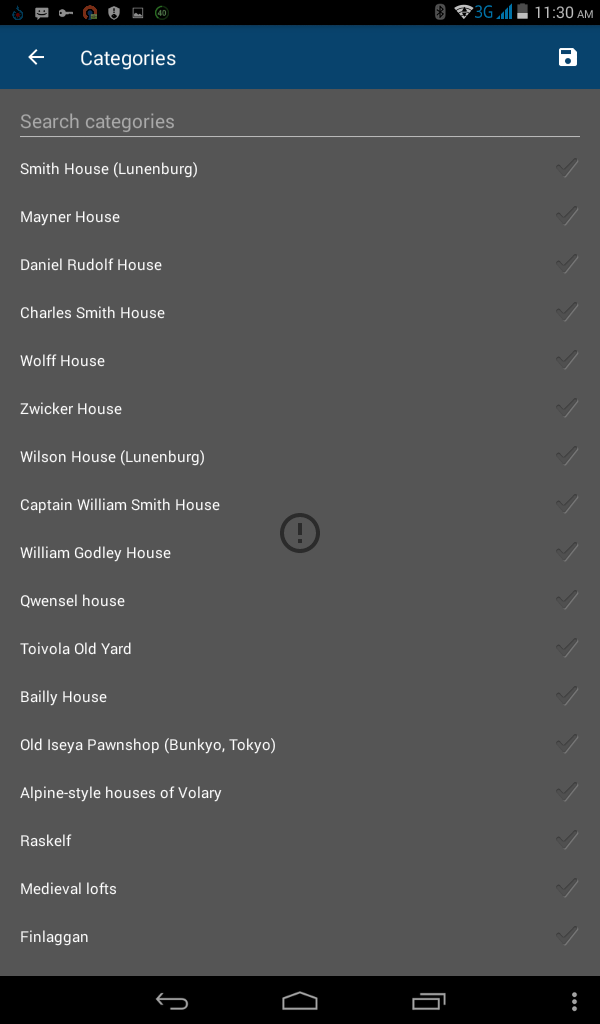
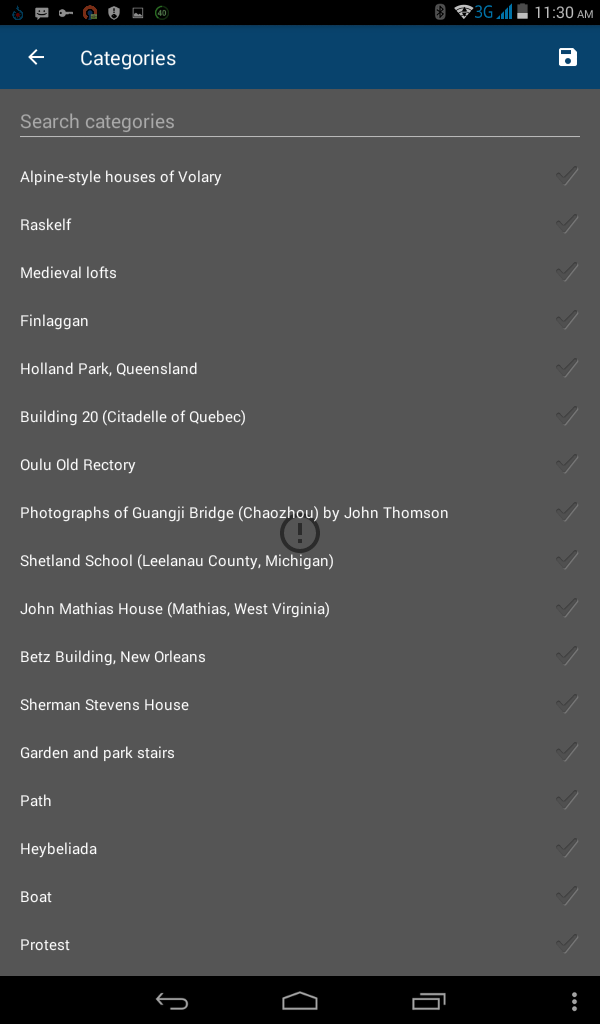
My title was "old wooden house", so we can say that "suggestion based title comes first". Last 5 item are from my previous uploads.
neslihanturan
on 4 Aug 2017
These explanations help a lot. Thanks @misaochan !
akaita
on 4 Aug 2017
Related issues
misaochan
·
3Comments
neslihanturan
·
3Comments
 madhurgupta10
·
3Comments
nicolas-raoul
·
4Comments
psh
·
4Comments
madhurgupta10
·
3Comments
nicolas-raoul
·
4Comments
psh
·
4Comments
Most helpful comment
Sure, everyone will be very happy. :)