Apps-android-commons: Modify categories/description afterwards
Scenario:
- I upload a picture
- I write description/categories
- After a few days, I realize that the description and categories are partly erroneous
- I click on the picture in the gallery, and can see the description and categories
- NEW: I can fix my errors
I actually have this need quite often.
 nicolas-raoul
All 44 comments
Sounds like a great idea to me. I wonder how feasible this is from a technical standpoint?
 misaochan
on 10 Jul 2017
misaochan
on 10 Jul 2017
Hopfully the title/description activity and the categories activity can be reused (with current data retrieved from Commons and preset)?
nicolas-raoul
on 10 Jul 2017
The technical issue I was wondering about is that I think modifying a description is different from submitting a new image with a description (which is what the current title/desc activity does). Categories are unlikely to be an issue since the app handles them via a modification to the original upload anyway (although I'm still not sure exactly how the modification works).
misaochan
on 10 Jul 2017
Great, I too was thinking about this.
I would love to work on this; I am done with previous tasks. I'll be coming back here to ask you guys for guidance/help and updates :-)
A very basic Design just to demonstrate:
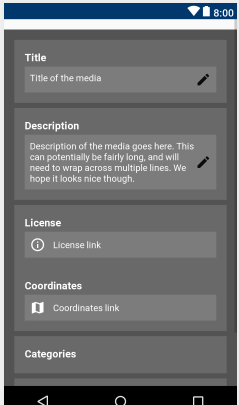
Also, should editing Title should be allowed?
 hismaeel
on 2 Mar 2018
hismaeel
on 2 Mar 2018
@hismaeel Thanks a lot, I will really use this feature a lot after you implement it, I need it very often.
I suggest skipping Title for now, because normal users can not do it, and might be replaced with "caption" when Structured Commons comes. More at
nicolas-raoul
on 2 Mar 2018
The mockup looks great to me. :) I think only description and categories should be modifiable for the time being? Also if I may nitpick a bit, the pencil icon colour feels slightly jarring to me, perhaps a lighter grey would be preferable..
misaochan
on 2 Mar 2018
Oh yup. I just quickly placed a provided icon just to demonstrate
hismaeel
on 2 Mar 2018
I am facing some issues while working on this feature.
So far I have achieved:
| 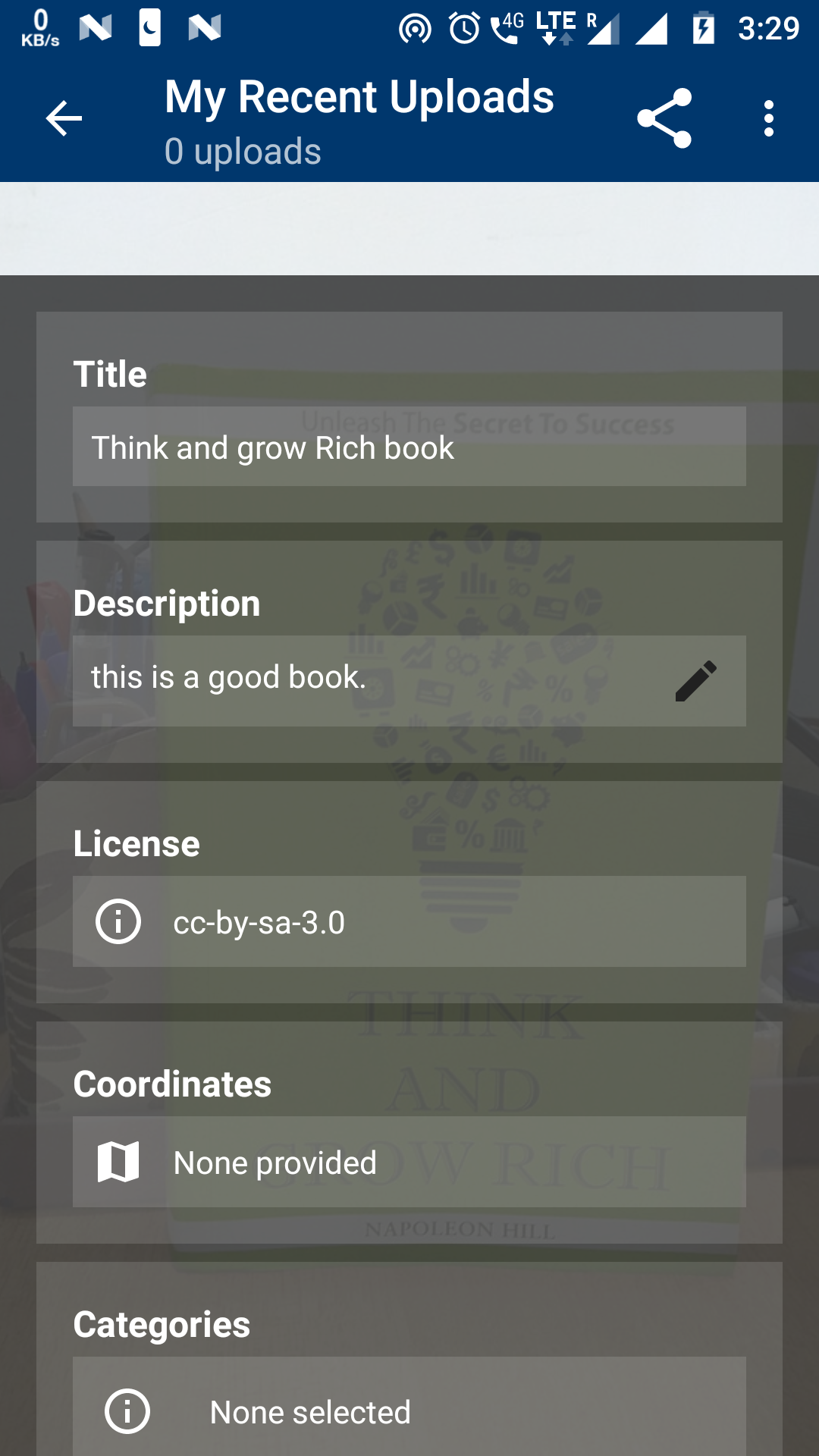 | 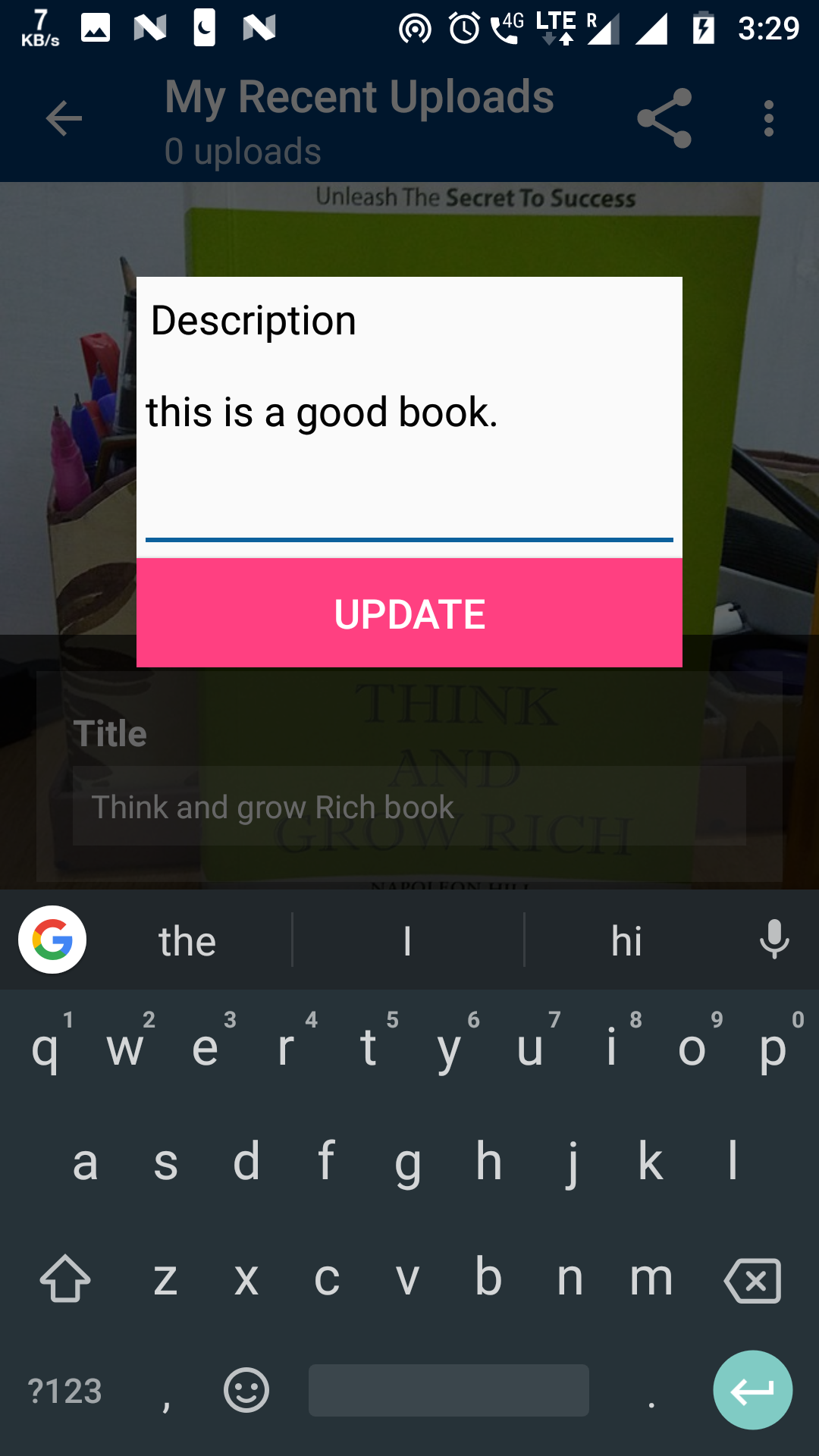 |
I am planning to use https://www.mediawiki.org/wiki/API:Edit for editing description.
I am facing some issues in getting edit Token.
Also, I want to know whether I am using the correct API or not, UI is good or we need to make a new fragment instead of dialog.
Log:
03-07 03:42:00.514 15963-15963/fr.free.nrw.commons.debug E/AndroidRuntime: FATAL EXCEPTION: main
Process: fr.free.nrw.commons.debug, PID: 15963
android.os.NetworkOnMainThreadException
at android.os.StrictMode$AndroidBlockGuardPolicy.onNetwork(StrictMode.java:1317)
at com.android.org.conscrypt.Platform.blockGuardOnNetwork(Platform.java:300)
at com.android.org.conscrypt.OpenSSLSocketImpl.shutdownAndFreeSslNative(OpenSSLSocketImpl.java:1194)
at com.android.org.conscrypt.OpenSSLSocketImpl.close(OpenSSLSocketImpl.java:1189)
at org.apache.http.impl.SocketHttpClientConnection.shutdown(SocketHttpClientConnection.java:188)
at org.apache.http.impl.conn.DefaultClientConnection.shutdown(DefaultClientConnection.java:155)
at org.apache.http.impl.conn.AbstractPooledConnAdapter.shutdown(AbstractPooledConnAdapter.java:174)
at org.apache.http.impl.conn.AbstractClientConnAdapter.abortConnection(AbstractClientConnAdapter.java:383)
at org.apache.http.impl.client.DefaultRequestDirector.abortConnection(DefaultRequestDirector.java:1045)
at org.apache.http.impl.client.DefaultRequestDirector.execute(DefaultRequestDirector.java:544)
at org.apache.http.impl.client.AbstractHttpClient.execute(AbstractHttpClient.java:592)
at org.apache.http.impl.client.AbstractHttpClient.execute(AbstractHttpClient.java:514)
at org.apache.http.impl.client.AbstractHttpClient.execute(AbstractHttpClient.java:492)
at in.yuvi.http.fluent.Http$HttpRequestBuilder.asResponse(Http.java:470)
at org.mediawiki.api.ApiResult.fromRequestBuilder(ApiResult.java:44)
at org.mediawiki.api.MWApi.makeRequest(MWApi.java:186)
at org.mediawiki.api.MWApi.access$000(MWApi.java:30)
at org.mediawiki.api.MWApi$RequestBuilder.get(MWApi.java:46)
at org.mediawiki.api.MWApi.getEditToken(MWApi.java:174)
at fr.free.nrw.commons.mwapi.ApacheHttpClientMediaWikiApi.getEditToken(ApacheHttpClientMediaWikiApi.java:196)
at fr.free.nrw.commons.media.MediaDetailFragment.updateDescription(MediaDetailFragment.java:445)
at fr.free.nrw.commons.media.MediaDetailFragment.lambda$showEditDiscriptionDialog$4$MediaDetailFragment(MediaDetailFragment.java:430)
at fr.free.nrw.commons.media.MediaDetailFragment$$Lambda$5.onClick(Unknown Source)
at android.view.View.performClick(View.java:5640)
at android.view.View$PerformClick.run(View.java:22455)
at android.os.Handler.handleCallback(Handler.java:751)
at android.os.Handler.dispatchMessage(Handler.java:95)
at android.os.Looper.loop(Looper.java:154)
at android.app.ActivityThread.main(ActivityThread.java:6165)
at java.lang.reflect.Method.invoke(Native Method)
at com.android.internal.os.ZygoteInit$MethodAndArgsCaller.run(ZygoteInit.java:888)
at com.android.internal.os.ZygoteInit.main(ZygoteInit.java:778)
Would be great if you could help.
 ujjwalagrawal17
on 6 Mar 2018
ujjwalagrawal17
on 6 Mar 2018
Well...Please ask next time before starting to work an issue :-)
hismaeel
on 7 Mar 2018
Well it seems @hismaeel was already working on this issue! @hismaeel have you made progress on this task and would like to continue?
@ujjwalagrawal17 We will have to assign the task to @hismaeel if he is still willing to complete it, as he came up with the initial mock ups and was already working on it.
It was a miss on our part that we didn't put a assigned label to this task. :(
 maskaravivek
on 7 Mar 2018
maskaravivek
on 7 Mar 2018
Yup, assigned label would've helped :-) I Haven't made any progress because it's mid-terms week at my uni. I thought of working on it next week which which is off.
@ujjwalagrawal17 can continue though seems he's put good work in it!
Best
hismaeel
on 7 Mar 2018
Awesome thanks for the update @hismaeel!
Feel free to pick up other tasks after your mid-terms. :)
@ujjwalagrawal17 Am assigning this task to you.
maskaravivek
on 7 Mar 2018
@ujjwalagrawal17 I am not very sure about this error but try doing this check before making your API call.
mediaWikiApi.validateLogin()
You can check out the sample usage in NotificationController#getNotifications
maskaravivek
on 7 Mar 2018
@hismaeel Sorry I forgot to comment that I am starting working on this issue.
@maskaravikas ok I will check it.
ujjwalagrawal17
on 7 Mar 2018
Guys, please don't rely solely on the "assigned" tag. :( We will put up the tag wherever possible to help (because it's easier to tell at a cursory glance that an issue is already taken), but the discussion on the thread is still visible to everyone. If someone has already presented a mockup and mentioned that they have started working on it, please at least ask first next time. If the last person working on it was inactive for, say, 1+ month, then it is somewhat understandable, but not 5 days.
(I'm not suggesting that we change anything here, since @hismaeel has already said that he's okay with passing the issue to @ujjwalagrawal17 and @maskaravivek has already changed the assignment, but just mentioning this for the future)
misaochan
on 7 Mar 2018
@misaochan Sorry for that I thought he is not working on the issue as there was no update in 5 days. I will take care of it from next time.☺️
ujjwalagrawal17
on 7 Mar 2018
Thanks @ujjwalagrawal17 . :)
misaochan
on 7 Mar 2018
Hi. It's been many days. Any progress? Can I take over this task from you @ujjwalagrawal17 ? :-)
hismaeel
on 25 Apr 2018
I was busy with my end semester exams. Exams will be finish day after tomorrow. But I will be working on featured image branch. So you can take this task.
ujjwalagrawal17
on 25 Apr 2018
Thanks @ujjwalagrawal17
hismaeel
on 25 Apr 2018
@hismaeel Do we have any updates on this? :)
misaochan
on 10 May 2018
Just got got finished with my finals. Will be working on it now. Sorry for the wait :-)
hismaeel
on 10 May 2018
Hi. I would love to do this but would need help; I can use edit from the API, but how can I get the description only? We can choose sections, summary being the one that has the description in it.
Also, why not update description of the media instance directly?
hismaeel
on 14 May 2018
Sorry, I'm not sure exactly what query to use, but it might be a good idea to take a look at the Modifications package. Currently categories are being submitted as a modification after the upload takes place, hence the code in that package. You can perhaps take a look at how the app currently handles that, and generalize that to this task.
Also, why not update description of the media instance directly?
What do you mean?
misaochan
on 17 May 2018
Oh I see. I can get the entire section using the API, parse it to get the description, edit, and pass the entire section edit request.
hismaeel
on 23 May 2018
Hello
I do not know how to get the edit working, or is the edit call broke? I wrote a python script to get the login token, login then, get edit token, and make an edit. I receive json responses of success, but cannot see any change in the actual page. The description is held in "section=1", but the api doesn't recognize it and says no such section exists,. That's why I have to pass section=0 but that's just the section that holds the image itself!! Please does anyone know how to get the edit call working correctly? I cannot find any info at all online. Here is my script:
import requests
import json

s = requests.Session()
dataObj = {
    'action': 'query',
    'meta':'tokens',
    'type': 'login',
    'format': 'json'
}
response = s.post('https://en.wikipedia.org/w/api.php', data=dataObj).json()
token = response['query']['tokens']['logintoken']


dataObj = {
    'action': 'login',
    'lgname':'my_username',
    'lgpassword': 'my_password',
    'format': 'json',
    'lgtoken': token
}

response = s.post('https://en.wikipedia.org/w/api.php', data=dataObj).json()
dataObj = {
    'action': 'query',
    'meta':'tokens',
    'format': 'json'
}

response =s.post('https://en.wikipedia.org/w/api.php', data=dataObj).json()
token = response['query']['tokens']['csrftoken']

dataObj = {
    'action': 'edit',
    'title':'File:Grand Avenue 2.jpg',
    'section': 'new',
    'summary': 'first edit',
    'text': 'new description this is',
    'format': 'json',
    'token': token
}

response = s.post('https://en.wikipedia.org/w/api.php', data=dataObj).json()
print (response)
#get success messages throughout
@whym @maskaravivek any thoughts on this?
misaochan
on 6 Jun 2018
Isn't it possible to use one of the MediaWikiApi methods we already have rather than working with the JSON level? We have MediaWikiApi.edit(). (The implementation is in ApacheHttpClientMediaWikiApi but we use MediaWikiApi to inject it.) It is used in DeleteTask which can be an example for you. Does this work for you? Or is it different from what you have in mind?
Section-wise editing might be slightly better because it sends and receives a smaller chunk of text, but unless we are dealing with really long pages, I don't think the difference would be huge. We are normally dealing with file pages here and there is hardly a page with >10kB of text among them.
 whym
on 6 Jun 2018
whym
on 6 Jun 2018
Alright so I tried it but with no effect. I still think section editing muight be the only option. The description is in that sinppet-thing which is in section 1, and if I edit a photo on the commons website, the url points to section 1.

But unfortunately the api always returns "no such section" when I pass it section 1. Also, to get the actual page content, when I run the revisionsByFilename() which does an api query call with "prop=revisions", I get a 'pages: -1' answer indicating that no results were found.
Also, when I try the call: action = parse, page=PageName, prop=sections, to get the information on any sections of the image page, I get a result of "The page you specified doesn't exist.". This call (as do most other) works smooth with wiki articles, but not "picture pages".
If anyone of you developers can just provide a sample API call that successfully edits the description of a picture-page, then implementing the feature is no problem. I think I might be missing some conventions, or maybe the API behaves differently for photos?
ps: sorry for the late replies. I am free from college now and available to contribute.
Thanks
hismaeel
on 24 Jun 2018
I get a 'pages: -1' answer indicating that no results were found.
I could be wrong but it sounds as though you were giving a file name (page title) that doesn't exist on Wikimedia Commons. What was the value of filename in your trial? FYI,revisionsByFilename() expects "File:Metro_Glasgow_city.jpg" not "Metro_Glasgow_city.jpg".
As for sample code, does this help?
whym
on 27 Jun 2018
Yes @whym I give the same filename as you mention :-) Also, revisionsByFileName doesn't work with "File:Metro_Glasgow_city.jpg"; It keeps saying page doesn't exist. In fact any picture-page I try from commons gives me the same result.
I've been trying the same code you've linked above- By sample code I meant a sample use of the edit call on a picture-page. That'd be of great help
hismaeel
on 27 Jun 2018
Perhaps you are using the beta site? (You must be if you haven't changed the product flavor.) In that case you would have to use files on the beta site, e.g. https://commons.wikimedia.beta.wmflabs.org/wiki/File:CommonsAppTest_14.jpg . For product flavors please see https://github.com/commons-app/apps-android-commons/issues/916 .
whym
on 28 Jun 2018
Nope it's the commons website, and the pictures were uploaded through the actual release app. Still no luck; I see that with the base URL of https://commons.wikimedia.org/w/api.php, it does return the page content with these parameters:
action=query&titles=File:PICTURE_PAGE_NAME&prop=revisions&rvprop=timestamp|content
This is what the app does to retrieve content.
But still when I pass in this content (with a new description) as the text parameter of the edit call, I get success messages but with no change in the actual description.
As I keep mentioning, if anyone @whym @misaochan @maskaravivek can try the edit call and successfully change the description, and share the process with me, then that'll be cool. I think I am missing a convention; somewhere I read edits must be signed?!
hismaeel
on 10 Jul 2018
@hismaeel: I tried a very quick test on the beta site, which seemed successful.
- Add FileModifyTask.java
- Add an inject method to CommonsApplicationComponent for the class above
- Insert a call to FileModifyTask somewhere. I modified onDeleteButtonClicked of MediaDetailsFragment to use this instead of DeleteTask.
Here is an edit I did using it: https://commons.wikimedia.beta.wmflabs.org/w/index.php?title=File:CommonsAppTesting_7.jpg&diff=prev&oldid=104340.
If you decide to keep using the regular Commons website, one thing that might happen there is AbuseFilter. If your edit seems destructive (such as removing the information template), AbuseFilter might block it automatically. You can check whether there were blocked edits at https://commons.wikimedia.org/w/index.php?title=Special:AbuseLog&wpSearchUser=Hasismaeel5 and it seemed happen once in June 14. ("Warn" makes the edit fail, because the app doesn't allow the user to review and resubmit upon a warning - this is in fact something we would want to support, by the way: https://github.com/commons-app/apps-android-commons/issues/535.)
And no, signatures are not needed for file descriptions. They are for discussion pages such as pages with the "User talk:" prefix.
whym
on 10 Jul 2018
Oh I just checked again; I was looking at a different picture of mine. The base URL was my problem. So I tried:
'action': 'edit',
    'title': 'File:Grand Avenue 2.jpg',
    'token': token,
    'section': 1,
    'text': """== {{int:filedesc}} ==\n{{Information\n|description=This is a final final description for my file\n|source={{own}}\n|author=[[User:Hasismaeel5|Hasismaeel5]]\n|date={{According to EXIF data|2018-03-12}}\n}}\n\n== {{int:license-header}} ==\n{{self|cc-by-sa-3.0}}\n\n{{Uploaded from Mobile|platform=Android|version=2.6.7}}\n{{Uncategorized|year=2018|month=March|day=12}}""",
    'summary': "edited by commons app",
    'format': 'json'
And it all works! It workls on the regular commons app. Also it has to be section-wise editing because the description is in section 1.
@whym Thanks for your help :-)
I'll now move on to implement it.
hismaeel
on 11 Jul 2018
@hismaeel Any updates on this? Please let us know if you are still working on it (or interested in doing so). I would need to add this to our 2019 plans otherwise, as it is a fairly important feature. :)
misaochan
on 16 Aug 2018
My motivation is a bit down these days. Please go ahead and add it to your plans; I'll try to do it regardless but don't want to hang up your plans.
Thanks
hismaeel
on 16 Aug 2018
Is anyone working on this.
Shall i take up this issue if no one is working?
 cypherop
on 8 Feb 2019
cypherop
on 8 Feb 2019
@sp2710 Nobody is working on this it seems, thanks for noticing! Looking forward to your pull request :-)
nicolas-raoul
on 9 Feb 2019
AFAIK, this is part of the IEG 2019 grant task.
@misaochan Can confirm if it can be assigned to someone else or should be left for the grant.
maskaravivek
on 9 Feb 2019
Yes, this is part of the IEG 2019 grant. AFAIK it isn't against policy if a volunteer really wants to do it, but it is probably advisable to choose a different task instead, @sp2710 , so that we get more new features done. :)
misaochan
on 10 Feb 2019
Sure @misaochan
I will try my hands on other tasks. :)
cypherop
on 10 Feb 2019
My shared design is related with this task too: #2881
 neslihanturan
on 15 Apr 2019
neslihanturan
on 15 Apr 2019
Closed in #3851 .
misaochan
on 17 Aug 2020
Related issues
 madhurgupta10
·
3Comments
nicolas-raoul
·
4Comments
madhurgupta10
·
4Comments
neslihanturan
·
3Comments
neslihanturan
·
3Comments
madhurgupta10
·
3Comments
nicolas-raoul
·
4Comments
madhurgupta10
·
4Comments
neslihanturan
·
3Comments
neslihanturan
·
3Comments