Apps-android-commons: Avoid copyright violations
In case we get flooded by copyvios like the mobile website used to be, we will have to try and tell whether the image is a copyright violation or not.
Method 1: Only allow pictures taken from within the app
The most extreme method would be to remove the Gallery button and receiving intent. This way, users would have to take each picture within the app, thus avoiding 99% of copyvios (the 1% would be people taking a picture of a their laptop screen showing a picture in Encyclopedia Britannica, for instance). Problem: It would be very cumbersome. I usually take pictures when I am in an interesting situation, and then upload them when I have more time.
This method could be limited to beginners and to people who have got some of their uploads deleted for copyvios. For instance users with less than 50 uploads OR more than 10% reverts in their last 30 uploads.
Method 2: Require EXIF
Most copyvios are uploads of pictures found on the web. On the web, most picture don't have any EXIF information, be it news websites or social networks . So, requiring EXIF data would probably filter out most of the copyvios.
People stripping EXIF data for privacy reasons should be advised to use a tool that selectively strips only the information but not the EXIF container itself. This could also be solved by integrating a privacy EXIF stripper within our app.
This requirement could be waived for long-time users with tons of uploads and barnstars, or something like this.
Waiving restrictions
Many people seem to think that a hard-to-use app would lead to less copyvios. While I don't think it is a good reason to make the app difficult-to-use on purpose, I propose we waive all restrictions to users who tap the About screen 7 times. Only true Wikimedians will know this secret. This is how Google prevents average users from doing irresponsible things: http://www.androidcentral.com/how-enable-developer-settings-android-42
 nicolas-raoul
All 24 comments
What does the % of reverts signify?
Sounds good to me!
 misaochan
on 27 Apr 2016
misaochan
on 27 Apr 2016
Like, if I uploaded 10 pictures and 6 were deleted. Pictures get deleted if they are copy violations or totally unusable: https://commons.wikimedia.org/wiki/Commons:Deletion_policy#Reasons_for_deletion
nicolas-raoul
on 27 Apr 2016
Exif or tapping 7 times sounds best to me
EDIT - typo
 domdomegg
on 24 May 2016
domdomegg
on 24 May 2016
Waiving restrictions
Another way to see if "this user fully knows what they are doing and is unlikely to make copyright violation" would be to look at the 'autopatrol' right [1]. This is a right that effectively all serious Commons users have (or should have).
Whether a user has 'autopatrol' and other rights can be checked by using the API. (Log in to see the results for your own account.)
A caveat is that not all serious Wikimedians, who might not be too active on Commons, have this right. So it should probably be used along with the 7-tap waiver.
[1] https://commons.wikimedia.org/wiki/Special:ListGroupRights .Notice that it's different from 'autopatroller', which is a user group.
 whym
on 23 Jun 2016
whym
on 23 Jun 2016
@whym: Great idea! How about this:
- User sends picture to the app
- App checks for EXIF. If EXIF present, allow upload. If EXIF not present:
- Check autopatrol. If autopatrol, allow upload. If not autopatrol, refuse upload and explain to the user that they must only upload pictures they have taken themselves (include an email address to send complains to)
nicolas-raoul
on 24 Jun 2016
The privacy protecting EXIF stripper should be its own enhancement IMO. Lots possible there. And an external app isnt very helpful. I want to keep EXIF on my device, but upload without some of the EXIF for some images only. (I.e. when the geo is within ~5kms of my home.)
Another approach is like DVD region locking, using EXIF. Require device make/model name to be in the EXIF. First, the app takes a dummy picture with the device, to find out what the camera records in the EXIF make/model. Lock the app to only upload images with that EXIF make/model , unless the user has advanced rights on Commons or otherwise knows how to unlock the app. But if they user bypasses the lock, rate limit the uploader to 10 uploads per day with different EXIF make/model, or only allow them to switch EXIF make/model a few times amd then really lock them out of uploading media from other make/models.
 jayvdb
on 12 Jul 2016
jayvdb
on 12 Jul 2016
@jayvdb Could you please create a new issue about this EXIF stripping idea? Thanks!
nicolas-raoul
on 12 Jul 2016
Now that #2328 has been implemented by @vanshikaarora , implementing the above "method 2" should be the next priority. To sum it up:
If the picture has no EXIF, display "Please only upload pictures that you have taken by yourself. Don't upload images that you have downloaded from the Internet, or screenshots of proprietary apps".
nicolas-raoul
on 25 Feb 2019
implementing the above "method 2" should be the next priority
Sure thing :)
 vanshikaarora
on 25 Feb 2019
vanshikaarora
on 25 Feb 2019
@nicolas-raoul An issue with EXIF is that, AFAIK, uploads via third party galleries like Google Photos are often lacking in EXIF. I'm not sure we want to require that a photo have EXIF in that case? A warning could be OK, but disallowing all uploads without EXIF would be detrimental to those who use Google Photos (a lot of people).
Tagging @maskaravivek @ashishkumar468 for input as they did the recent work re: EXIF handling, in case I am mistaken.
misaochan
on 7 Mar 2019
uploads via third party galleries like Google Photos are often lacking in EXIF
If we are looking just for the EXIF container, that is present in Google Photos as well. But if we are looking for specific tags in the EXIF then pictures uploaded from Google photos will have those tags missing.
For eg. I uploaded this pic using Google photos
https://commons.wikimedia.org/wiki/File:Excavation_site_of_Ashokan_Pillar.jpg
See the EXIF:
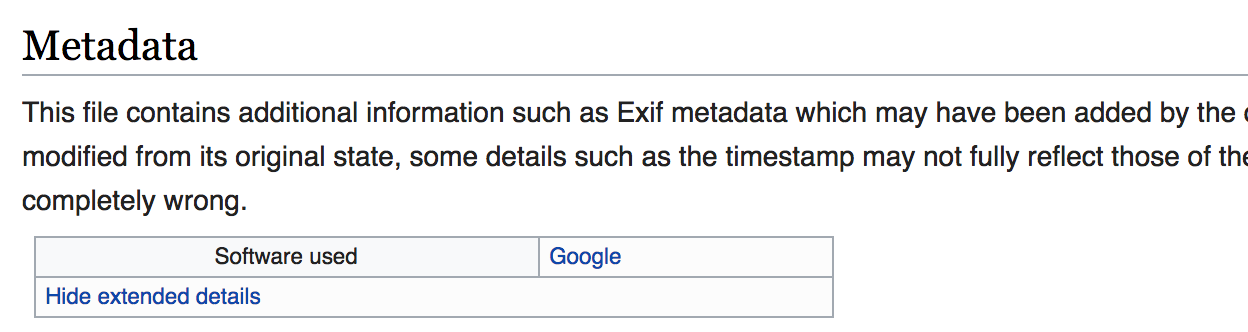
All other EXIF is missing from this picture.
With my limited understanding about EXIF and IPTC, I was wondering if we can use IPTC to check for copyright violations. We recently started checking just for tags that indicate the picture was downloaded from facebook. Likewise, 100s of media houses use IPTC in their media. Can we have a generic check that can help us prevent all such uploads?
 maskaravivek
on 7 Mar 2019
maskaravivek
on 7 Mar 2019
For now it is just about showing informational messages rather than blocking uploads.
Cool, we can use this Google EXIF value to whitelist such pictures.
Let's collect common IPTC prefixes (such as FBMD) and classify them into good/bad :-)
nicolas-raoul
on 8 Mar 2019
Having implemented #2518 now we are ready to work on this :)
@maskaravivek @nicolas-raoul In the absence of any EXIF data shall I give an Information meassage or
Let's collect common IPTC prefixes (such as FBMD) and classify them into good/bad :-)
Should we first analyse EXIF data of various sources for downloading image and check for each of the data in our code?
vanshikaarora
on 12 Mar 2019
@vanshikaarora Yes, showing a warning when no EXIF is present sounds like a good idea to me. There are valid reasons to not have EXIF (screenshot of FOSS software, drawing created on a tablet, removing EXIF for privacy), but these cases are less than 1% I would say.
About the other IPTC prefixes: We are not in a hurry, let's just record examples when we encounter them in the wild :-)
nicolas-raoul
on 12 Mar 2019
showing a warning when no EXIF is present sounds like a good idea to me.
Ok I'll go ahead with this work :+1:
vanshikaarora
on 12 Mar 2019
@nicolas-raoul So far while moving ahead with this work I have noticed that there are many types of EXIF data like ExifIFD0Directory, ExifSubIFDDirectory, ExifImageDirectory, ExifInteropDirectory, ExifThumbnailDirectory.
Yes, showing a warning when no EXIF is present
Here are we talking about each of these EXIF'S right?
vanshikaarora
on 12 Mar 2019
@vanshikaarora You are the EXIF expert now ^_^ so I guess you should be able to decide the best strategy. Please detail what you think is the best thing to do, so that we can understand and provide feedback about your strategy. The goal is to allow pictures that have probably really been shot by the user, and warn about pictures that probably have been shot by other people :-)
nicolas-raoul
on 13 Mar 2019
@nicolas-raoul Here are my general observations:
For Downloaded Images:
They contain the following directories:
- JPEG information like image size, pixels etc
- JFIF contains information like image resolution
- File Type Directories contains information about Image files
And other directories like Huffman Directory and in other cases might contain directories like WEBP directory (specific to source)
Images in phone storage taken via camera
- ExifIFD0Directory
- ExifSubIFDDirectory
- ExifThumbnailDirectory
- GPS directory (might not exist in all cases)
The top 3 directories pertaining to the EXIF must be checked for avoiding copyright violation. I'll raise a PR for this soon.
ExifImageDirectory and ExifInteropDirectory are other two directories available in the libraray metadata-extractor. However I have not found these directories in any image verified so far.
@nicolas-raoul @maskaravivek Can you please suggest whether I should check for these two libraries or not?
vanshikaarora
on 13 Mar 2019
The top 3 directories pertaining to the EXIF must be checked for avoiding copyright violation. I'll raise a PR for this soon.
I have raised a PR here Kindly review :)
vanshikaarora
on 13 Mar 2019
Do the above 3 directories exist for Google photo images?
maskaravivek
on 13 Mar 2019
@maskaravivek Do you mean images downloaded from Google Images or the images on Google Photos(application)
vanshikaarora
on 15 Mar 2019
I meant the images on Google Photos(application).
maskaravivek
on 16 Mar 2019
Do the above 3 directories exist for Google photo images
@maskaravivek I just checked for the images uploaded from Google photos they also contain the above three directories.
vanshikaarora
on 16 Mar 2019
Okay great (Y).
maskaravivek
on 16 Mar 2019
Related issues
 jidanni
·
3Comments
jidanni
·
3Comments
 4D17Y4
·
3Comments
domdomegg
·
3Comments
4D17Y4
·
3Comments
domdomegg
·
3Comments
 psh
·
3Comments
psh
·
4Comments
psh
·
3Comments
psh
·
4Comments