Applicationinsights-js: [BUG] Uncaught RangeError: Maximum call stack size exceeded
Description/Screenshot
I enabled App Insights in our Sharepoint Online environment using an SPFx extension. It was working fine for the first few days. I'm getting below error (randomly) since Friday and this is breaking functionality:

Steps to Reproduce
- Windows 10/Chrome 81.0.4044/Edge 83.0.478.45
- SDK Version [e.g. 22]:2.5.5
- How you initialized the SDK: Refer code below
Additional context
Below is my init code:
public async onInit(): Promise<void> {

    let key: string = 'my instrumentation key';
    let message: string;

    if (!key) {
      message = '(No instrumentation key was provided.)';
      console.log(`${message}`);
      return Promise.resolve();
    } else {
        await super.onInit();
        sp.setup(this.context);

        const profile = await sp.profiles.myProperties.get();

        console.log(profile);
        console.log(profile.Email.replace(/[,;=| ]+/g, "_"));

        const appInsights = new ApplicationInsights({
          config: {
            instrumentationKey: key,
            enableAutoRouteTracking: true,
            autoTrackPageVisitTime: true,
            disableAjaxTracking: true,
            accountId: profile.Email.replace(/[,;=| ]+/g, "_")
          }
        });
        appInsights.loadAppInsights();
        appInsights.trackPageView();
    }

    return Promise.resolve();
  }
 mohsinhere
All 11 comments
What does your _dwellPushState() function do?
Looking at the history handling in AI we are hooking the History API and then triggering some events that we are listening on for the window object... If your also listening to these events this may be the cause. (https://github.com/microsoft/ApplicationInsights-JS/blob/master/extensions/applicationinsights-analytics-js/src/JavaScriptSDK/ApplicationInsights.ts#L629)
We do optionally prefix the events with the "namePrefix" value to isolate then -- you could attempt setting this as well. Note: That this value will also be used for the session storage and cookie names.
 MSNev
on 16 Jun 2020
MSNev
on 16 Jun 2020
Thanks for the response mate. I believe _dwellPushSate() is a function in Sharepoint Online looking at the package name. I'll add a "namePrefix" today evening and see if that fixes the issue.
Cheers mate.
mohsinhere
on 16 Jun 2020
Hi,
I added namePrefix... but it was still failing. I can confirm when I disable autoRouteTracking, everything works fine.
When I go to a URL from the nav menu (without postback), it works. Then when I click on another nav, it fails... that means once the history API gets a url, it starts failing.
mohsinhere
on 16 Jun 2020
I tried the react plugin as well to see if that helps... but still got the same issue. Below is my code.
const browserHistory = createBrowserHistory({basename: '' });
      var reactPlugin = new ReactPlugin();
      var appInsights = new ApplicationInsights({
      config: {
        autoTrackPageVisitTime: true,
        maxBatchInterval: 0,
        disableFetchTracking: true,
        disableAjaxTracking: true,
        enableAutoRouteTracking: true,
        instrumentationKey: key,
        extensions: [reactPlugin],
        extensionConfig: {
          [reactPlugin.identifier]: { history: browserHistory }
        }
      }
    });
    appInsights.loadAppInsights();
    appInsights.trackPageView({
      name: document.title, uri: window.location.href,
      properties: {
        ["CustomProps"]: {
          WebAbsUrl: this.context.pageContext.web.absoluteUrl,
          WebSerUrl: this.context.pageContext.web.serverRelativeUrl,
          WebId: this.context.pageContext.web.id,
          UserTitle: this.context.pageContext.user.displayName,
          UserEmail: this.context.pageContext.user.email,
          UserLoginName: this.context.pageContext.user.loginName
        }
      }
    });
FYI - I'm trying to reach out to the internal SPO team to help identify the root cause for this 🙏 😰
MSNev
on 17 Jun 2020
@MSNev were you able to get any updates from SPO team? Sorry to sound pushy.
mohsinhere
on 25 Jun 2020
I'm checking with the team that I passed this onto, it may be a few days before I get a response due to schedule issues :-(
MSNev
on 25 Jun 2020
@mohsinhere Have you tried to file a support ticket directly with Sharepoint yet?
 mattmccleary
on 29 Jun 2020
mattmccleary
on 29 Jun 2020
@DawgFan Good point... No, I haven't done that yet. I'll ask our Sharepoint admin to raise a ticket.
Thanks!
mohsinhere
on 30 Jun 2020
@MSNev Sharepoint team has confirmed this is an issue at their end... They have temporarily disabled SharePoint URL change detect function (_dwellpushstate) so that there is no conflict between AppInsights route tracking function.
We enabled App insights extension yesterday evening and looks good... I'll close the issue now.
Thanks for your help!
mohsinhere
on 24 Jul 2020
Hi guys, I have almost the same issue :
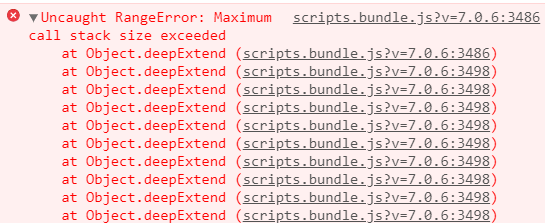
I use Angular 6, please help me fix this issue
 danouche93
on 18 Feb 2021
danouche93
on 18 Feb 2021
Related issues
 Erikvdv
·
6Comments
Erikvdv
·
6Comments
 raphaelm22
·
4Comments
raphaelm22
·
4Comments
 gregjhogan
·
8Comments
MSNev
·
6Comments
gregjhogan
·
8Comments
MSNev
·
6Comments
 Jack-Ramboll
·
6Comments
Jack-Ramboll
·
6Comments
Most helpful comment
FYI - I'm trying to reach out to the internal SPO team to help identify the root cause for this 🙏 😰