Applicationinsights-js: User Id property is set incorrectly
The user.Id property is set to be a randomString, however this Id is then used and sent to the track api in property tags.ai.user.id.
In doing this it then causes this random string Id to be used in the Users/Sesssions blade when viewing "Meet your users" it displays the randomString as the "User Id".
 ghost
ghost
All 26 comments
@jonrigney, you're correct - User Id is a random string. You can populate Authenticated User Id field and then Application Insights will use that field.
 zakimaksyutov
on 13 Mar 2018
zakimaksyutov
on 13 Mar 2018
@zakimaksyutov in that case would it be Application Insights that uses the incorrect field, see the image below which has the User Id set as the random string
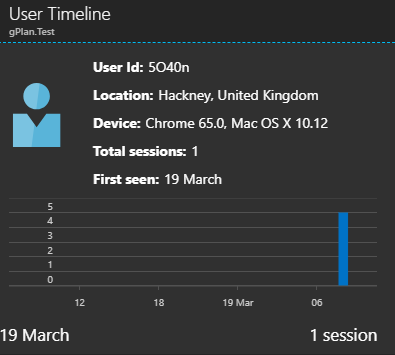
The payload going to AI includes the following tags:
ai.device.id : "browser"
ai.device.type : "Browser"
ai.internal.sdkVersion : "javascript:1.0.15"
ai.operation.id : "BqEzG"
ai.operation.name : "/"
ai.session.id : "C1KTM"
ai.user.accountId : "Jon Rigney"
ai.user.id : "sIuw7"
I am running the following line of code (userName = "Jon Rigney") and it appears to be setting the ai.user.accountId tag
appInsights.setAuthenticatedUserContext(userName);
I'm also using that line of code but still seeing a custom User Id.
 QuentinLuc
on 30 Mar 2018
QuentinLuc
on 30 Mar 2018
@jonrigney, @n0is, can you please try calling appInsights.clearAuthenticatedUserContext() and then appInsights.setAuthenticatedUserContext(userName); In the event, the cookie is set incorrectly in your browser, it may cause the result above.
You should see ai.user.authUserId being set from the call to
appInsights.setAuthenticatedUserContext(username);
 jpiyali
on 31 Mar 2018
jpiyali
on 31 Mar 2018
@jpiyali ai.user.authUserId is being set correctly, so to "Jon Rigney", however the UserId property is not. AppInsights seems to use the UserId property when rendering (see image above). I did try "appInsights.setAuthenticatedUserContext(username);", it made no difference to the payload going to AI API
ghost
on 3 Apr 2018
Same for me, I also tried using clearAuthenticateUserContext before setAuthenticatedUserContext but no difference.
QuentinLuc
on 3 Apr 2018
@jonrigney , @n0is, looks like I answered the wrong question :) To update the ai.user.id, you'll have to setup a telemetry initializer. This will provide you full access to the envelope before it is sent to us. https://docs.microsoft.com/en-us/azure/application-insights/app-insights-api-filtering-sampling#javascript-telemetry-initializers
Sample code below
jpiyali
on 3 Apr 2018
Also, the feature to support timelines for authenticatedUserId is on our backlog and should be coming in a few weeks time.
jpiyali
on 4 Apr 2018
Please let me know if the code changes work. Thanks!
jpiyali
on 4 Apr 2018
No it doesn't work.
So, when I implement the code the code tries to set telemetryItem.tags property, this is undefined when tracking pageViews.
I tried to change this to envelope.tags as this contained an array with the expected key pair values, but this does not go further downstream and the track AI API call still had the same userId (the random string)
Even if this did work it's a bit unclean, surely the ai.user.id should be the ai.user.authUserId when populated?!, if ai.user.authUserId is not set then it remains the random string?
ghost
on 5 Apr 2018
Im also running into issues with this using Angular - I'm calling AppInsights.setAuthenticatedUserContext(username); and still getting the generic app insights generated random string when checking in the portal in the user sessions. Realise this is an old thread, has there been any developments here / changes I need to make @jpiyali ?
 jjgriff93
on 28 Nov 2018
jjgriff93
on 28 Nov 2018
@jjgriff93 - unfortunately this feature (showing user sessions based on authenticated user id and not user id) still hasnt made it to production. The usage team is trying to get to this but the feature is yet to be completed.
As a workaround, can you kindly try the following (run it after snippet in your code)
https://github.com/Microsoft/ApplicationInsights-JS/blob/master/API-reference.md#addtelemetryinitializer
let telemetryInitializer = function () {
appInsights.context.addTelemetryInitializer(function (envelope) {
var tags= envelope.tags;
if (tags && tags["ai.user.authUserId"]) {
tags[ai.userId] = tags["ai.user.authUserId"]; // updates anonymous id generated by sdk with
// authenticated user id
}
});
};
if (appInsights.queue !== undefined) {
appInsights.queue.push(telemetryInitializer);
} else {
telemetryInitializer();
}
jpiyali
on 28 Nov 2018
The user Id that is being set here is correct as expected. The ask is to display user sessions by authenticated user id which is being tracked here: https://feedback.azure.com/forums/357324-application-insights/suggestions/31664080-support-authenticated-user-id-in-usage-scenarios
jpiyali
on 28 Nov 2018
Hi @jpiyali - thanks for the above. Just for my understanding what is the purpose of the authenticated user ID being settable if it's not visible in the portal?
I've implemented the code you provided above into my angular app; however it's had no effect:
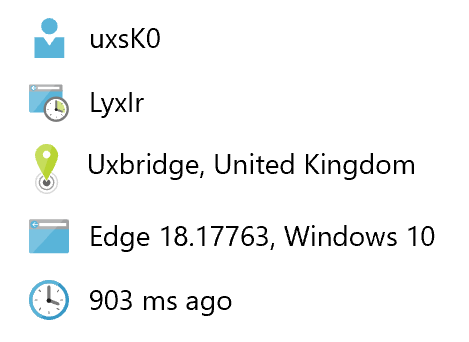
The code is as follows:
AppInsights.setAuthenticatedUserContext(username);
// update anonymous id generated by sdk with authenticated user id as not shown by default in portal yet
const telemetryInitializer = function () {
AppInsights.context.addTelemetryInitializer(function (envelope) {
const tags = envelope.tags;
if (tags && tags['ai.user.authUserId']) {
tags['ai.userId'] = tags['ai.user.authUserId'];
}
});
};
if (appInsights.queue !== undefined) {
appInsights.queue.push(telemetryInitializer);
} else {
telemetryInitializer();
}
Could you suggest what might be missing?
Thanks
jjgriff93
on 29 Nov 2018
@jjgriff93 - can you please check if you can can view authenticated user id value in raw data for this record above. You can check through analytics query:

Query:
pageViews
| where timestamp > ago(30m)
| project user_AuthenticatedId
Also, move AppInsights.setAuthenticatedUserContext(username);
to within the definition of telemetryInitializer. You can call it at any point of time later as well.
jpiyali
on 29 Nov 2018
Thanks for your quick reply @jpiyali - running the query shows that the authenticated user id is successfully making its way to app insights, so it looks like its just the changing of user_id that isn't working
I've moved the setAuthenticatedUserContext into the telemetryInitializer declaration as you suggested and the code now looks like this:
const telemetryInitializer = function () {
AppInsights.setAuthenticatedUserContext(username, username);
AppInsights.context.addTelemetryInitializer(function (envelope) {
const tags = envelope.tags;
if (tags && tags['ai.user.authUserId']) {
tags['ai.userId'] = tags['ai.user.authUserId'];
}
});
};
if (appInsights.queue !== undefined) {
appInsights.queue.push(telemetryInitializer);
} else {
telemetryInitializer();
}
Any ideas why it's not updating the user_id field?
Thanks for your help
jjgriff93
on 29 Nov 2018
@jjgriff93 , code looks correct to me. Can you try quickly debugging to ensure telemetryInitializer() is being called?
jpiyali
on 29 Nov 2018
@jpiyali - sure, it's evaluating if (appInsights.queue !== undefined) to true and hitting AppInsights.queue.push(telemetryInitializer); just fine
jjgriff93
on 29 Nov 2018
@jjgriff93 sorry for the second follow up, does telemetryInitializer() execute and at that point is this code run: tags['ai.userId'] = tags['ai.user.authUserId'];
jpiyali
on 29 Nov 2018
Hi @jpiyali - I've done some debugging and worked out that the tag ai.userId should actually be ai.user.id - I've changed that now in the code and it's working beautifully. Thanks for your help
For anyone else who ends up searching this thread, the angular snippet you need is this:
// Identify user for tracking their session
  public setUserContext(
    username?: string
  ) {
    // update anonymous id generated by sdk with authenticated user id as not shown by default in portal yet
    const telemetryInitializer = () => {
      AppInsights.setAuthenticatedUserContext(username);
      AppInsights.context.addTelemetryInitializer((envelope) => {
        const tags = envelope.tags;
        if (tags && tags['ai.user.authUserId']) {
          tags['ai.user.id'] = tags['ai.user.authUserId'];
        }
      });
    };
    if (AppInsights.queue !== undefined) {
      AppInsights.queue.push(telemetryInitializer);
    } else {
      telemetryInitializer();
    }
  }
@jjgriff93 - thank you for fixing the typo and spending time diagnosing the issue 👍
jpiyali
on 29 Nov 2018
@jpiyali this still doesn't work. that particular property is getting undefined as it is not even accessible.

 ImDmj
on 10 Jun 2019
ImDmj
on 10 Jun 2019
@ImDmj can you post a snippet of what you are trying to do? There is no such property as authId, instead it is tags["ai.user.authUserId"]
 markwolff
on 11 Jun 2019
markwolff
on 11 Jun 2019
In version 2.2.0 I could set this on: appInsights.context.user.id
 andagr
on 21 Aug 2019
andagr
on 21 Aug 2019
Any updates? Having the same issue on the latest version.
 rfink
on 16 Jan 2020
rfink
on 16 Jan 2020
I have been using the @microsoft/applicationinsights-web package and hit the same problem and was able to fix it.
  this._appInsights = new ApplicationInsights({ config: {
                instrumentationKey: "My Key Here",
                url: "My App Url Here",
                loggingLevelConsole: 1,
                loggingLevelTelemetry: 1,
                accountId: `Dont Think This Matters TBT`,
                samplingPercentage: 100,
                appId: 'My App Id',
                enableAjaxErrorStatusText: true
              }});

              this._appInsights.loadAppInsights();
              this._appInsights.context.user.id =  `My User Id`;
              this._appInsights.context.user.authenticatedId = `My authenticated Id`;
              this._appInsights.context.user.accountId =  `My Account Id`;
              this._appInsights.context.user.localId =  `My Local Id`;
I don't know if how I newed it up fixed anything, pretty sure it setting the user info after loading the package. Setting this._appInsights.context.user.id is what poped up for the user name in the screen shot above. Hope this helps someone
 mgot90
on 10 Mar 2020
mgot90
on 10 Mar 2020
Related issues
 Ruud-cb
·
3Comments
Ruud-cb
·
3Comments
 mikecabana
·
5Comments
mikecabana
·
5Comments
 ZhimaoLin
·
7Comments
ZhimaoLin
·
7Comments
 Jack-Ramboll
·
6Comments
Jack-Ramboll
·
6Comments
 raphaelm22
·
4Comments
raphaelm22
·
4Comments
Most helpful comment
Hi @jpiyali - I've done some debugging and worked out that the tag
ai.userIdshould actually beai.user.id- I've changed that now in the code and it's working beautifully. Thanks for your helpFor anyone else who ends up searching this thread, the angular snippet you need is this: