Applicationinsights-js: How to Correlate Requests from client to server for cross domain calls
I would like to know what is the guide line to correlate request from client to server which are on different domains and set up with different instrumentation key.
On client I am using the library: import { AppInsights } from "applicationinsights-js";
Server is a .Net web app.
Existing documentation do not give a clear picture of how correlation should work .
I understand that x-ms-request-id header is not added for cross domain calls.
So what is the workaround?
 shkrishms
All 9 comments
Yes, correlation is only enabled for requests within the same domain. You can add ms-root-* headers manually by using a telemetry processor.
 KamilSzostak
on 7 Mar 2017
KamilSzostak
on 7 Mar 2017
Hi Kamil,
You mentioned telemetry processor. Is it the same as Initializer? If so, addtelemetryInitializer function only gives an IEnvelope which does not expose any fields where I can modify the headers? Is this a typescript definition error?
interface IEnvelope extends ISerializable {
ver: number;
name: string;
time: string;
sampleRate: number;
seq: string;
iKey: string;
flags: number;
deviceId: string;
os: string;
osVer: string;
appId: string;
appVer: string;
userId: string;
tags: {
[name: string]: any;
};
}
shkrishms
on 7 Mar 2017
Yes, sorry my bad. The current API doesn't expose the headers. We need to change the SDK to allow users to set a custom list of external domains for which the correlation feature is enabled.
I'm changing this issue to an enhancement and will put it on our backlog.
KamilSzostak
on 8 Mar 2017
Has there been any movement on this? We need to be able to correlate data between a client domain and ours, so cross domain correlation headers would be ideal.
 NichUK
on 10 Feb 2018
NichUK
on 10 Feb 2018
Hi @KamilSzostak , any news so far? it's important for a SPA system.
 zhangpengchen
on 28 Mar 2018
zhangpengchen
on 28 Mar 2018
@NichUK , @zhangpeng-kooboo - cross domain correlation will be included in the upcoming JS SDK release that will happen very soon (in 1-2 weeks). You also will need server-side .NET SDK 2.6-beta1 for correct communication.
 iusafaro
on 28 Mar 2018
iusafaro
on 28 Mar 2018
Hi @iusafaro
Seems this has been moved to the 1.1.0 milestone.
I am currently wondering what a good workaround or alternative solution is? Not only do I want to correlate back-end and front-end, I also want to track the same user that is going from an home page to an order page (sub-domain). How would I currently do this?
Google Analytics uses a _ga url parameter when I switch from domain, is there something similar that application insights can do?
Or can I somehow configure application insights to set a cookie for the hostname (so that subdomains use the same cookie) just like cross subdomain authentication works (a little bit the same).
I know there is a cookieDomain inside the User object, is there something I can do to influence the behavior?
Last solution I could think of is asking my API for a session id and ask that on the telementryInitializer, the api endpoints is used for all server calls on the order page so that would be the same I guess...
 Ruud-cb
on 9 Jul 2018
Ruud-cb
on 9 Jul 2018
Actually it's done, but you need to enable it in the configuration:
Feature for cross-component correlation between client AJAX and server requests is out but is disabled by the default because CORS limitation for request headers.
1) In order to connect client to the server, client needs to send two request headers Request-Id and Request-Context and the connection to the server will fail in case of CORS call and if Access-Control-Allow-Headers settings explicitly configured on the serv-side. So you’ll need to ensure that if you have allowed headers configured in Access-Control-Allow-Headers then you extended the list with Request-Id and Request-Context.
Access-Control-Allow-Headers: Request-Id, Request-Context,
2) For server back to client correlation, client needs to read Request-Id response header and allowing for client to read is included by the default in 2.6 SDK, so ensure that you have latest SDK on the server.
To enable it you need to extend config with enableCorsCorrelation equal to true. If any of your or third-party servers that client communicates with cannot accept headers listed above and you cannot update their configuration then you’ll need to put them into excluded list in correlationHeaderExcludedDomains config property. correlationHeaderExcludedDomains supports wildcards syntax.
iusafaro
on 9 Jul 2018
Sorry to ask again @iusafaro but I'm a bit confused in your explanation.
- I have updated
Microsoft.ApplicationInsights.AspNetCoreto v2.3.0 (latest stable), this one has a dependency onMicrosoft.ApplicationInsightsv2.6.4, so I should be good serverside.
Applications
I have a wordpress website at domain.com which includes the latest cdn of this javascript library and I have a shop.domain.com which is an AspNetCore application with above version, the front-end is angular, I have included appInsights via npm as well as inserted in the <head>, I should probably drop the <head> one.
So, according to your answer, I need to:
- Allow
Request-IdandRequest-Contextheaders at back-end server.
In Asp.Net Core I can enable CORS and allow any headers like so:
app.UseCors(x => x.WithOrigins("https://domain.com").AllowAnyHeader());
- Because I have SDK 2.6 installed I should be fine with correlating back-end to front-end.
So fromshop.domain.comfront-end angular to back-end AspNetCore, this should now by default include theRequest-IdandRequest-Contextwhen I haveconfig.enableCorsCorrelation = true, correct?
Sadly the enableCorsCorrelation is not in the typescript library (updated to 1.0.18 and @types/applicationinsights-js to 1.0.5.
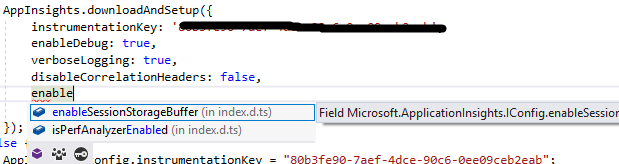
So unfortunately, I don't see any of those headers added to api requests being sent to the back-end, or do I need to make a manual random request with these headers? And with what values?
But not the tricky part, how do I correlate (same userId, same sessionId) from domain.com to shop.domain.com honestly I am more concerned about both 'front-ends' sharing the same userId then the back-end, but maybe the back-end is needed as a 'AI user manager' or something to correlate things. It is important that one user who visits domain.com, leaves and later comes back at shop.domain.com is tracked as the same user. How?
Ruud-cb
on 10 Jul 2018
Related issues
 James-E-Adams
·
3Comments
James-E-Adams
·
3Comments
 andrewconnell
·
3Comments
andrewconnell
·
3Comments
 spottedmahn
·
6Comments
spottedmahn
·
6Comments
 wouterroos
·
3Comments
wouterroos
·
3Comments
 gregjhogan
·
8Comments
gregjhogan
·
8Comments
Most helpful comment
Actually it's done, but you need to enable it in the configuration:
Feature for cross-component correlation between client AJAX and server requests is out but is disabled by the default because CORS limitation for request headers.
1) In order to connect client to the server, client needs to send two request headers Request-Id and Request-Context and the connection to the server will fail in case of CORS call and if Access-Control-Allow-Headers settings explicitly configured on the serv-side. So you’ll need to ensure that if you have allowed headers configured in Access-Control-Allow-Headers then you extended the list with Request-Id and Request-Context.
Access-Control-Allow-Headers: Request-Id, Request-Context,
2) For server back to client correlation, client needs to read Request-Id response header and allowing for client to read is included by the default in 2.6 SDK, so ensure that you have latest SDK on the server.
To enable it you need to extend config with enableCorsCorrelation equal to true. If any of your or third-party servers that client communicates with cannot accept headers listed above and you cannot update their configuration then you’ll need to put them into excluded list in correlationHeaderExcludedDomains config property. correlationHeaderExcludedDomains supports wildcards syntax.