Applicationinsights-js: Consider capturing telemetry for calls performed using window.fetch
As per http://caniuse.com/#search=fetch the "fetch" implementation (an easier and more friendly replacement for using XHR) now has approximately 55% coverage for modern browsers. I think it's probably about time the AI JS client looked to add hooks for monitoring calls with this modern API.
 oising
All 35 comments
oising
on 29 Mar 2016
Thanks for bringing this up. Is the suggestion to switch to this API or to add a conditional logic to use it wherever supported? Is there any advantage of using fetch (assuming XHR code is already written)?
 MaxShehovtsov
on 29 Mar 2016
MaxShehovtsov
on 29 Mar 2016
@MaxShehovtsov It's not so much about the AI JS client using it to send data to Azure (although this surely should be on your roadmap), it's more about the JS client capturing performance telemetry on general usage of this API, just like you do already for AJAX calls using XHR.
There is a general move away from using jQuery in process in the "modern web." The continued use of XHR is tied to the ubiquity of $.ajax - as more and more frameworks (angular 2, aurelia etc) start to take hold, you're going to see less and less XHR calls and more use of window.fetch which is far easier to use for REST endpoints. It has all of the CORS, Origin headers cruft baked in, and works with websockets etc. It's the future.
oising
on 29 Mar 2016
Now I see the point. Did you see any data on how popular it is? Is angular 2 using .fetch as a primary ajax mechanism?
MaxShehovtsov
on 29 Mar 2016
I can see value in supporting tracking it in future if the spec. is adopted but per http://caniuse.com/#search=fetch the support is not really there yet in Chrome and Opera unless explicitly enabled in the browser (which I doubt many users are going to do) so the actual support is currently limited to newer versions of Firefox.
 dnduffy
on 29 Mar 2016
dnduffy
on 29 Mar 2016
@dnduffy I think you're misreading the - admittedly ambiguous - notes on caniuse. window.fetch is available, and has been for quite a while in chrome. It's just the usage within workers that is hidden behind the flag. Open a chrome console yourself and see ;)
oising
on 29 Mar 2016
@dnduffy @MaxShehovtsov The front runners in modern web frameworks Angular 2 and Aurelia both have modules for fetch. Aurelia uses a polyfill if required, so even if the platform doesn't have a fully functioning fetch, the invocation is still there to capture, right? I'd have to look to see whether they're shimming XHR or just monkey-patching the base fetch.
oising
on 29 Mar 2016
We should strongly consider adding support for _window.fetch_ and taking this task in one of our next sprints.
_window.fetch_ was enabled by Default in Chrome 42, and it's currently in development in MS-Edge.
 KamilSzostak
on 31 Mar 2016
KamilSzostak
on 31 Mar 2016
This would be a great feature for me - will it make it into a release any time soon?
 kierenj
on 13 Apr 2017
kierenj
on 13 Apr 2017
This is such a fundamental part of modern web apps that I am struggling to understand why this is still open.
oising
on 13 Apr 2017
Well, that's a bit harsh. Everyone has competing priorities, and half of OUR new web apps didn't go down the fetch route for various reasons. But, I am enthusiastically waiting for this one. I just don't think hyperbole will help anyone ;)
kierenj
on 13 Apr 2017
I'm just bumping the thread, albeit snottily.
oising
on 29 May 2017
Just come across this issue when using a 3rd party library in an Angular 2 app that uses fetch, which means we have some AJAX requests being tracked and others not. Is there an ETA on when this functionality might be added?
 garrytrinder
on 30 Nov 2017
garrytrinder
on 30 Nov 2017
You should support the Fetch API. I fail to see why it isn't supported. We reviewed AI, and found it unsuitable to modern web applications as a result of this and lack of source map support.
 sylvanaar
on 5 Feb 2018
sylvanaar
on 5 Feb 2018
Is there any update on this?
Has anyone worked around this by attaching to fetch manually?
 andymac4182
on 18 Apr 2018
andymac4182
on 18 Apr 2018
Any update on capturing fetch API calls as dependency in AI for JS.
Currently we are using Apollo client to call graphql and it uses Fetch API, and they are not tracked as dependency calls in AI.
 riteshbhoi
on 16 May 2018
riteshbhoi
on 16 May 2018
We too are using the Apollo client and would like support for fetch.
 BenjaBobs
on 23 May 2018
BenjaBobs
on 23 May 2018
Not trying to be mean, but for some context and impact feedback, we dropped App Insights altogether, largely because of this, and are using Elastic Stack and Sentry.
kierenj
on 23 May 2018
Curious @kierenj What are you using to push this data from fetch to those other systems automatically?
andymac4182
on 23 May 2018
While this is being considered (2 years now :)
https://github.com/MaximBalaganskiy/application-insights-fetch-monitor
 MaximBalaganskiy
on 20 Jul 2018
MaximBalaganskiy
on 20 Jul 2018
Please add support!
 josundt
on 10 Oct 2018
josundt
on 10 Oct 2018
I had a PR for this which got removed until the next release.
MaximBalaganskiy
on 10 Oct 2018
I had a PR for this which got removed until the next release.
@MaximBalaganskiy : So you expect that the PR will be accepted and merged before the next release?
josundt
on 11 Oct 2018
It was said to be implemented in V2 of ai
MaximBalaganskiy
on 11 Oct 2018
Functionality exists in beta of v2 SDK. It is disabled by default for now. see disableFetchTracking here
https://www.npmjs.com/package/@microsoft/applicationinsights-web#configuration
 markwolff
on 28 Nov 2018
markwolff
on 28 Nov 2018
I am trying to track window.fetch() calls in my web application, using the beta v2 SDK, and running into some trouble. I've created a minimal web page to reproduce the issue (see here, run npm install and npm start to launch).
The issue I'm witnessing: While it seems that the page load itself is logged in the "Operations" tab of the browser performance (on the Azure portal)
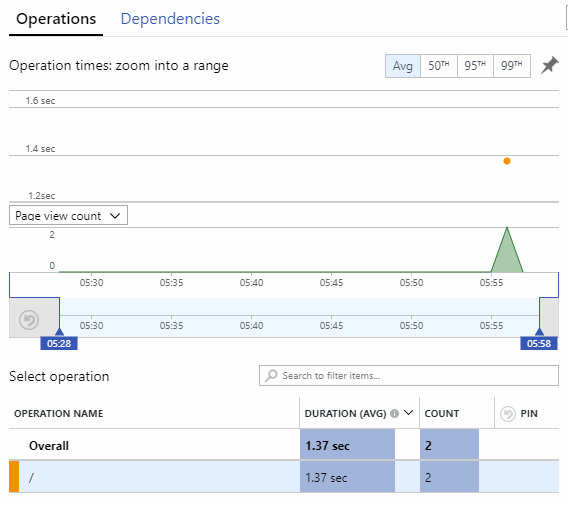
The Ajax fetch call performed when the page is loaded is never logged in the "Dependencies" tab of the browser performance
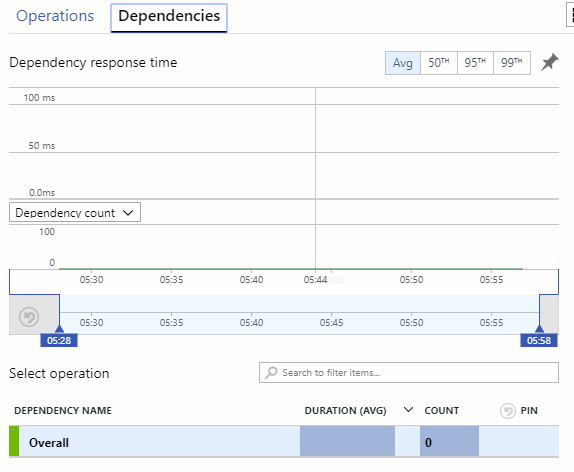
Any help or pointers towards resolving this will be much appreciated!
 YoniSmolin
on 24 Dec 2018
YoniSmolin
on 24 Dec 2018
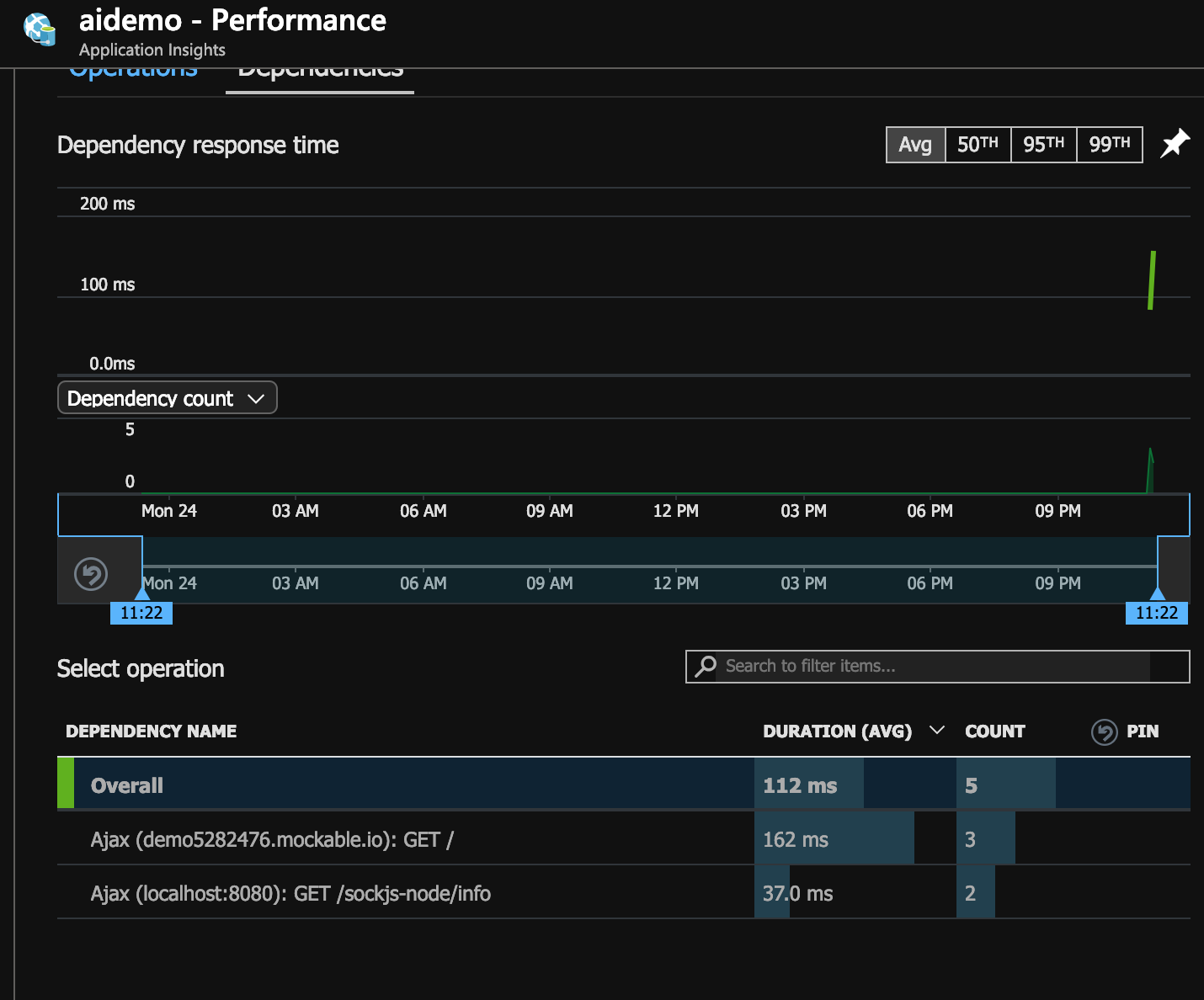
Hey @YoniSmolin, thanks for posting the repo. I was able to get the fetch request from your repo (as is) to show up in the performance page. It is only incorrectly labeled as ajax instead of fetch.
Can you share a network tab or fiddler trace of when the RemoteDependencyData item is sent out?
Also, add these to the config to "de-noise". With this, only 3 items should be sent in the network trace: pageview, pageviewperf, your fetch request telemetry.
disableFetchTracking: false,
disableAjaxTracking: true,
maxBatchInterval: 1,
enableDebug: true,
verboseLogging: true
markwolff
on 25 Dec 2018
Thanks @markwolff! Using the config you suggested, I've been able to see the fetch() call displayed in the "Dependencies" tab.
However, I'm still witnessing what seems to be incorrect tracking behavior: Having loaded the page multiple times
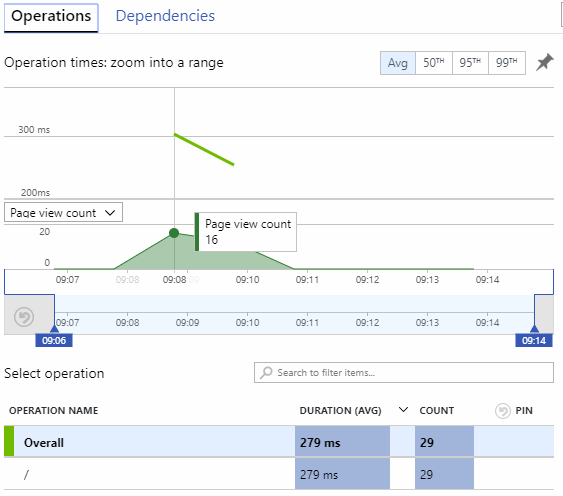
I see that only a single dependency call has been logged
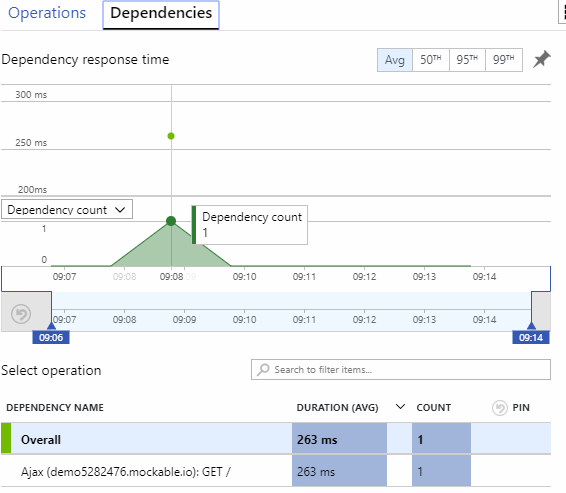
I thought this might be due to the browser caching the fetch response, so I tried adding headers to disable caching (see here), but this had no visible effect.
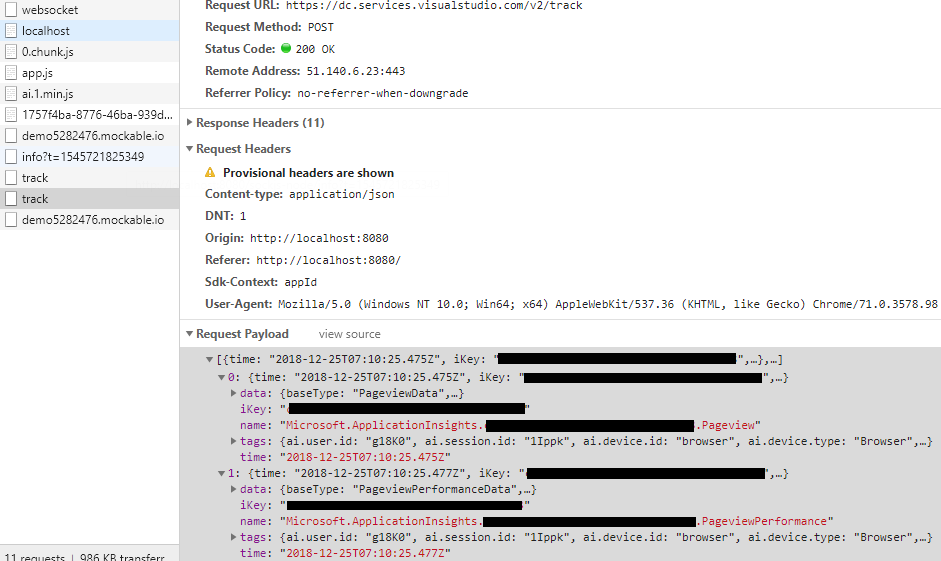
Find below the contents of my "Network" tab on chrome. Note there is no "track" call following the "fetch" call, and there are only two items in the "track" call preceding it (for context, the earlier calls to "track" and "demo5282476" seen in the trace are both "OPTIONS" calls):
YoniSmolin
on 25 Dec 2018
Hey @YoniSmolin I think this is because we don't instrument fetch at all in the instrumentation snippet, which we probably should. Right now, fetch is only instrumented during initialization after the sdk has been downloaded. It will miss requests until this happens. Ajax is instrumented in the snippet, so it doesn't miss any requests. You can verify by wrapping your fetch request in a setTimeout of ~15ms.
I'll create separate issue to track this bug and ping you on it. Thanks for pointing this out!
markwolff
on 25 Dec 2018
Thank you @markwolff for addressing my concerns. Following your suggestion, I've wrapped the fetch request in a setTimeout and indeed the request was tracked correctly and showed up in the Azure portal.
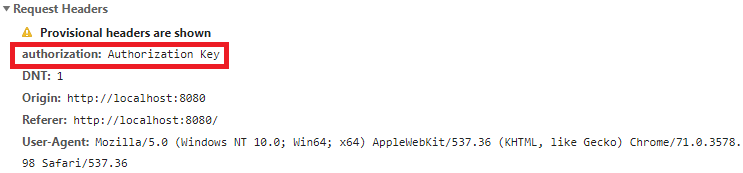
I'd like to draw your attention to yet another fetch-related issue that is preventing me from integrating the beta SDK in my application: The tracked fetch request seems to get stripped of the headers that were originally appended to it.
To reproduce the effect, I refer you again to my sample app. When I run the code with the Application Insights snippet commented out, the request contains the custom header I've added:
But when I enable the snippet, the request has no headers:
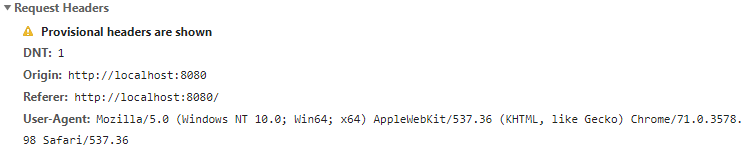
Is this a known issue? I will be grateful for any suggestions to work around this.
YoniSmolin
on 30 Dec 2018
Thanks for pointing this out @YoniSmolin. This is indeed a bug and will be fixed in next version. You can workaround it by adding enableCorsCorrelation: true to your config. As a side effect, this will add request-id & request-context (request-context is currently disabled for fetch though) headers to all outgoing requests.
markwolff
on 30 Dec 2018
Thanks for pointing this out @YoniSmolin. This is indeed a bug and will be fixed in next version. You can workaround it by adding
enableCorsCorrelation: trueto your config. As a side effect, this will addrequest-id&request-context(request-contextis currently disabled for fetch though) headers to all outgoing requests.
@markwolff adding those custom headers will render all the requests to be non-simple requests hence the browser will pre-flight the request w/ an OPTION request, this doubles the latency
@YoniSmolin and I would love to have fetch logged but w/o request-id header, is there a W/A we can execute to avoid this header ?
 mosdav
on 18 Jan 2019
mosdav
on 18 Jan 2019
@mosdav this is disabled by default. Do you have an example where this is not the case?
markwolff
on 18 Jan 2019
@markwolff it happens for all of our ajax requests.
Here is the relevant AI configuration (We use version 1.0.0-beta.10)
window.appInsights = new ApplicationInsights({
    config: {
        instrumentationKey: application_insights_key,
        disableFetchTracking: false,
        maxAjaxCallsPerView: -1,
        // enableCorsCorrelation is set to 'true' as a workaround for a bug in AppInsights.
        // Without this, all Ajax calls produced by the portal will be stripped of headers.
        // Reference: https://github.com/Microsoft/ApplicationInsights-JS/issues/166#issuecomment-450591284
        enableCorsCorrelation: true,
        autoTrackPageVisitTime: true
    },
    queue: []
});
@mosdav We've updated some internal packages to fix this issue. you can remove enableCorsCorrelation: true and "reinstall" applicationinsights-web beta.10
npm uninstall @microsoft/applicationinsights-web; npm install @microsoft/applicationinsights-web
Alternatively, you can update to beta.11 when it gets released on Jan 21 (You will still need to remove enableCorsCorrelation: true).
markwolff
on 18 Jan 2019
Related issues
 slawomir-brzezinski-at-clarksons
·
4Comments
slawomir-brzezinski-at-clarksons
·
4Comments
 gardnerjr
·
3Comments
gardnerjr
·
3Comments
 raphaelm22
·
4Comments
raphaelm22
·
4Comments
 BennyM
·
6Comments
slawomir-brzezinski-at-clarksons
·
4Comments
BennyM
·
6Comments
slawomir-brzezinski-at-clarksons
·
4Comments
Most helpful comment
While this is being considered (2 years now :)
https://github.com/MaximBalaganskiy/application-insights-fetch-monitor