Application-gateway-kubernetes-ingress: Problems when running AGIC behind Azure Firewall
Hello folks!
I have an environment comprised of:
- A VNet which has a route table pointing to an Azure Firewall on the AKS subnet
- AKS Deployed on its own subnet (+ the service subnet) as following the AKS deploy at an existing VNet using Azure CNI
- Azure Firewall being the gateway for egress on all the AKS infrastructure
- AAD Pod Identity deployed and working
- Azure Application Gateway (WAF_V2) deployed on its own subnet
- App Gateway with an NSG that block internet access to the Gateway's public internet IP so only the internal frontend IP is what would be used
So, the goal here is to have the following data path:
- Request arrive at Azure Firewall Public IP
- DNAT to the App Gateway Private frontend IP
- AGIC does the ingress into the cluster
The problem I'm facing is that after the AGIC is deployed, it looks like it isn't able to reach App Gateway APIs since it isn't allowed by default to egress thru the firewall. Other services (like LogAnalytics and AAD Pod Identity) has ServiceTags allowed to egress within the firewall but the ServiceTag for App Gateway don't work with Azure Firewall as the document states. Because of that, when an ingress resource is deployed to AKS, the AGIC pod isn't able to modify App Gateway resource to apply whatever rules are required.
So, in order to allow AGIC to do its thing, and since ServiceTag isn't supported, can someone tell me what are the fqdn/ip/port/protocol required by AGIC so we can enable it on our firewall?
Thanks!
Looking forward to hear from you!
Best regards,
Gutemberg
 galvesribeiro
All 6 comments
Hi @galvesribeiro, AGIC talks to AppGw indirectly via Azure Resource Manager, could you share your AGIC logs?
In addition, you might want to take a look at Deploy a cluster with outbound type of UDR and Azure Firewall
 3quanfeng
on 6 Jul 2020
3quanfeng
on 6 Jul 2020
Hi @3quanfeng
When I've opened the issue, I was trying to use the _supported_ addon mode, which totally fail in this setup. Then I tried with Helm. My cluster is completely locked down behind Azure Firewall and all egress traffic from the AKS subnet goes thru the firewall using this UDR:

The only way to make it work was to add another UDR to the AppGateway subnet like this:

And then configure an NSG for the AppGatewat subnet like this:
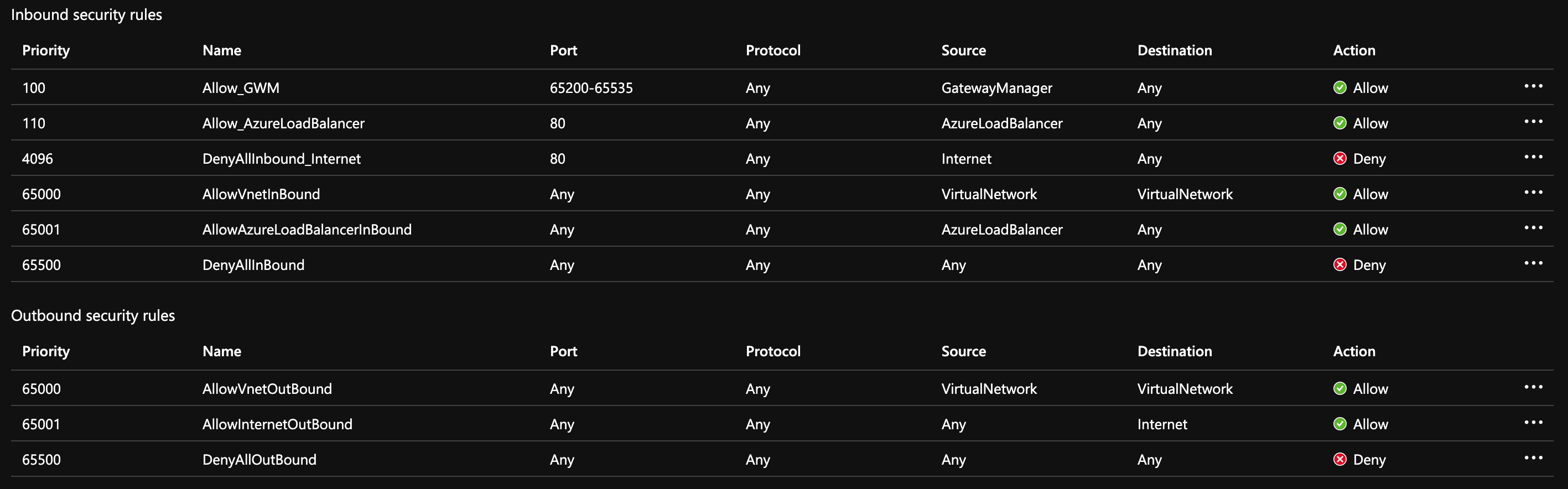
Now I have all the desired behaviour...
I honestly was expecting it to be a bit easier to deal with since it is a "built-in" integration of two Azure products. I would expect this kind of complexity if using nginx ingress, but not AppGateway, but anyway, it is working now. 😄
Thanks!
galvesribeiro
on 6 Jul 2020
Thanks @galvesribeiro , May I ask what IP address 100.64.3.4 is?
3quanfeng
on 6 Jul 2020
Azure Firewall private ip on AzureFirewallSubnet subnet
galvesribeiro
on 6 Jul 2020
Hi @galvesribeiro , could you help share a little bit more about your set-up with AGIC as ASK addon as well as the steps to reproduce? we would like to investigate regarding "I was trying to use the supported addon mode, which totally fail in this setup" if it's the case, Thanks a lot!
3quanfeng
on 7 Jul 2020
Sure, here we go. I'll omit the ENV var declaration here but by its usage you can infer what it meant.
First we create the VNET along with the subnets:
# Backbone Virtual Network and Cluster subnet
az network vnet create \
    --resource-group $RG \
    --name $VNET_NAME \
    --address-prefixes 100.64.0.0/16 \
    --subnet-name $AKSSUBNET_NAME \
    --subnet-prefix 100.64.1.0/24

# Dedicated subnet for K8s services
az network vnet subnet create \
    --resource-group $RG \
    --vnet-name $VNET_NAME \
    --name $SVCSUBNET_NAME \
    --address-prefix 100.64.2.0/24

# Dedicated subnet for Azure Firewall (Firewall name cannot be changed)
az network vnet subnet create \
    --resource-group $RG \
    --vnet-name $VNET_NAME \
    --name $FWSUBNET_NAME \
    --address-prefix 100.64.3.0/24

# Dedicated subnet for Azure Application Gateway
az network vnet subnet create \
    --resource-group $RG \
    --vnet-name $VNET_NAME \
    --name $APPGATEWAYSUBNET_NAME \
    --address-prefix 100.64.4.0/24
The public IPs:
# Azure Firewall Public IP
az network public-ip create -g $RG -n $FWPUBLICIP_NAME -l $LOC --sku "Standard" --allocation-method "Static"

# Egress Public IP (to be used later - not interesting for the particular problem)
az network public-ip create -g $RG -n $FWPUBLICIP_EGRESS_NAME -l $LOC --sku "Standard" --allocation-method "Static"

# App Gateway Public IP
az network public-ip create -g $RG -n $APPGATEWAYPUBLICIP_NAME -l $LOC --sku "Standard" --allocation-method "Static"
Azure Firewall:
# Deploy Azure Firewall
az network firewall create -g $RG -n $FWNAME -l $LOC --enable-dns-proxy true

# Configure Firewall IP Config
az network firewall ip-config create -g $RG -f $FWNAME -n $FWIPCONFIG_NAME --public-ip-address $FWPUBLICIP_NAME --vnet-name $VNET_NAME
az network firewall ip-config create -g $RG -f $FWNAME -n $FWIPCONFIG_EGRESS_NAME --public-ip-address $FWPUBLICIP_EGRESS_NAME

# Capture Firewall IP Address for Later Use
FWPUBLIC_IP=$(az network public-ip show -g $RG -n $FWPUBLICIP_NAME --query "ipAddress" -o tsv)
FWPRIVATE_IP=$(az network firewall show -g $RG -n $FWNAME --query "ipConfigurations[0].privateIpAddress" -o tsv)
UDRs used on the VNET
# Create UDR and add a route for Azure Firewall - that blocks direct egress to internet
az network route-table create -g $RG --name $FWROUTE_TABLE_NAME
az network route-table route create -g $RG --name $FWROUTE_NAME --route-table-name $FWROUTE_TABLE_NAME --address-prefix 0.0.0.0/0 --next-hop-type VirtualAppliance --next-hop-ip-address $FWPRIVATE_IP --subscription $SUBID
az network route-table route create -g $RG --name $FWROUTE_NAME_INTERNET --route-table-name $FWROUTE_TABLE_NAME --address-prefix $FWPUBLIC_IP/32 --next-hop-type Internet

# Create UDR for App Gateway - that allow only App Gateway to get out to internet directly without pass thru Azure Firewall. Without it, the Gateway itself don't work properly.
az network route-table create -g $RG --name $APPGATEWAYROUTE_TABLE_NAME
az network route-table route create -g $RG --name $APPGATEWAYROUTE_NAME_INTERNET --route-table-name $APPGATEWAYROUTE_TABLE_NAME --address-prefix 0.0.0.0/0 --next-hop-type Internet --subscription $SUBID
AKS-related firewall rules. Those set of rules are gathered along several spread docs about each product we're using that are related to AKS or that the Pods are going to use somehow, including AKS Addons (i.e. LogAnalytics).
# Add FW Network Rules
az network firewall network-rule create -g $RG -f $FWNAME --collection-name 'AKS_Global_Required' -n 'apiudp' --protocols 'UDP' --source-addresses '*' --destination-addresses "AzureCloud.$LOC" --destination-ports 1194 --action allow --priority 100
az network firewall network-rule create -g $RG -f $FWNAME --collection-name 'AKS_Global_Required' -n 'apitcp' --protocols 'TCP' --source-addresses '*' --destination-addresses "AzureCloud.$LOC" --destination-ports 9000
az network firewall network-rule create -g $RG -f $FWNAME --collection-name 'AKS_Global_Required' -n 'time' --protocols 'UDP' --source-addresses '*' --destination-fqdns 'ntp.ubuntu.com' --destination-ports 123
az network firewall application-rule create -g $RG -f $FWNAME --collection-name 'AKS_Global_Required' -n 'fqdn' --source-addresses '*' --protocols 'http=80' 'https=443' --fqdn-tags "AzureKubernetesService" --action allow --priority 100
az network firewall application-rule create -g $RG -f $FWNAME --collection-name 'AKS_ACR_Required' -n 'fqdn' --source-addresses '*' --protocols 'https=443' --fqdn-tags "AzureContainerRegistry" --action allow --priority 101
az network firewall application-rule create -g $RG -f $FWNAME --collection-name 'Docker_Registry' -n 'fqdn' --source-addresses '*' --protocols 'https=443' --target-fqdns "*.docker.io" --action allow --priority 102
az network firewall application-rule create -g $RG -f $FWNAME --collection-name 'Azure_Services' -n 'fqdn' --source-addresses '*' --protocols 'https=443' --action allow --priority 103 \
    --fqdn-tags \
        "AzureActiveDirectory" \
        "AppConfiguration" \
        "ApplicationInsightsAvailability" \
        "AzureContainerRegistry" \
        "AzureEventGrid" \
        "AzureFrontDoor.FirstParty" \
        "AzureKeyVault" \
        "AzureMonitor" \
        "AzurePlatformIMDS" \
        "AzureResourceManager" \
        "AzureTrafficManager" \
        "EventHub" \
        "MicrosoftContainerRegistry" \
        "ServiceBus" \
        "Sql" \
        "Storage" \
        "GatewayManager" \
        "AzureLoadBalancer"

az network firewall application-rule create -g $RG -f $FWNAME \
    --collection-name 'AKS_Addons' \
    --action allow \
    --priority 104 \
    -n 'required' \
    --source-addresses '*' \
    --protocols 'https=443' \
    --target-fqdns \
        'dc.services.visualstudio.com' \
        '*.ods.opinsights.azure.com' \
        '*.oms.opinsights.azure.com' \
        '*.monitoring.azure.com'
Associate route table with next hop to Firewall to the AKS subnet
az network vnet subnet update -g $RG --vnet-name $VNET_NAME --name $AKSSUBNET_NAME --route-table $FWROUTE_TABLE_NAME
Deploy Azure Application Gateway + WAF:
az network application-gateway create --name $APPGATEWAY_NAME --location $LOC --resource-group $RG --sku WAF_v2 --vnet-name $VNET_NAME --subnet $APPGATEWAYSUBNET_NAME --http2 Enabled --subscription $SUBID --private-ip-address 100.64.4.4 --public-ip-address $APPGATEWAYPUBLICIP_NAME --min-capacity 0 --max-capacity 10

# Create WAF private-only endpoint NSG
az network nsg create -g $RG -n $APPGATEWAY_NSG_NAME  -l $LOC
az network nsg rule create --name Allow_GWM --nsg-name $APPGATEWAY_NSG_NAME --priority 100 --resource-group $RG --access Allow --direction Inbound --destination-port-ranges 65200-65535 --source-address-prefixes GatewayManager
az network nsg rule create --name Allow_AzureLoadBalancer --nsg-name $APPGATEWAY_NSG_NAME --priority 110 --resource-group $RG --access Allow --direction Inbound --source-address-prefixes AzureLoadBalancer
az network nsg rule create --name DenyAllInbound_Internet --nsg-name $APPGATEWAY_NSG_NAME --priority 4096 --resource-group $RG --access Deny --direction Inbound --source-address-prefixes Internet
az network vnet subnet update -g $RG --vnet-name $VNET_NAME --name $APPGATEWAYSUBNET_NAME --network-security-group $APPGATEWAY_NSG_NAME
Now all the networking is in place. Let's deploy AKS:
# Get current machine IP to allow on the API Server otherwise, kubectl will fail
CURRENT_IP=$(dig @resolver1.opendns.com ANY myip.opendns.com +short)

az aks create -g $CLUSTER_RG -n $AKS_NAME -l $LOC \
  --node-count 1 --max-pods 60 --node-vm-size Standard_D16as_v4 \
  --node-resource-group $CLUSTER_RESOURCES_RG \
  --kubernetes-version 1.16.9 \
  --nodepool-name $AKS_CLUSTER_POOL_NAME \
  --network-plugin Azure --generate-ssh-keys \
  --service-cidr 192.168.0.0/16 \
  --dns-service-ip 192.168.0.10 \
  --docker-bridge-address 172.22.0.1/29 \
  --vnet-subnet-id $SUBNETID \
  --enable-managed-identity \
  --load-balancer-sku standard \
  --outbound-type userDefinedRouting \
  --api-server-authorized-ip-ranges "$FWPUBLIC_IP,$CURRENT_IP/32"

# Get Cluster Managed Identity (Add as Network Contributor on the VNet)
az aks show -g $CLUSTER_RG -n $AKS_NAME --query "identity"

# Set PL-Cluster-Administrators group as kubernetes 'Cluster Admin' role
AKS_CLUSTER=$(az aks show --resource-group $CLUSTER_RG --name $AKS_NAME --query id -o tsv)
az role assignment create \
    --assignee $CLUSTER_ADMIN_GROUP_AAD_ID \
    --scope $AKS_CLUSTER \
    --role "Azure Kubernetes Service Cluster Admin Role"

# (Optional) Get the credentials
az aks get-credentials -g $CLUSTER_RG -n $AKS_NAME --admin

# Attach Azure Container Image Registry to Kubernetes
az aks update --resource-group $CLUSTER_RG --name $AKS_NAME --attach-acr $ACR

# Get Cluster Managed Identity ID
CLUSTER_MID=$(az aks show -g $CLUSTER_RG -n $AKS_NAME --query identityProfile.kubeletidentity.clientId -otsv)

# Set role assignments to the Cluster MID to allow assign identities at the Cluster Resources resource group
az role assignment create --role "Managed Identity Operator" --assignee $CLUSTER_MID --scope /subscriptions/$SUBID/resourcegroups/$CLUSTER_RESOURCES_RG
az role assignment create --role "Virtual Machine Contributor" --assignee $CLUSTER_MID --scope /subscriptions/$SUBID/resourcegroups/$CLUSTER_RESOURCES_RG
Now with the cluster fully configured, install aad-pod-identity.
helm repo add aad-pod-identity https://raw.githubusercontent.com/Azure/aad-pod-identity/master/charts
helm install --namespace kube-system aad-pod-identity aad-pod-identity/aad-pod-identity
Ok, so far we have:
- Azure Firewall
- Azure AppGateway (using private frontend IP)
- AKS with Managed Identity
- aad-pod-identity
- All the networking plumbing to lock down the cluster (ingress / egress)
Now the only thing missing is the Ingress Controller.
I first tried the _supported_ addon mode as described on the docs. The pod is deployed, I was able to see the logs but it just don't create anything on the AppGateway at all when I deploy an Ingress resource into the cluster. After trying to read the pod log (sorry I don't have it right now since I destroyed the whole environment and recreated to try find the problem) the last thing I remember is that for whatever reason, the addon only moved a bit further in the logs, if I had disable the rout table that enforces egress traffic thru the firewall. Meaning, that it would need direct access to Internet, which makes all the other pods have the access as well which is unacceptable on my use-case (PCI regulated environment) so I reverted the rule.
With that being said, I've researched what looks to be (according to the docs) _"the previous way"_ of deploying AGIC, which led me to this repo and the Helm deployment.
Here is how I've deployed thru Helm:
# Deploy AGIC on the Cluster

AGIC_IDENTITY_NAME=agicidentity
az identity create -g $CLUSTER_RESOURCES_RG -n $AGIC_IDENTITY_NAME --subscription $SUBID
AGIC_CLIENT_ID="$(az identity show -g $CLUSTER_RESOURCES_RG -n $AGIC_IDENTITY_NAME --subscription $SUBID --query clientId -otsv)"
APPGATEWAYID=$(az network application-gateway show -n $APPGATEWAY_NAME -g $RG -o tsv --query "id")
BACKBONE_RG_ID=$(az group show -n $RG -o tsv --query "id")
az role assignment create --role Contributor --assignee $AGIC_CLIENT_ID --scope $APPGATEWAYID
az role assignment create --role Reader --assignee $AGIC_CLIENT_ID --scope $BACKBONE_RG_ID
helm repo add application-gateway-kubernetes-ingress https://appgwingress.blob.core.windows.net/ingress-azure-helm-package/
helm install ingress-azure --namespace kube-system -f agic-config.yaml application-gateway-kubernetes-ingress/ingress-azure
The agic-config.yaml is the default one from the samples except that usePrivateIP, shared and rbac.enabled where all set to true. Also the armAuth is set to aadPodIdentity accordingly.
It didn't worked right away. The pod was installed, some changes happened on the AppGateway (a good sign!!!) but any HttpListener/Config created was always being attached to the Public AppGateway endpoint, which is also not acceptable since we need all incoming request to pass thru Azure Firewall first.
So, I had to manually assign the initial configuration to the Private frontend endpoint:

After that, any deployed ingress resource was using the proper configuration and it is working well so far. I didn't tested all the ingress features yet, but at least the basic HTTP ingress is working as expected.
I hope this extensive steps help you try to reproduce the environment on your end and to make this experience a bit less painful. 😄
Please let me know if I can help you more.
Thanks!
galvesribeiro
on 7 Jul 2020
Related issues
 pbloigu
·
6Comments
pbloigu
·
6Comments
 sowsan
·
6Comments
sowsan
·
6Comments
 onybo
·
6Comments
onybo
·
6Comments
 Joon
·
3Comments
Joon
·
3Comments
 rhollins
·
3Comments
rhollins
·
3Comments
Most helpful comment
Sure, here we go. I'll omit the ENV var declaration here but by its usage you can infer what it meant.
First we create the VNET along with the subnets:
The public IPs:
Azure Firewall:
UDRs used on the VNET
AKS-related firewall rules. Those set of rules are gathered along several spread docs about each product we're using that are related to AKS or that the Pods are going to use somehow, including AKS Addons (i.e. LogAnalytics).
Associate route table with next hop to Firewall to the AKS subnet
Deploy Azure Application Gateway + WAF:
Now all the networking is in place. Let's deploy AKS:
Now with the cluster fully configured, install aad-pod-identity.
Ok, so far we have:
Now the only thing missing is the Ingress Controller.
I first tried the _supported_ addon mode as described on the docs. The pod is deployed, I was able to see the logs but it just don't create anything on the AppGateway at all when I deploy an Ingress resource into the cluster. After trying to read the pod log (sorry I don't have it right now since I destroyed the whole environment and recreated to try find the problem) the last thing I remember is that for whatever reason, the addon only moved a bit further in the logs, if I had disable the rout table that enforces egress traffic thru the firewall. Meaning, that it would need direct access to Internet, which makes all the other pods have the access as well which is unacceptable on my use-case (PCI regulated environment) so I reverted the rule.
With that being said, I've researched what looks to be (according to the docs) _"the previous way"_ of deploying AGIC, which led me to this repo and the Helm deployment.
Here is how I've deployed thru Helm:
The
agic-config.yamlis the default one from the samples except thatusePrivateIP,sharedandrbac.enabledwhere all set totrue. Also thearmAuthis set toaadPodIdentityaccordingly.It didn't worked right away. The pod was installed, some changes happened on the AppGateway (a good sign!!!) but any HttpListener/Config created was always being attached to the Public AppGateway endpoint, which is also not acceptable since we need all incoming request to pass thru Azure Firewall first.
So, I had to manually assign the initial configuration to the Private frontend endpoint:
After that, any deployed ingress resource was using the proper configuration and it is working well so far. I didn't tested all the ingress features yet, but at least the basic HTTP ingress is working as expected.
I hope this extensive steps help you try to reproduce the environment on your end and to make this experience a bit less painful. 😄
Please let me know if I can help you more.
Thanks!