Application-gateway-kubernetes-ingress: AGIC Ingress controller: Liveness probe failed
Describe the bug
After creating new chart of application-gateway-kubernetes-ingress/ingress-azure --version 1.0.0
pods created get stuck with Readiness probe failed and "new-pod-ingress-azure" gets in in 0/1 pods running.
After running a "describe pod" of that pod we are getting:
Warning  Unhealthy  13s (x10 over 113s)  kubelet, aks-agentpool-76661633-1  Readiness probe failed: Get http://10.2.0.15:8123/health/ready: dial tcp 10.2.0.15:8123: connect: connection refused
  Warning  Unhealthy  7s (x6 over 107s)    kubelet, aks-agentpool-76661633-1  Liveness probe failed: Get http://10.2.0.15:8123/health/alive: dial tcp 10.2.0.15:8123: connect: connection refused
To Reproduce
We already created 5 o 6 cluster using this procedure and it´s first time we have this issue:
steps:
1- kubectl create -f https://raw.githubusercontent.com/Azure/aad-pod-identity/master/deploy/infra/deployment-rbac.yaml
2-Create azure identity in RG where nodes are running (MC_xxxxxx) and adding WAF as reader in RG and as contributor in azure identity component
3- kubectl create -f aadpodidentity.yml
4- helm install -f dev-chart.yml application-gateway-kubernetes-ingress/ingress-azure --version 1.0.0
5- create binding : yml values: AzureIdentity: name of identity created in step 3.
selector: [nameofstep4]-ingress-azure
Ingress Controller details
Name:           bunking-lizard-ingress-azure-7b54978988-rs8h2
Namespace:      default
Priority:       0
Node:           aks-agentpool-76661633-1/10.2.0.4
Start Time:     Mon, 18 Nov 2019 20:42:53 -0300
Labels:         aadpodidbinding=bunking-lizard-ingress-azure
                app=ingress-azure
                pod-template-hash=7b54978988
                release=bunking-lizard
Annotations:    prometheus.io/port: 8123
                prometheus.io/scrape: true
Status:         Running
IP:             10.2.0.15
IPs:            <none>
Controlled By:  ReplicaSet/bunking-lizard-ingress-azure-7b54978988
Containers:
  ingress-azure:
    Container ID:   docker://bd46f4833b77b806132fd7cd7729aca5ffbf117bbee3a2e7c011ffb109894db0
    Image:          mcr.microsoft.com/azure-application-gateway/kubernetes-ingress:1.0.0
    Image ID:       docker-pullable://mcr.microsoft.com/azure-application-gateway/kubernetes-ingress@sha256:c295f99ae66443c5a392fd894620fcd1fc313b9efdec96d13f166fefb29780a9
    Port:           <none>
    Host Port:      <none>
    State:          Running
      Started:      Mon, 18 Nov 2019 20:44:58 -0300
    Last State:     Terminated
      Reason:       Error
      Exit Code:    2
      Started:      Mon, 18 Nov 2019 20:43:59 -0300
      Finished:     Mon, 18 Nov 2019 20:44:58 -0300
    Ready:          False
    Restart Count:  2
    Liveness:       http-get http://:8123/health/alive delay=15s timeout=1s period=20s #success=1 #failure=3
    Readiness:      http-get http://:8123/health/ready delay=5s timeout=1s period=10s #success=1 #failure=3
    Environment Variables from:
      bunking-lizard-cm-ingress-azure  ConfigMap  Optional: false
    Environment:
      AZURE_CONTEXT_LOCATION:  /etc/appgw/azure.json
      AGIC_POD_NAME:           bunking-lizard-ingress-azure-7b54978988-rs8h2 (v1:metadata.name)
      AGIC_POD_NAMESPACE:      default (v1:metadata.namespace)
    Mounts:
      /etc/appgw/azure.json from azure (rw)
      /var/run/secrets/kubernetes.io/serviceaccount from bunking-lizard-sa-ingress-azure-token-z9hvt (ro)
Conditions:
  Type              Status
  Initialized       True
  Ready             False
  ContainersReady   False
  PodScheduled      True
Volumes:
  azure:
    Type:          HostPath (bare host directory volume)
    Path:          /etc/kubernetes/azure.json
    HostPathType:  File
  bunking-lizard-sa-ingress-azure-token-z9hvt:
    Type:        Secret (a volume populated by a Secret)
    SecretName:  bunking-lizard-sa-ingress-azure-token-z9hvt
    Optional:    false
QoS Class:       BestEffort
Node-Selectors:  <none>
Tolerations:     node.kubernetes.io/not-ready:NoExecute for 300s
                 node.kubernetes.io/unreachable:NoExecute for 300s
Events:
  Type     Reason     Age                  From                               Message
  ----     ------     ----                 ----                               -------
  Normal   Scheduled  2m12s                default-scheduler                  Successfully assigned default/bunking-lizard-ingress-azure-7b54978988-rs8h2 to aks-agentpool-76661633-1
  Normal   Pulling    67s (x2 over 2m11s)  kubelet, aks-agentpool-76661633-1  Pulling image "mcr.microsoft.com/azure-application-gateway/kubernetes-ingress:1.0.0"
  Normal   Pulled     67s (x2 over 2m9s)   kubelet, aks-agentpool-76661633-1  Successfully pulled image "mcr.microsoft.com/azure-application-gateway/kubernetes-ingress:1.0.0"
  Normal   Created    67s (x2 over 2m6s)   kubelet, aks-agentpool-76661633-1  Created container ingress-azure
  Normal   Killing    67s                  kubelet, aks-agentpool-76661633-1  Container ingress-azure failed liveness probe, will be restarted
  Normal   Started    66s (x2 over 2m6s)   kubelet, aks-agentpool-76661633-1  Started container ingress-azure
  Warning  Unhealthy  13s (x10 over 113s)  kubelet, aks-agentpool-76661633-1  Readiness probe failed: Get http://10.2.0.15:8123/health/ready: dial tcp 10.2.0.15:8123: connect: connection refused
  Warning  Unhealthy  7s (x6 over 107s)    kubelet, aks-agentpool-76661633-1  Liveness probe failed: Get http://10.2.0.15:8123/health/alive: dial tcp 10.2.0.15:8123: connec
- Output of `kubectl logs
.
kubectl logs bunking-lizard-ingress-azure-7b54978988-rs8h2
ERROR: logging before flag.Parse: I1118 23:42:59.206842       1 main.go:302] Using verbosity level 5 from environment variable APPGW_VERBOSITY_LEVEL
I1118 23:42:59.256720       1 environment.go:168] KUBERNETES_WATCHNAMESPACE is not set. Watching all available namespaces.
I1118 23:42:59.256746       1 main.go:132] App Gateway Details: Subscription: mysubsxxxxxxxxxxxxxxxxxxxxxx, Resource Group: MYRESOURCEG, Name: MYAKSCLUSTER
I1118 23:42:59.256752       1 auth.go:90] Creating authorizer from Azure Managed Service Identity
* Any Azure support tickets associated with this issue.
Note. We are using kubernetes version 1.15.5 (preview in Azure) Could this be related?
- Any Azure support tickets associated with this issue.
119111924000415
 Yiyito11
All 19 comments
I think we might find something in the AAD Pod's logs. Would you be able to share those as well?
 akshaysngupta
on 19 Nov 2019
akshaysngupta
on 19 Nov 2019
Here is for: mic-6fdb84dfbb-59nrl (created automatically after STEP 1 )
kubectl logs mic-6fdb84dfbb-59nrl
I1119 01:25:48.282781 1 main.go:69] Starting mic process. Version: 1.5.3. Build date: 2019-10-12-00:24
W1119 01:25:48.282827 1 main.go:74] --kubeconfig not passed will use InClusterConfig
I1119 01:25:48.282831 1 main.go:88] kubeconfig () cloudconfig (/etc/kubernetes/azure.json)
I1119 01:25:48.283008 1 main.go:99] Client QPS set to: 5. Burst to: 5
I1119 01:25:48.283028 1 mic.go:89] Starting to create the pod identity client. Version: 1.5.3. Build date: 2019-10-12-00:24
I1119 01:25:48.366257 1 mic.go:95] Kubernetes server version: v1.14.8
**_I1119 01:25:48.366814 1 log.go:16] Initialized health probe on port &[8080]
I1119 01:25:48.366835 1 log.go:11] Started health probe_**
I1119 01:25:48.366842 1 mic.go:144] Initiating MIC Leader election
I1119 01:25:48.366849 1 leaderelection.go:175] attempting to acquire leader lease default/aad-pod-identity-mic...
And other 3 where created after step 1. Starting with nmi-xxxxxx
kubectl get pods
NAME READY STATUS RESTARTS AGE
hopping-robin-ingress-azure-6756bb8464-zq8dv 0/1 CrashLoopBackOff 172 10h
mic-6fdb84dfbb-59nrl 1/1 Running 0 12h
mic-6fdb84dfbb-rtfxg 1/1 Running 0 12h
nmi-d7bsq 1/1 Running 0 12h
nmi-tdzbq 1/1 Running 0 12h
nmi-zjkpw 1/1 Running 0 12h
kubectl logs nmi-d7bsq
time="2019-11-19T01:25:46Z" level=info msg="Starting nmi process. Version: 1.5.3. Build date: 2019-10-12-00:23. Log level: info."
time="2019-11-19T01:25:46Z" level=info msg="CRD lite informers started "
**_time="2019-11-19T01:25:46Z" level=info msg="Initialized health probe on port &[8080]"
time="2019-11-19T01:25:46Z" level=info msg="Started health probe"_**
time="2019-11-19T01:25:46Z" level=info msg="Listening on port 2579"
ERROR: logging before flag.Parse: E1119 01:32:46.237265 1 client.go:161] pod list empty
time="2019-11-19T01:32:46Z" level=warning msg="List pod error: pod list empty. Retrying, attempt number: 1"
ERROR: logging before flag.Parse: E1119 01:32:46.537448 1 client.go:161] pod list empty
time="2019-11-19T01:32:46Z" level=warning msg="List pod error: pod list empty. Retrying, attempt number: 2"
ERROR: logging before flag.Parse: E1119 01:32:46.837756 1 client.go:161] pod list empty
time="2019-11-19T01:32:46Z" level=warning msg="List pod error: pod list empty. Retrying, attempt number: 3"
ERROR: logging before flag.Parse: E1119 01:32:47.138060 1 client.go:161] pod list empty
time="2019-11-19T01:32:47Z" level=warning msg="List pod error: pod list empty. Retrying, attempt number: 4"
time="2019-11-19T01:32:52Z" level=warning msg="failed to get assigned ids for pod:default/hopping-robin-ingress-azure-6756bb8464-bx5rw in ASSIGNED state, retrying attempt: 1" req.method=GET req.path=/metadata/identity/oauth2/token req.remote=10.2.0.15
time="2019-11-19T01:32:57Z" level=warning msg="failed to get assigned ids for pod:default/hopping-robin-ingress-azure-6756bb8464-bx5rw in ASSIGNED state, retrying attempt: 2" req.method=GET req.path=/metadata/identity/oauth2/token req.remote=10.2.0.15
time="2019-11-19T01:33:02Z" level=warning msg="failed to get assigned ids for pod:default/hopping-robin-ingress-azure-6756bb8464-bx5rw in ASSIGNED state, retrying attempt: 3" req.method=GET req.path=/metadata/identity/oauth2/token req.remote=10.2.0.15
time="2019-11-19T01:33:07Z" level=warning msg="failed to get assigned ids for pod:default/hopping-robin-ingress-azure-6756bb8464-bx5rw in ASSIGNED state, retrying attempt: 4" req.method=GET req.path=/metadata/identity/oauth2/token req.remote=10.2.0.15
time="2019-11-19T01:33:12Z" level=warning msg="failed to get assigned ids for pod:default/hopping-robin-ingress-azure-6756bb8464-bx5rw in ASSIGNED state, retrying attempt: 5" req.method=GET req.path=/metadata/identity/oauth2/token req.remote=10.2.0.15
time="2019-11-19T01:33:17Z" level=warning msg="failed to get assigned ids for pod:default/hopping-robin-ingress-azure-6756bb8464-bx5rw in ASSIGNED state, retrying attempt: 6" req.method=GET req.path=/metadata/identity/oauth2/token req.remote=10.2.0.15
time="2019-11-19T01:33:22Z" level=warning msg="failed to get assigned ids for pod:default/hopping-robin-ingress-azure-6756bb8464-bx5rw in ASSIGNED state, retrying attempt: 7" req.method=GET req.path=/metadata/identity/oauth2/token req.remote=10.2.0.15
time="2019-11-19T01:33:27Z" level=warning msg="failed to get assigned ids for pod:default/hopping-robin-ingress-azure-6756bb8464-bx5rw in ASSIGNED state, retrying attempt: 8" req.method=GET req.path=/metadata/identity/oauth2/token req.remote=10.2.0.15
time="2019-11-19T01:33:32Z" level=warning msg="failed to get assigned ids for pod:default/hopping-robin-ingress-azure-6756bb8464-bx5rw in ASSIGNED state, retrying attempt: 9" req.method=GET req.path=/metadata/identity/oauth2/token req.remote=10.2.0.15
time="2019-11-19T01:33:37Z" level=warning msg="failed to get assigned ids for pod:default/hopping-robin-ingress-azure-6756bb8464-bx5rw in ASSIGNED state, retrying attempt: 10" req.method=GET req.path=/metadata/identity/oauth2/token req.remote=10.2.0.15
time="2019-11-19T01:33:42Z" level=warning msg="failed to get assigned ids for pod:default/hopping-robin-ingress-azure-6756bb8464-bx5rw in ASSIGNED state, retrying attempt: 11" req.method=GET req.path=/metadata/identity/oauth2/token req.remote=10.2.0.15
time="2019-11-19T01:33:47Z" level=warning msg="failed to get assigned ids for pod:default/hopping-robin-ingress-azure-6756bb8464-bx5rw in ASSIGNED state, retrying attempt: 12" req.method=GET req.path=/metadata/identity/oauth2/token req.remote=10.2.0.15
time="2019-11-19T01:33:52Z" level=warning msg="failed to get assigned ids for pod:default/hopping-robin-ingress-azure-6756bb8464-bx5rw in ASSIGNED state, retrying attempt
So those pods they are able to start health probe successfully, but ingres is not. What can this issue be related to?. Was recently a change made of AGIC code? We built more than 10 clusters on the past weeks and it´s the first time we are dealing with this issue.-
Thanks!
Yiyito11
on 19 Nov 2019
We are facing the same issue.
To Reproduce
We are installing the Azure App Gateway Ingress Controller as following:
# install azure ad pod identities
./kubernetes-d/linux-amd64/helm repo add aad-pod-identity https://raw.githubusercontent.com/Azure/aad-pod-identity/master/charts
./kubernetes-d/linux-amd64/helm repo update
./kubernetes-d/linux-amd64/helm upgrade --install aad-pod-identity aad-pod-identity/aad-pod-identity --atomic
# install azure app gateway ingress controller
./kubernetes-d/linux-amd64/helm repo add application-gateway-kubernetes-ingress https://appgwingress.blob.core.windows.net/ingress-azure-helm-package/
./kubernetes-d/linux-amd64/helm repo update
# manipulating config.yaml
./kubernetes-d/linux-amd64/helm upgrade -f=./app-gw-ingress/helm-config.yaml --install ingress-azure application-gateway-kubernetes-ingress/ingress-azure --version=$appgwChartVersion --namespace=default --atomic
 ```

The applied helm-chart values:
Specify aks cluster related information. THIS IS BEING DEPRECATED.
aksClusterConfiguration:
apiServerAddress: AKS_API_SERVER_ADDRESS
The values.yaml file is important to templates.
This file contains the default values for a chart.
These values may be overridden during helm install or helm upgrade.
replicaCount: 1
Verbosity level of the App Gateway Ingress Controller
verbosityLevel: 3
image:
repository: mcr.microsoft.com/azure-application-gateway/kubernetes-ingress
tag: 0.7.1
pullPolicy: Always
kubernetes:
# Namespace(s) AGIC watches; Leaving this blank watches all namespaces;
# Accepts one or many comma-separated values
watchNamespace:
# Port for AGIC's HTTP API endpoint
httpServicePort: 8124
#
Specify which application gateway the ingress controller will manage
#
appgw:
subscriptionId: SUBSCRIPTION_ID
resourceGroup: RESOURCE_GROUP_NAME
name: APP_GW_NAME
#
Specify the authentication with Azure Resource Manager
#
Two authentication methods are available:
- Option 1: AAD-Pod-Identity (https://github.com/Azure/aad-pod-identity)
armAuth:
type: aadPodIdentity
identityResourceID: ARM_AUTH_RESOURCE_ID
identityClientID: ARM_AUTH_CLIENT_ID
- Option 2: ServicePrincipal as a kubernetes secret
armAuth:
type: servicePrincipal
#
# Generate this value with:
# az ad sp create-for-rbac --subscription --sdk-auth | base64 -w0
secretJSON:
#
Specify if the cluster is RBAC enabled or not
rbac:
enabled: true # true/false
nodeSelector: {}
```
Describe the bug
- azure-app-gateway-ingress-controller pod stuck in crashLoopBackOff
kubectl describeof the pod shows the Liveness and Readiness probe failing in the same manner as described by the author in the first post
Current workaround
We currently worked around by manually editing the deployment of the azure-app-gateway-ingress-controller and removing the Readiness and Liveness probes there. Afterwards the azure-app-gateway-ingress-controller pod is able to spin up correctly and stays stable in the Running status.
kubectl edit deployment azure-app-gateway-ingress-controller -> remove the complete Readiness and Liveness section, so that it looks somehow like this:
# Please edit the object below. Lines beginning with a '#' will be ignored,
# and an empty file will abort the edit. If an error occurs while saving this file will be
# reopened with the relevant failures.
#
apiVersion: apps/v1
kind: Deployment
metadata:
  annotations:
    deployment.kubernetes.io/revision: "3"
  creationTimestamp: "2019-11-18T16:34:42Z"
  generation: 3
  labels:
    app: ingress-azure
    chart: ingress-azure-1.0.0
    heritage: Tiller
    release: ingress-azure
  name: ingress-azure
  namespace: default
  resourceVersion: "425992"
  selfLink: /apis/apps/v1/namespaces/default/deployments/ingress-azure
  uid: f357ad89-67ac-49f4-8f12-3041b3d10081
spec:
  progressDeadlineSeconds: 600
  replicas: 1
  revisionHistoryLimit: 10
  selector:
    matchLabels:
      app: ingress-azure
      release: ingress-azure
  strategy:
    rollingUpdate:
      maxSurge: 25%
      maxUnavailable: 25%
    type: RollingUpdate
  template:
    metadata:
      annotations:
        prometheus.io/port: "8123"
        prometheus.io/scrape: "true"
      creationTimestamp: null
      labels:
        aadpodidbinding: ingress-azure
        app: ingress-azure
        release: ingress-azure
    spec:
      containers:
      - env:
        - name: AZURE_CONTEXT_LOCATION
          value: /etc/appgw/azure.json
        - name: AGIC_POD_NAME
          valueFrom:
            fieldRef:
              apiVersion: v1
              fieldPath: metadata.name
        - name: AGIC_POD_NAMESPACE
          valueFrom:
            fieldRef:
              apiVersion: v1
              fieldPath: metadata.namespace
        envFrom:
        - configMapRef:
            name: ingress-azure
        image: mcr.microsoft.com/azure-application-gateway/kubernetes-ingress:0.7.1
        imagePullPolicy: Always
        name: ingress-azure
        resources: {}
        terminationMessagePath: /dev/termination-log
        terminationMessagePolicy: File
        volumeMounts:
        - mountPath: /etc/appgw/azure.json
          name: azure
      dnsPolicy: ClusterFirst
      restartPolicy: Always
      schedulerName: default-scheduler
      securityContext: {}
      serviceAccount: ingress-azure
      serviceAccountName: ingress-azure
      terminationGracePeriodSeconds: 30
      volumes:
      - hostPath:
          path: /etc/kubernetes/azure.json
          type: File
        name: azure
status:
  availableReplicas: 1
  conditions:
  - lastTransitionTime: "2019-11-20T08:27:25Z"
    lastUpdateTime: "2019-11-20T08:27:25Z"
    message: Deployment has minimum availability.
    reason: MinimumReplicasAvailable
    status: "True"
    type: Available
  - lastTransitionTime: "2019-11-20T08:27:21Z"
    lastUpdateTime: "2019-11-20T08:27:25Z"
    message: ReplicaSet "ingress-azure-78d4c6c4d6" has successfully progressed.
    reason: NewReplicaSetAvailable
    status: "True"
    type: Progressing
  observedGeneration: 3
  readyReplicas: 1
  replicas: 1
  updatedReplicas: 1
Further Question
Is it somehow possible to archive a running azure-app-gateway-ingress-controller without the need of manually editing the deployment of it after it was deployed with the helm-chart?
 gitflo1
on 20 Nov 2019
gitflo1
on 20 Nov 2019
Same issue here, because the Liveness probe failed
 lwiedenhoeft
on 20 Nov 2019
lwiedenhoeft
on 20 Nov 2019
this is new issue, as we already deployed in last weeks at least 4 o 5 AKS clusters with AGIC lattest version 1.0.0, and pods started running successfully.-
Yiyito11
on 20 Nov 2019
@delqn any chances to help us out here? 😃
 ahojman
on 21 Nov 2019
ahojman
on 21 Nov 2019
@ahojman (I'm also @delqn) Thanks for your patience with this. It is KubeCon weeks and a few of us are here in San Diego at the conference, so responses could be delayed.
@Yiyito11 I was able to reproduce the issue w/ Kubernetes v 1.15.x. Thanks for offering the workaround.
It seems that the ingress pod is waiting on obtaining authorization from AAD Pod Identity and that never succeeds. I need to dig into that to understand what and why is happening.
@ahojman would you be able to use the workaround @Yiyito11 proposed above while we are troubleshooting this?
 draychev
on 21 Nov 2019
draychev
on 21 Nov 2019
The workaround to remove Liveness Probe and Readiness Probe from the Deployment, as suggested by @gitflo1, seems to be doing the trick.
Blocks removed from AGIC's Deployment:
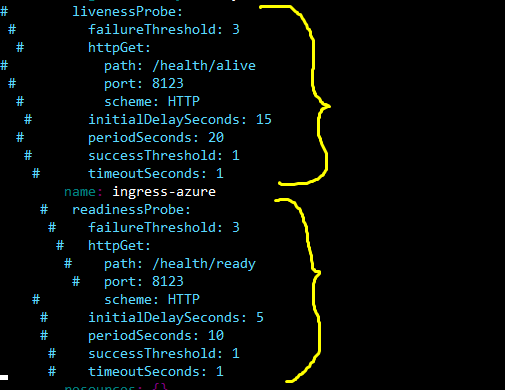
Causes the running AGIC pod to be replaced by another new one, as expected.
Checking the new pod logs:
$ kubectl log deadly-ibex-ingress-azure-c97797d69-btp8f

log is DEPRECATED and will be removed in a future version. Use logs instead.
ERROR: logging before flag.Parse: I1121 16:20:29.990455       1 main.go:302] Using verbosity level 3 from environment variable APPGW_VERBOSITY_LEVEL
I1121 16:20:30.028429       1 environment.go:168] KUBERNETES_WATCHNAMESPACE is not set. Watching all available namespaces.
I1121 16:20:30.028470       1 main.go:132] App Gateway Details: Subscription: <SubID>, Resource Group: <RG-Name>, Name: <AppGw-Name>
I1121 16:20:30.028494       1 auth.go:90] Creating authorizer from Azure Managed Service Identity
I1121 16:20:30.499006       1 main.go:179] Ingress Controller will observe all namespaces.
I1121 16:20:30.531956       1 context.go:129] k8s context run started
I1121 16:20:30.532008       1 context.go:168] Waiting for initial cache sync
I1121 16:20:30.632318       1 context.go:176] Initial cache sync done
I1121 16:20:30.632344       1 context.go:177] k8s context run finished
I1121 16:20:30.632487       1 worker.go:35] Worker started
I1121 16:20:30.632747       1 httpserver.go:57] Starting API Server on :8123
I1121 16:20:30.791415       1 mutate_app_gateway.go:154] BEGIN AppGateway deployment
I1121 16:20:31.198186       1 mutate_app_gateway.go:182] Applied App Gateway config in 406.740784ms
I1121 16:20:31.198218       1 mutate_app_gateway.go:198] cache: Updated with latest applied config.
I1121 16:20:31.198685       1 mutate_app_gateway.go:203] END AppGateway deployment
AGIC pod is able to reach Application Gateway now, and update its properties...
ahojman
on 21 Nov 2019
@draychev - just deployed a couple more AGICs; they seem be working fine w/o having to apply this workaround....
ahojman
on 29 Nov 2019
Hi all, I've got two questions:
- Are there any known side-effects of the recently merged PR #675 affecting (or even fixing) this bug?
- As soon as #674 is merged, will there be a patch-version of the helm-chart available?
Thank you for your help!
gitflo1
on 3 Dec 2019
@gitflo1 Thanks for asking.
- No, not yet. I am yet to test it myself before I can be fully confident.
- Yes, we will publish a release candidate after this PR is merged.
akshaysngupta
on 3 Dec 2019
@akshaysngupta thank you for resolving this issue with the RC 1.0.1-rc1. I just tested the RC helm-chart version on our prior failing AKS clusters and the issue was resolved.
gitflo1
on 11 Dec 2019
@akshaysngupta Can you please confirm if 1.0.1-rc1 is the current. I am using helm and I dont see this.
helm search repo application-gateway-kubernetes-ingress -l
CHART VERSION APP VERSION DESCRIPTION
application-gateway-kubernetes-ingress/ingress-... 1.0.0 1.0.0 Use Azure Application Gateway as the ingress fo...
application-gateway-kubernetes-ingress/ingress-... 0.10.0 0.10.0 Use Azure Application Gateway as the ingress fo...
application-gateway-kubernetes-ingress/ingress-... 0.9.0 0.9.0 Use Azure Application Gateway as the ingress fo...
application-gateway-kubernetes-ingress/ingress-... 0.8.0 0.8.0 Use Azure Application Gateway as the ingress fo...
application-gateway-kubernetes-ingress/ingress-... 0.7.1 0.7.1 Use Azure Application Gateway as the ingress fo...
application-gateway-kubernetes-ingress/ingress-... 0.7.0 0.7.0 Use Azure Application Gateway as the ingress fo...
application-gateway-kubernetes-ingress/ingress-... 0.6.0 0.6.0 Use Azure Application Gateway as the ingress fo...
application-gateway-kubernetes-ingress/ingress-... 0.5.0 0.5.0 Use Azure Application Gateway as the ingress fo...
application-gateway-kubernetes-ingress/ingress-... 0.4.0 0.4.0 Use Azure Application Gateway as the ingress fo...
application-gateway-kubernetes-ingress/ingress-... 0.3.0 0.3.0 Use Azure Application Gateway as the ingress fo...
application-gateway-kubernetes-ingress/ingress-... 0.2.0 0.2.0 Use Azure Application Gateway as the ingress fo...
application-gateway-kubernetes-ingress/ingress-... 0.1.5 1.0 Use Azure Application Gateway as the ingress fo...
application-gateway-kubernetes-ingress/ingress-... 0.1.4 1.0 Use Azure Application Gateway as the ingress fo...
application-gateway-kubernetes-ingress/ingress-... 0.1.3 1.0 Use Azure Application Gateway as the ingress fo...
application-gateway-kubernetes-ingress/ingress-... 0.1.2 1.0 Use Azure Application Gateway as the ingress fo...
I tried upgrading to 1.16.7 but the chart wont get deployed.
helm install ingress-azure -f agic-helm-config.yaml application-gateway-kubernetes-ingress/ingress-azure
Error: unable to build kubernetes objects from release manifest: unable to recognize "": no matches for kind "Deployment" in version "apps/v1beta2"
 g0pinath
on 26 Apr 2020
g0pinath
on 26 Apr 2020
Use helm repo update and try installing 1.2.0-rc1
akshaysngupta
on 26 Apr 2020
Akshay
I am getting the below error on NMI pod
E0426 11:01:05.884078 1 client.go:185] pod list empty
W0426 11:01:05.884106 1 client.go:208] List pod error: pod list empty. Retrying, attempt number: 1
E0426 11:01:06.184319 1 client.go:185] pod list empty
W0426 11:01:06.184354 1 client.go:208] List pod error: pod list empty. Retrying, attempt number: 2
E0426 11:01:06.484518 1 client.go:185] pod list empty
W0426 11:01:06.484556 1 client.go:208] List pod error: pod list empty. Retrying, attempt number: 3
E0426 11:01:06.784753 1 client.go:185] pod list empty
W0426 11:01:06.784798 1 client.go:208] List pod error: pod list empty. Retrying, attempt number: 4
E0426 11:02:27.088122 1 server.go:366] failed to get matching identities for pod: default/ingress-azure-6d874bfd5d-6spj2, error: getting assigned identities for pod default/ingress-azure-6d874bfd5d-6spj2 in CREATED state failed after 16 attempts, retry duration [5]s. Error:
I0426 11:02:27.088211 1 server.go:190] Status (403) took 81204174752 ns for req.method=GET reg.path=/metadata/identity/oauth2/token req.remote=10.244.0.15
E0426 11:03:57.092436 1 server.go:366] failed to get matching identities for pod: default/ingress-azure-6d874bfd5d-6spj2, error: getting assigned identities for pod default/ingress-azure-6d874bfd5d-6spj2 in CREATED state failed after 16 attempts, retry duration [5]s. Error:
I0426 11:03:57.092554 1 server.go:190] Status (403) took 80003258486 ns for req.method=GET reg.path=/metadata/identity/oauth2/token req.remote=10.244.0.15
E0426 11:04:20.970623 1 server.go:366] failed to get matching identities for pod: default/ingress-azure-6d874bfd5d-6spj2, error: context canceled
I0426 11:04:20.970648 1 server.go:190] Status (404) took 13877065391 ns for req.method=GET reg.path=/metadata/identity/oauth2/token req.remote=10.244.0.15
E0426 11:04:23.619286 1 client.go:185] pod list empty
W0426 11:04:23.619310 1 client.go:208] List pod error: pod list empty. Retrying, attempt number: 1
E0426 11:04:23.919510 1 client.go:185] pod list empty
W0426 11:04:23.919672 1 client.go:208] List pod error: pod list empty. Retrying, attempt number: 2
E0426 11:05:44.223140 1 server.go:366] failed to get matching identities for pod: default/ingress-azure-6d874bfd5d-5pmjm, error: getting assigned identities for pod default/ingress-azure-6d874bfd5d-5pmjm in CREATED state failed after 16 attempts, retry duration [5]s. Error:
I0426 11:05:44.223270 1 server.go:190] Status (403) took 80604025721 ns for req.method=GET reg.path=/metadata/identity/oauth2/token req.remote=10.244.0.16
I followed the steps inhttps://github.com/Azure/aad-pod-identity#deploy-the-azure-aad-identity-infra and ensure that kubectl logs demo in step 6 is returning results without error
time="2020-04-26T11:07:21Z" level=info msg="starting demo pod demo/demo 10.244.0.17"
time="2020-04-26T11:08:03Z" level=info msg="succesfull doARMOperations vm count 0" podip=10.244.0.17 podname=demo podnamespace=demo
time="2020-04-26T11:08:03Z" level=info msg="succesfully acquired a token using the MSI, msiEndpoint(http://169.254.169.254/metadata/identity/oauth2/token)" podip=10.244.0.17 podname=demo podnamespace=demo
time="2020-04-26T11:08:03Z" level=info msg="succesfully acquired a token, userAssignedID MSI, msiEndpoint(http://169.254.169.254/metadata/identity/oauth2/token) clientID(5ec5d303-f605-46dc-880c-d1c01307bdfd)" podip=10.244.0.17 podname=demo podnamespace=demo
time="2020-04-26T11:08:03Z" level=info msg="succesfully made GET on instance metadata, {\"compute\":{\"location\":\"australiaeast\",\"name\":\"aks-nodepool1-37221196-vmss_0\",\"offer\":\"aks\",\"osType\":\"Linux\",\"placementGroupId\":\"7efc1cf2-96e5-4a97-a44c-3eb80031ffb8\",\"platformFaultDomain\":\"0\",\"platformUpdateDomain\":\"0\",\"publisher\":\"microsoft-aks\",\"resourceGroupName\":\"MC_az-aks-dev_az-aks-dev-cl_australiaeast\",\"sku\":\"aks-ubuntu-1604-202004\",\"subscriptionId\":\"60961e5e-39f3-46f1-9f11-16309a937340\",\"tags\":\"aksEngineVersion:aks-release-v0.47.0-1-aks;creationSource:aks-aks-nodepool1-37221196-vmss;orchestrator:Kubernetes:1.15.10;poolName:nodepool1;resourceNameSuffix:37221196\",\"version\":\"2020.04.16\",\"vmId\":\"f317eeaf-926f-4438-b0f1-7dddb4a0f505\",\"vmSize\":\"Standard_DS2_v2\"},\"network\":{\"interface\":[{\"ipv4\":{\"ipAddress\":[{\"privateIpAddress\":\"10.240.0.4\",\"publicIpAddress\":\"\"}],\"subnet\":[{\"address\":\"10.240.0.0\",\"prefix\":\"16\"}]},\"ipv6\":{\"ipAddress\":[]},\"macAddress\":\"000D3ACB42A6\"}]}}" podip=10.244.0.17 podname=demo podnamespace=demo
time="2020-04-26T11:08:23Z" level=info msg="succesfull doARMOperations vm count 0" podip=10.244.0.17 podname=demo podnamespace=demo
time="2020-04-26T11:08:23Z" level=info msg="succesfully acquired a token using the MSI, msiEndpoint(http://169.254.169.254/metadata/identity/oauth2/token)" podip=10.244.0.17 podname=demo podnamespace=demo
time="2020-04-26T11:08:23Z" level=info msg="succesfully acquired a token, userAssignedID MSI, msiEndpoint(http://169.254.169.254/metadata/identity/oauth2/token) clientID(5ec5d303-f605-46dc-880c-d1c01307bdfd)" podip=10.244.0.17 podname=demo podnamespace=demo
time="2020-04-26T11:08:23Z" level=info msg="succesfully made GET on instance metadata, {\"compute\":{\"location\":\"australiaeast\",\"name\":\"aks-nodepool1-37221196-vmss_0\",\"offer\":\"aks\",\"osType\":\"Linux\",\"placementGroupId\":\"7efc1cf2-96e5-4a97-a44c-3eb80031ffb8\",\"platformFaultDomain\":\"0\",\"platformUpdateDomain\":\"0\",\"publisher\":\"microsoft-aks\",\"resourceGroupName\":\"MC_az-aks-dev_az-aks-dev-cl_australiaeast\",\"sku\":\"aks-ubuntu-1604-202004\",\"subscriptionId\":\"60961e5e-39f3-46f1-9f11-16309a937340\",\"tags\":\"aksEngineVersion:aks-release-v0.47.0-1-aks;creationSource:aks-aks-nodepool1-37221196-vmss;orchestrator:Kubernetes:1.15.10;poolName:nodepool1;resourceNameSuffix:37221196\",\"version\":\"2020.04.16\",\"vmId\":\"f317eeaf-926f-4438-b0f1-7dddb4a0f505\",\"vmSize\":\"Standard_DS2_v2\"},\"network\":{\"interface\":[{\"ipv4\":{\"ipAddress\":[{\"privateIpAddress\":\"10.240.0.4\",\"publicIpAddress\":\"\"}],\"subnet\":[{\"address\":\"10.240.0.0\",\"prefix\":\"16\"}]},\"ipv6\":{\"ipAddress\":[]},\"macAddress\":\"000D3ACB42A6\"}]}}" podip=10.244.0.17 podname=demo podnamespace=demo
my helm-config is as below and the MI and the SPN that the cluster is configured with has been granted contributor access and Managed Identity provider role at subscription level.
verbosityLevel: 3
appgw:
subscriptionId: 60961e5e-39f3-46f1-9f11-16309a937340
resourceGroup: az-aks-dev
name: az-aks-dev-agic
usePrivateIP: false
shared: false
- Option 1: AAD-Pod-Identity (https://github.com/Azure/aad-pod-identity)
armAuth:
type: aadPodIdentity
identityResourceID: /subscriptions/60961e5e-39f3-46f1-9f11-16309a937340/resourcegroups/az-aks-dev/providers/Microsoft.ManagedIdentity/userAssignedIdentities/az-aks-dev-agic-mi
identityClientID: 5ec5d303-f605-46dc-880c-d1c01307bdfd
rbac:
enabled: true # true/false
Specify aks cluster related information. THIS IS BEING DEPRECATED.
aksClusterConfiguration:
apiServerAddress: az-aks-dev-az-aks-dev-60961e-fe73df2e.hcp.australiaeast.azmk8s.io
below is helm version used.
helm install ingress-azure -f helm-config.yaml application-gateway-kubernetes-ingress/ingress-azure --version 1.2.0-rc1
g0pinath
on 26 Apr 2020
if I point demo pod to use the aadidentity and its binding created during the release ie ingress-azure, the demo pod also fails. 0.18 is ingress pod and 0.19 is demo pod
E0426 11:33:49.942556 1 server.go:366] failed to get matching identities for pod: default/ingress-azure-db7567987-6f7h9, error: context canceled
I0426 11:33:49.942583 1 server.go:190] Status (404) took 58153218024 ns for req.method=GET reg.path=/metadata/identity/oauth2/token req.remote=10.244.0.18
E0426 11:34:44.897257 1 server.go:366] failed to get matching identities for pod: default/demo, error: getting assigned identities for pod default/demo in CREATED state failed after 16 attempts, retry duration [5]s. Error:
I0426 11:34:44.897317 1 server.go:190] Status (403) took 80603980820 ns for req.method=GET reg.path=/metadata/identity/oauth2/token req.remote=10.244.0.19
E0426 11:36:04.901363 1 server.go:366] failed to get matching identities for pod: default/demo, error: getting assigned identities for pod default/demo in CREATED state failed after 16 attempts, retry duration [5]s. Error:
I0426 11:36:04.901398 1 server.go:190] Status (403) took 80003411477 ns for req.method=GET reg.path=/metadata/identity/oauth2/token req.remote=10.244.0.19
E0426 11:37:24.905651 1 server.go:366] failed to get matching identities for pod: default/demo, error: getting assigned identities for pod default/demo in CREATED state failed after 16 attempts, retry duration [5]s. Error:
I0426 11:37:24.905685 1 server.go:190] Status (403) took 80003767427 ns for req.method=GET reg.path=/metadata/identity/oauth2/token req.remote=10.244.0.19
E0426 11:38:44.910002 1 server.go:366] failed to get matching identities for pod: default/demo, error: getting assigned identities for pod default/demo in CREATED state failed after 16 attempts, retry duration [5]s. Error:
I0426 11:38:44.910057 1 server.go:190] Status (403) took 80003709509 ns for req.method=GET reg.path=/metadata/identity/oauth2/token req.remote=10.244.0.19
E0426 11:39:49.946541 1 server.go:366] failed to get matching identities for pod: default/ingress-azure-db7567987-6f7h9, error: context canceled
I0426 11:39:49.946591 1 server.go:190] Status (404) took 55622147652 ns for req.method=GET reg.path=/metadata/identity/oauth2/token req.remote=10.244.0.18
E0426 11:40:04.914209 1 server.go:366] failed to get matching identities for pod: default/demo, error: getting assigned identities for pod default/demo in CREATED state failed after 16 attempts, retry duration [5]s. Error:
I0426 11:40:04.914295 1 server.go:190] Status (403) took 80003610952 ns for req.method=GET reg.path=/metadata/identity/oauth2/token req.remote=10.244.0.19
g0pinath
on 26 Apr 2020
@akshaysngupta Why is it that helm repo update doesn't show any new packages like 1.2.0-rc1 although helm install doesn't fail but the pod never becomes ready?
 vaishali-prophecy
on 19 May 2020
vaishali-prophecy
on 19 May 2020
Check your AzureIdentity and AzureIdentityBinding. There has been a change on lattest version of aad-pod-identity. check it out here.
Yiyito11
on 19 May 2020
@vaishali-prophecy @Yiyito11 We have released 1.2.0-rc2 to address the issue related to AAD Pod Identity breaking change.
@vaishali-prophecy
To list all available versions using helm 3:
helm repo add \
    application-gateway-kubernetes-ingress \
    https://appgwingress.blob.core.windows.net/ingress-azure-helm-package/
helm repo update

# this will list release candidates as well
helm search repo application-gateway-kubernetes-ingress --devel -l
Related issues
 jasonchester
·
7Comments
jasonchester
·
7Comments
 MarkDNL
·
5Comments
MarkDNL
·
5Comments
 abenck
·
5Comments
Yiyito11
·
4Comments
abenck
·
5Comments
Yiyito11
·
4Comments
 marc-mueller
·
4Comments
marc-mueller
·
4Comments
Most helpful comment
We are facing the same issue.
To Reproduce
We are installing the Azure App Gateway Ingress Controller as following:
Specify aks cluster related information. THIS IS BEING DEPRECATED.
aksClusterConfiguration:
apiServerAddress: AKS_API_SERVER_ADDRESS
The values.yaml file is important to templates.
This file contains the default values for a chart.
These values may be overridden during helm install or helm upgrade.
replicaCount: 1
Verbosity level of the App Gateway Ingress Controller
verbosityLevel: 3
image:
repository: mcr.microsoft.com/azure-application-gateway/kubernetes-ingress
tag: 0.7.1
pullPolicy: Always
kubernetes:
# Namespace(s) AGIC watches; Leaving this blank watches all namespaces;
# Accepts one or many comma-separated values
watchNamespace:
# Port for AGIC's HTTP API endpoint
httpServicePort: 8124
#
Specify which application gateway the ingress controller will manage
#
appgw:
subscriptionId: SUBSCRIPTION_ID
resourceGroup: RESOURCE_GROUP_NAME
name: APP_GW_NAME
#
Specify the authentication with Azure Resource Manager
#
Two authentication methods are available:
- Option 1: AAD-Pod-Identity (https://github.com/Azure/aad-pod-identity)
armAuth:
type: aadPodIdentity
identityResourceID: ARM_AUTH_RESOURCE_ID
identityClientID: ARM_AUTH_CLIENT_ID
- Option 2: ServicePrincipal as a kubernetes secret
armAuth:
type: servicePrincipal
#
# Generate this value with:
# az ad sp create-for-rbac --subscription --sdk-auth | base64 -w0
secretJSON:
#
Specify if the cluster is RBAC enabled or not
rbac:
enabled: true # true/false
nodeSelector: {}
```
Describe the bug
kubectl describeof the pod shows the Liveness and Readiness probe failing in the same manner as described by the author in the first postCurrent workaround
We currently worked around by manually editing the deployment of the azure-app-gateway-ingress-controller and removing the Readiness and Liveness probes there. Afterwards the azure-app-gateway-ingress-controller pod is able to spin up correctly and stays stable in the Running status.
kubectl edit deployment azure-app-gateway-ingress-controller-> remove the complete Readiness and Liveness section, so that it looks somehow like this:Further Question
Is it somehow possible to archive a running azure-app-gateway-ingress-controller without the need of manually editing the deployment of it after it was deployed with the helm-chart?