Appconfiguration: RequestFailedException: Service request failed. Status: 403 (Forbidden)
Have an Azure App Service that is unable to start properly due to the following error:
An error occurred while starting the application.
RequestFailedException: Service request failed.
Status: 403 (Forbidden)
Azure.Data.AppConfiguration.ConfigurationClient.GetConfigurationSettingsPageAsync(SettingSelector selector, string pageLink, CancellationToken cancellationToken)
RequestFailedException: Service request failed. Status: 403 (Forbidden)
We use a User-Assigned Managed Identity to authenticate to the configuration store. The Managed Identity has both "Contributor" and "App Configuration Data Reader" role to access the configuration store, it also has the "Contributor" and "Key Vault Secret User (Preview)" role to the Key Vault instance (we're using App Configuration to resolve KeyVault references too)
Below is the snippet of code that we use to connect to the configuration store:
var appConfigOption = new AzureAppConfigurationOptions();
configBuilder.AddAzureAppConfiguration(appConfigOptions =>
{
    appConfigOptions
        .Connect(
            new Uri(appConfigSvcUrl),
            new ManagedIdentityCredential())
        .ConfigureKeyVault(kv =>
        {
            kv.SetCredential(new ManagedIdentityCredential());
        });
}
I've tried using both kv.SetCredential(new DefaultAzureCredential()) which uses the Service Principal, and kv.SetCredential(new ManagedIdentityCredential()) which uses the MSI to authenticate to the Key Vault instance. Both result in the same error.
Edit: I've also made sure to set the Managed Identity to the App Service that will be making this connection
 tyh77
tyh77
All 11 comments
I tried disabling the System-Assigned Managed Identity, so the only Managed Identity that could be used for authentication would be the User-Assigned one.
I'm now getting this exception instead:
AzureServiceTokenProviderException: Parameters: Connection String: [No connection string specified], Resource: https://vault.azure.net, Authority: https://login.windows.net/72f988bf-86f1-41af-91ab-2d7cd011db47. Exception Message: Tried the following 4 methods to get an access token, but none of them worked.
Parameters: Connection String: [No connection string specified], Resource: https://vault.azure.net, Authority: https://login.windows.net/72f988bf-86f1-41af-91ab-2d7cd011db47. Exception Message: Tried to get token using Managed Service Identity. Access token could not be acquired. Failed after 5 retries. MSI ResponseCode: BadRequest, Response: {"StatusCode":400,"Message":"No MSI found for specified ClientId/ResourceId.","CorrelationId":"09eb4803-4552-4fac-87a0-ee124bf33667"}
Parameters: Connection String: [No connection string specified], Resource: https://vault.azure.net, Authority: https://login.windows.net/72f988bf-86f1-41af-91ab-2d7cd011db47. Exception Message: Tried to get token using Visual Studio. Access token could not be acquired. Visual Studio Token provider file not found at "D:\local\LocalAppData.IdentityServiceAzureServiceAuth\tokenprovider.json"
Parameters: Connection String: [No connection string specified], Resource: https://vault.azure.net, Authority: https://login.windows.net/72f988bf-86f1-41af-91ab-2d7cd011db47. Exception Message: Tried to get token using Azure CLI. Access token could not be acquired. 'az' is not recognized as an internal or external command,
operable program or batch file.Parameters: Connection String: [No connection string specified], Resource: https://vault.azure.net, Authority: https://login.windows.net/72f988bf-86f1-41af-91ab-2d7cd011db47. Exception Message: Tried to get token using Active Directory Integrated Authentication. Access token could not be acquired. Failed to get user name from the operating system.Inner Exception : The format of the specified domain name is invalid
Microsoft.Azure.Services.AppAuthentication.AzureServiceTokenProvider.GetAuthResultAsyncImpl(string authority, string resource, string scope, CancellationToken cancellationToken)AzureServiceTokenProviderException: Parameters: Connection String: [No connection string specified], Resource: https://vault.azure.net, Authority: https://login.windows.net/72f988bf-86f1-41af-91ab-2d7cd011db47. Exception Message: Tried the following 4 methods to get an access token, but none of them worked. Parameters: Connection String: [No connection string specified], Resource: https://vault.azure.net, Authority: https://login.windows.net/72f988bf-86f1-41af-91ab-2d7cd011db47. Exception Message: Tried to get token using Managed Service Identity. Access token could not be acquired. Failed after 5 retries. MSI ResponseCode: BadRequest, Response: {"StatusCode":400,"Message":"No MSI found for specified ClientId/ResourceId.","CorrelationId":"09eb4803-4552-4fac-87a0-ee124bf33667"} Parameters: Connection String: [No connection string specified], Resource: https://vault.azure.net, Authority: https://login.windows.net/72f988bf-86f1-41af-91ab-2d7cd011db47. Exception Message: Tried to get token using Visual Studio. Access token could not be acquired. Visual Studio Token provider file not found at "D:\local\LocalAppData.IdentityServiceAzureServiceAuth\tokenprovider.json" Parameters: Connection String: [No connection string specified], Resource: https://vault.azure.net, Authority: https://login.windows.net/72f988bf-86f1-41af-91ab-2d7cd011db47. Exception Message: Tried to get token using Azure CLI. Access token could not be acquired. 'az' is not recognized as an internal or external command, operable program or batch file. Parameters: Connection String: [No connection string specified], Resource: https://vault.azure.net, Authority: https://login.windows.net/72f988bf-86f1-41af-91ab-2d7cd011db47. Exception Message: Tried to get token using Active Directory Integrated Authentication. Access token could not be acquired. Failed to get user name from the operating system.Inner Exception : The format of the specified domain name is invalid
Key Vault and App Configuration instance still have the same roles for the managed identity: Contributor, Key Vault User (Preview) - for KV, App Configuration Data Reader (for App Config)
Exception described is all in the integrated cloud environment
EDIT: Upon closer inspection of the exception message, this seems to be related to Key Vault authentication. But the key vault instance does have MSI roles assigned (Key Vault User (Preview)) and Access Policies set, so not sure what could be wrong.
tyh77
on 20 Oct 2020
Based on some more reading, it seems like User-Assigned MI needs to be explicitly defined while constructing the DefaultAzureCredential object for app services, so I've tried the following:
configBuilder.AddAzureAppConfiguration(appConfigOptions =>
{
    var managedIdentityCredential = new ManagedIdentityCredential("<User-Assigned Managed Identity>");

    appConfigOptions
        .Connect(
            new Uri(appConfigSvcUrl),
            managedIdentityCredential)
        .ConfigureKeyVault(kv =>
        {
            kv.SetCredential(managedIdentityCredential);
        });
}
still the same error. Permissions for MI are set, access policy enabled in KV, no luck.
Also tried with DefaultAzureCredential:
var managedIdentityCredential = new DefaultAzureCredential(
    new DefaultAzureCredentialOptions()
    {
        ManagedIdentityClientId = "<User-Assigned Managed Identity>"
    });
@timhuang77, correct, when you use user-assigned MI, you must pass clientId when constructing the *Credential. Otherwise, it will be using the system-assigned MI.
When you say "the same error" above, do you mean the error from Key Vault? If so, this means you already passed authentication with App Configuration.
For troubleshooting purpose, instead of using Key Vault Secrets User (preview) role assignment, can you please use Access policies in Key Vault to grant your user-assigned MI read permission to your secret?
 zhenlan
on 20 Oct 2020
zhenlan
on 20 Oct 2020
Yes @zhenlan - the exception is still related to MI auth with Key Vault I believe:
Parameters: Connection String: [No connection string specified], Resource: https://vault.azure.net, Authority: https://login.windows.net/72f988bf-86f1-41af-91ab-2d7cd011db47. Exception Message: Tried to get token using Managed Service Identity. Access token could not be acquired. Failed after 5 retries. MSI ResponseCode: BadRequest, Response: {"StatusCode":400,"Message":"No MSI found for specified ClientId/ResourceId.","CorrelationId":"09eb4803-4552-4fac-87a0-ee124bf33667"}
I have also granted the correct Access Policies to the MI for Key Vault (GET, LIST, etc.) i.e. all permissions for Key, Secret, Cert management, but that has had no impact on the output
tyh77
on 20 Oct 2020
@timhuang77 sorry, I wasn't able to get back to you sooner. I'm wondering if the issue has been resolved. The error suggests your app cannot get the managed identity from the App Service environment for your Key Vault authentication. I am wondering if it will make a difference if you use a new instance of ManagedIdentityCredential when calling kv.SetCredential.
zhenlan
on 30 Oct 2020
I have had the same issue yesterday! Unfortunately - I don't have enough proofs, but I THINK that the issue got resolved after I have removed the key vault reference from the App Configuration..
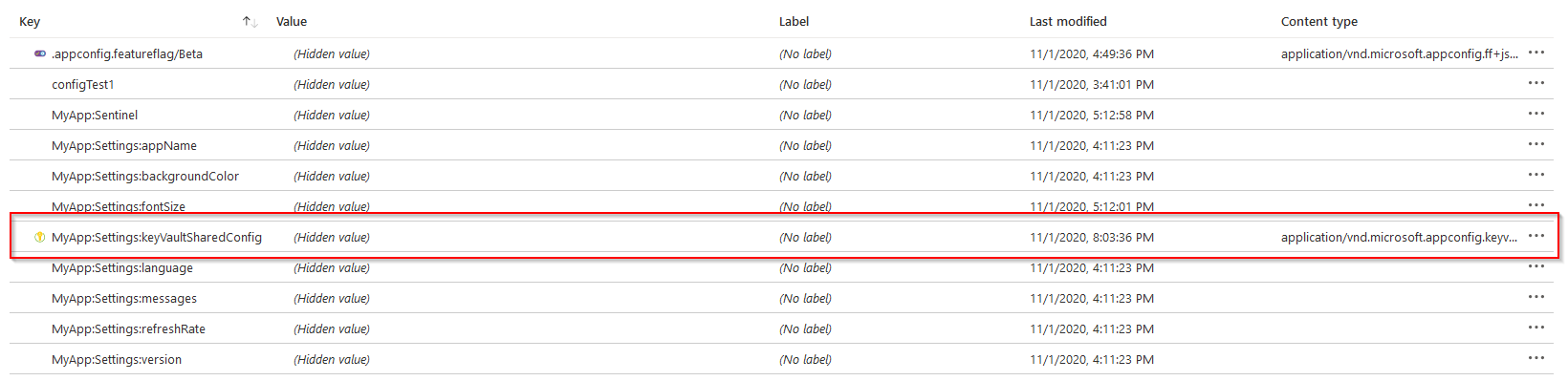
So I had a bunch of app configuration settings (see screenshot) and 1 of these was a reference to the Key Vault. After I removed this key from the app configuration - the 403 Forbidden error went away! To confirm this behavior - I went back in and added the same reference as before - but I could not reproduce the issue any more.. The error is now gone forever.
Please try verifying if you are affected by the same issue. I want to get this reported but I can't because of the zero evidence :)
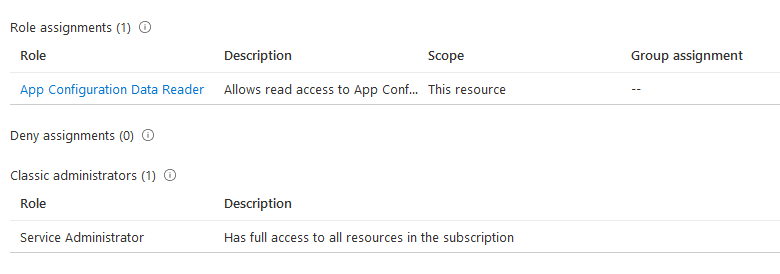
p.s. I am not using the managed identity. My user has following access rights:
Code snippet:
                    var kvUri = "https://" + keyVaultName + ".vault.azure.net";
                    var credentials = new SharedTokenCacheCredential();
                    var client = new SecretClient(new Uri(kvUri), credentials);

                    config.AddAzureAppConfiguration(options =>
                    {
                        options.Connect(new Uri($"https://{appConfigName}.azconfig.io"), credentials)
                            .ConfigureKeyVault(c =>
                                {
                                    c.Register(client);
                                }
                            )
                            .Select(keyFilter: "MyApp:Settings:*")
                            .ConfigureRefresh((refreshOptions) =>
                            {
                                refreshOptions.Register(key: "MyApp:Sentinel", refreshAll: true);
                                refreshOptions.SetCacheExpiration(TimeSpan.FromSeconds(5));
                            }).UseFeatureFlags();
                    });
 pavlexander
on 2 Nov 2020
pavlexander
on 2 Nov 2020
@pavlexander thanks for sharing. What added in the App Configuration store is nothing but a reference to Key Vault and the App Configuration service will not make any requests to Key Vault. Any access errors are between your application and the Key Vault. Sometimes, the issue can go away by just waiting for the AAD assignment in Key Vault to propagate or an application restart. Removing and re-adding the Key Vault reference in App Configuration may just be a coincidence. But let's see if others experience the same issue. Thanks again for sharing.
zhenlan
on 6 Nov 2020
@zhenlan Sorry about the late response. I was able to figure out the issue on my end.
Our issue was due to the fact that we had existing code to connect to Key Vault directly via Service Principal and was not actually related to App Configuration. Once we removed those direct KV calls, there were no issues.
I do want to comment on the issue that @pavlexander was experiencing - we had the same thing occur, if the Key Vault reference is no longer valid, then the entire App Configuration instance would not work for the client.
So even in a App Configuration resource with hundreds of configs, if just 1 Key Vault-reference is invalid, the whole thing would not work and the consuming app service would not start due to exception in Startup.
There is no reason to have invalid Key Vault references in App Configuration, _but I suppose there is a gentler way of handling these invalid references_. Say, someone decided to clean-up Key Vault secrets, but didn't do so in App Config - the next deployment or app service restart would lead to service outage.
tyh77
on 6 Nov 2020
The other comment I wanted to make, for someone who might benefit from this in the future...
We have a short-checklist for those seeking to use App Configuration with Managed Identity, especially User-Assigned MI...
- [ ] Each App Service that uses Azure App Configuration via MI needs to have MI's set in the App Service configs, especially if it's User-Assigned
- [ ] The Managed Identity must have _App Configuration Data Reader_ permissions at least in IAM
If using Key Vault references in App Configuration resource... - [ ] The Managed Identity must have _Reader_ permissions for whatever is being referenced in the Key Vault: secret, cert, etc. There is currently a Key Vault Reader role, we have been using that. Access Policies must also be set.
tyh77
on 6 Nov 2020
@timhuang77, excellent, thanks for the update and sharing the learnings. That really benefits the whole community. Appreciate it!
So even in a App Configuration resource with hundreds of configs, if just 1 Key Vault-reference is invalid, the whole thing would not work and the consuming app service would not start due to exception in Startup.
The reason for this default behavior is to ensure the integrity of the configuration. Loading configuration partially and letting an application continue to run can cause issues that are even harder to track down later. However, we also realized there were times developers wanted better controls. We, therefore, are planning to add a new API as proposed in https://github.com/Azure/AppConfiguration-DotnetProvider/issues/209. Please feel free to share your feedback on that issue whether it will meet your needs.
zhenlan
on 6 Nov 2020
Closing as questions in this issue have been addressed.
zhenlan
on 3 Dec 2020
Related issues
 David-Stark
·
5Comments
David-Stark
·
5Comments
 Prince269090
·
4Comments
Prince269090
·
4Comments
 WarrenFerrell
·
5Comments
WarrenFerrell
·
5Comments
 sslepova
·
4Comments
sslepova
·
4Comments
 kamalsivalingam
·
3Comments
kamalsivalingam
·
3Comments
Most helpful comment
@timhuang77, excellent, thanks for the update and sharing the learnings. That really benefits the whole community. Appreciate it!
The reason for this default behavior is to ensure the integrity of the configuration. Loading configuration partially and letting an application continue to run can cause issues that are even harder to track down later. However, we also realized there were times developers wanted better controls. We, therefore, are planning to add a new API as proposed in https://github.com/Azure/AppConfiguration-DotnetProvider/issues/209. Please feel free to share your feedback on that issue whether it will meet your needs.