Appcenter: How to enable v2 scheme android signing
Describe the solution you'd like
I would like to be able to select the v2SigningEnabled option to sign builds.
Because v1 scheme is known to be insecure and v2 will be mandatory for android 11.
Describe alternatives you've considered
Use gradle signinConfigs. But unlike text files I'm not sure to be able to upload the keystore as env varialbe and restore it with an appcenter-pre-build script.
 Nikosmonaut
All 11 comments
I also encountered the same problem on Android 11, and finally I solved it by modifying the gradle configuration.
This is my configuration: https://github.com/lz233/OneText_For_Android/blob/master/app/build.gradle
It should be noted that you need to enable "My Gradle settings are entirely set to handle signing automatically" in appcenter.
 lz233
on 25 Sep 2020
lz233
on 25 Sep 2020
Because you keep your keystore in source code then yes it is possible.
I think I've just found the solution though. To use gradle signing config AND not keeping the keystore in source code.
openssl base64 -A -in keystore.jks
It is in fact possible to store the keystore as text string. Keep it in env variables et restore it on every build with app center build scripts.
Thanks @lz233
Nikosmonaut
on 25 Sep 2020
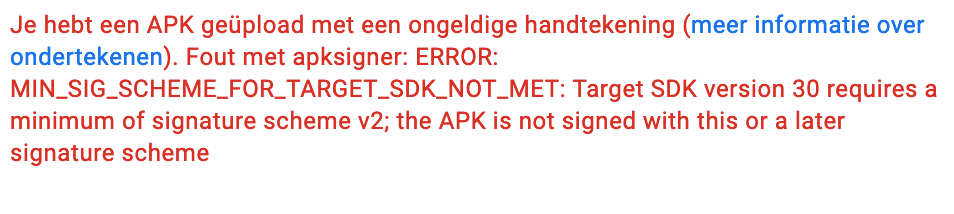
We also updated our targetSdkVersion to 30. App Center has no settings for controlling the signature version, like Android Studio does. Publishing to the Play Store does not work anymore in this case. It rejects the binary.
Screenshot of the error:
 tdekker
on 23 Mar 2021
tdekker
on 23 Mar 2021
+1
 pives
on 9 Apr 2021
pives
on 9 Apr 2021
+1
 ptsiogas
on 22 Apr 2021
ptsiogas
on 22 Apr 2021
Anyone working on this issue yet?
 jst7-1230
on 22 Apr 2021
jst7-1230
on 22 Apr 2021
I have the same issue here with a xamarin forms application I have to upgrade to Android 11 within next november (last month Google accept apk compiled for Android 10)
https://developer.android.com/distribute/best-practices/develop/target-sdk#pre11
any update?
 nicolgit
on 1 Jun 2021
nicolgit
on 1 Jun 2021
tl;dr:
Try to re-upload existing keystore in your AppCenter build configuration. It helped in my case.
I had a conversation with AppCenter Support. Looks like they have fixed the issue and now they do sign with signature v2+.
For existing projects in order to make these changes work, you have to re-upload existing keystore in your AppCenter build configuration.
 barvii
on 8 Jun 2021
barvii
on 8 Jun 2021
In my case, re-uploading the keystore did not work. Instead I had to delete the build configuration for the branch and re-create it, but after that it has been working correctly.
At the start of the build logs, it lists which build tasks it is using. If it lists an older version it will use the jarsigner tool:
Downloading task: AndroidSigning (1.122.0)
After recreating the build configuration (or possibly just re-uploading the keystore if you're lucky), it should list the newer version of the AndroidSigning task and it will use the apksigner tool
Downloading task: AndroidSigning (3.181.0)
 ea-orbital8
on 15 Jun 2021
ea-orbital8
on 15 Jun 2021
tl;dr:
Try to re-upload existing keystore in your AppCenter build configuration. It helped in my case.I had a conversation with AppCenter Support. Looks like they have fixed the issue and now they do sign with signature v2+.
For existing projects in order to make these changes work, you have to re-upload existing keystore in your AppCenter build configuration.
For me, re-uploading the keystore did make a difference, in that the app that targets Android API 30 will now install on Android 11. Unfortunately, now the app won't install on any version of Android lower than 11. Also, nothing that was built with the previous keystore will install at all, on any Android version.
 StarbuckSapien
on 2 Jul 2021
StarbuckSapien
on 2 Jul 2021
Any update, unable to use apk to push to play store
 chakrihacker
on 15 Jul 2021
chakrihacker
on 15 Jul 2021
Related issues
 muhammaddadu
·
3Comments
muhammaddadu
·
3Comments
 mason-hz
·
3Comments
mason-hz
·
3Comments
 thabemmz
·
3Comments
thabemmz
·
3Comments
 busterlaursen
·
4Comments
busterlaursen
·
4Comments
 DouglasMarq
·
4Comments
DouglasMarq
·
4Comments
Most helpful comment
tl;dr:
Try to re-upload existing keystore in your AppCenter build configuration. It helped in my case.
I had a conversation with AppCenter Support. Looks like they have fixed the issue and now they do sign with signature v2+.
For existing projects in order to make these changes work, you have to re-upload existing keystore in your AppCenter build configuration.