We will be working on porting our applications to Apple's new processor architecture and we currently leverage AppCenter for crash reporting and to distribute development builds of our software internally.
For crash reporting we are considering Backtrace. Ultimately, both AppCenter and Backtrace depends on PLCrashReporter library, though.
 tonylambert
All 41 comments
Alright. Apple Silicon is getting closer, and we'd like to build our app with all dependencies, including AppCenter. Any ETA at this time?
 duncanwilcox
on 20 Aug 2020
duncanwilcox
on 20 Aug 2020
We are also interested in releasing our apps for Apple Silicon and we would love to include Microsoft Appcenter.
 depth42
on 25 Aug 2020
depth42
on 25 Aug 2020
Is there an update on this? ... Anyone? ... Bueller?
We've been forced to look at Backtrace.io as an alternate due to the delay. Apple arm conversion video from WWDC says "contact the developer"
 bitweaver
on 15 Sep 2020
bitweaver
on 15 Sep 2020
Can we please at least have an ETA or any kind of commitment or feedback from the team on this?
The lack of response on this is very frustrating. It feels like MS is treating this as just another feature request, waiting to collect +1s on GitHub before consideration. I do hope someone at MS realizes that without Apple Silicon support developers will be forced to abandon App Center in the near future. (Along those lines: @bitweaver thank you for suggesting backtrace.io as a fallback.)
 triplef
on 30 Sep 2020
triplef
on 30 Sep 2020
Need this too 👍.
 nielsmouthaan
on 2 Oct 2020
nielsmouthaan
on 2 Oct 2020
This is what their support told me:
Hi, there isn't currently an ETA for supporting Apple chips yet. App center is currently working on reliability and performance, and will start working on more feature requests after mid 2021.
Time to look for an App Center replacement. 😞
triplef
on 2 Oct 2020
I’d also encourage everyone to contact App Center support directly about this by logging into https://appcenter.ms and clicking the question mark button in the top right corner:
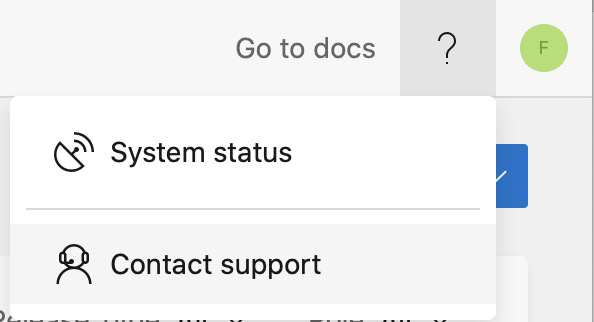
I don’t see any indication of their roadmap team monitoring GitHub requests, so maybe this will help escalating this internally.
triplef
on 2 Oct 2020
Yeah already did that. Let's hope it makes some difference.
nielsmouthaan
on 2 Oct 2020
Also just got a reply from support:
Hi there! Thanks for connecting with usAs of now there is no ETAs on this at this time. You can follow the below thread for updates in the future!https://github.com/microsoft/appcenter/issues/1927
Doesn't sound promising as they simply refer to this issue for communicating future updates.
nielsmouthaan
on 2 Oct 2020
We too are looking for alternatives, don't want to be caught without a solution when Apple Silicon drops. Microsoft get your act together!
duncanwilcox
on 2 Oct 2020
Wow, I can't believe this isn't already done by Microsoft. Come on folks, or we'll have to look to some other crash reporting solution for macOS. We're already having to use sentry.io for C++ Windows Store apps...
 sseyod
on 5 Oct 2020
sseyod
on 5 Oct 2020
adding another vote for this... we'll need to explore other options if we don't get a solid ETA soon
 mikewoodworth
on 6 Oct 2020
mikewoodworth
on 6 Oct 2020
We're also dependent on AppCenter. An ETA from Microsoft would be much appreciated.
 subdigital
on 7 Oct 2020
subdigital
on 7 Oct 2020
@subdigital see above re. ETA – apparently not before mid 2021 according to their support:
Hi, there isn't currently an ETA for supporting Apple chips yet. App center is currently working on reliability and performance, and will start working on more feature requests after mid 2021.
triplef
on 8 Oct 2020
An earlier ETA from Microsoft would be much appreciated. :)
sseyod
on 8 Oct 2020
Thank you.
Link for reference https://stackoverflow.com/questions/63607158/xcode-12-building-for-ios-simulator-but-linking-in-object-file-built-for-ios
 Kedar-27
on 9 Oct 2020
Kedar-27
on 9 Oct 2020
Please, Microsoft PMs – mid 2021 just _cannot_ be your honest stance on this? We like AppCenter a lot, but this would force us to move elsewhere…
 macguru
on 9 Oct 2020
macguru
on 9 Oct 2020
Am I missing something or doesn't this work already (at least for projects using Swift Package Manager)? I just tested by adding the AppCenter repository to my Xcode project as a Swift Package Manager dependency and it compiles and runs just fine on an arm64 Mac. Submitted a test crash and it shows up as expected on the diagnostics page.
 stevesw
on 12 Oct 2020
stevesw
on 12 Oct 2020
@stevenwei that is very interesting!
To be clear, our products are a combination of Swift, Objective-C and C++.
FWIW, we have separate products for both iOS and macOS (and Android and Windows!), all using a lot of C++ at their core.
Best to all, Pete
sseyod
on 12 Oct 2020
@stevenwei Are you sure the project is built for x86_64 and ARM64? Have a look your test crash in App Center and view the raw report ("Reports" tab, then select an entry and click on "RAW"). Next to Code Type:, does it show arm64 instead of x86_64?
You could also call file on the executable of you project to see the architectures in the binary.
I suspect your project is x86_64 only and is executed by Rosetta 2 on your ARM64 Mac.
 DarkDust
on 12 Oct 2020
DarkDust
on 12 Oct 2020
@DarkDust Yes, the raw crash report, file, and Activity Monitor all confirm the binary is arm64.
stevesw
on 12 Oct 2020
@DarkDust are they all built from BitCode, or something along those lines...?
sseyod
on 12 Oct 2020
App Center via Cocoapods is definitely missing the arm64 slice:
$ lipo -archs Pods/AppCenter/AppCenter-SDK-Apple/macOS/AppCenter.framework/Versions/A/AppCenter
x86_64
But as a workaround for the time being you can still include App Center on x86_64 only using the following Cocoapods post-install hook and guarding your code referencing App Center using #if TARGET_CPU_X86_64 (Objective-C) / #if arch(x86_64) (Swift):
post_install do |installer|

  # Remove App Center from Apple Silicon on macOS
  # https://github.com/microsoft/appcenter/issues/1927
  installer.aggregate_targets.each do |target|
    if target.platform.symbolic_name == :osx
      puts "Removing App Center in #{target.name}"

      target.xcconfigs.each_pair do |config_name, config|
        # remove AppCenter frameworks
        frameworks = config.other_linker_flags[:frameworks]
        app_center_frameworks = frameworks.select {|f| f.start_with?('AppCenter')}
        frameworks.subtract(app_center_frameworks)

        # re-add AppCenter frameworks on x86_64 only
        config.attributes['OTHER_LDFLAGS[arch=x86_64]'] = '$(inherited) ' + app_center_frameworks.map {|f| "-framework \"#{f}\""}.join(' ')

        config.save_as(Pathname.new("#{target.support_files_dir}/#{target.label}.#{config_name}.xcconfig"))
      end
    end
  end

end
I recently tested downloading appcenter as source, opening in Xcode 12.2b3, changing the relevant build settings to include ARM. That works and, when tested on a DTK, crash reports round trip back to appcenter.
I don't know how robust that is though.
duncanwilcox
on 20 Oct 2020
Hello,
I'm from the App Center product side. Wanted to share an update on the status of this work. Our team will pick up this work soon, and support for Apple Silicon should be available before the end of this year.
 dimazaid
on 22 Oct 2020
dimazaid
on 22 Oct 2020
@dimazaid: Thank you, much appreciated!
DarkDust
on 23 Oct 2020
Similar to @duncanwilcox's finding, you can compile the source with Carthage on Xcode 12.2b3 and get fat binaries. I can integrate them into my app but I don't have a DTK to go any further.
carthage update --platform macOS --verbose --no-use-binaries
Compiling from source is not supported by MS, but I am tempted to use this as a stopgap if the first ARM Mac ships before official AppCenter binaries.
 fraserhess
on 25 Oct 2020
fraserhess
on 25 Oct 2020
@fraserhess compiling from sources by carthage was fixed in 3.3.0
 MatkovIvan
on 26 Oct 2020
MatkovIvan
on 26 Oct 2020
We ended up switching to Firebase Crashlytics, which is available on macOS and for Apple Silicon.
triplef
on 26 Oct 2020
Are they officially supporting macOS? They've mentioned support on their GitHub once but I cannot find anything officially on their site.
I'm also asking this as I am using App Center for test/beta distribution. Firebase has something similar: Firebase App Distribution. However they only mention Android and iOS as platforms.
Don't want to end up with yet another dependency having issues regarding platform support in the future.
Personally I would like to stick to App Center for now. It's great they've mentioned upcoming support but somewhere I am concerned it might be too late. Silicon-powered Macs are likely to be launched before end of this year, perhaps even causing the App Store to require binaries supporting arm64. A more specific (or sooner) release date is preferred.
nielsmouthaan
on 26 Oct 2020
Yeah, Firebase support for macOS is generally unofficial ("community supported" or such), and some products like Firebase Analytics and I think Distribution are unavailable on macOS. So this is mainly an option if you just need crash reporting.
triplef
on 26 Oct 2020
I recently tested downloading appcenter as source, opening in Xcode 12.2b3, changing the relevant build settings to include ARM. That works and, when tested on a DTK, crash reports round trip back to appcenter.
I don't know how robust that is though.
We managed to build appcenter for ARM Macs, but the crashes recorded on these machines do not get symbolized in appcenter although we have provided all DSYMs. Has anybody gotten symbolication to work yet?
 akaenner
on 29 Oct 2020
akaenner
on 29 Oct 2020
App center is currently working on reliability and performance, and will start working on more feature requests after mid 2021
We are talking about the framework no longer working at all on Macs that will be on the store shelves in a few weeks, can it be more relevant to "reliability" than that?
should be available before the end of this year.
The possibility of this slipping until Q1 2021 is honestly not good enough. Very disappointed to see that this hasn't been prioritized. We've had 3+ months of DTK access...
 OskarGroth
on 2 Nov 2020
OskarGroth
on 2 Nov 2020
Supporting any platform means supporting the popular processor architectures it runs on. As of next week (most likely) “supporting the Mac” will mean supporting 2 processor architectures. For developers preparing for this reality, supporting Apple Silicon is now ‘table stakes’ in macOS support and this flows upstream to orgs offering binary frameworks for macOS.
The frustration expressed in this thread is understandable when the request is characterized as an enhancement. Rather, it will soon be baseline for support of macOS.
fraserhess
on 2 Nov 2020
Am I missing something or doesn't this work already (at least for projects using Swift Package Manager)? I just tested by adding the AppCenter repository to my Xcode project as a Swift Package Manager dependency and it compiles and runs just fine on an arm64 Mac. Submitted a test crash and it shows up as expected on the diagnostics page.
I would like to reinforce that this solution WORKS. As long as you are using Swift, change your App Center integration from using Cocoapods to Swift Package Manager, and it simply works.
 zeromhz
on 6 Nov 2020
zeromhz
on 6 Nov 2020
Does the support mentioned earlier in this thread include support for arm64 iOS simulators?
 DavidBrunow
on 6 Nov 2020
DavidBrunow
on 6 Nov 2020
@DavidBrunow yes, these binaries will be included to .xcframework
MatkovIvan
on 9 Nov 2020
Am I missing something or doesn't this work already (at least for projects using Swift Package Manager)? I just tested by adding the AppCenter repository to my Xcode project as a Swift Package Manager dependency and it compiles and runs just fine on an arm64 Mac. Submitted a test crash and it shows up as expected on the diagnostics page.
I would like to reinforce that this solution WORKS. As long as you are using Swift, change your App Center integration from using Cocoapods to Swift Package Manager, and it simply works.
This is the approach I went for too. I have a mixed ObjC & Swift project so I simply created a (Swift-written) wrapper with ObjC exposed functions to make App Center work too with my ObjC code. I submitted a test crash (imitated from ObjC code) and it appeared properly (and symbolicated) in App Center. Seems like the best workaround for now. Have not tested it on arm64 though but the binary seems to support it.
nielsmouthaan
on 10 Nov 2020
Hi there!
App Center Apple SDK 4.0.0 with Apple Silicon support has been published today. Please note that this is a major release and it has some naming changes that we had to do to avoid naming conflict with Apple private frameworks, so it requires some adjustments (most of it should be fixed by just "Find & Replace"). Please follow the migration guide.
Also, I want to explicitly mention that symbolycation part is still in progress, it works only particularly for now - only places in your code are decoded, system symbols are missing.
MatkovIvan
on 11 Nov 2020
All worked fine for me, using Swift Package Manager. Thanks folks!
sseyod
on 13 Nov 2020
Symbolication part should be done now. We tested all the pieces together and we think that Apple Silicon in App Center is ready for the prime time. Closing this issue now. Thanks for all your feedback! If you hit any issues, please do not hesitate to contact our customer support.
 wham
on 14 Dec 2020
wham
on 14 Dec 2020
Related issues
 KSemenenko
·
3Comments
KSemenenko
·
3Comments
 DouglasMarq
·
4Comments
DouglasMarq
·
4Comments
 mason-hz
·
3Comments
mason-hz
·
3Comments
 galfonso777
·
3Comments
galfonso777
·
3Comments
 Oddj0b
·
3Comments
Oddj0b
·
3Comments
Most helpful comment
Hello,
I'm from the App Center product side. Wanted to share an update on the status of this work. Our team will pick up this work soon, and support for Apple Silicon should be available before the end of this year.