Appcenter: Support custom build configurations for iOS
step1, install
npm install appcenter appcenter-analytics appcenter-crashes --save
react-native link
step2, do archive in Xcode, but get error in AppDelegate.m


Any configuration issue?
 kala888
All 33 comments
@kala888 The "Header Search Paths" of appcenter-crashes module should be $(SRCROOT)/../node_modules/appcenter-crashes/ios/AppCenterReactNativeCrashes instead of $(SRCROOT)/../node_modules/appcenter-crashes/ios/AppCenterReactNativeAnalytics. I am not sure why it's referencing appcenter-analytics path as react-native link won't do that, did you change the path yourself? Can you change it back and try again?
 dhei
on 4 Jan 2018
dhei
on 4 Jan 2018
Hi, we are closing this issue due to inactivity. Please reply with requested details from the previous answer if you want us to reopen the issue.
 guperrot
on 18 Jan 2018
guperrot
on 18 Jan 2018
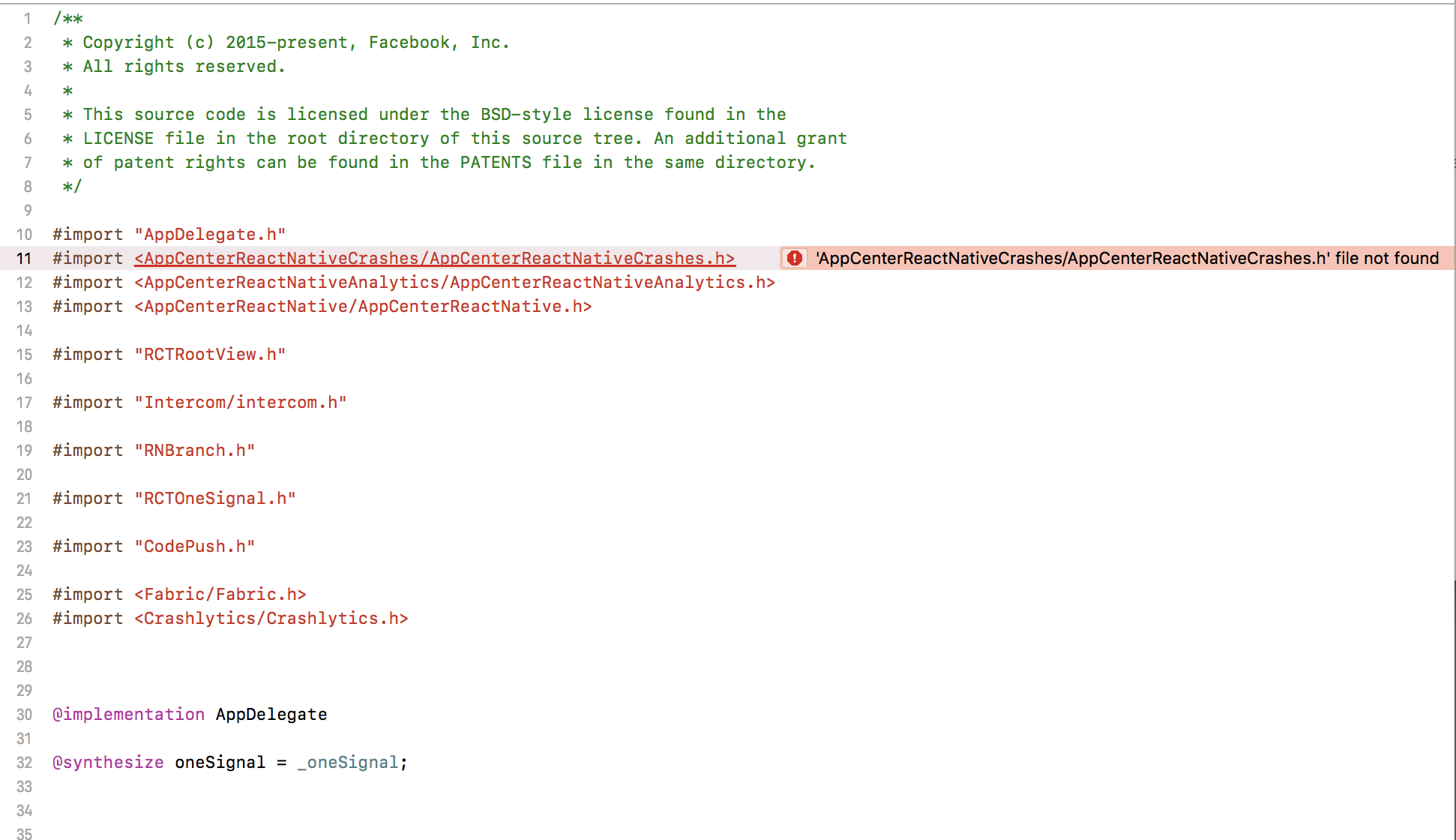
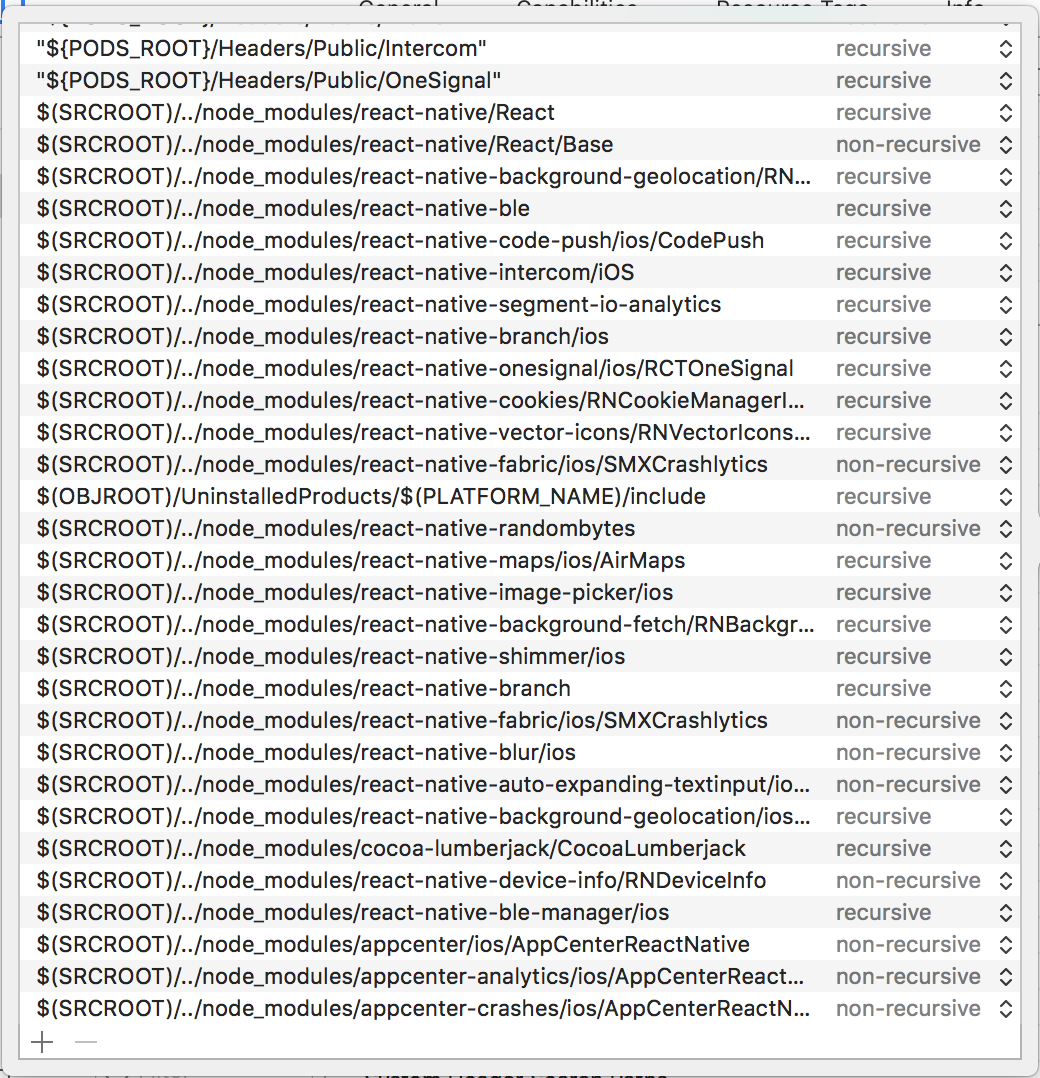
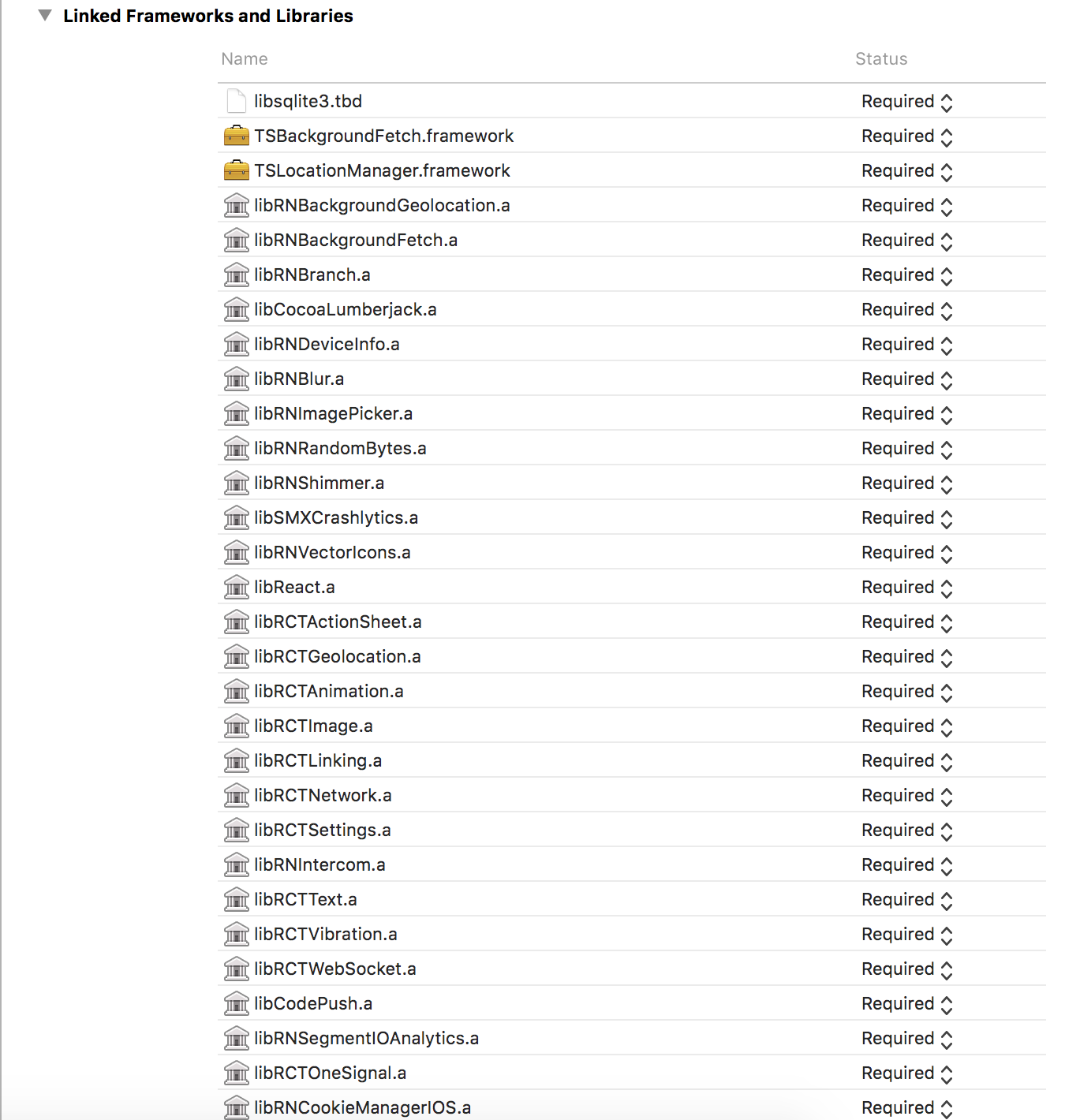
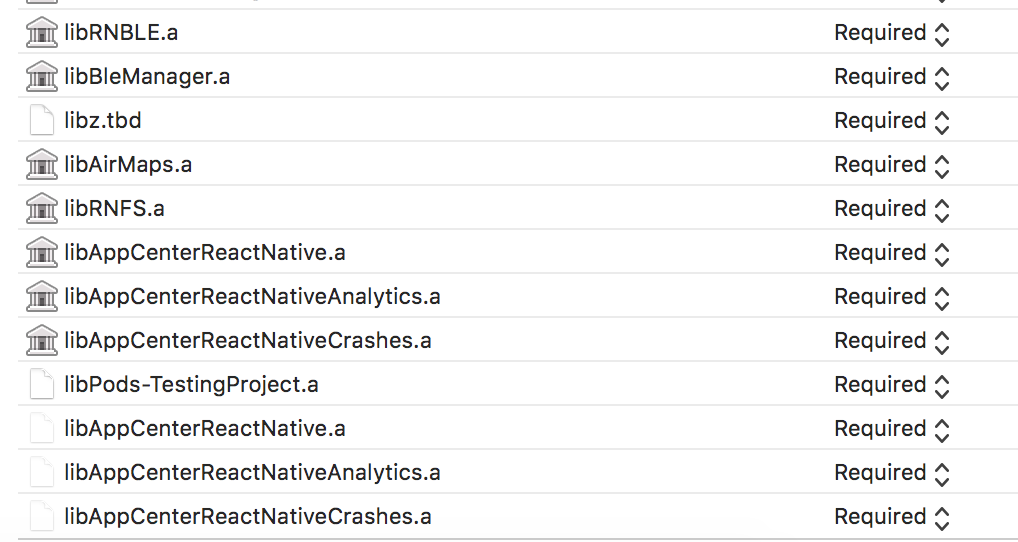
I'm having the exact same problem but my project header search paths are correct.
I used pod install and react-native link. I can run the app via react-native run-ios but I cannot build in Xcode for release.
 jayporta
on 24 Feb 2018
jayporta
on 24 Feb 2018
Hi, please avoid commenting on closed issues as this might be a different problem even if it looks similar.
Usually, if react-native run-ios works but not XCode that means you open the project directly on XCode instead of using the workspace generated by Cocoapods (opening project directly will definitely not work after react-native link). Have you tried opening the new xcworkspace instead?
guperrot
on 26 Feb 2018
Hi guperrot, thanks for replying.
Using XCode (in a workspace, not a project) I can build in the Release build configuration with no problem. However, if I switch to a custom build configuration (in this case, Alpha) then the AppCenterReactNative header cannot be found.
So, Release and Debug work just fine, but any additional build configurations fail.
I did notice in AppCenter's node module, there are some references to Release and Debug
build configurations, and I didn't notice any flexibility for user-created configurations.
(node_modules>appcenter>ios>AppCenterReactNative.xcodeproj>project.pbxproj).
jayporta
on 26 Feb 2018
Conversation followed up on official support center.
guperrot
on 26 Feb 2018
@guperrot Is the resolution that custom build configurations are not currently supported at this time, but are on the backlog without an ETA ??
Just want to double check because that's the reply I received today via an official support request.
 wkoutre
on 7 Mar 2018
wkoutre
on 7 Mar 2018
@wkoutre you are right it's a feature request and I edited the title and label for better visibility. We don't have any ETA for that.
guperrot
on 7 Mar 2018
Okay, just wanted to confirm. Thank you @guperrot.
For anyone else who ends up here, checkout this GitHub thread about custom build configs in React Native.
Currently in the middle of configuring my XCode project, but from what I understand it should be a relatively clean workaround to get CodePush working with custom build configs for the time being. Will report back when I've reached a conclusion.
wkoutre
on 8 Mar 2018
Change the import paths to,
`#import
import
import `
 dinukasal
on 8 Mar 2018
dinukasal
on 8 Mar 2018
@dinukasal Doesn't work in my setup, and even if it did, it doesn't solve the underlying library & framework referencing/linking issue faced when using custom build configurations in React Native.
I've found a workaround, though. Pretty straightforward: add the Release config's header and library search path to your custom config's paths -- in my case, it's named Staging.
Checkout @tisho's comment on this thread.
From that, and one additional modification to my target's Build Settings >> Library Search Paths -- including both Release and Staging build directories, recursively -- gave me an end-configuration as follows:
--
Targets >> [Your App Name] >> Per-configuration:
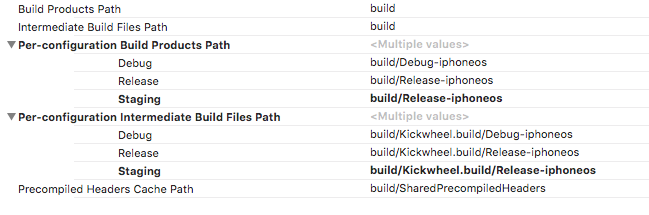
Targets >> [Your App Name] >> Build Settings >> POD_CONFIG setup:

--
Targets >> [Your App Name] >> New Build Settings >> User-Defined Setting: REACT_HEADERS_PATH

--
Targets >> [Your App Name] >> Header Search Paths (partial)

--
Targets >> [Your App Name] >> Library Search Paths (partial)

--
Targets >> [Your App Name] >> Framework Search Paths (partial)

--
[Targets >> [Your App Name] >> Build Phases >> Target Dependencies
![Targets >> [Your App Name] >> Build Phases >> Target Dependencies](https://user-images.githubusercontent.com/13321210/37167100-d3551636-22b5-11e8-8b7d-8db66777d6cc.png)
--
Some of these are, clearly, necessary only if you're also using Cocoapods to handle linking third-party libs.
wkoutre
on 8 Mar 2018
Thanks @wkoutre it worked.
 Msspl-PrashenjeetRoy
on 15 Mar 2018
Msspl-PrashenjeetRoy
on 15 Mar 2018
@wkoutre I was solving this from more than one week. So finally helped from this. I have made a post here with all my configurations. https://medium.com/@royprashenjeet25/solution-of-appcenter-codepush-multi-deployment-issue-ios-which-i-have-faced-c149813f84dd
I have added screenshots for others who are facing the same issue. In my case these configurations
are working for multiple deployment.
Msspl-PrashenjeetRoy
on 15 Mar 2018
@Msspl-PrashenjeetRoy 👍🏼 Glad it's working for you!
wkoutre
on 15 Mar 2018
Guys, How can I change the build configuration to use Debug for my develop branch?
Example:
ios-setBuildConfiguration { buildConfiguration: 'Debug' }
Thanks in advance, Nicholls
 jdnichollsc
on 7 Jun 2018
jdnichollsc
on 7 Jun 2018
Anyone facing this issue #1330
 iosfitness
on 8 Jul 2018
iosfitness
on 8 Jul 2018
@iosfitness which issue are you trying to reference here?
 ElektrojungeAtWork
on 10 Jul 2018
ElektrojungeAtWork
on 10 Jul 2018
in my case it helps me to set $(SRCROOT)/../node_modules/appcenter-crashes/ios/AppCenterReactNativeCrashes as recursive
 MikhailVasiliev
on 15 Jul 2018
MikhailVasiliev
on 15 Jul 2018
I tried every solution presented here and I was able to pass by most of the errors but now I am left with duplicate symbols for architecture errors when trying to build. Has anyone had a similar experience?
 reinvanimschoot
on 11 Feb 2019
reinvanimschoot
on 11 Feb 2019
Can you tried this https://github.com/react-native-community/react-native-maps/issues/718 @reinvanimschoot
I have this code in my pod file for solving this also.
post_install do |installer|
    installer.pods_project.targets.each do |target|
      if target.name == "React"
        target.remove_from_project
      end
      if target.name == "yoga"
        target.remove_from_project
      end
    end
  end
also plz follow this link https://stackoverflow.com/questions/42021796/react-native-xcode-project-product-archive-fails-with-duplicate-symbols-for-arch
Open xcode > click left panel pod > click right side react > right click delete (yoga or react will show you the error so delete yoga.
 prashen
on 11 Feb 2019
prashen
on 11 Feb 2019
@prashen I'll take a look! But I wonder why other people were able to install without those steps then, just using the steps described in this thread.
reinvanimschoot
on 11 Feb 2019
@reinvanimschoot Everyone has a different version or following them differently may be. You have followed my this article on medium https://medium.com/@royprashenjeet25/solution-of-appcenter-codepush-multi-deployment-issue-ios-which-i-have-faced-c149813f84dd.
But now there is no mobilecenter. it's Appcenter now. so some header search path may change.
prashen
on 11 Feb 2019
@prashen haha yes, I was following that guide. Have you had to change anything since you wrote that?
reinvanimschoot
on 11 Feb 2019
@reinvanimschoot Yes, because I am now using :
react-native 0.57.8 and
App Center :
"appcenter": "~1.8.1",
"appcenter-analytics": "~1.8.1",
"appcenter-crashes": "~1.8.1",
I have updated my pod file this code :
post_install do |installer|
    installer.pods_project.targets.each do |target|
      if target.name == "React"
        target.remove_from_project
      end
      if target.name == "yoga"
        target.remove_from_project
      end
    end
  end
which helps me and removed the issue which always facing from duplicate symbol error.
you have to take things in one-way pod file or Xcode. That's why it's showing duplicate symbol error.
I hope this will fix your error.
prashen
on 11 Feb 2019
@prashen Ill give it a try right now! Did you change anything else compared to the guide you wrote?
reinvanimschoot
on 11 Feb 2019
if you just installed or updated your pods you need to close your Xcode project and reopen it again.
 ismnoiet
on 11 Feb 2019
ismnoiet
on 11 Feb 2019
@prashen I added those lines to my podfile, which looks like this now:
platform :ios, '9.0'

def react_pods
  pod 'React', :path => '../node_modules/react-native', :subspecs => [
    'Core',
    'DevSupport',
    'CxxBridge',
    'RCTNetwork',
  ]

  pod 'yoga', :path => '../node_modules/react-native/ReactCommon/yoga'
  pod 'DoubleConversion', podspec: '../node_modules/react-native/third-party-podspecs/DoubleConversion.podspec'
  pod 'Folly', podspec: '../node_modules/react-native/third-party-podspecs/Folly.podspec'
  pod 'glog', :podspec => '../node_modules/react-native/third-party-podspecs/glog.podspec'
end

target 'baseline' do
  react_pods
  pod 'AppCenter/Crashes', '~> 1.13.0'
  pod 'AppCenter/Analytics', '~> 1.13.0'
  pod 'AppCenterReactNativeShared', '~> 1.12.0'

  # Pods for baseline
  pod 'RNGestureHandler', :path => '../node_modules/react-native-gesture-handler'

  target 'baselineTests' do
    inherit! :search_paths
    react_pods
  end
end

post_install do |installer|
  installer.pods_project.targets.each do |target|
    if target.name == "React"
      target.remove_from_project
    end
    if target.name == "yoga"
      target.remove_from_project
    end
  end
end
But I still get exactly the same error of duplicate symbols. Anything else you could think of?
reinvanimschoot
on 13 Feb 2019
Hi @reinvanimschoot , thanks for reporting this!
Can you provide detailed steps of how you configured sdk?
Thanks!
 dtrabo
on 14 Feb 2019
dtrabo
on 14 Feb 2019
Hello guys, do you have any example using this configuration with React Native >= 0.61?
I'm having these errors:
- Installing Pods
[!] The `MyAppStaging [Staging]` target overrides the `PODS_CONFIGURATION_BUILD_DIR` build setting defined in `Pods/Target Support Files/Pods-MyAppStaging/Pods-MyAppStaging.staging.xcconfig'. This can lead to problems with the CocoaPods installation
- Building from Xcode
ld: warning: directory not found for option '-F$PODS_CONFIGURATIONS_BUILD_DIR'
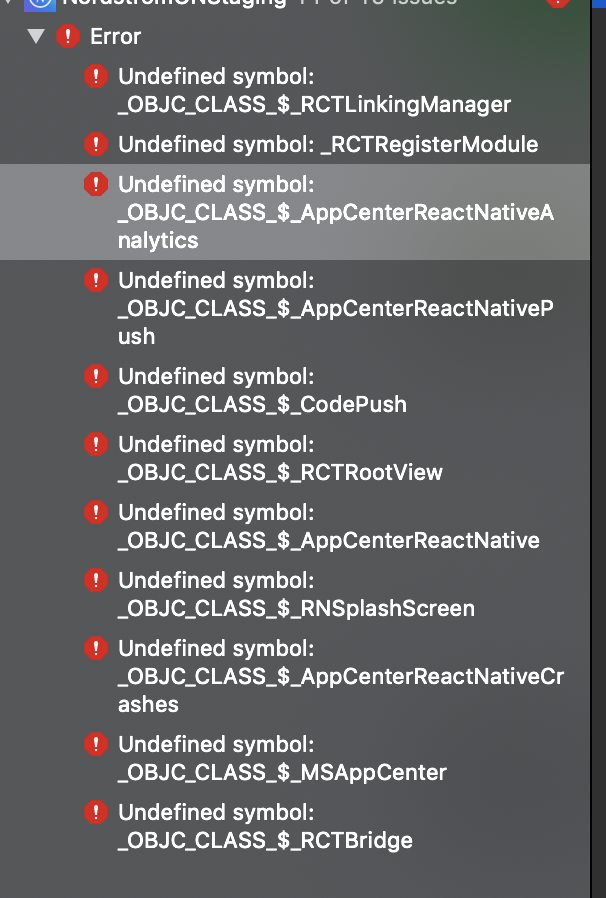
Thanks in advance!
jdnichollsc
on 10 Oct 2019
Ok, fixed by using $(CONFIGURATION) instead of Release for the other targets, e.g:
- Before
PODS_CONFIGURATION_BUILD_DIR = "${PODS_BUILD_DIR}/Release$(EFFECTIVE_PLATFORM_NAME)";
- After
PODS_CONFIGURATION_BUILD_DIR = "${PODS_BUILD_DIR}/$(CONFIGURATION)$(EFFECTIVE_PLATFORM_NAME)";
Working perfect now with RN 0.61.2 💯
jdnichollsc
on 11 Oct 2019
I followed this article (https://medium.com/tutorials4beginners/solution-of-appcenter-codepush-multi-deployment-issue-ios-which-i-have-faced-c149813f84dd) it super worked. Man, I hope it will be included some where in the document please. It took me few days for it.
Small note: If you cannot find Pre-Configuration Build Products Path, just skip that step, still work without it. Just follow exactly what mention in the article, some configuration come with double quote ", some without it.
 baotoan1905
on 12 Jan 2020
baotoan1905
on 12 Jan 2020
This issue has been automatically marked as stale because it has not had any activity for 60 days. It will be closed if no further activity occurs within 15 days of this comment.
![msftbot[bot] picture](https://avatars.githubusercontent.com/in/26612?v=4&s=40) msftbot[bot]
on 30 Jun 2021
msftbot[bot]
on 30 Jun 2021
This issue will now be closed because it hasn't had any activity for 15 days after stale. Please feel free to open a new issue if you still have a question/issue or suggestion.
msftbot[bot]
on 15 Jul 2021
Related issues
 galfonso777
·
3Comments
galfonso777
·
3Comments
 kuyazee
·
3Comments
kuyazee
·
3Comments
 sourabhtyagi2003
·
3Comments
sourabhtyagi2003
·
3Comments
 master-lincoln
·
3Comments
master-lincoln
·
3Comments
 KSemenenko
·
3Comments
KSemenenko
·
3Comments
Most helpful comment
Change the import paths to,
`#import
import
import`