Appcenter: Appcenter is unable to find Android build
The app center is unable to find artifact after a successful build.
Describe the solution you'd like
Fix - https://github.com/microsoft/appcenter/pull/1519
Additional context
Below is the script that is executed internally to find the build and the error I was getting.
Task : Shell Script
Description : Run a shell script using bash
Version : 2.1.3
Author : Microsoft Corporation
Help : More Information
[command]/bin/bash /Users/runner/runners/2.163.1/scripts/android-postprocess.sh /Users/runner/runners/2.163.1/work/1/s/android/app/app/build/outputs/apk
Removing all ABI or density dependent APKs…
find: /Users/runner/runners/2.163.1/work/1/s/android/app/app/build/outputs/apk: No such file or directory
find: /Users/runner/runners/2.163.1/work/1/s/android/app/app/build/outputs/apk: No such file or directory
find: /Users/runner/runners/2.163.1/work/1/s/android/app/app/build/outputs/apk: No such file or directory
Found 0 APK file(s)
Found 0 unaligned APK file(s)
find: /Users/runner/runners/2.163.1/work/1/s/android/app/app/build/outputs/apk: No such file or directory
/Users/runner/runners/2.163.1/scripts/android-postprocess.sh: line 36: pushd: /Users/runner/runners/2.163.1/work/1/s/android/app/app/build/outputs/apk/..: No such file or directory
/Users/runner/runners/2.163.1/scripts/android-postprocess.sh: line 43: popd: directory stack empty
[error]/bin/bash failed with return code: 1
[error]Bash failed with error: /bin/bash failed with return code: 1
 sawankumarbundelkhandi
All 48 comments
Same issue, any idea ?
 baotoan1905
on 6 Jan 2020
baotoan1905
on 6 Jan 2020
@baotoan1905 check this pr - https://github.com/microsoft/appcenter/pull/1519/files
sawankumarbundelkhandi
on 7 Jan 2020
Thanks for noting, merged the PR.
 dipree
on 17 Jan 2020
dipree
on 17 Jan 2020
this issue should be reopened. I am still experiencing the same issue with react-native 0.61.5
find: /Users/runner/runners/2.163.1/work/1/s/android/app/app/build/outputs/apk: No such file or directory
 makassigithub
on 27 Jan 2020
makassigithub
on 27 Jan 2020
still getting this issue. Please reopen the issue. this pr reverted the change: Revert "Updated path so that appcenter can find the apk"
find: /Users/runner/runners/2.164.8/work/1/s/android/app/app/build/outputs/apk: No such file or directory
Found        0 APK file(s)
 saileshkasaju
on 11 Feb 2020
saileshkasaju
on 11 Feb 2020
Ensure you do not have gradle.bat and a gradle folder in your app directory.
This fixed my issue.
 Prosquid1
on 19 Feb 2020
Prosquid1
on 19 Feb 2020
Ensure you do not have gradle.bat and a gradle folder in your app directory.
This fixed my issue.
When I do this I get this error:
==============================================================================
Task         : Gradle
Description  : Build using a Gradle wrapper script
Version      : 1.128.0
Author       : Microsoft Corporation
Help         : [More Information](https://go.microsoft.com/fwlink/?LinkID=613720)
==============================================================================
(node:2373) Warning: Use Cipheriv for counter mode of aes-256-ctr
(node:2373) Warning: Use Cipheriv for counter mode of aes-256-ctr
(node:2373) Warning: Use Cipheriv for counter mode of aes-256-ctr
(node:2373) Warning: Use Cipheriv for counter mode of aes-256-ctr
(node:2373) Warning: Use Cipheriv for counter mode of aes-256-ctr
(node:2373) Warning: Use Cipheriv for counter mode of aes-256-ctr
(node:2373) Warning: Use Cipheriv for counter mode of aes-256-ctr
(node:2373) Warning: Use Cipheriv for counter mode of aes-256-ctr
(node:2373) Warning: Use Cipheriv for counter mode of aes-256-ctr
(node:2373) Warning: Use Cipheriv for counter mode of aes-256-ctr
(node:2373) Warning: Use Cipheriv for counter mode of aes-256-ctr
(node:2373) Warning: Use Cipheriv for counter mode of aes-256-ctr
(node:2373) Warning: Use Cipheriv for counter mode of aes-256-ctr
(node:2373) Warning: Use Cipheriv for counter mode of aes-256-ctr
(node:2373) Warning: Use Cipheriv for counter mode of aes-256-ctr
(node:2373) Warning: Use Cipheriv for counter mode of aes-256-ctr
(node:2373) Warning: Use Cipheriv for counter mode of aes-256-ctr
(node:2373) Warning: Use Cipheriv for counter mode of aes-256-ctr
(node:2373) Warning: Use Cipheriv for counter mode of aes-256-ctr
(node:2373) Warning: Use Cipheriv for counter mode of aes-256-ctr
(node:2373) Warning: Use Cipheriv for counter mode of aes-256-ctr
(node:2373) Warning: Use Cipheriv for counter mode of aes-256-ctr
(node:2373) Warning: Use Cipheriv for counter mode of aes-256-ctr
(node:2373) Warning: Use Cipheriv for counter mode of aes-256-ctr
##[error]Error: Not found wrapperScript: /Users/runner/runners/2.165.2/work/1/s/mobile/android/app/gradlew
##[section]Finishing: Gradle Task
##[section]Starting: Post Build Script
 dusanjovanov
on 22 Mar 2020
dusanjovanov
on 22 Mar 2020
Any update? I'm getting the same issue.
 seanoh1989
on 31 Mar 2020
seanoh1989
on 31 Mar 2020
This issue was related to flutter and the script change I gave was for the flutter.
I think we should open a new issue for react-native.
sawankumarbundelkhandi
on 31 Mar 2020
I am getting the same issue. My project is native android.
 ptsiogas
on 27 Apr 2020
ptsiogas
on 27 Apr 2020
@ptsiogas I think the problem is your project has unrelated gradle files in the 'app' directory.
If you have unrelated gradle files in the 'app' directory, your app will proceed to build an app using the 'app' directory instead of the 'android' directory and you will end up with an MSCenter output apk with path: 'android/app/app/build/outputs/apk'
As opposed to 'android/app/build/outputs/apk'
Prosquid1
on 27 Apr 2020
@ptsiogas I think the problem is your project has unrelated grade files in the 'app' directory.
If you have unrelated grade files in the 'app' directory, your app will proceed to build an app using the 'app' directory instead of the 'android' directory and you will end up with an MSCenter output apk with path: 'android/app/app/build/outputs/apk'
As opposed to 'android/app/build/outputs/apk'
How can I fix that?
ptsiogas
on 27 Apr 2020
Delete all unrelated files in your app directory, 'gradle.bat', gradle wrapper properties,
You can start a new Android project and compare your app directory with what you currently have.
Prosquid1
on 27 Apr 2020
Delete all unrelated files in your app directory, 'gradle.bat', gradle wrapper properties,
You can start a new Android project and compare your app directory with what you currently have.
Thanks. I will try those steps and let you know.
ptsiogas
on 27 Apr 2020
Delete all unrelated files in your app directory, 'gradle.bat', gradle wrapper properties,
You can start a new Android project and compare your app directory with what you currently have.Thanks. I will try those steps and let you know.
It worked like a charm! Very useful tip!
ptsiogas
on 27 Apr 2020
Same issue. Android native. My app folder is clean.
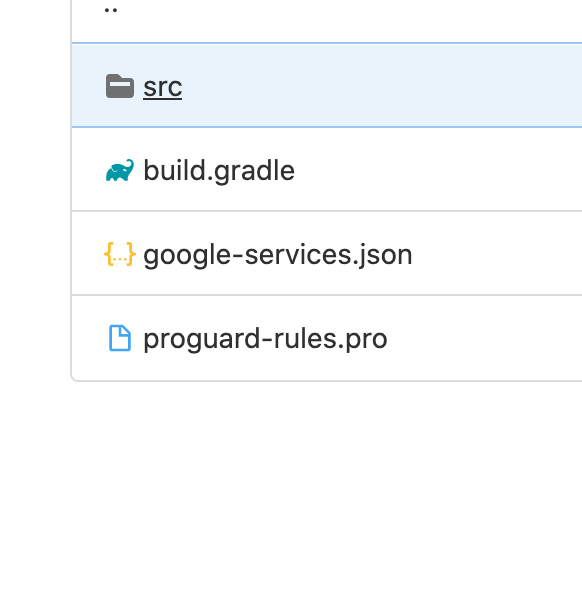
May be anyone knows other decisions?
 Spelliar
on 5 Aug 2020
Spelliar
on 5 Aug 2020
Same issue. Android native. My app folder is clean.
May be anyone knows other decisions?
@Spelliar did you get any progress on this am also getting the same issue as yourself.
 johnclarete
on 21 Aug 2020
johnclarete
on 21 Aug 2020
@makassigithub How did you resolve this.i am facing similar issue in appcenter
 affantechcarrot
on 1 Sep 2020
affantechcarrot
on 1 Sep 2020
I was able to resolve this by removing duplicated gradle-wrapper. You only need one
seanoh1989
on 1 Sep 2020
@seanoh1989 I removed but i am getting this now
(node:2301) Warning: Use Cipheriv for counter mode of aes-256-ctr
[error]Error: Not found wrapperScript: /Users/runner/work/1/s/android/app/gradlew
(node:2301) Warning: Use Cipheriv for counter mode of aes-256-ctr
(node:2301) Warning: Use Cipheriv for counter mode of aes-256-ctr
(node:2301) Warning: Use Cipheriv for counter mode of aes-256-ctr
(node:2301) Warning: Use Cipheriv for counter mode of aes-256-ctr
(node:2301) Warning: Use Cipheriv for counter mode of aes-256-ctr
(node:2301) Warning: Use Cipheriv for counter mode of aes-256-ctr
(node:2301) Warning: Use Cipheriv for counter mode of aes-256-ctr
(node:2301) Warning: Use Cipheriv for counter mode of aes-256-ctr
(node:2301) Warning: Use Cipheriv for counter mode of aes-256-ctr
(node:2301) Warning: Use Cipheriv for counter mode of aes-256-ctr
(node:2301) Warning: Use Cipheriv for counter mode of aes-256-ctr
(node:2301) Warning: Use Cipheriv for counter mode of aes-256-ctr
(node:2301) Warning: Use Cipheriv for counter mode of aes-256-ctr
(node:2301) Warning: Use Cipheriv for counter mode of aes-256-ctr
(node:2301) Warning: Use Cipheriv for counter mode of aes-256-ctr
(node:2301) Warning: Use Cipheriv for counter mode of aes-256-ctr
(node:2301) Warning: Use Cipheriv for counter mode of aes-256-ctr
(node:2301) Warning: Use Cipheriv for counter mode of aes-256-ctr
(node:2301) Warning: Use Cipheriv for counter mode of aes-256-ctr
(node:2301) Warning: Use Cipheriv for counter mode of aes-256-ctr
(node:2301) Warning: Use Cipheriv for counter mode of aes-256-ctr
(node:2301) Warning: Use Cipheriv for counter mode of aes-256-ctr
(node:2301) Warning: Use Cipheriv for counter mode of aes-256-ctr
(node:2301) Warning: Use Cipheriv for counter mode of aes-256-ctr
[section]Finishing: Gradle Task
affantechcarrot
on 1 Sep 2020
@affantechcarrot I too was getting the same issue as you after removing the duplicate grade wrapper files in the app folder. Still would like to know why this isn't working but a workaround I found that was working was to add this into the module level build.gradle for the different build types like in the example below
release {
applicationVariants.all { variant ->
variant.outputs.all {
def currentFile = new File(outputFileName)
def filename = currentFile.getName()
outputFileName = "../../../../../app/build/outputs/apk/${filename}"
}
}
johnclarete
on 2 Sep 2020
@johnclarete what i did. i just click on save and build and the appcenter created the build.
affantechcarrot
on 2 Sep 2020
@ptsiogas I think the problem is your project has unrelated gradle files in the 'app' directory.
If you have unrelated gradle files in the 'app' directory, your app will proceed to build an app using the 'app' directory instead of the 'android' directory and you will end up with an MSCenter output apk with path: 'android/app/app/build/outputs/apk'
As opposed to 'android/app/build/outputs/apk'
Thank you so much and thank you for having the patience to explain it more than one. This fixed the problem for me. However, I also had to delete the original AppCenter build configuration because the scripts files where based off the bad Grade definitions and simply updating the branch didn't update the script files. After creating a new configuration definition, everything built fine for my Android AppCenter build.
 stanhughes
on 25 Sep 2020
stanhughes
on 25 Sep 2020
I had the same issue cause of generating multiple .apk with enableSeparateBuildPerCPUArchitecture = true
Solution:
https://github.com/microsoft/appcenter/issues/501#issuecomment-547142908
 SameeraMadushan
on 4 Nov 2020
SameeraMadushan
on 4 Nov 2020
@dipree
@dusanjovanov @SameeraMadushan @stanhughes @affantechcarrot @johnclarete
Hi, was anyone here actually able to solve this issue? I'm having the exact problem and App Center support doesn't seem to be able to help me. My android app builds fine locally but in App Center im getting this error.
##[section]Starting: Gradle Task
==============================================================================
Task         : Gradle
Description  : Build using a Gradle wrapper script
Version      : 1.128.0
Author       : Microsoft Corporation
Help         : [More Information](https://go.microsoft.com/fwlink/?LinkID=613720)
==============================================================================
##[error]Error: Not found wrapperScript: /Users/runner/work/1/s/android/app/gradlew
(node:2691) Warning: Use Cipheriv for counter mode of aes-256-ctr
Here is my file structure
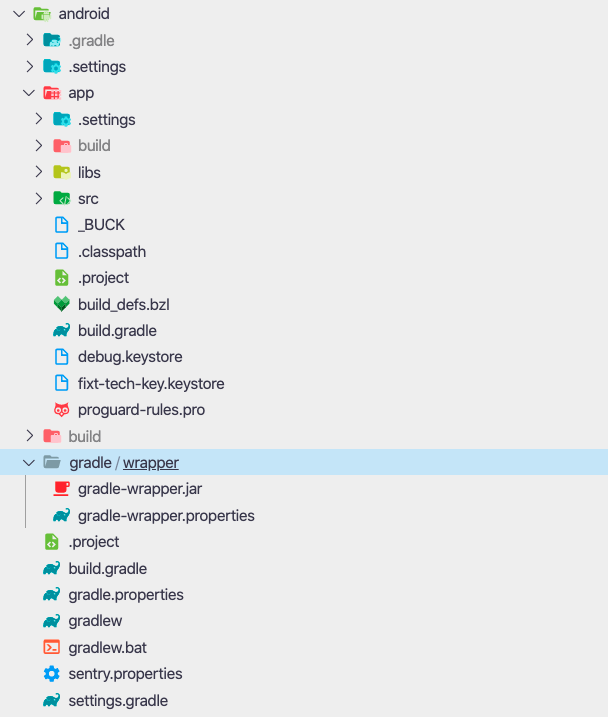
Is anyone able to see what is wrong? I'd really appreciate the help. Please let me know if I can provide any further context.
 TylerEikenberg
on 3 Dec 2020
TylerEikenberg
on 3 Dec 2020
@stanhughes Can you give more detailed instructions?
 anhdo9797
on 5 Dec 2020
anhdo9797
on 5 Dec 2020
@dipree
@dusanjovanov @SameeraMadushan @stanhughes @affantechcarrot @johnclareteHi, was anyone here actually able to solve this issue? I'm having the exact problem and App Center support doesn't seem to be able to help me. My android app builds fine locally but in App Center im getting this error.
##[section]Starting: Gradle Task
==============================================================================
Task         : Gradle
Description  : Build using a Gradle wrapper script
Version      : 1.128.0
Author       : Microsoft Corporation
Help         : [More Information](https://go.microsoft.com/fwlink/?LinkID=613720)
==============================================================================
##[error]Error: Not found wrapperScript: /Users/runner/work/1/s/android/app/gradlew
(node:2691) Warning: Use Cipheriv for counter mode of aes-256-ctr
Here is my file structure
Is anyone able to see what is wrong? I'd really appreciate the help. Please let me know if I can provide any further context.
I am getting the same issue
anhdo9797
on 5 Dec 2020
@anhdo9797
I just solved this for myself.
My issue was that the build branch ( the branch I configured App Center to build ) had gradle files in the /android/app directory. I had deleted these files in the brach I was attempting to merge into my build branch with a PR but it wasn't working until I directly deleted and committed the deletion on the build branch itself. Then on App Center I opened the config and chose Save And Build again.
I can try to clarify if this isn't clear.
TylerEikenberg
on 6 Dec 2020
@anhdo9797
I just solved this for myself.My issue was that the build branch ( the branch I configured App Center to build ) had
gradlefiles in the/android/appdirectory. I had deleted these files in the brach I was attempting to merge into my build branch with a PR but it wasn't working until I directly deleted and committed the deletion on the build branch itself. Then on App Center I opened the config and choseSave And Buildagain.I can try to clarify if this isn't clear.
Can you give me see your file structure ?
I deleted gradle in android and recived message

anhdo9797
on 9 Dec 2020
@anhdo9797
I just solved this for myself.
My issue was that the build branch ( the branch I configured App Center to build ) hadgradlefiles in the/android/appdirectory. I had deleted these files in the brach I was attempting to merge into my build branch with a PR but it wasn't working until I directly deleted and committed the deletion on the build branch itself. Then on App Center I opened the config and choseSave And Buildagain.
I can try to clarify if this isn't clear.Can you give me see your file structure ?
I deleted
gradlein android and recived message
@anhdo9797 my file structure is posted above. It would actually be helpful to see your file structure if you dont mind?
TylerEikenberg
on 9 Dec 2020
@anhdo9797
I just solved this for myself.
My issue was that the build branch ( the branch I configured App Center to build ) hadgradlefiles in the/android/appdirectory. I had deleted these files in the brach I was attempting to merge into my build branch with a PR but it wasn't working until I directly deleted and committed the deletion on the build branch itself. Then on App Center I opened the config and choseSave And Buildagain.
I can try to clarify if this isn't clear.Can you give me see your file structure ?
I deletedgradlein android and recived message
@anhdo9797 my file structure is posted above. It would actually be helpful to see your file structure if you dont mind?
This is my files structure, I has restored back to the original. Can you help me ?
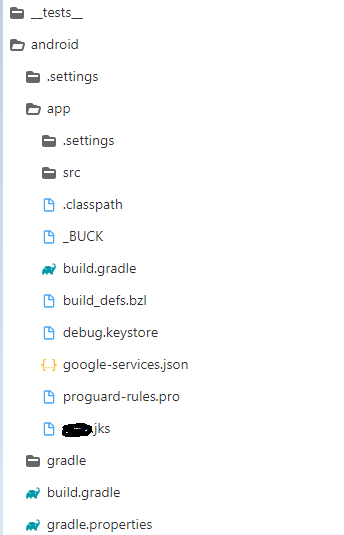
anhdo9797
on 10 Dec 2020
@anhdo9797 This all looks fine. Do you also have a gradlew, gradle.bat, and settings.gradle in your /android directory?
TylerEikenberg
on 10 Dec 2020
@anhdo9797 This all looks fine. Do you also have a
gradlew,gradle.bat, andsettings.gradlein your/androiddirectory?
My full files structure
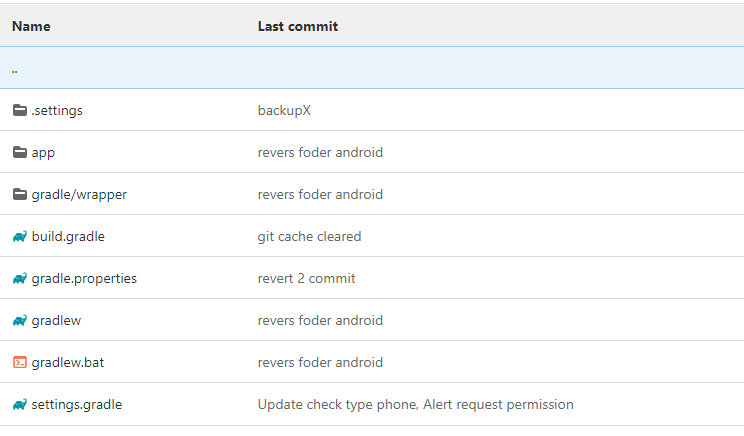
anhdo9797
on 10 Dec 2020
@anhdo9797 hmm, nothing here is immediately indicating a problem to me. Can you describe what is it you're trying to do, and what error you're getting?
TylerEikenberg
on 10 Dec 2020
@anhdo9797 hmm, nothing here is immediately indicating a problem to me. Can you describe what is it you're trying to do, and what error you're getting?
I was like this:
- config app center
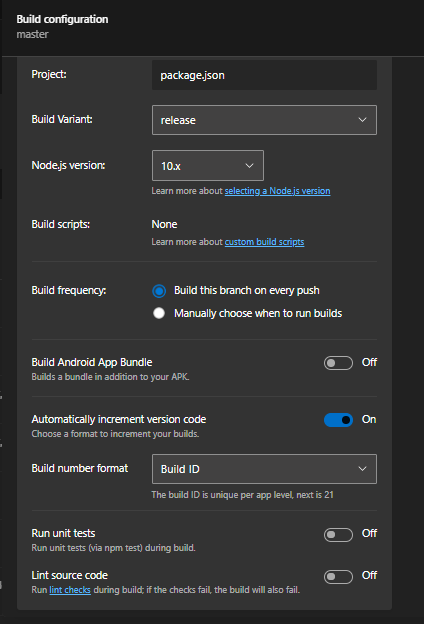
- my structure:
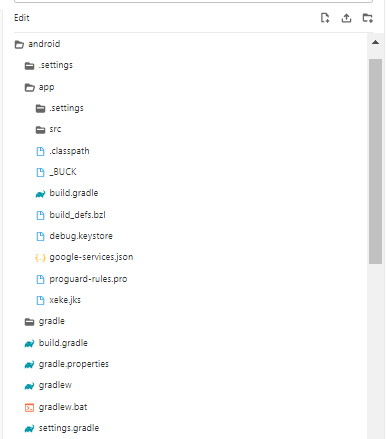
- My
app/build.gradle: https://gitlab.com/anhdo9797/test/-/blob/master/build.gradle
=> I recived error from app center
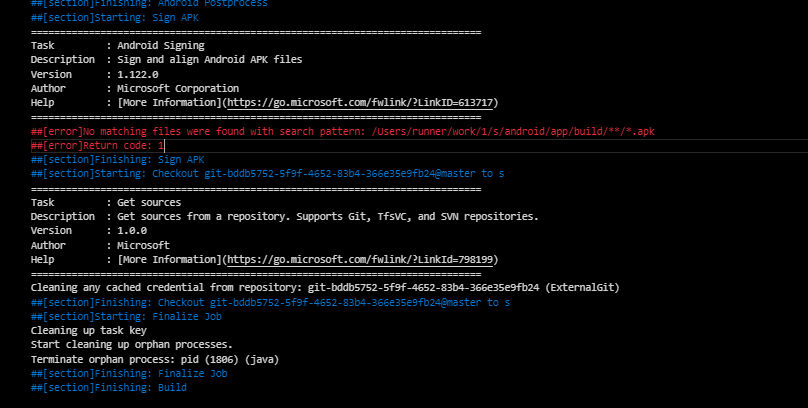
anhdo9797
on 10 Dec 2020
@affantechcarrot I too was getting the same issue as you after removing the duplicate grade wrapper files in the app folder. Still would like to know why this isn't working but a workaround I found that was working was to add this into the module level build.gradle for the different build types like in the example below
release {
applicationVariants.all { variant ->
variant.outputs.all {
def currentFile = new File(outputFileName)
def filename = currentFile.getName()
outputFileName = "../../../../../app/build/outputs/apk/${filename}"
}
}
Following up on @johnclarete idea above - it didn't work the first time for an Android native build, but I did get it working.
Steps:
- Modify the build.gradle file in your Application folder as follows:
Find the android { part of the file and paste in the buildTypes part:
android {
    compileSdkVersion 30

    **buildTypes {
        appcenter {
            applicationVariants.all { variant ->
                variant.outputs.all {
                    def currentFile = new File(outputFileName)
                    def filename = currentFile.getName()
                    outputFileName = "../../../../../Application/Application/build/outputs/apk/${filename}"
                }
            }
        }
    }**
- In AppCenter, you should now have an "appcenter" Build Variant option.

- Disable Build Android App Bundle.
That worked for me. I hope that helps others.
 AuriR
on 11 Dec 2020
AuriR
on 11 Dec 2020
- In AppCenter, you should now have an "appcenter
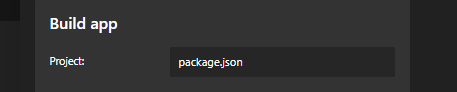
Can you help me how to select Application ?
I only item project => pack.json
anhdo9797
on 12 Dec 2020
@affantechcarrot I too was getting the same issue as you after removing the duplicate grade wrapper files in the app folder. Still would like to know why this isn't working but a workaround I found that was working was to add this into the module level build.gradle for the different build types like in the example below
release {
applicationVariants.all { variant ->
variant.outputs.all {
def currentFile = new File(outputFileName)
def filename = currentFile.getName()
outputFileName = "../../../../../app/build/outputs/apk/${filename}"
}
}Following up on @johnclarete idea above - it didn't work the first time for an Android native build, but I _did_ get it working.
Steps:
- Modify the build.gradle file in your Application folder as follows:
Find the android { part of the file and paste in the buildTypes part:
android {
    compileSdkVersion 30

  **buildTypes {
      appcenter {
          applicationVariants.all { variant ->
              variant.outputs.all {
                  def currentFile = new File(outputFileName)
                  def filename = currentFile.getName()
                  outputFileName = "../../../../../Application/Application/build/outputs/apk/${filename}"
              }
          }
      }
  }**
- In AppCenter, you should now have an "appcenter" Build Variant option.
- Disable Build Android App Bundle.
That worked for me. I hope that helps others.
My step:
- add buildTypes:{
...
buildTypes:{
...
     appcenter {

       applicationVariants.all { variant ->

               variant.outputs.all {

                       def currentFile = new File(outputFileName)

                       def filename = currentFile.getName()

                       outputFileName = "../../../../../Application/Application/build/outputs/apk/${filename}"

                     }

             }

     }
}
} - config build
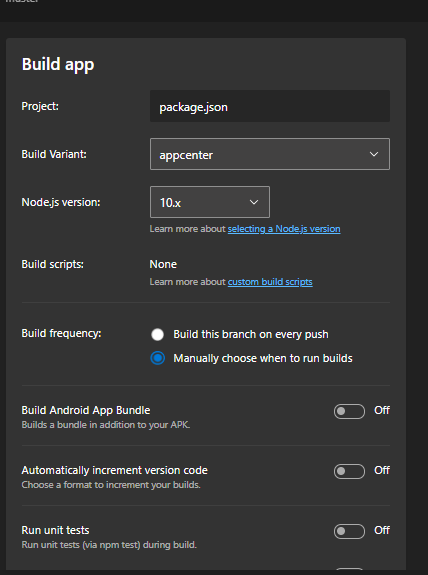
=> error
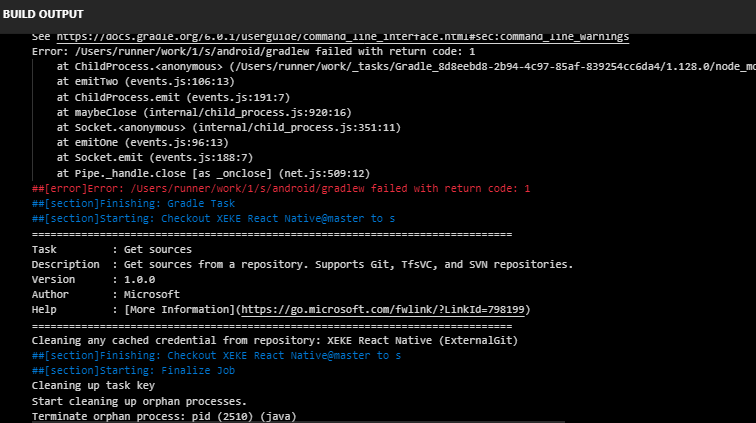
1_Build (1).txt
Please help me !
anhdo9797
on 12 Dec 2020
Hey there – if you send me your logs I’m happy to take a look. Make sure your app builds locally, otherwise AppCenter won’t be able to build it, either.
The toggle for Building App Bundle is in your Build Settings:
[cid:[email protected]]
If you can confirm it builds, I’ll try to help further by looking at the logs.
Thanks and Best,
-Auri
--
Never confuse motion with action.
www.auri.nethttp://www.auri.net / @Auri on Twitter
From: Đỗ Công Phước Anhnotifications@github.com
Sent: Saturday, December 12, 2020 1:05 AM
To: microsoft/appcenterappcenter@noreply.github.com
Cc: Auri A. Rahimzadehaurir@msn.com; Mentionmention@noreply.github.com
Subject: Re: [microsoft/appcenter] Appcenter is unable to find Android build (#1520)
@affantechcarrothttps://nam12.safelinks.protection.outlook.com/?url=https%3A%2F%2Fgithub.com%2Faffantechcarrot&data=04%7C01%7C%7C24d53554f650431cf6c508d89e63f8f7%7C84df9e7fe9f640afb435aaaaaaaaaaaa%7C1%7C0%7C637433499491653779%7CUnknown%7CTWFpbGZsb3d8eyJWIjoiMC4wLjAwMDAiLCJQIjoiV2luMzIiLCJBTiI6Ik1haWwiLCJXVCI6Mn0%3D%7C1000&sdata=UKFD6%2FTe5C6UYoJ6YroGh%2FQ3CcPYVE1C7ZVQ5R6jN3U%3D&reserved=0 I too was getting the same issue as you after removing the duplicate grade wrapper files in the app folder. Still would like to know why this isn't working but a workaround I found that was working was to add this into the module level build.gradle for the different build types like in the example below
release {
applicationVariants.all { variant ->
variant.outputs.all {
def currentFile = new File(outputFileName)
def filename = currentFile.getName()
outputFileName = "../../../../../app/build/outputs/apk/${filename}"
}
}
Following up on @johnclaretehttps://nam12.safelinks.protection.outlook.com/?url=https%3A%2F%2Fgithub.com%2Fjohnclarete&data=04%7C01%7C%7C24d53554f650431cf6c508d89e63f8f7%7C84df9e7fe9f640afb435aaaaaaaaaaaa%7C1%7C0%7C637433499491663775%7CUnknown%7CTWFpbGZsb3d8eyJWIjoiMC4wLjAwMDAiLCJQIjoiV2luMzIiLCJBTiI6Ik1haWwiLCJXVCI6Mn0%3D%7C1000&sdata=NvhzeQXhnMphuug7UprqaAh9w9HHbX0AHYkj0E%2FpWmQ%3D&reserved=0 idea above - it didn't work the first time for an Android native build, but I did get it working.
Steps:
- Modify the build.gradle file in your Application folder as follows:
Find the android { part of the file and paste in the buildTypes part:
android {
compileSdkVersion 30
**buildTypes {
appcenter {
applicationVariants.all { variant ->
variant.outputs.all {
def currentFile = new File(outputFileName)
def filename = currentFile.getName()
outputFileName = "../../../../../Application/Application/build/outputs/apk/${filename}"
}
}
}
}**
- In AppCenter, you should now have an "appcenter" Build Variant option.
- Disable Build Android App Bundle.
That worked for me. I hope that helps others.
My step:
- add buildTypes:{
...
buildTypes:{
...
appcenter {
applicationVariants.all { variant ->
variant.outputs.all {
def currentFile = new File(outputFileName)
def filename = currentFile.getName()
outputFileName = "../../../../../Application/Application/build/outputs/apk/${filename}"
}
}
}
}
} - config build
[image]https://nam12.safelinks.protection.outlook.com/?url=https%3A%2F%2Fuser-images.githubusercontent.com%2F60549336%2F101976705-82056380-3c7a-11eb-8a08-9879f85e2dcd.png&data=04%7C01%7C%7C24d53554f650431cf6c508d89e63f8f7%7C84df9e7fe9f640afb435aaaaaaaaaaaa%7C1%7C0%7C637433499491673767%7CUnknown%7CTWFpbGZsb3d8eyJWIjoiMC4wLjAwMDAiLCJQIjoiV2luMzIiLCJBTiI6Ik1haWwiLCJXVCI6Mn0%3D%7C1000&sdata=D1EvAmmvEE8efnpnFuGCBZyog1XJU6J20OqWlpYkAd8%3D&reserved=0
=> error
[image]https://nam12.safelinks.protection.outlook.com/?url=https%3A%2F%2Fuser-images.githubusercontent.com%2F60549336%2F101976723-947f9d00-3c7a-11eb-9c01-3f84f929c2c5.png&data=04%7C01%7C%7C24d53554f650431cf6c508d89e63f8f7%7C84df9e7fe9f640afb435aaaaaaaaaaaa%7C1%7C0%7C637433499491673767%7CUnknown%7CTWFpbGZsb3d8eyJWIjoiMC4wLjAwMDAiLCJQIjoiV2luMzIiLCJBTiI6Ik1haWwiLCJXVCI6Mn0%3D%7C1000&sdata=agHn4qErbNQmnpDCZYh2PlyzXscHASx%2BFHRMPiZ7axw%3D&reserved=0
1_Build (1).txthttps://nam12.safelinks.protection.outlook.com/?url=https%3A%2F%2Fgithub.com%2Fmicrosoft%2Fappcenter%2Ffiles%2F5682565%2F1_Build.1.txt&data=04%7C01%7C%7C24d53554f650431cf6c508d89e63f8f7%7C84df9e7fe9f640afb435aaaaaaaaaaaa%7C1%7C0%7C637433499491683771%7CUnknown%7CTWFpbGZsb3d8eyJWIjoiMC4wLjAwMDAiLCJQIjoiV2luMzIiLCJBTiI6Ik1haWwiLCJXVCI6Mn0%3D%7C1000&sdata=Q%2BS7Px5u67VrqI9pFQ2n8kJOw1eWEnQ2xmCsrTzR6vU%3D&reserved=0
Please help me !
—
You are receiving this because you were mentioned.
Reply to this email directly, view it on GitHubhttps://nam12.safelinks.protection.outlook.com/?url=https%3A%2F%2Fgithub.com%2Fmicrosoft%2Fappcenter%2Fissues%2F1520%23issuecomment-743710216&data=04%7C01%7C%7C24d53554f650431cf6c508d89e63f8f7%7C84df9e7fe9f640afb435aaaaaaaaaaaa%7C1%7C0%7C637433499491683771%7CUnknown%7CTWFpbGZsb3d8eyJWIjoiMC4wLjAwMDAiLCJQIjoiV2luMzIiLCJBTiI6Ik1haWwiLCJXVCI6Mn0%3D%7C1000&sdata=B0cT1ZKWbqBM5uSDeNlDg97YgMTpdmNJxqSZwItb1SY%3D&reserved=0, or unsubscribehttps://nam12.safelinks.protection.outlook.com/?url=https%3A%2F%2Fgithub.com%2Fnotifications%2Funsubscribe-auth%2FAAXHGDDSLHNWCV3LZRXS7ELSUMB3ZANCNFSM4J54UPXQ&data=04%7C01%7C%7C24d53554f650431cf6c508d89e63f8f7%7C84df9e7fe9f640afb435aaaaaaaaaaaa%7C1%7C0%7C637433499491683771%7CUnknown%7CTWFpbGZsb3d8eyJWIjoiMC4wLjAwMDAiLCJQIjoiV2luMzIiLCJBTiI6Ik1haWwiLCJXVCI6Mn0%3D%7C1000&sdata=akmTaymVNPzVDkOmRRdtb0lWPvzVOO6z%2FXRhqiuj9Ic%3D&reserved=0.
AuriR
on 12 Dec 2020
@anhdo9797 I saw your log file link. It looks like you have a React Native app, which I'm not familiar with.
However, it looks like you may have made the change in the wrong build.gradle file. I had to make sure I made the change to the one in my Application folder, where my Android source code was. I imagine you may need to do something similar with React Native, although I don't know where to tell you to look :)
AuriR
on 12 Dec 2020
Hey there – if you send me your logs I’m happy to take a look. Make sure your app builds locally, otherwise AppCenter won’t be able to build it, either. The toggle for Building App Bundle is in your Build Settings: [cid:[email protected]] If you can confirm it builds, I’ll try to help further by looking at the logs. Thanks and Best,
…
-Auri
-- Never confuse motion with action. www.auri.nethttp://www.auri.net> / @auri on Twitter From: Đỗ Công Phước Anhnotifications@github.com Sent: Saturday, December 12, 2020 1:05 AM To: microsoft/appcenterappcenter@noreply.github.com Cc: Auri A. Rahimzadehaurir@msn.com; Mentionmention@noreply.github.com Subject: Re: [microsoft/appcenter] Appcenter is unable to find Android build (#1520) @affantechcarrothttps://nam12.safelinks.protection.outlook.com/?url=https%3A%2F%2Fgithub.com%2Faffantechcarrot&data=04%7C01%7C%7C24d53554f650431cf6c508d89e63f8f7%7C84df9e7fe9f640afb435aaaaaaaaaaaa%7C1%7C0%7C637433499491653779%7CUnknown%7CTWFpbGZsb3d8eyJWIjoiMC4wLjAwMDAiLCJQIjoiV2luMzIiLCJBTiI6Ik1haWwiLCJXVCI6Mn0%3D%7C1000&sdata=UKFD6%2FTe5C6UYoJ6YroGh%2FQ3CcPYVE1C7ZVQ5R6jN3U%3D&reserved=0 I too was getting the same issue as you after removing the duplicate grade wrapper files in the app folder. Still would like to know why this isn't working but a workaround I found that was working was to add this into the module level build.gradle for the different build types like in the example below release { applicationVariants.all { variant -> variant.outputs.all { def currentFile = new File(outputFileName) def filename = currentFile.getName() outputFileName = "../../../../../app/build/outputs/apk/${filename}" } } Following up on @johnclaretehttps://nam12.safelinks.protection.outlook.com/?url=https%3A%2F%2Fgithub.com%2Fjohnclarete&data=04%7C01%7C%7C24d53554f650431cf6c508d89e63f8f7%7C84df9e7fe9f640afb435aaaaaaaaaaaa%7C1%7C0%7C637433499491663775%7CUnknown%7CTWFpbGZsb3d8eyJWIjoiMC4wLjAwMDAiLCJQIjoiV2luMzIiLCJBTiI6Ik1haWwiLCJXVCI6Mn0%3D%7C1000&sdata=NvhzeQXhnMphuug7UprqaAh9w9HHbX0AHYkj0E%2FpWmQ%3D&reserved=0 idea above - it didn't work the first time for an Android native build, but I did get it working. Steps: 1. Modify the build.gradle file in your Application folder as follows: Find the android { part of the file and paste in the buildTypes part: android { compileSdkVersion 30 buildTypes { appcenter { applicationVariants.all { variant -> variant.outputs.all { def currentFile = new File(outputFileName) def filename = currentFile.getName() outputFileName = "../../../../../Application/Application/build/outputs/apk/${filename}" } } } } 1. In AppCenter, you should now have an "appcenter" Build Variant option. [image]https://nam12.safelinks.protection.outlook.com/?url=https%3A%2F%2Fuser-images.githubusercontent.com%2F3044108%2F101952591-e36bfa80-3bc6-11eb-8ccc-bb739e746f2d.png&data=04%7C01%7C%7C24d53554f650431cf6c508d89e63f8f7%7C84df9e7fe9f640afb435aaaaaaaaaaaa%7C1%7C0%7C637433499491663775%7CUnknown%7CTWFpbGZsb3d8eyJWIjoiMC4wLjAwMDAiLCJQIjoiV2luMzIiLCJBTiI6Ik1haWwiLCJXVCI6Mn0%3D%7C1000&sdata=RqB4nohNaX8wAntzrCLzyuTz%2Fmk2rvk2y5IQTb7OiAo%3D&reserved=0 1. Disable Build Android App Bundle. That worked for me. I hope that helps others. My step: 1. add buildTypes:{ ... buildTypes:{ ... appcenter { applicationVariants.all { variant -> variant.outputs.all { def currentFile = new File(outputFileName) def filename = currentFile.getName() outputFileName = "../../../../../Application/Application/build/outputs/apk/${filename}" } } } } } 2. config build [image]https://nam12.safelinks.protection.outlook.com/?url=https%3A%2F%2Fuser-images.githubusercontent.com%2F60549336%2F101976705-82056380-3c7a-11eb-8a08-9879f85e2dcd.png&data=04%7C01%7C%7C24d53554f650431cf6c508d89e63f8f7%7C84df9e7fe9f640afb435aaaaaaaaaaaa%7C1%7C0%7C637433499491673767%7CUnknown%7CTWFpbGZsb3d8eyJWIjoiMC4wLjAwMDAiLCJQIjoiV2luMzIiLCJBTiI6Ik1haWwiLCJXVCI6Mn0%3D%7C1000&sdata=D1EvAmmvEE8efnpnFuGCBZyog1XJU6J20OqWlpYkAd8%3D&reserved=0 => error [image]https://nam12.safelinks.protection.outlook.com/?url=https%3A%2F%2Fuser-images.githubusercontent.com%2F60549336%2F101976723-947f9d00-3c7a-11eb-9c01-3f84f929c2c5.png&data=04%7C01%7C%7C24d53554f650431cf6c508d89e63f8f7%7C84df9e7fe9f640afb435aaaaaaaaaaaa%7C1%7C0%7C637433499491673767%7CUnknown%7CTWFpbGZsb3d8eyJWIjoiMC4wLjAwMDAiLCJQIjoiV2luMzIiLCJBTiI6Ik1haWwiLCJXVCI6Mn0%3D%7C1000&sdata=agHn4qErbNQmnpDCZYh2PlyzXscHASx%2BFHRMPiZ7axw%3D&reserved=0 1_Build (1).txthttps://nam12.safelinks.protection.outlook.com/?url=https%3A%2F%2Fgithub.com%2Fmicrosoft%2Fappcenter%2Ffiles%2F5682565%2F1_Build.1.txt&data=04%7C01%7C%7C24d53554f650431cf6c508d89e63f8f7%7C84df9e7fe9f640afb435aaaaaaaaaaaa%7C1%7C0%7C637433499491683771%7CUnknown%7CTWFpbGZsb3d8eyJWIjoiMC4wLjAwMDAiLCJQIjoiV2luMzIiLCJBTiI6Ik1haWwiLCJXVCI6Mn0%3D%7C1000&sdata=Q%2BS7Px5u67VrqI9pFQ2n8kJOw1eWEnQ2xmCsrTzR6vU%3D&reserved=0 Please help me ! — You are receiving this because you were mentioned. Reply to this email directly, view it on GitHubhttps://nam12.safelinks.protection.outlook.com/?url=https%3A%2F%2Fgithub.com%2Fmicrosoft%2Fappcenter%2Fissues%2F1520%23issuecomment-743710216&data=04%7C01%7C%7C24d53554f650431cf6c508d89e63f8f7%7C84df9e7fe9f640afb435aaaaaaaaaaaa%7C1%7C0%7C637433499491683771%7CUnknown%7CTWFpbGZsb3d8eyJWIjoiMC4wLjAwMDAiLCJQIjoiV2luMzIiLCJBTiI6Ik1haWwiLCJXVCI6Mn0%3D%7C1000&sdata=B0cT1ZKWbqBM5uSDeNlDg97YgMTpdmNJxqSZwItb1SY%3D&reserved=0, or unsubscribehttps://nam12.safelinks.protection.outlook.com/?url=https%3A%2F%2Fgithub.com%2Fnotifications%2Funsubscribe-auth%2FAAXHGDDSLHNWCV3LZRXS7ELSUMB3ZANCNFSM4J54UPXQ&data=04%7C01%7C%7C24d53554f650431cf6c508d89e63f8f7%7C84df9e7fe9f640afb435aaaaaaaaaaaa%7C1%7C0%7C637433499491683771%7CUnknown%7CTWFpbGZsb3d8eyJWIjoiMC4wLjAwMDAiLCJQIjoiV2luMzIiLCJBTiI6Ik1haWwiLCJXVCI6Mn0%3D%7C1000&sdata=akmTaymVNPzVDkOmRRdtb0lWPvzVOO6z%2FXRhqiuj9Ic%3D&reserved=0.
hi bros, this is my logs
anhdo9797
on 12 Dec 2020
In your csproj of Android, check OutputPath Variable is not set to "." (dot), if yes then change it as below:
Example
< OutputPath> bin\Release </OutputPath>
 gbadwaik2706
on 22 Dec 2020
gbadwaik2706
on 22 Dec 2020
In your csproj of Android, check OutputPath Variable is not set to "." (dot), if yes then change it as below:
bin\Release
Example
< OutputPath> bin\Release
Can you tell me more clearly, I don't understand your answer yet
anhdo9797
on 22 Dec 2020
@anhdo9797
You need to set OutputPath of your project configuration as shown in image attached.

gbadwaik2706
on 22 Dec 2020
@gbadwaik2706 Sorry but The file could not be found, it could be added OutputPath
can you guide me where to configure it ?
anhdo9797
on 22 Dec 2020
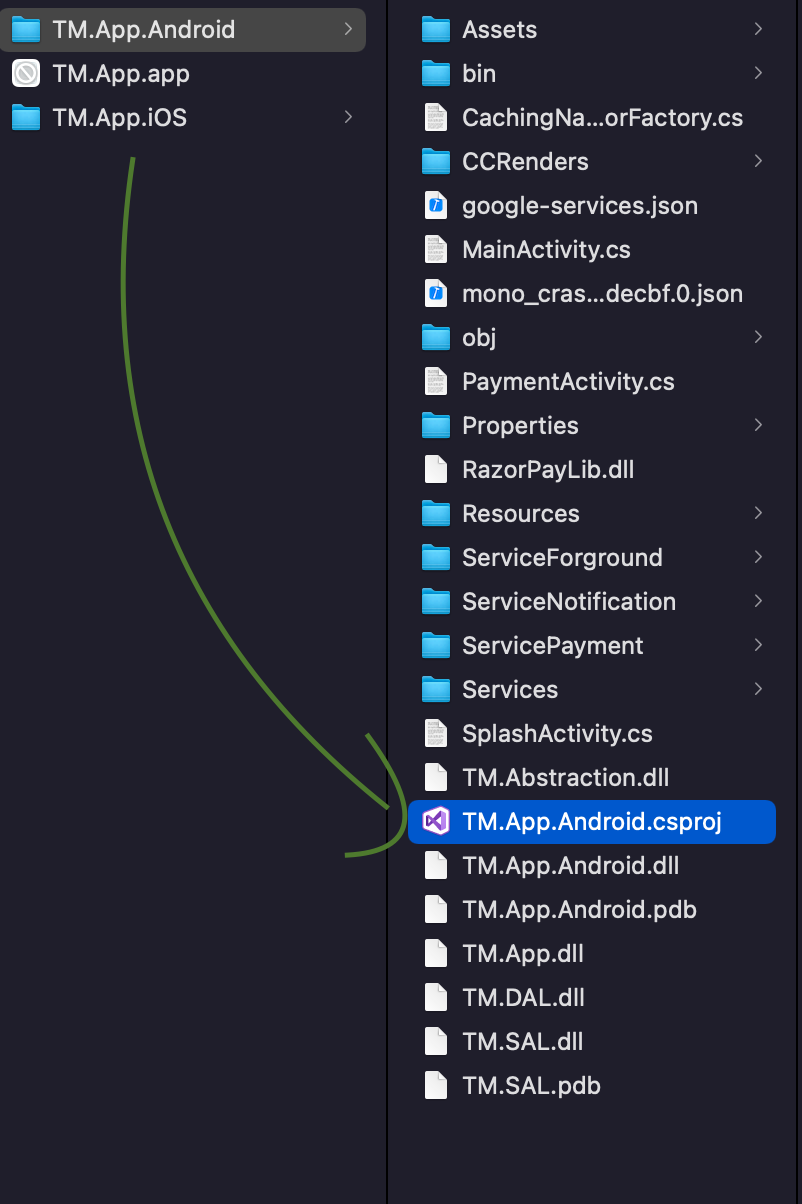
You need to open the *.csproj file in TextEditor
gbadwaik2706
on 22 Dec 2020
You need to open the *.csproj file in TextEditor
Sorry but I can't find in my project react-native
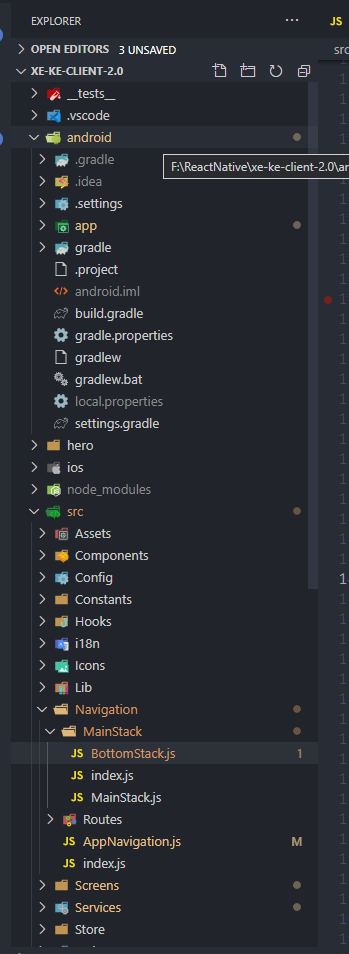
anhdo9797
on 22 Dec 2020
In my case i had enabled building multiple APKs, but had disabled building a universal APK.
splits {
        abi {
            reset()
            enable enableSeparateBuildPerCPUArchitecture
            universalApk true  // If true, also generate a universal APK
            include "armeabi-v7a", "x86", "arm64-v8a", "x86_64"
        }
    }
 muneneevans
on 6 Apr 2021
muneneevans
on 6 Apr 2021
Related issues
 botatoes
·
4Comments
botatoes
·
4Comments
 mason-hz
·
3Comments
mason-hz
·
3Comments
 kuyazee
·
3Comments
kuyazee
·
3Comments
 patrickdoodyIRL
·
3Comments
patrickdoodyIRL
·
3Comments
 thabemmz
·
3Comments
thabemmz
·
3Comments
Most helpful comment
this issue should be reopened. I am still experiencing the same issue with react-native 0.61.5
find: /Users/runner/runners/2.163.1/work/1/s/android/app/app/build/outputs/apk: No such file or directory