Appcenter: Builds failed for Xamarin projects with error NU1201 while restoring nuget packages
When building a Xamarin.Android or Xamarin.iOS project, the build fails with error NU1201.
The builds of the Android / iOS projects run on their respective .csproj.
The solution includes the following projects :
- A project Xamarin.Android (Target Framework Android 10.0)
- A project Xamarin.iOS (Target Framework Xamarin.iOS)
- A project UI Tests (.NET Framework 4.7.2)
- A project Unit Tests (.NET Core 3.0)
- 8 projects shared code (.NET Standard 2.1)
Android and iOS projects are not referenced between them.
 lanarchyste
All 14 comments
Please reach out to us in support so we can further investigate the issue.
 dipree
on 8 Oct 2019
dipree
on 8 Oct 2019
Please reach out to us in support so we can further investigate the issue.
@derpixeldan I am having the same problem. I did reach out to the support on AppCenter, and it takes days to get an answer, however, the last answer was to remove references between the projects.
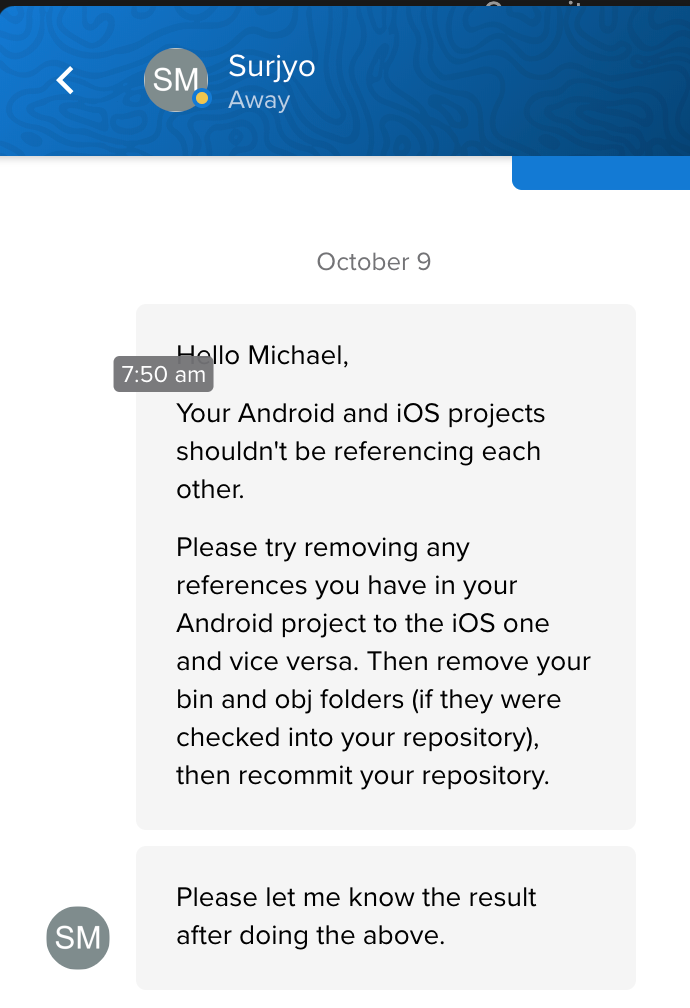
Our iOS & Android projects do not reference each other, and prior to updating to .netcore3/standard2.1 the builds worked just fine.
 Shaggy13spe
on 9 Oct 2019
Shaggy13spe
on 9 Oct 2019
Please solve that issue immediately or post any possible work around.
 ericbrunner
on 30 Oct 2019
ericbrunner
on 30 Oct 2019
@ericbrunner Sorry for the delay on official communication as we're working to track things down. Did you reach out to our support team already? If not I would highly recommend doing so and sharing a reference to the failing build - logs and a URL to the build that's failing are helpful as the issue might be a different per app and configuration.
Update: I can see you reached out to us and we're taking a look.
 matthiaswenz
on 30 Oct 2019
matthiaswenz
on 30 Oct 2019
@ranterle Yes I am with 3 guys in touch on appcenter support. Please talk to Ashish, he has all build logs. The logs with the netstandard2.1 attempt (failed) and the one with netstandard2.0 (success).
ericbrunner
on 30 Oct 2019
Did some investigation today. This is a sample project forked to reproduce this: https://github.com/DennisPan/TestNetStandardApp. The same error can be seen if I run nuget restore './TestNetStandardApp.Android/TestNetStandardApp.Android.csproj' locally. So most likely this isn't something specific to App Center. I'm following up with folks from Xamarin to get more information.
 DennisPan
on 31 Oct 2019
DennisPan
on 31 Oct 2019
@DennisPan Well to verify your assertion that its is locally not build-able I checkedout out your project and did a nuget restore and msbuild on the android related project. All works well locally. I used the lateste nuget.exe from nuget.org and the msbuild.exe from latest VS2019 Community. See all in the gist
https://gist.github.com/ericbrunner/74682775f70cefe2229e3337e49b6572
ericbrunner
on 31 Oct 2019
Not sure exactly what's missing from your repro. Could be that it only does on Mac (judging from your log it's running on Windows), which is where we run the builds in App Center.
Here's the Issue tracking it: https://github.com/mono/mono/issues/17637
I'm experimenting with couple workarounds suggested.
DennisPan
on 31 Oct 2019
Switch the Build VM to Windows and it will work or give us users in appcenter the choice which build platform we want to use. Sure I use Windows and it works. If appcenter does only run the builds on Mac OS then there is the issue burried.
ericbrunner
on 31 Oct 2019
Doesn’t it require to us MacOS as the build VM for iOS projects? I think that is why they use it.
Sent from my iPhone
On Oct 31, 2019, at 1:37 PM, Eric Brunner notifications@github.com wrote:
Switch the Build VM to Windows and it will work or give us users in appcenter the choice which build platform we want to use. Sure I use Windows and it works. If appcenter does only run the builds on Mac OS then there is the issue burried.—
You are receiving this because you commented.
Reply to this email directly, view it on GitHub, or unsubscribe.
Shaggy13spe
on 31 Oct 2019
For iOS, not for Android.
ericbrunner
on 31 Oct 2019
Yup totally. We potentially could provide that option, but we cannot now. If more customization is needed, Azure Pipelines would be a good option to look into.
For this issue, we've prepared a workaround. We'd download https://dist.nuget.org/win-x86-commandline/v5.3.1/nuget.exe, then run mono nuget.exe restore, instead of nuget restore. This will be applicable if you pick a Xamarin version with Mono 6.4. It works on couple test apps. Need more validation. Hopefully we can roll this out tomorrow.
DennisPan
on 31 Oct 2019
The fix is available now. If you re-save the branch configuration, then start a new build, you shouldn't hit the same problem now (if you are building with Mono 6.4). Let me know how it goes!
DennisPan
on 1 Nov 2019
Closing this as we have two confirmations the error no longer happens
DennisPan
on 2 Nov 2019
Related issues
 muhammaddadu
·
3Comments
muhammaddadu
·
3Comments
 patrickdoodyIRL
·
3Comments
patrickdoodyIRL
·
3Comments
 DouglasMarq
·
4Comments
DouglasMarq
·
4Comments
 galfonso777
·
3Comments
galfonso777
·
3Comments
 KSemenenko
·
3Comments
KSemenenko
·
3Comments
Most helpful comment
@derpixeldan I am having the same problem. I did reach out to the support on AppCenter, and it takes days to get an answer, however, the last answer was to remove references between the projects.

Our iOS & Android projects do not reference each other, and prior to updating to .netcore3/standard2.1 the builds worked just fine.