Appcenter: Before building, first check for valid connection to App Store Connect
Describe the solution you'd like
It would be great that, before building, testing and releasing the build, to check if the connection to App Store Connect is still active. I've already had several times that the login to App Store Connect is expired for some unknown reason. You only get that warning at the end of a build, which is in my case 15-20 minutes later.
It's better to know this upfront, so you can re-connect your account before building. This could possibly save an extra 15-20 minutes in my use case, as I don't have to run the whole build twice.
Describe alternatives you've considered
The only alternative would be to manually check on the Distribute > Stores page if the connection is still active or expired.
Additional context
This problem usually happens in step 23 of the build:
2019-08-16T09:37:54.4007730Z ##[section]Starting: Create distribution
2019-08-16T09:37:54.4012570Z ==============================================================================
2019-08-16T09:37:54.4012700Z Task         : App Center distribute
2019-08-16T09:37:54.4012840Z Description  : Distribute app builds to testers and ***s via Visual Studio App Center
2019-08-16T09:37:54.4012940Z Version      : 3.156.0
2019-08-16T09:37:54.4013010Z Author       : Microsoft Corporation
2019-08-16T09:37:54.4013110Z Help         : https://docs.microsoft.com/azure/devops/pipelines/tasks/deploy/app-center-distribute
2019-08-16T09:37:54.4013200Z ==============================================================================
2019-08-16T09:44:50.7225470Z ##[error]{"code":"two_factor_authentication_error","message":"Error: Failed to publish to store. Error: apple connection is not valid for ***: XXXX"}
http response code: 400
2019-08-16T09:44:50.7243110Z ##[section]Finishing: Create distribution
 jvandenaardweg
All 9 comments
This is unrelated to the actual feature request but fastlane, an open-source mobile build automation tool, handles this really well by managing your App Store Connect session and automatically logging back in if it's broken.
 mylesbarros
on 16 Aug 2019
mylesbarros
on 16 Aug 2019
@jvandenaardweg Thank you for the feature request, this is good feedback and I hope we get some traction on it so we can implement it.
 Oddj0b
on 9 Sep 2019
Oddj0b
on 9 Sep 2019
@jvandenaardweg , how can I renew the token?
 Sutil
on 24 Mar 2020
Sutil
on 24 Mar 2020
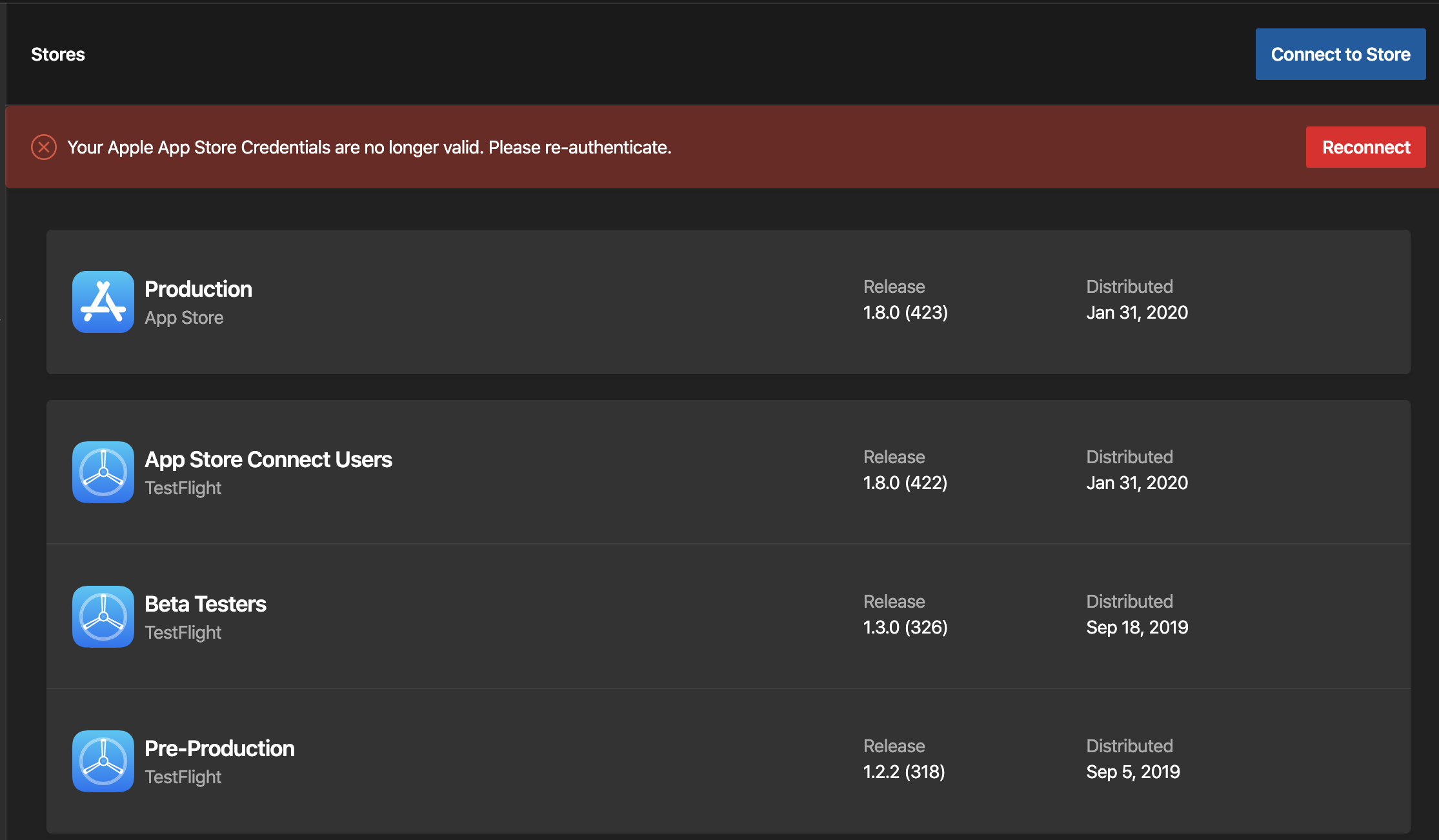
@Sutil Select your app in AppCenter, then: on the left sidebar: Distribute -> Stores. Then you should see a red banner like the one below, which allows you to sign in again to the App Store. After doing that, you can build again.
Seems it expires every once in a while, which is good for security reasons. But a bit annoying.
jvandenaardweg
on 24 Mar 2020
@jvandenaardweg Thanks! It worked fine!
Sutil
on 24 Mar 2020
Or at least the build shouldn't completely fail. Just because the distribution step fails doesn't mean that there's anything wrong with the app package. I could reconnect my store and publish it in 30 seconds, but instead I have to repeat the 30 minutes build process...
 petegivens
on 14 Jan 2021
petegivens
on 14 Jan 2021
This issue has been automatically marked as stale because it has not had any activity for 60 days. It will be closed if no further activity occurs within 15 days of this comment.
![msftbot[bot] picture](https://avatars.githubusercontent.com/in/26612?v=4&s=40) msftbot[bot]
on 30 Jun 2021
msftbot[bot]
on 30 Jun 2021
I just had this error today and would love to see a solution similar to the one suggested.
 benmagos
on 14 Jul 2021
benmagos
on 14 Jul 2021
Maybe also send an email that the auth token is _going_ to expire, or at least that it has done?
 IonoclastBrigham
on 14 Jul 2021
IonoclastBrigham
on 14 Jul 2021
Related issues
 galfonso777
·
3Comments
galfonso777
·
3Comments
 muhammaddadu
·
3Comments
muhammaddadu
·
3Comments
 thabemmz
·
3Comments
thabemmz
·
3Comments
 comply365dev
·
4Comments
comply365dev
·
4Comments
 sourabhtyagi2003
·
3Comments
sourabhtyagi2003
·
3Comments
Most helpful comment
@Sutil Select your app in AppCenter, then: on the left sidebar: Distribute -> Stores. Then you should see a red banner like the one below, which allows you to sign in again to the App Store. After doing that, you can build again.
Seems it expires every once in a while, which is good for security reasons. But a bit annoying.