Appcenter: Ability to promote Google Play Store Track
Describe the solution you'd like
Let's say I've created a release and assigned it to a Play Store track, say Beta. And then via the AppCenter console, I want it the same release to be used for production as well. Unfortunately, when trying to do this in the AppCenter console, I get a notice saying: We are unable to publish the release as it is already active on a track.
Feature request: Ability to choose a track (Alpha or Beta) and then promote it to another track i.e. Production. Additionally, also possible to do Alpha -> Beta promotion.
Describe alternatives you've considered
I haven't tried yet, but the Group Distribution can be an alternative. i.e. Instead of Play Store tracks, use Group Distribution for Beta/Alpha testing, then only do Production track in Play Store.
Additional context

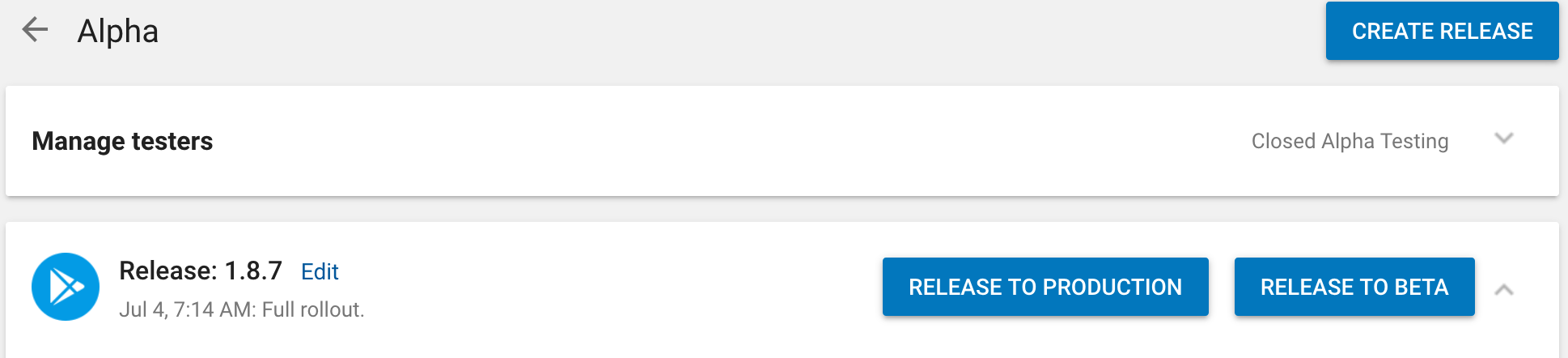
Release/promote track feature in Play Store console:
 mcchrish
All 15 comments
Thanks for the suggestion! We have proposals to update our stores support in the coming quarter. Will add this to the list of improvements.
 botatoes
on 23 Jul 2019
botatoes
on 23 Jul 2019
+1 on this issue, it doesn't make any sense to not be able to deploy a new build because of Alpha track, any way to disable the Alpha track? We do a different build during alpha process to enable a debug test server. Alpha point to alpha web server and production to production web server. How does one manage to do this with the limitation of Play Store and AppCenter?
 godboutj
on 20 Nov 2019
godboutj
on 20 Nov 2019
+1 on this issue, it doesn't make any sense to not be able to deploy a new build because of Alpha track, any way to disable the Alpha track? We do a different build during alpha process to enable a debug test server. Alpha point to alpha web server and production to production web server. How does one manage to do this with the limitation of Play Store and AppCenter?
We are facing the exact same situation, with our alpha and beta builds pointing to different servers.
Issue
I'm setting the app versionCode over a pre-build script to the Appcenter build number.
This is the exact error:
`
[error]{"code":"store_track_deactivated","message":"Error: Failed to publish to store. Production version code (23) would become higher than Alpha track version (19) and Beta track version 20) so Alpha and Beta tracks would be deactivated."}
`
Possible Workaround
As the Appcenter build number always increments within the app, doesn't matter which branch (alpha/beta/production), I'm thinking of adding a prefix for the environments:
1 -> production
3 -> beta
7 -> alpha
Assuming the build number would be 23, the following versionCodes would be set:
123 -> production
323 -> beta
723 -> alpha
The versionName would be 1.0.0.23 in this case.
What are your opinions in regard to this workaround?
 L-U-C-K-Y
on 1 Jul 2020
L-U-C-K-Y
on 1 Jul 2020
Thanks for the suggestion! We have proposals to update our stores support in the coming quarter. Will add this to the list of improvements.
Hi is this improvement made?
 jixun999
on 13 Jul 2020
jixun999
on 13 Jul 2020
hi. is there any solution for that? i have similar problem.
Error: Failed to publish to store. Production version code (21) would become higher than Beta track version (20) so Beta track would be deactivated.
 mtalhagaoglu
on 5 Oct 2020
mtalhagaoglu
on 5 Oct 2020
I haven't found any other solution aside from pushing a new version into alpha/beta, uplift it to the store and close the alpha/beta (for good and always). I went for split application on AppCenter for beta/alpha and gave up on this crap. Android store alpha/beta is a pain.
godboutj
on 5 Oct 2020
i opened a beta yesterday by mistake and it keeps give me pain. i am talking with play console live chat. i hope they can found a solution.
mtalhagaoglu
on 5 Oct 2020
Same here
 danilo900
on 7 Oct 2020
danilo900
on 7 Oct 2020
we need this too. Doesn't make sense to not being able to promote one version from one track to another. When this will be sorted?
 marcomoscatiello
on 13 Oct 2020
marcomoscatiello
on 13 Oct 2020
We're running into this limitation too. The code that displays this error message and halts should probably just be removed. It's an extra check that's not necessary. If it must stay, change it to a warning and say: `Published version XXX to Production. Deactivated Alpha Track Version YYY.
 morrisonbrett
on 24 Oct 2020
morrisonbrett
on 24 Oct 2020
Hey @botatoes!
Do you have good news to share with us about this feature?
 yonatanganot
on 3 Dec 2020
yonatanganot
on 3 Dec 2020
I am using react native.
How I`m working with versionCode.
I added MODE = alpha/beta/prod variable to .env file
And then I added in build.gradle file (youApp/android/app/build.gradle) versionCode generate method.
...
def date = new Date()
def minuteTimeStamp = (date.getTime()).toString().take(8)
def formattedDate = "00" + minuteTimeStamp
if (project.env.get("MODE").equals("alpha")) {
formattedDate = "01" + minuteTimeStamp
}
if (project.env.get("MODE").equals("beta")) {
formattedDate = "02" + minuteTimeStamp
}
def code = formattedDate.toInteger()
...
defaultConfig {
...
versionCode code
versionName "1.4.16"
....
}
...
This is not the best option, but it allows you to automatically generate a version of the code while the version of the production code will be lower than alpha and beta, but higher than its previous one.
Note: You need to disable auto generation of the code version for android in the app center.
The code version is updated once a minute. Also a certain limitation, but I don't think that you will need to upload the application to the store more often)
 PrgrmmrOleg
on 14 Feb 2021
PrgrmmrOleg
on 14 Feb 2021
Same problem here
[error]{"code":"store_track_deactivated","message":"Error: Failed to publish to store. Production version code (70) would become higher than Beta track version (63) so Beta track would be deactivated."}
 luizfelipelaviola
on 18 Feb 2021
luizfelipelaviola
on 18 Feb 2021
This issue has been automatically marked as stale because it has not had any activity for 60 days. It will be closed if no further activity occurs within 15 days of this comment.
![msftbot[bot] picture](https://avatars.githubusercontent.com/in/26612?v=4&s=40) msftbot[bot]
on 30 Jun 2021
msftbot[bot]
on 30 Jun 2021
+1
 dineshtrivedi
on 30 Jun 2021
dineshtrivedi
on 30 Jun 2021
Related issues
 galfonso777
·
3Comments
galfonso777
·
3Comments
 vonovak
·
3Comments
vonovak
·
3Comments
 sklmnv
·
3Comments
sklmnv
·
3Comments
 kuyazee
·
3Comments
kuyazee
·
3Comments
 patrickdoodyIRL
·
3Comments
patrickdoodyIRL
·
3Comments
Most helpful comment
+1 on this issue, it doesn't make any sense to not be able to deploy a new build because of Alpha track, any way to disable the Alpha track? We do a different build during alpha process to enable a debug test server. Alpha point to alpha web server and production to production web server. How does one manage to do this with the limitation of Play Store and AppCenter?