Appcenter: iPadOS 13 cannot install IPAs
What App Center service does this affect?
AppCenter app installs
Describe the bug
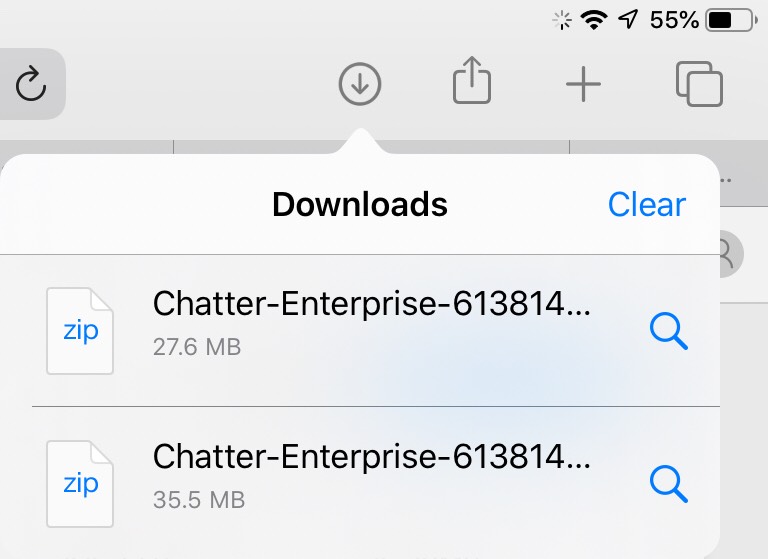
iOS 13 changed the way Safari treats downloads in iPadOS (at least). They become a download to iCloud Drive instead of an install.
This is likely a bug on Apple, and I've filed a radar there as well, but wanted to make you aware of this issue in case there are any changes that need to be done on the web-side to tell the new Safari that an app-install is desired.
To Reproduce
Steps to reproduce the behavior:
- Install iOS 13 on an iPad
- Go to an application view in AppCenter
- Tap on Download
- The app 'downloads' into the files app.
Expected behavior
The app should install. Alternatively Apple may allow an install action from the Files app of an ipa.
Screenshots
If applicable, add screenshots to help explain your problem.
Smartphone (please complete the following information):
- Device: iPad Pro first gen
- OS: 13.0 beta 1
- Browser: Safari
Additional context
Add any other context about the problem here.
 asikora-sf
All 16 comments
Thanks for filing the bug. We are aware of this and will get a fix out. This is around the introduction of iPadOS and how we are detecting devices.
 botatoes
on 10 Jun 2019
botatoes
on 10 Jun 2019
This topic is related to the new iPadOS and the identifier of the OS
 blanx
on 17 Jun 2019
blanx
on 17 Jun 2019
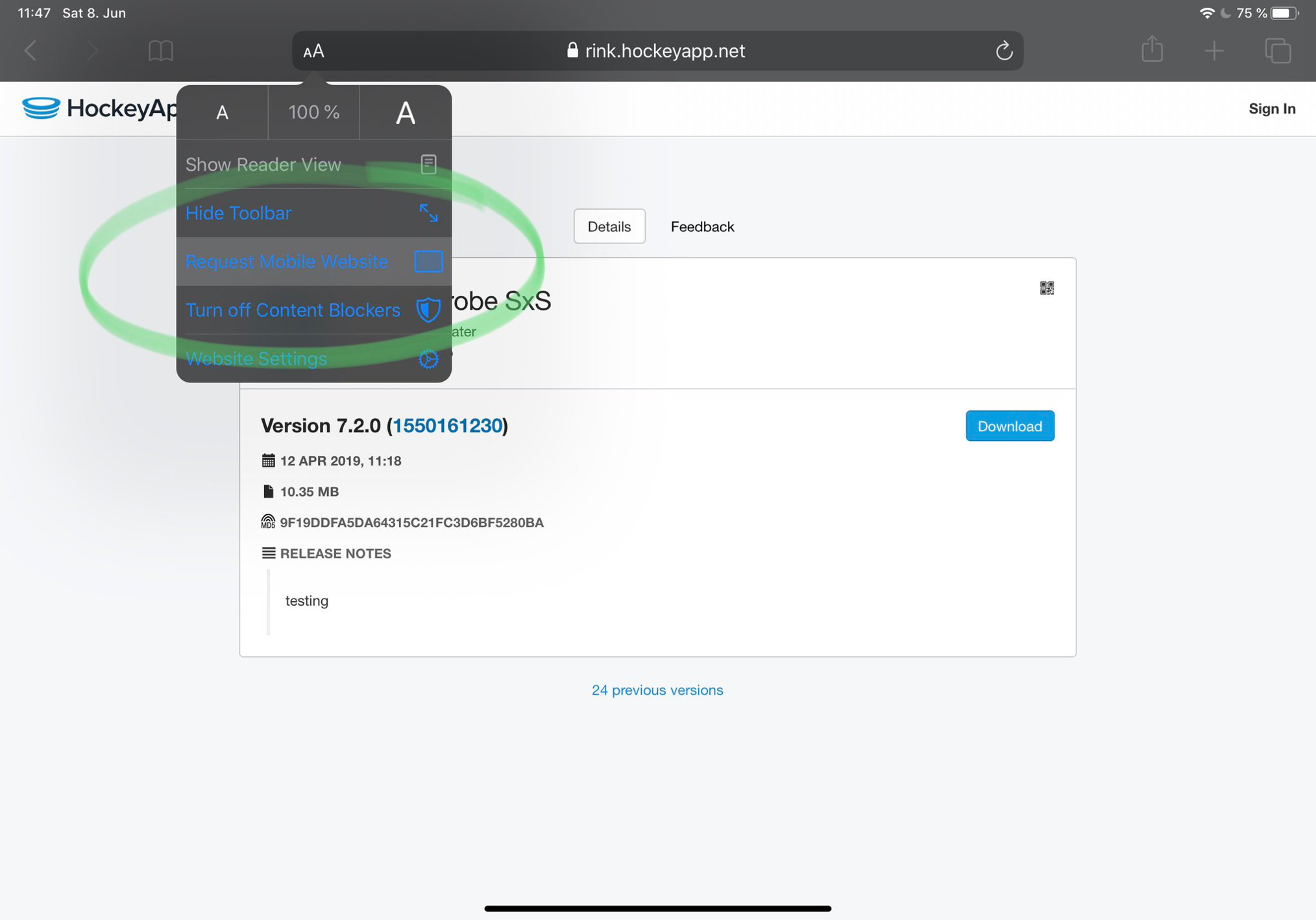
For the time being, you can use the workaround of requesting the mobile website like in the screenshot below:
 lumaxis
on 12 Jul 2019
lumaxis
on 12 Jul 2019
We have a smart chap in our team and he pointed that in iOS13, in Safari settings you can set "Request Desktop Website" to false (to show the mobile site), this way when downloading an app on App Center it will show the mobile version with the "Install" button instead of "Download" @asikora-sf @botatoes
 Guy783
on 29 Jul 2019
Guy783
on 29 Jul 2019
@Guy783 You're absolutely right! It's possible to change this setting for the HockeyApp website permanently:

lumaxis
on 10 Aug 2019
Hi!
Any ETA on a fix for this?
 tewner
on 8 Sep 2019
tewner
on 8 Sep 2019
I have also observed this happening on an iPhone 6s plus device running on iOS 13.1 beta
@Guy783 pointed out that
We have a smart chap in our team and he pointed that in iOS13, in Safari settings you can set "Request Desktop Website" to false (to show the mobile site), this way when downloading an app on App Center it will show the mobile version with the "Install" button instead of "Download"
But it did not work for me as the setting was turned off. I also tried turning it on and off, and restarted the device but nothing worked to my avail.
 kuyazee
on 13 Sep 2019
kuyazee
on 13 Sep 2019
@kuyazee This particular problem is specific to iPadOS since that changed the browser user agent that is sent to our side.
If you are experiencing issues installing on non-iPad devices, it is different from this and please open a separate Issue for that, thanks!
lumaxis
on 18 Sep 2019
Any solution to this... i tried updating the settings in iPadOS safari...didnt work. The ipa is always downloaded to the iCloudDrive
 anoop4real
on 30 Sep 2019
anoop4real
on 30 Sep 2019
Hello! Wondering if this would affect the ability to trust enterprise developers? After installing it's telling me I need to trust my enterprise profile, but it doesn't actually have one listed under "Profiles and Device Management".
Thanks!
 wtaconnerzeuli
on 7 Oct 2019
wtaconnerzeuli
on 7 Oct 2019
This is affecting my team also. The workaround in ok for short term but not long term.
 marikavertzonis
on 10 Oct 2019
marikavertzonis
on 10 Oct 2019
@wtaconnerzeuli It does not, from my experience. iOS has had a long standing issue where sometimes, profiles take a while to show up in the settings page but it's definitely separate from this issue.
lumaxis
on 14 Oct 2019
We're experiencing some variant or derivation of this issue on App Center.
It looks like a warning banner has been introduced, as referenced in #1186, to warn the user to view the website in Mobile mode, but this banner is not very explicit, and too easily dismissed. It is now also not possible to download/install apps when viewing the site in Desktop mode, presumably to prevent the .ipa file from being downloaded into the device's file system.
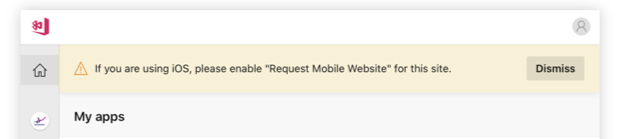
Viewing the site on Desktop does not allow users to install apps, yet App Center only shows a dismissible warning as a solution. If the user dismisses this warning, they have restricted functionality and are none the wiser as to why.
Is it possible to more firmly require that the user access the site in Mobile mode, for example by displaying the warning until they do so, with extra information on the warning as to why and how they should heed it?
Cheers!
 Chris-Friend
on 4 Dec 2019
Chris-Friend
on 4 Dec 2019
Solution for that look for the AA in the URL bar of Safari in IOS 13, and press it..you'll see an item for "Request Desktop Website" there... that solves the issue.
 cguerin
on 6 Jan 2020
cguerin
on 6 Jan 2020
@cguerin we are aware of the aA button and the Desktop/Mobile website options, as shown in @lumaxis's screenshots above, and how this affects the behaviour of the site. My comment was was a request for an improvement to the implemented dismissible warning to improve user experience, not a request for a solution to not being able to download/install the apps. However, thank you for taking the time to read through it.
Chris-Friend
on 7 Jan 2020
Is there any update on this? Our team is running into this on a regular basis, esp. when onboarding new members. Would be very nice if we didn’t have to waste that time. :)
 triplef
on 3 Jul 2020
triplef
on 3 Jul 2020
Related issues
kuyazee
·
3Comments
 chriskellor
·
3Comments
chriskellor
·
3Comments
 thabemmz
·
3Comments
thabemmz
·
3Comments
 comply365dev
·
4Comments
comply365dev
·
4Comments
 busterlaursen
·
4Comments
busterlaursen
·
4Comments
Most helpful comment
For the time being, you can use the workaround of requesting the mobile website like in the screenshot below: