Appcenter: Download DSYM files via UI for iOS builds created outside AppCenter
Describe the solution you'd like
I am uploading the ipa , ipk and dsym files Using AppCenter API through jenkins Jobs . I am able to upload the files successfully and able to locate the ipa and ipk files in app center whereas dsym files is not visible or available for download. Developers are not able to download the file from AppCenter for crash reporting and analysis on third party tools.
Describe alternatives you've considered
I am uploading the DSYM file on an repository server for download.
 sand070581
All 22 comments
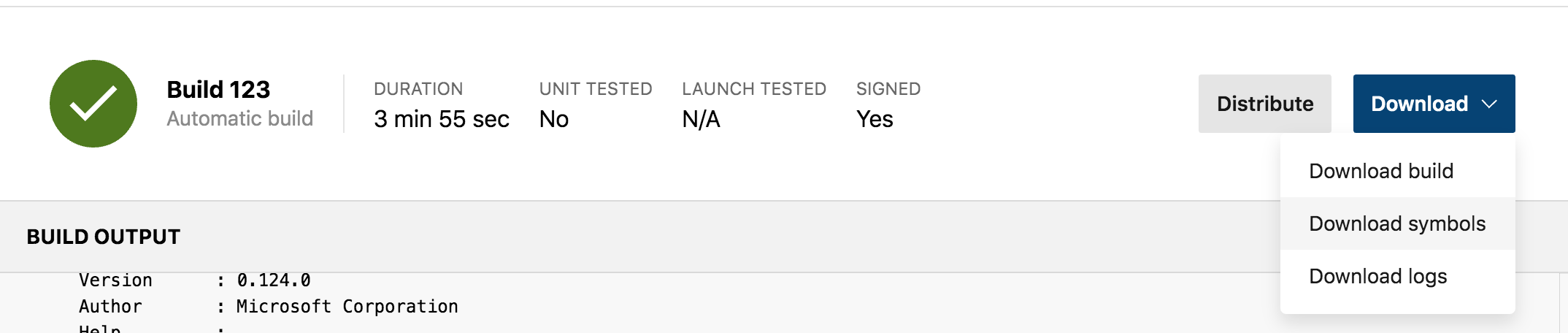
Hi @sand070581 - thanks for the feature request! You can download the .dsym files if you're using App Center build as shown below:
Are you requesting a way to download these files using Jenkins?
 winnie
on 13 Jun 2019
winnie
on 13 Jun 2019
Hi ,
We are not using AppCenter build feature. We are creating the ipk's in our inhouse build sytem and uploading it into AppCenter for release distribution. Along with ipk's we are also uploading DSYM files so that developers can download it for crash analysis. This feature is working well in our existing hockeyApp but AppCenter is not giving any option to download the DSYM files uploaded by us. Let me know if you need more information.
sand070581
on 20 Jun 2019
Any Update on the issue ?
sand070581
on 31 Jul 2019
No updates at the moment! Assigning Dan who can update you in the next few days. Thanks for your patience!
winnie
on 3 Aug 2019
We're needing this feature as well to meet our business needs. Keep me updated as well if you would please.
 roshaincam
on 7 Aug 2019
roshaincam
on 7 Aug 2019
Thanks, we're looking into it.
On App Center the services are independent. In distribute we don't extract the symbols from a .ipa. In theory it would require to make an additional call and upload the symbols to Diagnostics, however, they are currently not exposed in the UI and I see that the relation between build and symbols gets lost.
 dipree
on 7 Aug 2019
dipree
on 7 Aug 2019
Any ETA on this?
 nareen2
on 4 Sep 2019
nareen2
on 4 Sep 2019
I’m actually running into the exact same issue
 codecaffeine
on 6 Sep 2019
codecaffeine
on 6 Sep 2019
@winnieli1 We use this feature frequently on HockeyApp, so having this ability before we are forced to migrate is critical.
 nathanhillyer
on 24 Sep 2019
nathanhillyer
on 24 Sep 2019
We are missing this feature as well. We cannot download our symbols from AppCenter.
 stevedavis7
on 25 Sep 2019
stevedavis7
on 25 Sep 2019
We are required to build locally and then upload. Loosing the ability to download the DSYM as we can from HockeyApp hinders our CI & testing.
We are using the AppCenter Cli to upload our ipa & dsym files.
 kirktay
on 14 Oct 2019
kirktay
on 14 Oct 2019
We miss the download option too! It could be done in HockeyApp...
 marcoses83
on 17 Oct 2019
marcoses83
on 17 Oct 2019
@derpixeldan Any progress on this issue?
For those of us not building in AppCenter this will be a critical piece of functionality not carried over from HockeyApp.
Thanks
kirktay
on 22 Oct 2019
@derpixeldan Do you have any insight to share regarding this issue?
As other have pointed out, it was possible to do so in HockeyApp, and some of us do use this feature as part of our QA and / or CD.
It is somewhat alarming to be two weeks away from the closing of HockeyApp, and not have any information regarding this issue, neither an ETA, nor knowing if it is even considered a priority or not.
Thank you for your time.
Regards
 Nooba
on 31 Oct 2019
Nooba
on 31 Oct 2019
Interested in this too. Needed to properly debug builds hosted in AppC...
 adelavina
on 14 Nov 2019
adelavina
on 14 Nov 2019
I have an app that uses an Azure Pipeline to build and upload the app to AppCenter together with the symbols. I can find what looks like the dSYM folder under Diagnostics -> symbols
The symbols seems to be moved one folder up in the structure so no dSYM file in the downloaded folder if only one dSYM file is uploaded. So you will need to place the Contents folder inside another folder and add the .dSYM extention.
This does not seem to be uploaded to AppStore though when publishing there.
I am using the "App Center Distribute" Task and setting the dSYM path in the symbols section.
Hope this can help some of you.
It would be great to have the ability to download the symbols from the the release page for a package.
 tentom
on 22 Jan 2020
tentom
on 22 Jan 2020
I also would love this feature
 adingler6
on 27 Feb 2020
adingler6
on 27 Feb 2020
I was going through the same issues of downloading the dSYM that I successfully uploaded via fastlane from Bitrise.
This is already available but might not be that visible, we naturally would go to the actual build and try to get the files related to that build, but instead all symbols are under Diagnostic/ Symbols ... you can see all files there with the following format name: upload-2020-05-01T02-12-12Z.zip
However there is no way to link one symbol file with the actual build it belongs other that just matching the date/time from the file name and the build.
Seems to be a limitation of the API, I couldn't find any way from the official API to link such files.
At least is better than nothing.
 ed-mejia
on 4 May 2020
ed-mejia
on 4 May 2020
Introduction
I stumbled upon this Issue while Googling my use case: download specific symbols (dSYM) no matter how they were uploaded to App Center. At the bottom is a Workaround short guide on how to do that because the UI doesn't support that. Before that, I go over the issues and what changes should be made.
Issues
Technically this Open Issue is _partially_ addressed as of Nov 2019 because dSYM files can be downloaded via UI Diagnostic/ Symbols (url ends with crashes/symbols/uploads), but there are still two main issues:
In the UI, I cannot download specific symbols for a build (release/build number or UUID). I'd have to download symbols within the date range of when I think the symbols were uploaded. This is unacceptable.
In the UI, there seems to be a limit of 30 symbols displayed on the page and no pagination. This means I can't even get to all symbols in my mass downloading "hunting" to try to find the one I'm looking for. This is unacceptable.
Changes to address deficiencies
Paginate so a user can get to more than the 30 most recent symbol uploads.
Ability to name the uploaded file.
Guessing that'd have to be added here https://github.com/microsoft/appcenter-cli/blob/master/src/commands/crashes/upload-symbols.ts
This was requested just over two years ago https://github.com/microsoft/appcenter-cli/issues/407Show more info in the Diagnostic/ Symbols page, such as the UUID(s), CFBundleVersion, and CFBundleShortVersionString. These should be available because upon upload the zip is unzipped and UUIDs recorded somewhere. If the upload also has an Info.plist, the values for the CF fields I mentioned should also be recorded somewhere.
When the above work is done, a next step would be some kind of filtering in the UI. An example is that my team will build a version multiple times so we might have 1.1.1 build 100, 1.1.1 build 101, 1.1.2 build 102, 1.1.2 build 103, etc. It would be helpful to filter by value of fields, such as version 1.1.1 and only the first two would be displayed.
Bring back the Hockey App functionality where symbols could be downloaded from a specific release page.
Several other Issues, such as https://github.com/microsoft/appcenter/issues/1340, get at these deficiencies and would be addressed by one or more of these Changes.
Workaround
In case this will help anyone else, my common use case is to download specific symbols. This can be done using
https://openapi.appcenter.ms/ (specifically there is one that ends with {symbol_id}/location) and usage is explained at https://docs.microsoft.com/en-us/appcenter/api-docs/.
Pre-req: Make a read-only User API token to copy-paste for authorization (see https://docs.microsoft.com/en-us/appcenter/api-docs/).
- Go to https://openapi.appcenter.ms/#/crash/symbols_getLocation
– This item should be expanded. - Click the lock icon on the right side and paste your token into the field and click Authorize
– The lock icon will go from unlocked to locked.
– You can also authorize at the top of the page. They are the same. - Click Try it out and fill in the parameters
– app_name is self-explanatory and owner_name can be a user or organization (see https://docs.microsoft.com/en-us/appcenter/api-docs/).
– symbol_id is the UUID and can have hyphens or not. - Click Execute, and under Responses will appear a Response body, which if successful will provide a uri to directly download symbols
– If incorrect params, such as symbols not found, double check them.
– If you get an authorization error make sure the API token is valid and authorization succeeded. - Use that uri to download the symbols - I just copy-paste it into my browser
– The download will be the actual symbols and not the .dSYM so you will not get the Info.plist.
 sheehanm
on 7 Jul 2020
sheehanm
on 7 Jul 2020
This issue has been automatically marked as stale because it has not had any activity for 60 days. It will be closed if no further activity occurs within 15 days of this comment.
![msftbot[bot] picture](https://avatars.githubusercontent.com/in/26612?v=4&s=40) msftbot[bot]
on 30 Jun 2021
msftbot[bot]
on 30 Jun 2021
This issue will now be closed because it hasn't had any activity for 15 days after stale. Please feel free to open a new issue if you still have a question/issue or suggestion.
msftbot[bot]
on 15 Jul 2021
While this issue was closed, so I don't think commenting re-opens it, @winnie @dipree is there an update? Does the issue make sense?
sheehanm
on 23 Jul 2021
Related issues
 busterlaursen
·
4Comments
busterlaursen
·
4Comments
 kuyazee
·
3Comments
kuyazee
·
3Comments
 invariant
·
3Comments
invariant
·
3Comments
 sindresorhus
·
3Comments
sindresorhus
·
3Comments
 patrickdoodyIRL
·
3Comments
patrickdoodyIRL
·
3Comments
Most helpful comment
@derpixeldan Any progress on this issue?
For those of us not building in AppCenter this will be a critical piece of functionality not carried over from HockeyApp.
Thanks