Appcenter: Issue - CocoaPods 1.6.0 Versus CocoaPods 1.5.3 on AppCenter
What App Center service does this affect?
AppCenter - BUILD/Branches
Describe the bug
It doesn't build the project due to missing files Podfile.lock and Manifest.lock

The error message is from the Check Pods Manifest.lock (We can find the script in XCode/build phases).
In this script, the path of Podfile.lock and Manifest.lock has variable. These variable are defined in .../ios/Pods/Target Support Files/Pods-MoviesAndMe/Pods-MoviesAndMe.release.xcconfig.
But he doesn't load it as the path is wrong :

It should be .../ios/Pods/Target Support Files/Pods-MoviesAndMe/Pods-MoviesAndMe.release.xcconfig)
Steps to reproduce the behavior:
- Go to the root of the project
- Open a terminal and type "npm install"
- After this, type "cd ios" and then "pod install"
- Build the project on Appcenter
Files :
Logs : logs_7.zip
Project : https://github.com/Snowycofy/Tuto_ReactNative
Expected behavior
it doesn't compile due to missing files /Podfile.lock and /Manifest.lock
Desktop, Software:
- MacOs version 10.13.6
- Browser : Safari
- Xcode 10.1
- CocoaPods 1.6.0
 Snowycofy
All 11 comments
Latest cocoapods release is now 1.6.1
 ApolloZhu
on 28 Feb 2019
ApolloZhu
on 28 Feb 2019
Hi @Snowycofy @ApolloZhu, I'm taking a look into this and will report back here with an update
 nilofer
on 1 Mar 2019
nilofer
on 1 Mar 2019
Hi,
I had this same issue, and after a couple of research, I found out that the problem is the pod install (check it out here: #6194).
So I added a script to remove all cocoapods versions and install the version 1.6.1 (which has the bug fixed).
This is the script which I am using:
echo "uninstalling all cocoapods versions"
sudo gem uninstall cocoapods --all
echo "installing cocoapods version 1.6.1"
sudo gem install cocoapods -v 1.6.1
I added it to the post-clone event (appcenter-post-clone.sh).
Not sure if that is the best way, but it solved from me ;)
 alanlima
on 9 Mar 2019
alanlima
on 9 Mar 2019
This issue is also affecting me and havent been able to fix it, any clues on how to fix it ?? @alanlima i tried your solution and its not working due to my appcenter-post-clone.sh is not being triggered by appcenter
 ivan-jorge001
on 10 Mar 2019
ivan-jorge001
on 10 Mar 2019
Hi @ivan-jorge001
Try to follow the steps below to add a custom script:
- Added the file at the root of your project (same as package.json)
- Commit to your repository.
- Open build configuration on app center and check that this file should be recognized by the appcenter.
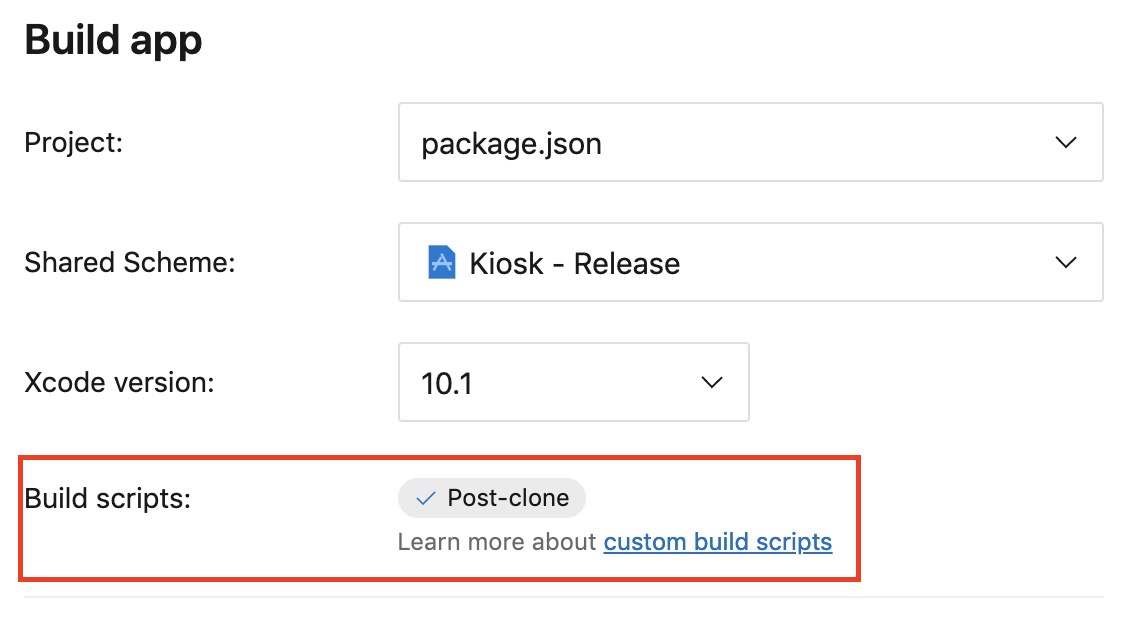
- Trigger a build
_More info about custom build scripts here._
And when you build, you should have those lines on your build log:
2019-03-09T05:57:14.6327620Z ##[section]Starting: Post Clone Script
2019-03-09T05:57:14.6331620Z ==============================================================================
2019-03-09T05:57:14.6331800Z Task : Shell Script
2019-03-09T05:57:14.6331940Z Description : Run a shell script using bash
2019-03-09T05:57:14.6332020Z Version : 2.1.3
2019-03-09T05:57:14.6332150Z Author : Microsoft Corporation
2019-03-09T05:57:14.6332240Z Help : [More Information](https://go.microsoft.com/fwlink/?LinkID=613738)
2019-03-09T05:57:14.6332390Z ==============================================================================
2019-03-09T05:57:14.8068860Z [command]/bin/bash /Users/vsts/agent/2.148.0/work/1/s/appcenter-post-clone.sh
2019-03-09T05:57:14.8168300Z uninstalling all cocoapods versions
2019-03-09T05:57:15.3878190Z Removing pod
2019-03-09T05:57:15.3879420Z Removing sandbox-pod
2019-03-09T05:57:15.3880050Z Successfully uninstalled cocoapods-1.5.3
2019-03-09T05:57:15.3896290Z installing cocoapods version 1.6.1
2019-03-09T05:57:20.7843550Z Successfully installed cocoapods-core-1.6.1
2019-03-09T05:57:20.7844330Z Successfully installed fourflusher-2.2.0
2019-03-09T05:57:20.7844980Z Successfully installed cocoapods-1.6.1
2019-03-09T05:57:20.7845640Z Parsing documentation for cocoapods-core-1.6.1
2019-03-09T05:57:20.7846250Z Installing ri documentation for cocoapods-core-1.6.1
2019-03-09T05:57:20.7846810Z Parsing documentation for fourflusher-2.2.0
2019-03-09T05:57:20.7847450Z Installing ri documentation for fourflusher-2.2.0
2019-03-09T05:57:20.7848000Z Parsing documentation for cocoapods-1.6.1
2019-03-09T05:57:20.7848630Z Installing ri documentation for cocoapods-1.6.1
2019-03-09T05:57:20.7849510Z Done installing documentation for cocoapods-core, fourflusher, cocoapods after 3 seconds
2019-03-09T05:57:20.7849720Z 3 gems installed
2019-03-09T05:57:20.7988570Z ##[section]Finishing: Post Clone Script
Hi,
I didn't think that we could remove cocoapods 1.5.3 and install the version 1.6.1 on AppCenter.
Thank you @alanlima, it works for me.
Snowycofy
on 11 Mar 2019
Here's the appcenter-post-clone.sh script I use. This one has the benefit to install the same version of CocoaPods as the one in Podfile.lock. It prevents potential breaking issues and warnings introduced by running a different CocoaPods version (i.e. the one on the App Center cloud build machine) vs. the one specified in the lock file (the one you use to build your project locally).
#!/usr/bin/env bash

echo "Uninstalling all CocoaPods versions"
sudo gem uninstall cocoapods --all --executables

COCOAPODS_VER=`sed -n -e 's/^COCOAPODS: \([0-9.]*\)/\1/p' Podfile.lock`

echo "Installing CocoaPods version $COCOAPODS_VER"
sudo gem install cocoapods -v $COCOAPODS_VER
I think this should be the default behavior for iOS builds with a Podfile.lock. Thoughts @nrajpurkar?
Maybe a performance improvement would be to check first if the versions are already matching.
 istvanp
on 18 Mar 2019
istvanp
on 18 Mar 2019
We'll be updating to the latest versions of CocoaPods in our next update to our agents. There are some backwards compatibility issues. If these affect your build, check out this build script to rollback.
nilofer
on 19 Mar 2019
Nice suggestion @istvanp! That's definitely helpful if you need to lock on to a specific version. Would you mind adding that to our build script repository for others to use before we decide on whether or not to make that default behavior?
nilofer
on 19 Mar 2019
@nrajpurkar Done!
https://github.com/Microsoft/appcenter-build-scripts-examples/pull/30
istvanp
on 20 Mar 2019
I got the same issue when install 1.6
but it work fine on 1.5
[!] An error occurred while processing the post-install hook of the Podfile.

undefined method `native_target' for <Pod::PodTarget name=Amplitude-iOS >:Pod::PodTarget

/Users/sopheak/Documents/cam/DMS/fira/ios/Podfile:127:in `block (4 levels) in from_ruby'
/Users/sopheak/Documents/cam/DMS/fira/ios/Podfile:107:in `each'
/Users/sopheak/Documents/cam/DMS/fira/ios/Podfile:107:in `block (3 levels) in from_ruby'
/Library/Ruby/Gems/2.3.0/gems/cocoapods-core-1.7.4/lib/cocoapods-core/podfile.rb:179:in `post_install!'
/Library/Ruby/Gems/2.3.0/gems/cocoapods-1.7.4/lib/cocoapods/installer.rb:836:in `run_podfile_post_install_hook'
/Library/Ruby/Gems/2.3.0/gems/cocoapods-1.7.4/lib/cocoapods/installer.rb:824:in `block in run_podfile_post_install_hooks'
/Library/Ruby/Gems/2.3.0/gems/cocoapods-1.7.4/lib/cocoapods/user_interface.rb:145:in `message'
/Library/Ruby/Gems/2.3.0/gems/cocoapods-1.7.4/lib/cocoapods/installer.rb:823:in `run_podfile_post_install_hooks'
/Library/Ruby/Gems/2.3.0/gems/cocoapods-1.7.4/lib/cocoapods/installer.rb:309:in `block in create_and_save_projects'
/Library/Ruby/Gems/2.3.0/gems/cocoapods-1.7.4/lib/cocoapods/user_interface.rb:64:in `section'
/Library/Ruby/Gems/2.3.0/gems/cocoapods-1.7.4/lib/cocoapods/installer.rb:290:in `create_and_save_projects'
/Library/Ruby/Gems/2.3.0/gems/cocoapods-1.7.4/lib/cocoapods/installer.rb:281:in `generate_pods_project'
/Library/Ruby/Gems/2.3.0/gems/cocoapods-1.7.4/lib/cocoapods/installer.rb:159:in `install!'
/Library/Ruby/Gems/2.3.0/gems/cocoapods-1.7.4/lib/cocoapods/command/install.rb:51:in `run'
/Library/Ruby/Gems/2.3.0/gems/claide-1.0.2/lib/claide/command.rb:334:in `run'
/Library/Ruby/Gems/2.3.0/gems/cocoapods-1.7.4/lib/cocoapods/command.rb:52:in `run'
/Library/Ruby/Gems/2.3.0/gems/cocoapods-1.7.4/bin/pod:55:in `<top (required)>'
/usr/local/bin/pod:22:in `load'
/usr/local/bin/pod:22:in `<main>'
 hengsoheak
on 12 Jul 2019
hengsoheak
on 12 Jul 2019
Related issues
 egorikftp
·
3Comments
egorikftp
·
3Comments
 busterlaursen
·
4Comments
busterlaursen
·
4Comments
 DouglasMarq
·
4Comments
DouglasMarq
·
4Comments
 comply365dev
·
4Comments
comply365dev
·
4Comments
 Oddj0b
·
3Comments
Oddj0b
·
3Comments
Most helpful comment
Here's the
appcenter-post-clone.shscript I use. This one has the benefit to install the same version of CocoaPods as the one inPodfile.lock. It prevents potential breaking issues and warnings introduced by running a different CocoaPods version (i.e. the one on the App Center cloud build machine) vs. the one specified in the lock file (the one you use to build your project locally).I think this should be the default behavior for iOS builds with a
Podfile.lock. Thoughts @nrajpurkar?Maybe a performance improvement would be to check first if the versions are already matching.