Appcenter: Android versionCode does not auto increment
What App Center service does this affect?
Android release builds
Describe the bug
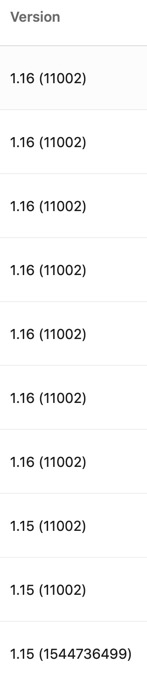
AppCenter fails to auto increment the versionCode
To Reproduce
Steps to reproduce the behavior:
- Open the branch/build configuration
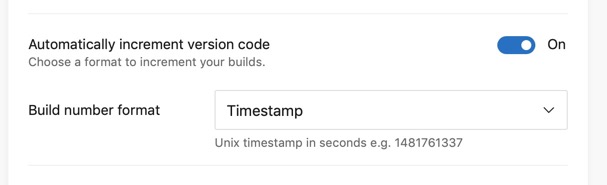
- Toggle ON Automatically increment version code
- select the timestamp option
- Save & Build
- Build again
Expected behavior
I expect each successive build to update the version code, however the number from the gradle file is used no matter what the version code build setting is
Screenshots
Desktop (please complete the following information):
- OS: Android
- Browser n/a
- Version 28.0.3
Additional context
I've tried builds with the toggle on and off, using the incremented build number vs timestamp... everything. I just won't come unstuck.
 iamcam
All 10 comments
Hi @iamcam, do you mind reaching out through the chat feature in the App Center web portal to get your configuration looked at by someone from our team? It's difficult for us to triage issues with peoples build configurations here, but we would be happy to give you some 1 on 1 support there.
 patniko
on 9 Feb 2019
patniko
on 9 Feb 2019
@patniko Sure thing, thanks.
iamcam
on 11 Feb 2019
I received 1 on 1 support in App Center for this today. Auto increment for versionCode doesn't work with Android gradle plugin version 3.3.0 or higher. Downgrade to 3.2.1 and you should be good.
Edit: My advice to downgrade was accurate at the time but is now outdated.
 josmithua
on 19 Feb 2019
josmithua
on 19 Feb 2019
@iamcam still hitting this issue or was support able to help you out?
 nilofer
on 12 Apr 2019
nilofer
on 12 Apr 2019
Closing this for now as there hasn't been follow up from the original reporter.
patniko
on 21 May 2019
The solution is just a workaround, so what is the status of the issue? is that fixed? I am facing this issue even today. @patniko
 ramasamyprabakaran
on 27 Jul 2020
ramasamyprabakaran
on 27 Jul 2020
@ramasamyprabakaran @patniko have either of you found a solution?
 Ryanauger95
on 18 Sep 2020
Ryanauger95
on 18 Sep 2020
still doesn't work
 tronin
on 29 Sep 2020
tronin
on 29 Sep 2020
This is still happening. Please reopen the issue.
 zoontek
on 2 Nov 2020
zoontek
on 2 Nov 2020
I have a solution if you use timestamp based versionCode:
appcenter-post-clone.sh
#!/usr/bin/env bash -e

cd $APPCENTER_SOURCE_DIRECTORY

if [[ -z "$APPCENTER_XCODE_PROJECT" ]]; then
  node ./appcenter-post-clone.android.js
fi
appcenter-post-clone.android.js:
const path = require("path");
const fs = require("fs");

const buildFilePath = path.join(__dirname, "android", "app", "build.gradle"); // react-native project, you might want to adjust the path
const buildFile = fs.readFileSync(buildFilePath, { encoding: "utf8" });

const versionCodeRegExp = /versionCode (?<versionCode>\d+)/g;
const buildFileMatch = versionCodeRegExp.exec(buildFile);

if (!buildFileMatch) {
  console.error("Could not increment versionCode");
  process.exit(1);
}

const nextVersionCode = Math.floor(Date.now() / 1000).toFixed(0);

fs.writeFileSync(
  buildFilePath,
  buildFile.replace(versionCodeRegExp, `versionCode ${nextVersionCode}`),
  { encoding: "utf8" },
);
It should also work with pre-build script, but I didn't tested it, and I'm not sure the difference matter.
This is still a workaround, I hope this will be fixed 🙂
zoontek
on 2 Nov 2020
Related issues
 thabemmz
·
3Comments
thabemmz
·
3Comments
 patrickdoodyIRL
·
3Comments
patrickdoodyIRL
·
3Comments
 master-lincoln
·
3Comments
master-lincoln
·
3Comments
 vonovak
·
3Comments
vonovak
·
3Comments
 chriskellor
·
3Comments
chriskellor
·
3Comments