Appcenter-sdk-react-native: unknown receiver errors
Description
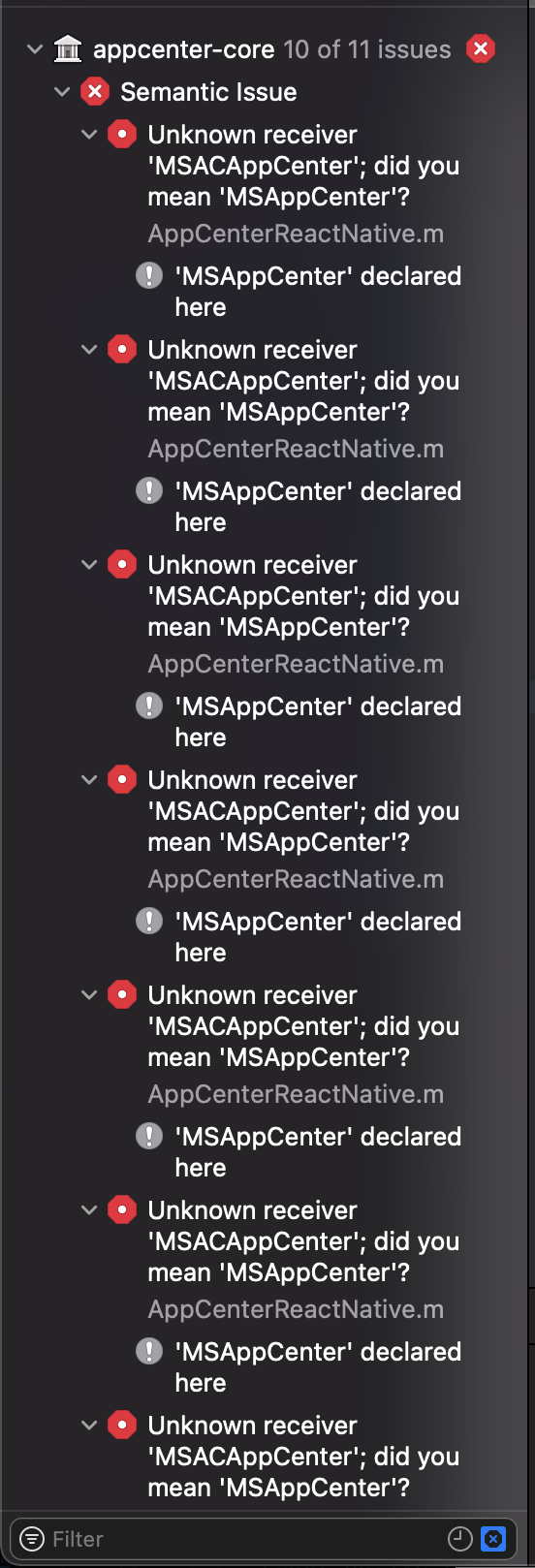
I am getting lots of unknown receiver errors as you can see on the screenshot below
Repro Steps
Please list the steps used to reproduce your issue.
- yarn add appcenter appcenter-push
- cd ios
- pod install
- Add
#import <AppCenterReactNative.h> - Add
[AppCenterReactNative register];after flipper initialization. - run the app on iphone simulator.
Details
- Which version of the App Center SDK are you using?
- e.g. 4.0.0
- Which OS version did you experience the issue on?
- e.g. iOS 11
- What device version did you see this error on? Were you using an emulator or a physical device?
- e.g. iPhone 6 simulator
- What third party libraries are you using?
- N/A
- Run the following command and paste the output below:
react-native info
info Fetching system and libraries information...
System:
    OS: macOS 11.0.1
    CPU: (8) x64 Intel(R) Core(TM) i7-6820HQ CPU @ 2.70GHz
    Memory: 147.26 MB / 16.00 GB
    Shell: 5.8 - /bin/zsh
  Binaries:
    Node: 15.2.0 - ~/.nvm/versions/node/v15.2.0/bin/node
    Yarn: 1.22.10 - ~/.nvm/versions/node/v15.2.0/bin/yarn
    npm: 7.0.8 - ~/.nvm/versions/node/v15.2.0/bin/npm
    Watchman: 4.9.0 - /usr/local/bin/watchman
  Managers:
    CocoaPods: 1.10.0 - /usr/local/bin/pod
  SDKs:
    iOS SDK:
      Platforms: iOS 14.2, DriverKit 20.0, macOS 11.0, tvOS 14.2, watchOS 7.1
    Android SDK:
      API Levels: 24, 26, 28, 29, 30
      Build Tools: 28.0.3, 29.0.2, 30.0.2
      System Images: android-24 | Google Play Intel x86 Atom, android-28 | Google Play Intel x86 Atom, android-29 | Google Play Intel x86 Atom, android-30 | Google APIs Intel x86 Atom, android-30 | Google Play Intel x86 Atom
      Android NDK: Not Found
  IDEs:
    Android Studio: 4.1 AI-201.8743.12.41.6953283
    Xcode: 12.2/12B45b - /usr/bin/xcodebuild
  Languages:
    Java: 1.8.0_275 - /usr/bin/javac
    Python: 2.7.16 - /usr/bin/python
  npmPackages:
    @react-native-community/cli: Not Found
    react: ^16.14.0 => 16.14.0
    react-native: 0.63.3 => 0.63.3
    react-native-macos: Not Found
  npmGlobalPackages:
    *react-native*: Not Found
- If you're developing for React Native iOS, run the following command and paste the output below:
pod --version
1.10.0
- Please enable verbose logging for your app using
[MSAppCenter setLogLevel: MSLogLevelVerbose];before your call to[AppCenterReactNative register];(or any other SDK registration). For Android, useAppCenter.setLogLevel(android.util.Log.VERBOSE);before yourSoLoader.initcall (you will need toimport com.microsoft.appcenter.AppCenter;). Include the logs here:
N/A becauyse the app doesn't even build.
 aprilmintacpineda
All 5 comments
Hello @aprilmintacpineda ,
thanks for using App Center. In version 4.0.0 Push module was removed. So, to use this module you should install previous releases, for example, 3.1.3 (yarn add [email protected] [email protected]).
If you want to update the old App Center SDK version in the project to the last 4.0.0 version then you should remove push module usage from your project.
On the attached picture I see that App Center Apple SDK 4.0.0 was installed through the pods. Are you using App Center React Native SDK 4.0.0?
The versions of the Apple and React Native App Center SDKs should be synchronized.
Thanks
 olmisa
on 3 Dec 2020
olmisa
on 3 Dec 2020
We haven’t heard from you in a while so I’m closing this issue.
Feel free to reopen this issue if it isn’t resolved or you have additional questions.
 AnastasiaKubova
on 10 Dec 2020
AnastasiaKubova
on 10 Dec 2020
Facing the same issue. I just followed the instructions on the AppCenter website and I have the same error as above.
 CatsNipYummy
on 31 Dec 2020
CatsNipYummy
on 31 Dec 2020
@CatsNipYummy Push module was removed because of retirement. Read more about it here.
Adding appcenter-push (3.x) aside of other modules with latest version (4.x) causes version conflict.
 MatkovIvan
on 6 Jan 2021
MatkovIvan
on 6 Jan 2021
In my case I realise I had 4.x installed of appcenter but 3.x for crashes and analytics which was causing the issue. Updating them all to the lastest fixed this issue for me
 CDBridger
on 11 Jan 2021
CDBridger
on 11 Jan 2021
Related issues
 Maximell
·
9Comments
Maximell
·
9Comments
 ionut-movila
·
8Comments
ionut-movila
·
8Comments
 rafaelcorreiapoli
·
5Comments
rafaelcorreiapoli
·
5Comments
 divyamakkar26
·
7Comments
divyamakkar26
·
7Comments
 danielmilner
·
10Comments
danielmilner
·
10Comments
Most helpful comment
In my case I realise I had 4.x installed of appcenter but 3.x for crashes and analytics which was causing the issue. Updating them all to the lastest fixed this issue for me