Appcenter-sdk-react-native: AppCenterReactNative.h file not found for specific target
Description
One of the targets on my Xcode does not build because of the following error:
AppCenterReactNative.h file not found in AppDelegate.m
Repro Steps
Please list the steps used to reproduce your issue.
- cd ios/
- open NFIBEngage.xcworkspace
- Run Build
Details
- Which version of the App Center SDK are you using?
- 2.3.0
- Which OS version did you experience the issue on?
- Xcode 10.1
- What device version did you see this error on? Were you using an emulator or a physical device?
iPhone XR - What third party libraries are you using?
```
"dependencies": {
"@react-native-community/async-storage": "1.5.1",
"@react-native-community/cli": "2.9.0",
"add": "2.0.6",
"appcenter": "2.3.0",
"appcenter-analytics": "2.3.0",
"appcenter-crashes": "2.3.0",
"axios": "0.19.0",
"exact": "0.8.0",
"lodash": "4.17.15",
"moment": "2.24.0",
"payment": "2.3.0",
"prop-types": "15.7.2",
"react": "16.8.6",
"react-native": "0.60.4",
"react-native-autoheight-webview": "1.1.5",
"react-native-device-info": "2.2.2",
"react-native-gesture-handler": "1.3.0",
"react-native-image-progress": "1.1.1",
"react-native-immediate-phone-call": "1.0.0",
"react-native-input-scroll-view": "1.9.3",
"react-native-iphone-x-helper": "1.2.1",
"react-native-keyboard-aware-scroll-view": "0.8.0",
"react-native-keyboard-manager": "4.0.13-15",
"react-native-material-buttons": "0.5.0",
"react-native-material-dropdown": "0.11.1",
"react-native-material-tabs": "3.8.1",
"react-native-material-textfield": "0.12.0",
"react-native-onesignal": "3.2.14",
"react-native-popup-menu": "0.15.6",
"react-native-reanimated": "1.1.0",
"react-native-sentry": "0.43.2",
"react-native-size-matters": "0.2.1",
"react-native-splash-screen": "3.2.0",
"react-native-svg": "9.5.3",
"react-native-swipe-view": "3.0.1",
"react-native-vector-icons": "6.6.0",
"react-native-webview": "5.12.1",
"react-navigation": "1.5.11",
"react-redux": "5.1.1",
"reactotron-redux": "3.1.1",
"recompose": "0.30.0",
"redux": "4.0.4",
"redux-thunk": "2.3.0",
"replace-in-file": "4.1.1"
5. Run the following command and paste the output below: `react-native info`
System:
OS: macOS High Sierra 10.13.6
CPU: (8) x64 Intel(R) Core(TM) i7-4770HQ CPU @ 2.20GHz
Memory: 25.07 MB / 16.00 GB
Shell: 5.3 - /bin/zsh
Binaries:
Node: 10.16.3 - /usr/local/bin/node
Yarn: 1.10.1 - /usr/local/bin/yarn
npm: 6.9.0 - /usr/local/bin/npm
Watchman: 4.7.0 - /usr/local/bin/watchman
SDKs:
iOS SDK:
Platforms: iOS 12.1, macOS 10.14, tvOS 12.1, watchOS 5.1
Android SDK:
API Levels: 23, 25, 26, 27, 28
Build Tools: 23.0.1, 26.0.2, 27.0.3, 28.0.3
System Images: android-28 | Google Play Intel x86 Atom
IDEs:
Android Studio: 3.5 AI-191.8026.42.35.5791312
Xcode: 10.1/10B61 - /usr/bin/xcodebuild
npmPackages:
@react-native-community/cli: 2.9.0 => 2.9.0
react: 16.8.6 => 16.8.6
react-native: 0.60.4 => 0.60.4
npmGlobalPackages:
react-native-cli: 2.0.1
react-native-git-upgrade: 0.2.7
```
- If you're developing for React Native iOS, run the following command and paste the output below:
pod --version
1.7.5
- Please enable verbose logging for your app using
[MSAppCenter setLogLevel: MSLogLevelVerbose];before your call to[AppCenterReactNative register];(or any other SDK registration). For Android, useAppCenter.setLogLevel(android.util.Log.VERBOSE);before yourSoLoader.initcall (you will need toimport com.microsoft.appcenter.AppCenter;). Include the logs here:
 ldco2016
All 15 comments
Hi there @ldco2016! I see you are experiencing problems with React-Native iOS autolinking now, did you run pod install after all the changes?
 annakocheshkova
on 23 Sep 2019
annakocheshkova
on 23 Sep 2019
Hi @annakocheshkova , yes I ran a pod install, I even did a sudo gem install Cocoapods, removed Podfile, removed Podfile-lock and then conducted a pod install and I still get this problem when trying to build in Xcode.
The application itself is working on both android and iOS with Appcenter after @russelarms , helped me, but not sure why now I get this error when trying to build in Xcode. This does not happen when I try to build the app, but when I try to build a specific target in the app, this project comes with multiple targets. This is my podfile:
platform :ios, '9.0'
require_relative '../node_modules/@react-native-community/cli-platform-ios/native_modules'

abstract_target 'defaults' do
  # Pods for NFIBEngage
  pod 'React', :path => '../node_modules/react-native/'
  pod 'React-Core', :path => '../node_modules/react-native/React'
  pod 'React-DevSupport', :path => '../node_modules/react-native/React'
  pod 'React-fishhook', :path => '../node_modules/react-native/Libraries/fishhook'
  pod 'React-RCTActionSheet', :path => '../node_modules/react-native/Libraries/ActionSheetIOS'
  pod 'React-RCTAnimation', :path => '../node_modules/react-native/Libraries/NativeAnimation'
  pod 'React-RCTBlob', :path => '../node_modules/react-native/Libraries/Blob'
  pod 'React-RCTImage', :path => '../node_modules/react-native/Libraries/Image'
  pod 'React-RCTLinking', :path => '../node_modules/react-native/Libraries/LinkingIOS'
  pod 'React-RCTNetwork', :path => '../node_modules/react-native/Libraries/Network'
  pod 'React-RCTSettings', :path => '../node_modules/react-native/Libraries/Settings'
  pod 'React-RCTText', :path => '../node_modules/react-native/Libraries/Text'
  pod 'React-RCTVibration', :path => '../node_modules/react-native/Libraries/Vibration'
  pod 'React-RCTWebSocket', :path => '../node_modules/react-native/Libraries/WebSocket'

  pod 'React-cxxreact', :path => '../node_modules/react-native/ReactCommon/cxxreact'
  pod 'React-jsi', :path => '../node_modules/react-native/ReactCommon/jsi'
  pod 'React-jsiexecutor', :path => '../node_modules/react-native/ReactCommon/jsiexecutor'
  pod 'React-jsinspector', :path => '../node_modules/react-native/ReactCommon/jsinspector'
  pod 'yoga', :path => '../node_modules/react-native/ReactCommon/yoga'

  pod 'DoubleConversion', :podspec => '../node_modules/react-native/third-party-podspecs/DoubleConversion.podspec'
  pod 'glog', :podspec => '../node_modules/react-native/third-party-podspecs/glog.podspec'
  pod 'Folly', :podspec => '../node_modules/react-native/third-party-podspecs/Folly.podspec'

  pod 'RNDeviceInfo', :path => '../node_modules/react-native-device-info'

  target 'PROD'
  target 'DEV'
  target 'QA'
  target 'UA'
  target 'IN'
  target 'NFIBEngageTests'
  target 'NFIBEngage-tvOS'
  target 'NFIBEngage-tvOSTests'

  use_native_modules!

end
And this is my AppDelegate.m file:
/**
 * Copyright (c) Facebook, Inc. and its affiliates.
 *
 * This source code is licensed under the MIT license found in the
 * LICENSE file in the root directory of this source tree.
 */

#import "AppDelegate.h"
#import <AppCenterReactNativeShared/AppCenterReactNativeShared.h>
#import <AppCenterReactNative.h>
#import <AppCenterReactNativeAnalytics.h>
#import <AppCenterReactNativeCrashes.h>

#import <React/RCTBridge.h>
#import <React/RCTBundleURLProvider.h>
#import <React/RCTRootView.h>
#import "RNSplashScreen.h"


@implementation AppDelegate

- (BOOL)application:(UIApplication *)application didFinishLaunchingWithOptions:(NSDictionary *)launchOptions
{
  [AppCenterReactNative register];
  [AppCenterReactNativeAnalytics registerWithInitiallyEnabled:true];
  [AppCenterReactNativeCrashes registerWithAutomaticProcessing];

  RCTBridge *bridge = [[RCTBridge alloc] initWithDelegate:self launchOptions:launchOptions];
  RCTRootView *rootView = [[RCTRootView alloc] initWithBridge:bridge
                                                   moduleName:@"NFIBEngage"
                                            initialProperties:nil];

  rootView.backgroundColor = [[UIColor alloc] initWithRed:1.0f green:1.0f blue:1.0f alpha:1];

  self.window = [[UIWindow alloc] initWithFrame:[UIScreen mainScreen].bounds];
  UIViewController *rootViewController = [UIViewController new];
  rootViewController.view = rootView;
  self.window.rootViewController = rootViewController;
  [self.window makeKeyAndVisible];
  [RNSplashScreen show];
  return YES;
}

- (NSURL *)sourceURLForBridge:(RCTBridge *)bridge
{
#if DEBUG
  return [[RCTBundleURLProvider sharedSettings] jsBundleURLForBundleRoot:@"index" fallbackResource:nil];
#else
  return [[NSBundle mainBundle] URLForResource:@"main" withExtension:@"jsbundle"];
#endif
}

@end
So when building from command line, everything is fine, but when you try to build from XCode, it fails right?
Just to make this clear, do you see similar to the following picture:
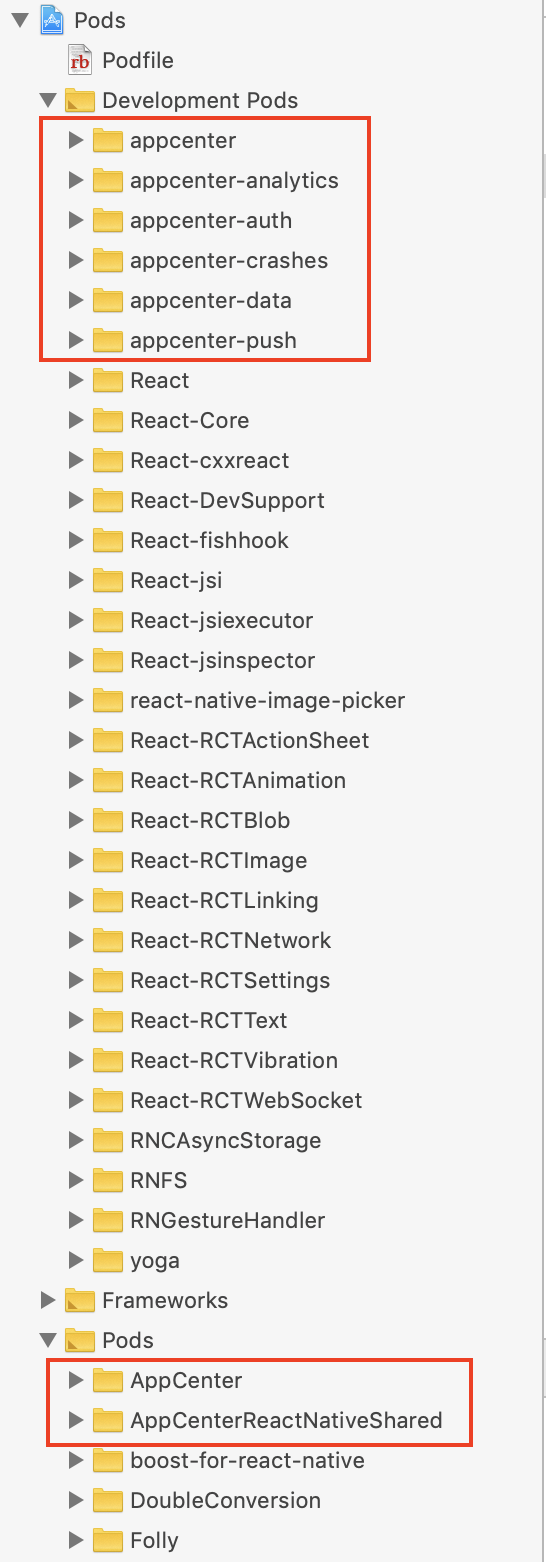
And in the target which should use App Center:

annakocheshkova
on 23 Sep 2019
@annakocheshkova , I have everything the same except for appcenter-auth, appcenter-data and appcenter-push, but thats probably because we only use these libraries:
"appcenter": "2.3.0",
    "appcenter-analytics": "2.3.0",
    "appcenter-crashes": "2.3.0",
@annakocheshkova , I just sent you an email to your microsoft account with a copy of the project with just ios/ folder so you can take a closer look at why the IN target does not find #import <AppCenterReactNative.h>
ldco2016
on 23 Sep 2019
Thank you @ldco2016 I received it. Will try to take a thorough look today.
annakocheshkova
on 24 Sep 2019
What is the target you attempt to build @ldco2016 ?
annakocheshkova
on 24 Sep 2019
I'm having a similar issue with autolinking on xCode 11, trying to build on an iPad pro: https://github.com/microsoft/appcenter-sdk-react-native/issues/714
 brunoreis
on 24 Sep 2019
brunoreis
on 24 Sep 2019
@annakocheshkova , the target I was attempting to build is IN.
ldco2016
on 24 Sep 2019
@ldco2016 So at first I attempted to build NFIBEngage scheme. It had one unrelated to App Center error which was solved by this. Then I build DEV target which has also built successfully. Then, yeah, I attempted to build IN target, faced the described issue.
I wonder what is the difference between IN and DEV targets, so far I could not see any.
I'm planning to look at this more closely this evening.
annakocheshkova
on 24 Sep 2019
@brunoreis this looks like a different problem although the error message is similar. Could you open a separate issue please? It would really help me. Thank you.
annakocheshkova
on 24 Sep 2019
@annakocheshkova , now I get this error when I try to Archive
ios/Pods/Target Support Files/AppCenter/AppCenter.xcconfig: unable to open file (in target "AppCenter" in project "Pods") (in target 'AppCenter')
There is no AppCenter target inside Pods, this is my Podfile:
platform :ios, '9.0'
require_relative '../node_modules/@react-native-community/cli-platform-ios/native_modules'

abstract_target 'defaults' do
  # Pods for NFIBEngage
  pod 'React', :path => '../node_modules/react-native/'
  pod 'React-Core', :path => '../node_modules/react-native/React'
  pod 'React-DevSupport', :path => '../node_modules/react-native/React'
  pod 'React-fishhook', :path => '../node_modules/react-native/Libraries/fishhook'
  pod 'React-RCTActionSheet', :path => '../node_modules/react-native/Libraries/ActionSheetIOS'
  pod 'React-RCTAnimation', :path => '../node_modules/react-native/Libraries/NativeAnimation'
  pod 'React-RCTBlob', :path => '../node_modules/react-native/Libraries/Blob'
  pod 'React-RCTImage', :path => '../node_modules/react-native/Libraries/Image'
  pod 'React-RCTLinking', :path => '../node_modules/react-native/Libraries/LinkingIOS'
  pod 'React-RCTNetwork', :path => '../node_modules/react-native/Libraries/Network'
  pod 'React-RCTSettings', :path => '../node_modules/react-native/Libraries/Settings'
  pod 'React-RCTText', :path => '../node_modules/react-native/Libraries/Text'
  pod 'React-RCTVibration', :path => '../node_modules/react-native/Libraries/Vibration'
  pod 'React-RCTWebSocket', :path => '../node_modules/react-native/Libraries/WebSocket'

  pod 'React-cxxreact', :path => '../node_modules/react-native/ReactCommon/cxxreact'
  pod 'React-jsi', :path => '../node_modules/react-native/ReactCommon/jsi'
  pod 'React-jsiexecutor', :path => '../node_modules/react-native/ReactCommon/jsiexecutor'
  pod 'React-jsinspector', :path => '../node_modules/react-native/ReactCommon/jsinspector'
  pod 'yoga', :path => '../node_modules/react-native/ReactCommon/yoga'

  pod 'DoubleConversion', :podspec => '../node_modules/react-native/third-party-podspecs/DoubleConversion.podspec'
  pod 'glog', :podspec => '../node_modules/react-native/third-party-podspecs/glog.podspec'
  pod 'Folly', :podspec => '../node_modules/react-native/third-party-podspecs/Folly.podspec'

  pod 'RNDeviceInfo', :path => '../node_modules/react-native-device-info'

  target 'NFIBEngage'
  target 'PROD'
  target 'DEV'
  target 'QA'
  target 'UA'
  target 'IN'
  target 'NFIBEngageTests'
  target 'NFIBEngage-tvOS'
  target 'NFIBEngage-tvOSTests'

  use_native_modules!

end
@ldco2016 So I tried to archive "DEV" scheme. First it complained that linker can't find SwipeView. I added it to the scheme (right after React dependency) and then it worked.
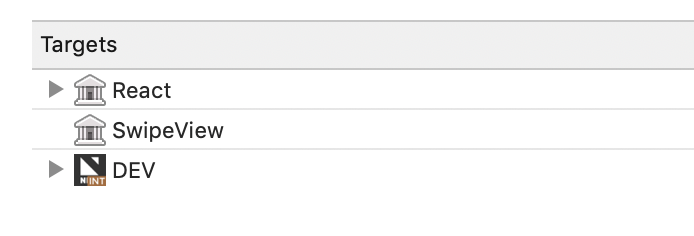
For "IN" scheme, I can't say. - still not able to compile it.
annakocheshkova
on 25 Sep 2019
@annakocheshkova , I was able to get them all to build and archive without that Appcenter error anymore. I just tried different things until it started working again, I cannot say exactly what it was.
ldco2016
on 25 Sep 2019
@ldco2016 would you explain what step you've done to solved the problem?
I faced a same problem with you.
 abdullahizzuddiin
on 13 Jan 2020
abdullahizzuddiin
on 13 Jan 2020
Hey @abdullahizzuddiin could you open a separate issue and fill the template? Thanks.
annakocheshkova
on 20 Jan 2020
Related issues
 rskapadiadev
·
7Comments
rskapadiadev
·
7Comments
 MrLoh
·
4Comments
MrLoh
·
4Comments
 thomasgazzoni
·
5Comments
thomasgazzoni
·
5Comments
 v0lume
·
5Comments
v0lume
·
5Comments
 CodyBrouwers
·
4Comments
CodyBrouwers
·
4Comments
Most helpful comment
@ldco2016 would you explain what step you've done to solved the problem?
I faced a same problem with you.