Appcenter-sdk-react-native: onPushNotificationReceived not firing for iOS
Description
We're receiving push notifications in our react native app, in Android works perfect (also using a redirection) but from iOS the onPushNotificationReceived is not executed (background or foreground).
Repro Steps
Please list the steps used to reproduce your issue.
- Put the configuration:
Push.setListener({
    onPushNotificationReceived(pushNotification) {
    ...
    if (AppState.currentState === 'active') {
      Alert.alert(title, message);
    } else {
      // Sometimes the push callback is received shortly before the app is fully active in the foreground.
      // In this case you'll want to save off the notification info and wait until the app is fully shown
      // in the foreground before displaying any UI. You could use AppState.addEventListener to be notified
      // when the app is fully in the foreground.

      // Showing an alert when not in the "active" state seems to work on iOS; for Android, we show a toast
      // message instead
      if (Platform.OS === 'android') {
        ToastAndroid.show(`${message}`, ToastAndroid.LONG);
      }
      Alert.alert(title, message);
    }
  }
})
- Try sending messages from AppCenter/Push
- We can't see the alert when the app is opened from the push notification (background) and in foreground.
Details
- Which version of the App Center SDK are you using?
- 1.11.0
- Which OS version did you experience the issue on?
- iOS 12.1.2
- What device version did you see this error on? Were you using an emulator or a physical device?
- iPhone 6 and iPhone X physical devices
- What third party libraries are you using?
- nothing for push notifications
Run the following command and paste the output below:
react-native infoReact Native Environment Info:
System:
OS: macOS 10.14.2
CPU: (8) x64 Intel(R) Core(TM) i7-6820HQ CPU @ 2.70GHz
Memory: 1.45 GB / 16.00 GB
Shell: 3.2.57 - /bin/bash
Binaries:
Node: 8.9.4 - /usr/local/bin/node
Yarn: 1.1.0 - /usr/local/bin/yarn
npm: 5.6.0 - /usr/local/bin/npm
Watchman: 4.9.0 - /usr/local/bin/watchman
SDKs:
iOS SDK:
Platforms: iOS 12.1, macOS 10.14, tvOS 12.1, watchOS 5.1
Android SDK:
API Levels: 17, 18, 19, 21, 22, 23, 24, 25, 26, 27, 28
Build Tools: 23.0.1, 25.0.2, 26.0.1, 26.0.2, 26.0.3, 27.0.3
IDEs:
Android Studio: 3.1 AI-173.4907809
Xcode: 10.1/10B61 - /usr/bin/xcodebuild
npmPackages:
react: 16.4.1 => 16.4.1
react-native: 0.56.0 => 0.56.0
npmGlobalPackages:
create-react-native-app: 1.0.0
react-native-cli: 2.0.1
react-native-create-library: 3.1.2
react-native-device-info: 0.22.4
react-native-git-upgrade: 0.2.7
react-native-inappbrowser-reborn: 1.3.10If you're developing for React Native iOS, run the following command and paste the output below:
pod --version
1.5.3
- Please enable verbose logging for your app using
[MSAppCenter setLogLevel: MSLogLevelVerbose];before your call to[AppCenterReactNative register];(or any other SDK registration). For Android, useAppCenter.setLogLevel(android.util.Log.VERBOSE);before yourSoLoader.initcall. Include the logs here:
We have our app configured in release mode from AppCenter
 jdnichollsc
All 32 comments
Hi there, so you do receive the notification when the app is in background it's just that the AppCenter call back is not triggered at any given time right? We would need the SDK logs to understand the behavior of the SDK when a push is received. Can you please do as described in step 7 of the PR template and paste the SDK logs here? Thanks
 iamclement
on 15 Jan 2019
iamclement
on 15 Jan 2019
I don't know how to share the logs when the app is in release mode. Also, testing the app in foreground the callback onPushNotificationReceived is not executed too, only works for Android.
jdnichollsc
on 15 Jan 2019
It looks an issue with these changes https://github.com/Microsoft/AppCenter-SDK-React-Native/commit/31b6a42cc8b12316c809aacbf32e46395e1097f3
I think you need to revert these changes like this pull request => https://github.com/Microsoft/AppCenter-SDK-React-Native/commit/f8e3024deb10bbab66af1846de5f41aa0e2bd72b#diff-6f9f591e634fb0754d70a19f7b4b9c65L35
jdnichollsc
on 15 Jan 2019
Honestly, I don't know what happen in the case of iOS, the event doesn't work too using previous versions 1.8.0 and 1.1.0 :/
jdnichollsc
on 15 Jan 2019
To share the logs in release mode or generally speaking when debugger is not attached, you need to launch the Console application on Mac OS. Then you select the device and you can use "AppCenter" as a search pattern. Make sure to enable verbose logs before in native code and not in Javascript as explained in https://docs.microsoft.com/en-us/appcenter/sdk/other-apis/react-native.
 guperrot
on 15 Jan 2019
guperrot
on 15 Jan 2019
ok, let me do that, thanks for your help guys!
jdnichollsc
on 15 Jan 2019
@guperrot sorry, what commands we need to use from the terminal on Mac? or can we use Xcode to attach the process?
jdnichollsc
on 15 Jan 2019
You need to launch the "Console" application UI in Mac OS. Then select the device in the list that runs the app and then search "AppCenter" logs.
guperrot
on 15 Jan 2019
Before enabling push notifications:
iOS_Console_Juan_David’s_iPhone_2019-01-1515.27.06.log
jdnichollsc
on 15 Jan 2019
After enabling push notifications and reopen the app
iOS_Console_Juan_David’s_iPhone_2019-01-1515.29.45.log
jdnichollsc
on 15 Jan 2019
@guperrot when a push notification is sent (background mode)
iOS_Console_Juan_David’s_iPhone_2019-01-1515.34.56.log
jdnichollsc
on 15 Jan 2019
when a push notification is sent (foreground)
iOS_Console_Juan_David’s_iPhone_2019-01-1515.37.19.log
jdnichollsc
on 15 Jan 2019
1/15/19, 3:37:05 PM NordstromON[1832]: [AppCenterPush] VERBOSE: -[MSPush didReceiveRemoteNotification:fromUserNotification:]/314 User info for notification was forwarded to Push: {
aps = {
alert = {
body = "This is a test";
title = "Testing AppCenter logs from foreground";
};
};
"mobile_center" = {
customerName = Juan;
roomId = "eee8f491-d912-4099-844c-f41758bc6d27";
};
}
1/15/19, 3:37:05 PM NordstromON[1832]: [AppCenterPush] DEBUG: -[MSPush didReceiveRemoteNotification:fromUserNotification:]/355 Notification received.
Title: Testing AppCenter logs from foreground
Message:This is a test
Custom data: {
customerName = Juan;
roomId = "eee8f491-d912-4099-844c-f41758bc6d27";
}
Thanks for all the SDK logs, it feels like at least the native SDK received the push so something went wrong in forwarding this up to your application. Let me take a closer look at the logs.
iamclement
on 15 Jan 2019
So in the logs where the notification is supposed to be received in background, I don't see the notification being forwarded to the SDK at all. That's another issue to me, probably iOS is not forwarding the notification to the app because the notification wasn't declared silent in App Center or the app doesn't have the permission to wake up in the background. We can get back to this background issue later.
I tried to reproduce the issue for when the notification is received in the foreground and the onPushNotificationReceived JS callback is not triggered but I couldn't reproduce.
From your last comment the SDK received the push. If it wasn't forwarded to the onPushNotificationReceived callback it's likely because the AC Push listener wasn't found. Can you tel me where did you set that push listener?
iamclement
on 16 Jan 2019
We have the following method in a file:
push-notifications.js
...
export const initialize = () => {
Push.setListener({
onPushNotificationReceived: function (pushNotification) {
let message = pushNotification.message;
const title = pushNotification.title;
const customData = pushNotification.customProperties
// Message can be null on iOS silent push or Android background notifications.
if (message === null) {
message = '';
} else {
message += '\n';
}
// Any custom name/value pairs added in the portal are in customProperties
if (customData && Object.keys(customData).length > 0) {
message += `Custom properties:\n${JSON.stringify(customData)}`;
}
if (AppState.currentState === 'active') {
Alert.alert(title, message);
} else {
// Sometimes the push callback is received shortly before the app is fully active in the foreground.
// In this case you'll want to save off the notification info and wait until the app is fully shown
// in the foreground before displaying any UI. You could use AppState.addEventListener to be notified
// when the app is fully in the foreground.
// Showing an alert when not in the "active" state seems to work on iOS; for Android, we show a toast
// message instead
if (Platform.OS === 'android') {
ToastAndroid.show(`${message}`, ToastAndroid.LONG);
}
Alert.alert(title, message);
}
}
})
}
And in our App.js, we're executing:
import { initialize } from 'push-notifications.js'
if (!__DEV__) {
initialize()
}
And the onPushNotificationReceived callback works from Android, I don't know what happen if it's the same logic
jdnichollsc
on 16 Jan 2019
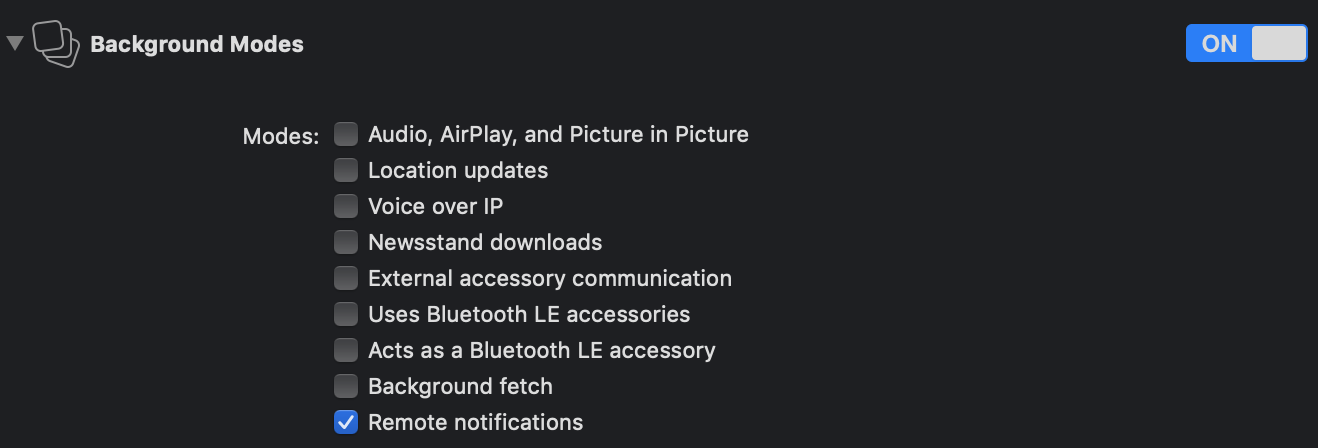
jdnichollsc
on 16 Jan 2019
Thanks, I'll try to reproduce with your code snippet. But yes it's weird that it's working for Android and not iOS.
For the background issue just to eliminate some hypothesis:
- you made sure you activated the silent push for the notification in the portal:
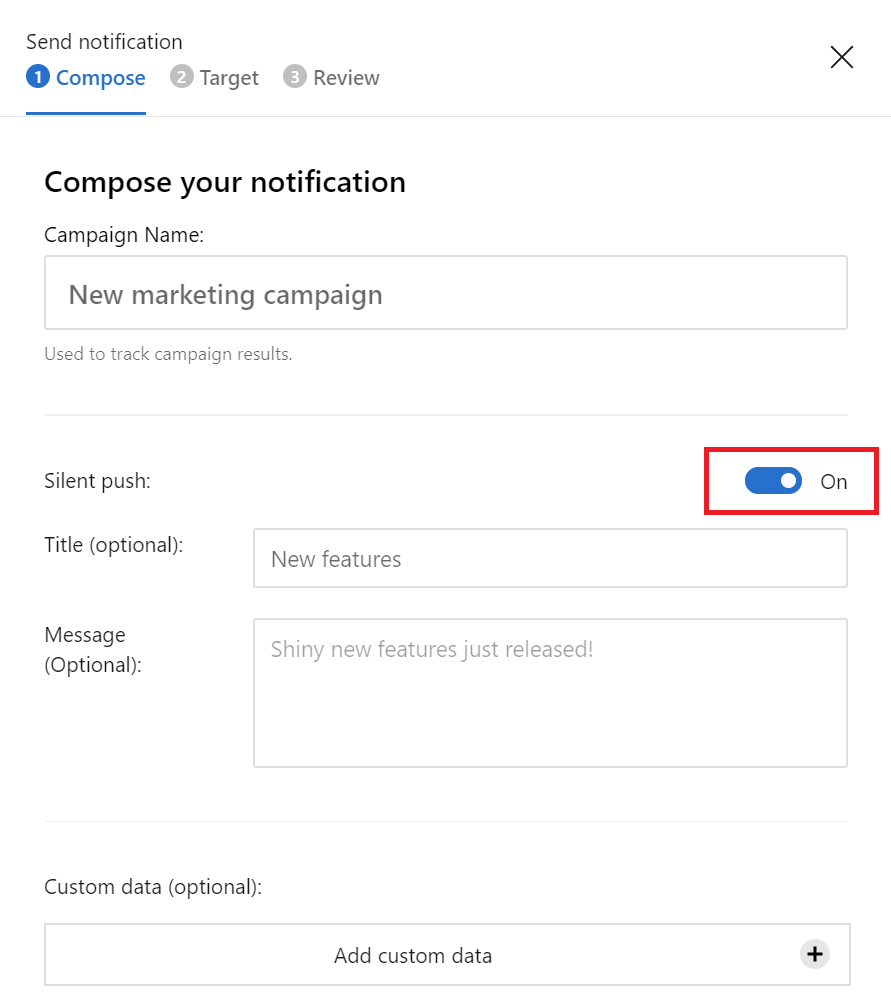
- Your device is plugged in and is connected to internet via wifi (just trying to be in the optimum scenario).
iamclement
on 16 Jan 2019
@clpolet hi! we're sending push notifications like this (the devices are connected via wifi)

Thanks for your help, let me know
jdnichollsc
on 16 Jan 2019
@jdnichollsc in your screen shot the silent push is deactivated (off) which means you'll see the notification on your device but the App Center SDK won't get the notification so the callback won't be triggered for sure. So that explains why you were not seeing any console logs from the SDK in background.
iamclement
on 17 Jan 2019
@clpolet Let me try, but what about on foreground?
jdnichollsc
on 17 Jan 2019
Yeah the foreground is another issue. I pinged you on the AC portal support for implementation details.
iamclement
on 17 Jan 2019
Hey mate, thanks for your help! Check more details from the AC portal 👍
jdnichollsc
on 17 Jan 2019
@clpolet I can see the following logs after receiving a push notification on foreground:
1/17/19, 1:30:01 PM NordstromON[2713]: [AppCenterPush] VERBOSE: -[MSPush didReceiveRemoteNotification:fromUserNotification:]/314 User info for notification was forwarded to Push: {
aps = {
alert = {
body = "testing AppCenter logs";
title = "Testing from foreground";
};
};
"mobile_center" = {
};
}
1/17/19, 1:30:01 PM NordstromON[2713]: [AppCenter] ERROR: -[MSServiceAbstract canBeUsed]/54 Push service hasn't been started. You need to call [MSAppCenter start:YOUR_APP_SECRET withServices:LIST_OF_SERVICES] first.
1/17/19, 1:30:01 PM NordstromON[2713]: [AppCenterPush] VERBOSE: -[MSPush didReceiveRemoteNotification:fromUserNotification:]/325 Notification received while Push was ]enabled but it is disabled now, discard the notification.
But I don't understand, any suggestion please?
jdnichollsc
on 17 Jan 2019
I understand now :). See the Push service hasn't been started after the SDK received the payload? It means the Push service is started too late to handle the notification. That's the root cause of the issue.
So I think you are using the old workaround to delay the permission dialog right? That's delaying the push service start and it can explain the behavior you are seeing. There was a feature released in v1.11.0 to delay the push permission pop up. Please remove the workaround that delays the push service start and follow the documentation to implement the new feature.
Let me know how it goes, I think we are almost there :).
iamclement
on 17 Jan 2019
The issue with the initialization of AppCenter push was fixed as we can see from the iOS console
But nothing, the JS code is not being notified :(
Maybe this issue is related with our version of React Native in the project, because the event emitter and callbacks are not working on iOS.
We’re using React Native 0.56
What do you think mate?
jdnichollsc
on 18 Jan 2019
Hello guys!
We fixed the following warning after uncomment [AppCenterReactNativePush register]; from AppDelegate.m and onPushNotificationReceived is working now on iOS! (With the last version of AppCenter https://github.com/Microsoft/AppCenter-SDK-React-Native/issues/287#issuecomment-448027977)
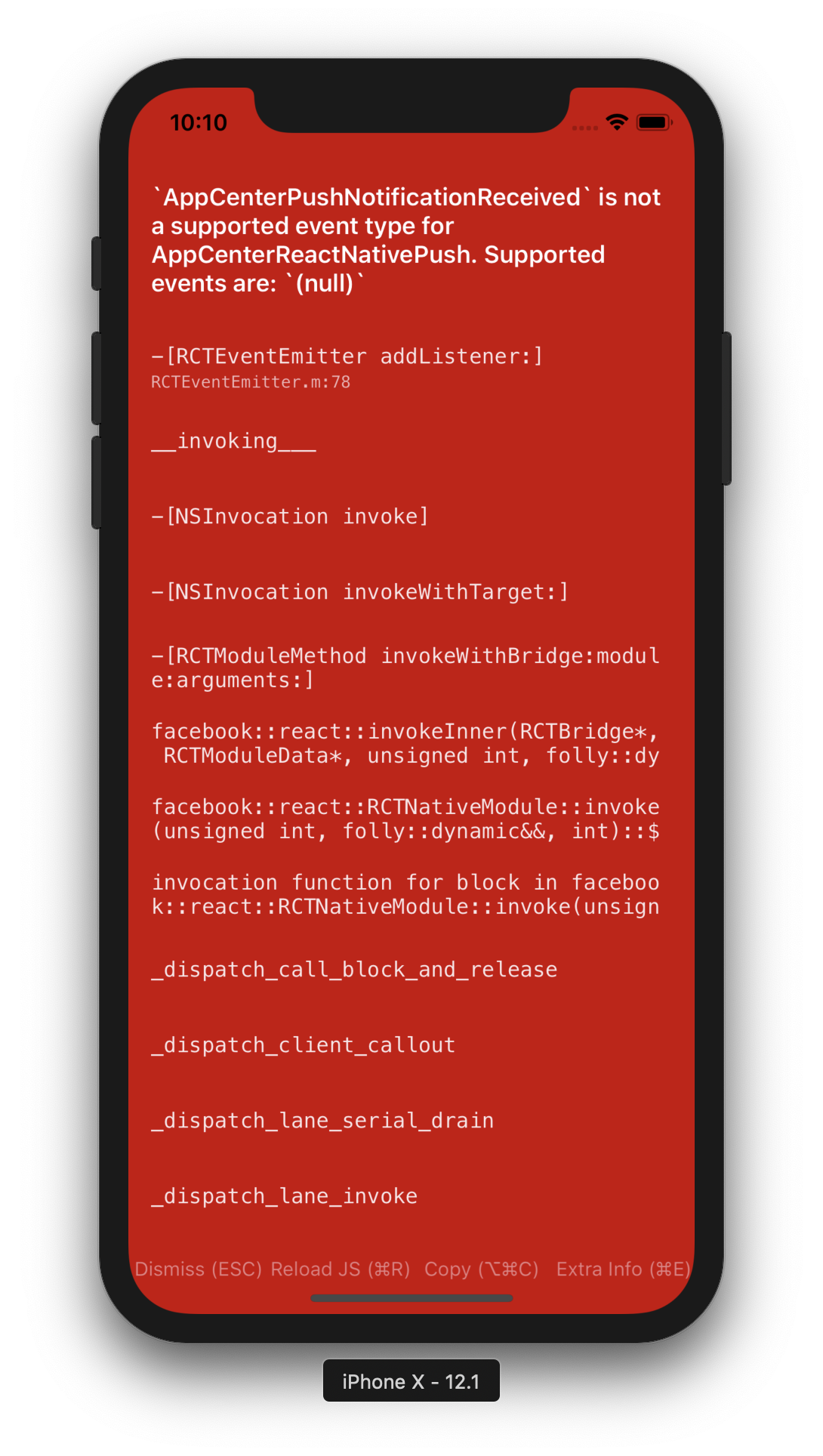
We don't know what's the issue with our custom EventEmitter and also using Callback of React Native, but that was the solution.
On the other hand, we have a workaround to fix the issue of AppCenter: The App Center SDK-provided callback is not enough in this case since the application's state will always be reported as active. https://docs.microsoft.com/en-us/appcenter/sdk/push/react-native-ios#handle-a-push-notification-while-the-app-is-in-foreground:
let previousAppState = AppState.currentState
export const setPreviousAppState = (appState) => {
  previousAppState = appState
  // Workaround to distinguish between notifications received in the foreground or while the app was in the background
  setTimeout(() => {
    previousAppState = AppState.currentState
  }, 1000)
}

Push.setListener({
    onPushNotificationReceived: function (pushNotification) {
      if (previousAppState !== 'active') {
        Alert.alert('It was received on background', 'working now!');
      }
    }
})
And you call that method from AppState.addEventListener('change', this._handleAppStateChange.bind(this)):
async _handleAppStateChange(nextAppState) {
    setPreviousAppState(this.state.appState)
This seems to be fixed, I'll go ahead and close this issue. Feel free to reply to the thread otherwise.
iamclement
on 22 Jan 2019
Hey mate, thanks for your help!
jdnichollsc
on 22 Jan 2019
@jdnichollsc Could you please give a brief comment on how this works? :)
Thanks!
 annakocheshkova
on 28 Jan 2019
annakocheshkova
on 28 Jan 2019
@annakocheshkova sorry for the delay, do you still need help?
jdnichollsc
on 28 Jan 2019
@jdnichollsc thanks, I already saw your comments in PR!
annakocheshkova
on 29 Jan 2019
Related issues
 BrianTheArcane
·
6Comments
BrianTheArcane
·
6Comments
 henrikra
·
10Comments
henrikra
·
10Comments
 v0lume
·
5Comments
jdnichollsc
·
5Comments
v0lume
·
5Comments
jdnichollsc
·
5Comments
 elnygren
·
5Comments
elnygren
·
5Comments
Most helpful comment
Hello guys!

We fixed the following warning after uncomment
[AppCenterReactNativePush register];fromAppDelegate.mandonPushNotificationReceivedis working now on iOS! (With the last version of AppCenter https://github.com/Microsoft/AppCenter-SDK-React-Native/issues/287#issuecomment-448027977)We don't know what's the issue with our custom
EventEmitterand also usingCallbackofReact Native, but that was the solution.On the other hand, we have a workaround to fix the issue of AppCenter:
The App Center SDK-provided callback is not enough in this case since the application's state will always be reported as active.https://docs.microsoft.com/en-us/appcenter/sdk/push/react-native-ios#handle-a-push-notification-while-the-app-is-in-foreground:And you call that method from
AppState.addEventListener('change', this._handleAppStateChange.bind(this)):