Appcenter-sdk-react-native: gradlew check error
After creating build, my app is keep crashing. Not sure who is the correct culprit although gradlew check is giving me hints from App center. help me for possible fix.
my ext looks like this
ext {
    buildToolsVersion = "28.0.3"
    minSdkVersion = 19
    compileSdkVersion = 27
    targetSdkVersion = 27
    supportLibVersion = "28.0.0"
    googlePlayServicesVersion = "15.0.1"
}
Description
Hellow ./gradlew check is failing
FAILURE: Build failed with an exception.

* What went wrong:
Execution failed for task ':appcenter:lint'.

node_modules/appcenter/android/build.gradle:9: Error: Google Play will soon require that apps target API level 26 or higher. This will be required for new apps in August 2018, and for updates to existing apps in November 2018. [ExpiringTargetSdkVersion]
          targetSdkVersion 22
          ~~~~~~~~~~~~~~~~~~~
Details
Which version of the App Center SDK are you using?
    "appcenter": "^1.7.1",
    "appcenter-analytics": "^1.7.1",
    "appcenter-crashes": "^1.7.1",
React Native Info
  React Native Environment Info:
    System:
      OS: macOS 10.14
      CPU: x64 Intel(R) Core(TM) i7-3720QM CPU @ 2.60GHz
      Memory: 105.00 MB / 16.00 GB
      Shell: 5.3 - /bin/zsh
    Binaries:
      Node: 9.11.1 - /usr/local/bin/node
      Yarn: 1.9.4 - /usr/local/bin/yarn
      npm: 6.4.1 - /usr/local/bin/npm
      Watchman: 4.9.0 - /usr/local/bin/watchman
    SDKs:
      iOS SDK:
        Platforms: iOS 12.0, macOS 10.14, tvOS 12.0, watchOS 5.0
      Android SDK:
        Build Tools: 23.0.1, 25.0.1, 25.0.2, 26.0.1, 26.0.2, 26.0.3, 27.0.0, 27.0.1, 27.0.2, 27.0.3, 28.0.0, 28.0.3
        API Levels: 17, 18, 19, 20, 21, 22, 23, 24, 25, 26, 27, 28
    IDEs:
      Android Studio: 3.1 AI-173.4907809
      Xcode: 10.0/10A255 - /usr/bin/xcodebuild
    npmPackages:
      react: 16.5.0 => 16.5.0
      react-native: 0.57.0 => 0.57.0
    npmGlobalPackages:
      react-native-cli: 2.0.1
      react-native-create-bridge: 2.0.1
      react-native-git-upgrade: 0.2.7
 yeomann
All 31 comments
Hi, there might be 2 different issues here.
For the targetSdkVersion can you try updating node_modules manually to change from 22 to 27? We will investigate if we can make this change in the SDK but this should not be related to the crash as this information is overridden by your application, this is more like a code sanity check failing.
As for the crash, we need the stack trace to investigate the crash, can you provide it?
 guperrot
on 26 Oct 2018
guperrot
on 26 Oct 2018
Please remove the ^ character in ^1.7.1 also from package.json to pin AppCenter SDK version otherwise the npms for AppCenter will be version 1.9.0 and will mismatch with the native code that is linked as explained in https://github.com/Microsoft/AppCenter-SDK-React-Native/issues/449.
guperrot
on 26 Oct 2018
okay let me try and update you. thank you for quick response @guperrot
yeomann
on 26 Oct 2018
stack trace as requested
> Task :app:lint
Ran lint on variant release: 19 issues found
Ran lint on variant debug: 19 issues found
Wrote HTML report to file:///Users/xxx/xxxprojectxxx/android/app/build/reports/lint-results.html
Wrote XML report to file:///Users/xxx/xxxprojectxxx/android/app/build/reports/lint-results.xml
> Task :appcenter:lint FAILED
Ran lint on variant debug: 3 issues found
Ran lint on variant release: 3 issues found
Wrote HTML report to file:///Users/xxx/xxxprojectxxx/node_modules/appcenter/android/build/reports/lint-results.html
Wrote XML report to file:///Users/xxx/xxxprojectxxx/node_modules/appcenter/android/build/reports/lint-results.xml
FAILURE: Build failed with an exception.
* What went wrong:
Execution failed for task ':appcenter:lint'.
> Lint found errors in the project; aborting build.
Fix the issues identified by lint, or add the following to your build script to proceed with errors:
...
android {
lintOptions {
abortOnError false
}
}
...
Errors found:
/Users/xxx/xxxprojectxxx/node_modules/appcenter/android/build.gradle:4: Error: The compileSdkVersion (26) should not be lower than the targetSdkVersion (27) [GradleCompatible]
compileSdkVersion 26
~~~~~~~~~~~~~~~~~~~~
* Try:
Run with --info or --debug option to get more log output. Run with --scan to get full insights.
* Exception is:
org.gradle.api.tasks.TaskExecutionException: Execution failed for task ':appcenter:lint'.
at org.gradle.api.internal.tasks.execution.ExecuteActionsTaskExecuter.executeActions(ExecuteActionsTaskExecuter.java:103)
at org.gradle.api.internal.tasks.execution.ExecuteActionsTaskExecuter.execute(ExecuteActionsTaskExecuter.java:73)
at org.gradle.api.internal.tasks.execution.OutputDirectoryCreatingTaskExecuter.execute(OutputDirectoryCreatingTaskExecuter.java:51)
at org.gradle.api.internal.tasks.execution.SkipUpToDateTaskExecuter.execute(SkipUpToDateTaskExecuter.java:59)
at org.gradle.api.internal.tasks.execution.ResolveTaskOutputCachingStateExecuter.execute(ResolveTaskOutputCachingStateExecuter.java:54)
at org.gradle.api.internal.tasks.execution.ValidatingTaskExecuter.execute(ValidatingTaskExecuter.java:59)
at org.gradle.api.internal.tasks.execution.SkipEmptySourceFilesTaskExecuter.execute(SkipEmptySourceFilesTaskExecuter.java:101)
at org.gradle.api.internal.tasks.execution.FinalizeInputFilePropertiesTaskExecuter.execute(FinalizeInputFilePropertiesTaskExecuter.java:44)
at org.gradle.api.internal.tasks.execution.CleanupStaleOutputsExecuter.execute(CleanupStaleOutputsExecuter.java:91)
at org.gradle.api.internal.tasks.execution.ResolveTaskArtifactStateTaskExecuter.execute(ResolveTaskArtifactStateTaskExecuter.java:62)
at org.gradle.api.internal.tasks.execution.SkipTaskWithNoActionsExecuter.execute(SkipTaskWithNoActionsExecuter.java:59)
at org.gradle.api.internal.tasks.execution.SkipOnlyIfTaskExecuter.execute(SkipOnlyIfTaskExecuter.java:54)
at org.gradle.api.internal.tasks.execution.ExecuteAtMostOnceTaskExecuter.execute(ExecuteAtMostOnceTaskExecuter.java:43)
at org.gradle.api.internal.tasks.execution.CatchExceptionTaskExecuter.execute(CatchExceptionTaskExecuter.java:34)
at org.gradle.execution.taskgraph.DefaultTaskGraphExecuter$EventFiringTaskWorker$1.run(DefaultTaskGraphExecuter.java:256)
at org.gradle.internal.progress.DefaultBuildOperationExecutor$RunnableBuildOperationWorker.execute(DefaultBuildOperationExecutor.java:336)
at org.gradle.internal.progress.DefaultBuildOperationExecutor$RunnableBuildOperationWorker.execute(DefaultBuildOperationExecutor.java:328)
at org.gradle.internal.progress.DefaultBuildOperationExecutor.execute(DefaultBuildOperationExecutor.java:199)
at org.gradle.internal.progress.DefaultBuildOperationExecutor.run(DefaultBuildOperationExecutor.java:110)
at org.gradle.execution.taskgraph.DefaultTaskGraphExecuter$EventFiringTaskWorker.execute(DefaultTaskGraphExecuter.java:249)
at org.gradle.execution.taskgraph.DefaultTaskGraphExecuter$EventFiringTaskWorker.execute(DefaultTaskGraphExecuter.java:238)
at org.gradle.execution.taskgraph.DefaultTaskPlanExecutor$TaskExecutorWorker.processTask(DefaultTaskPlanExecutor.java:123)
at org.gradle.execution.taskgraph.DefaultTaskPlanExecutor$TaskExecutorWorker.access$200(DefaultTaskPlanExecutor.java:79)
at org.gradle.execution.taskgraph.DefaultTaskPlanExecutor$TaskExecutorWorker$1.execute(DefaultTaskPlanExecutor.java:104)
at org.gradle.execution.taskgraph.DefaultTaskPlanExecutor$TaskExecutorWorker$1.execute(DefaultTaskPlanExecutor.java:98)
at org.gradle.execution.taskgraph.DefaultTaskExecutionPlan.execute(DefaultTaskExecutionPlan.java:663)
at org.gradle.execution.taskgraph.DefaultTaskExecutionPlan.executeWithTask(DefaultTaskExecutionPlan.java:597)
at org.gradle.execution.taskgraph.DefaultTaskPlanExecutor$TaskExecutorWorker.run(DefaultTaskPlanExecutor.java:98)
at org.gradle.internal.concurrent.ExecutorPolicy$CatchAndRecordFailures.onExecute(ExecutorPolicy.java:63)
at org.gradle.internal.concurrent.ManagedExecutorImpl$1.run(ManagedExecutorImpl.java:46)
at org.gradle.internal.concurrent.ThreadFactoryImpl$ManagedThreadRunnable.run(ThreadFactoryImpl.java:55)
Caused by: org.gradle.api.GradleException: Lint found errors in the project; aborting build.
Fix the issues identified by lint, or add the following to your build script to proceed with errors:
...
android {
lintOptions {
abortOnError false
}
}
...
Errors found:
/Users/xxx/xxxprojectxxx/node_modules/appcenter/android/build.gradle:4: Error: The compileSdkVersion (26) should not be lower than the targetSdkVersion (27) [GradleCompatible]
compileSdkVersion 26
~~~~~~~~~~~~~~~~~~~~
at com.android.tools.lint.gradle.LintGradleExecution.abort(LintGradleExecution.java:206)
at com.android.tools.lint.gradle.LintGradleExecution.lintAllVariants(LintGradleExecution.java:511)
at com.android.tools.lint.gradle.LintGradleExecution.analyze(LintGradleExecution.java:96)
at com.android.tools.lint.gradle.api.ReflectiveLintRunner.runLint(ReflectiveLintRunner.kt:38)
at com.android.build.gradle.tasks.LintBaseTask.runLint(LintBaseTask.java:88)
at com.android.build.gradle.tasks.LintGlobalTask.lint(LintGlobalTask.java:47)
at org.gradle.internal.reflect.JavaMethod.invoke(JavaMethod.java:73)
at org.gradle.api.internal.project.taskfactory.StandardTaskAction.doExecute(StandardTaskAction.java:46)
at org.gradle.api.internal.project.taskfactory.StandardTaskAction.execute(StandardTaskAction.java:39)
at org.gradle.api.internal.project.taskfactory.StandardTaskAction.execute(StandardTaskAction.java:26)
at org.gradle.api.internal.AbstractTask$TaskActionWrapper.execute(AbstractTask.java:788)
at org.gradle.api.internal.AbstractTask$TaskActionWrapper.execute(AbstractTask.java:755)
at org.gradle.api.internal.tasks.execution.ExecuteActionsTaskExecuter$1.run(ExecuteActionsTaskExecuter.java:124)
at org.gradle.internal.progress.DefaultBuildOperationExecutor$RunnableBuildOperationWorker.execute(DefaultBuildOperationExecutor.java:336)
at org.gradle.internal.progress.DefaultBuildOperationExecutor$RunnableBuildOperationWorker.execute(DefaultBuildOperationExecutor.java:328)
at org.gradle.internal.progress.DefaultBuildOperationExecutor.execute(DefaultBuildOperationExecutor.java:199)
at org.gradle.internal.progress.DefaultBuildOperationExecutor.run(DefaultBuildOperationExecutor.java:110)
at org.gradle.api.internal.tasks.execution.ExecuteActionsTaskExecuter.executeAction(ExecuteActionsTaskExecuter.java:113)
at org.gradle.api.internal.tasks.execution.ExecuteActionsTaskExecuter.executeActions(ExecuteActionsTaskExecuter.java:95)
... 30 more
* Get more help at https://help.gradle.org
BUILD FAILED in 1m 22s
330 actionable tasks: 13 executed, 317 up-to-date
EDIT: i will edit 26 to 27 for compileSdkVersion and see if it will fix the issue
Update the error went away for appcenter but came for appcenter-analytics and appcenter-crashes so i did above mentioned steps for them and appcenter related are clear now. Unfortunately some new errors react-native-firebase are here. which are obviously not related to this repo. i guess i should close this issue now?
yeomann
on 26 Oct 2018
So by crash you mean gradle lint error, I thought your application was actually crashing at runtime.
~For firebase you would need to add explicit dependencies to Firebase to the latest versions and disable strict version checking as explained in https://github.com/Microsoft/AppCenter-SDK-React-Native/issues/365.~
We will keep the issue open as we have API level updates to do in our SDK to avoid this lint issue.
guperrot
on 26 Oct 2018
So by crash you mean gradle error, I thought your application was actually crashing at runtime.
this is my guess, and yes the release APK after installing is just simply crashing at runtime.
and for Firebase i tried with explicit dependencies of
com.google.firebase:firebase-messaging:17.0.0
and with com.google.firebase:firebase-messaging:17.1.0
along implementation "com.google.firebase:firebase-core:16.0.1"
but i am still having error on gradle check.
here's the stack trace. i would much appreciate any help!
> Task :react-native-firebase:lint FAILED
Ran lint on variant debug: 30 issues found
Ran lint on variant release: 30 issues found
Wrote HTML report to file:///Users/xxxx/zzzprojzzz/node_modules/react-native-firebase/android/build/reports/lint-results.html
Wrote XML report to file:///Users/xxxx/zzzprojzzz/node_modules/react-native-firebase/android/build/reports/lint-results.xml
FAILURE: Build failed with an exception.
* What went wrong:
Execution failed for task ':react-native-firebase:lint'.
> Lint found errors in the project; aborting build.
Fix the issues identified by lint, or add the following to your build script to proceed with errors:
...
android {
lintOptions {
abortOnError false
}
}
...
The first 3 errors (out of 4) were:
/Users/xxxx/zzzprojzzz/node_modules/react-native-firebase/android/src/main/java/io/invertase/firebase/notifications/RNFirebaseNotificationManager.java:200: Error: Call requires API level 23 (current min is 16): android.app.NotificationManager#getActiveNotifications [NewApi]
StatusBarNotification[] statusBarNotifications = notificationManager.getActiveNotifications();
~~~~~~~~~~~~~~~~~~~~~~
/Users/xxxx/zzzprojzzz/node_modules/react-native-firebase/android/src/main/java/io/invertase/firebase/notifications/RNFirebaseNotificationManager.java:202: Error: Call requires API level 18 (current min is 16): android.service.notification.StatusBarNotification#getTag [NewApi]
if (statusBarNotification.getTag() == tag) {
~~~~~~
/Users/xxxx/zzzprojzzz/node_modules/react-native-firebase/android/src/main/java/io/invertase/firebase/notifications/RNFirebaseNotificationManager.java:203: Error: Call requires API level 18 (current min is 16): android.service.notification.StatusBarNotification#getId [NewApi]
notificationManager.cancel(statusBarNotification.getTag(), statusBarNotification.getId());
~~~~~
* Try:
Run with --info or --debug option to get more log output. Run with --scan to get full insights.
* Exception is:
org.gradle.api.tasks.TaskExecutionException: Execution failed for task ':react-native-firebase:lint'.
at org.gradle.api.internal.tasks.execution.ExecuteActionsTaskExecuter.executeActions(ExecuteActionsTaskExecuter.java:100)
at org.gradle.api.internal.tasks.execution.ExecuteActionsTaskExecuter.execute(ExecuteActionsTaskExecuter.java:70)
at org.gradle.api.internal.tasks.execution.OutputDirectoryCreatingTaskExecuter.execute(OutputDirectoryCreatingTaskExecuter.java:51)
at org.gradle.api.internal.tasks.execution.SkipUpToDateTaskExecuter.execute(SkipUpToDateTaskExecuter.java:62)
at org.gradle.api.internal.tasks.execution.ResolveTaskOutputCachingStateExecuter.execute(ResolveTaskOutputCachingStateExecuter.java:54)
at org.gradle.api.internal.tasks.execution.ValidatingTaskExecuter.execute(ValidatingTaskExecuter.java:60)
at org.gradle.api.internal.tasks.execution.SkipEmptySourceFilesTaskExecuter.execute(SkipEmptySourceFilesTaskExecuter.java:97)
at org.gradle.api.internal.tasks.execution.CleanupStaleOutputsExecuter.execute(CleanupStaleOutputsExecuter.java:87)
at org.gradle.api.internal.tasks.execution.ResolveTaskArtifactStateTaskExecuter.execute(ResolveTaskArtifactStateTaskExecuter.java:52)
at org.gradle.api.internal.tasks.execution.SkipTaskWithNoActionsExecuter.execute(SkipTaskWithNoActionsExecuter.java:52)
at org.gradle.api.internal.tasks.execution.SkipOnlyIfTaskExecuter.execute(SkipOnlyIfTaskExecuter.java:54)
at org.gradle.api.internal.tasks.execution.ExecuteAtMostOnceTaskExecuter.execute(ExecuteAtMostOnceTaskExecuter.java:43)
at org.gradle.api.internal.tasks.execution.CatchExceptionTaskExecuter.execute(CatchExceptionTaskExecuter.java:34)
at org.gradle.execution.taskgraph.DefaultTaskGraphExecuter$EventFiringTaskWorker$1.run(DefaultTaskGraphExecuter.java:248)
at org.gradle.internal.progress.DefaultBuildOperationExecutor$RunnableBuildOperationWorker.execute(DefaultBuildOperationExecutor.java:336)
at org.gradle.internal.progress.DefaultBuildOperationExecutor$RunnableBuildOperationWorker.execute(DefaultBuildOperationExecutor.java:328)
at org.gradle.internal.progress.DefaultBuildOperationExecutor.execute(DefaultBuildOperationExecutor.java:199)
at org.gradle.internal.progress.DefaultBuildOperationExecutor.run(DefaultBuildOperationExecutor.java:110)
at org.gradle.execution.taskgraph.DefaultTaskGraphExecuter$EventFiringTaskWorker.execute(DefaultTaskGraphExecuter.java:241)
at org.gradle.execution.taskgraph.DefaultTaskGraphExecuter$EventFiringTaskWorker.execute(DefaultTaskGraphExecuter.java:230)
at org.gradle.execution.taskgraph.DefaultTaskPlanExecutor$TaskExecutorWorker.processTask(DefaultTaskPlanExecutor.java:123)
at org.gradle.execution.taskgraph.DefaultTaskPlanExecutor$TaskExecutorWorker.access$200(DefaultTaskPlanExecutor.java:79)
at org.gradle.execution.taskgraph.DefaultTaskPlanExecutor$TaskExecutorWorker$1.execute(DefaultTaskPlanExecutor.java:104)
at org.gradle.execution.taskgraph.DefaultTaskPlanExecutor$TaskExecutorWorker$1.execute(DefaultTaskPlanExecutor.java:98)
at org.gradle.execution.taskgraph.DefaultTaskExecutionPlan.execute(DefaultTaskExecutionPlan.java:626)
at org.gradle.execution.taskgraph.DefaultTaskExecutionPlan.executeWithTask(DefaultTaskExecutionPlan.java:581)
at org.gradle.execution.taskgraph.DefaultTaskPlanExecutor$TaskExecutorWorker.run(DefaultTaskPlanExecutor.java:98)
at org.gradle.internal.concurrent.ExecutorPolicy$CatchAndRecordFailures.onExecute(ExecutorPolicy.java:63)
at org.gradle.internal.concurrent.ManagedExecutorImpl$1.run(ManagedExecutorImpl.java:46)
at org.gradle.internal.concurrent.ThreadFactoryImpl$ManagedThreadRunnable.run(ThreadFactoryImpl.java:55)
Caused by: org.gradle.api.GradleException: Lint found errors in the project; aborting build.
Fix the issues identified by lint, or add the following to your build script to proceed with errors:
...
android {
lintOptions {
abortOnError false
}
}
...
The first 3 errors (out of 4) were:
/Users/xxxx/zzzprojzzz/node_modules/react-native-firebase/android/src/main/java/io/invertase/firebase/notifications/RNFirebaseNotificationManager.java:200: Error: Call requires API level 23 (current min is 16): android.app.NotificationManager#getActiveNotifications [NewApi]
StatusBarNotification[] statusBarNotifications = notificationManager.getActiveNotifications();
~~~~~~~~~~~~~~~~~~~~~~
/Users/xxxx/zzzprojzzz/node_modules/react-native-firebase/android/src/main/java/io/invertase/firebase/notifications/RNFirebaseNotificationManager.java:202: Error: Call requires API level 18 (current min is 16): android.service.notification.StatusBarNotification#getTag [NewApi]
if (statusBarNotification.getTag() == tag) {
~~~~~~
/Users/xxxx/zzzprojzzz/node_modules/react-native-firebase/android/src/main/java/io/invertase/firebase/notifications/RNFirebaseNotificationManager.java:203: Error: Call requires API level 18 (current min is 16): android.service.notification.StatusBarNotification#getId [NewApi]
notificationManager.cancel(statusBarNotification.getTag(), statusBarNotification.getId());
~~~~~
at com.android.tools.lint.gradle.LintGradleExecution.abort(LintGradleExecution.java:199)
at com.android.tools.lint.gradle.LintGradleExecution.lintAllVariants(LintGradleExecution.java:558)
at com.android.tools.lint.gradle.LintGradleExecution.analyze(LintGradleExecution.java:98)
at com.android.tools.lint.gradle.api.ReflectiveLintRunner.runLint(ReflectiveLintRunner.kt:38)
at com.android.build.gradle.tasks.LintBaseTask.runLint(LintBaseTask.java:87)
at com.android.build.gradle.tasks.LintGlobalTask.lint(LintGlobalTask.java:47)
at org.gradle.internal.reflect.JavaMethod.invoke(JavaMethod.java:73)
at org.gradle.api.internal.project.taskfactory.StandardTaskAction.doExecute(StandardTaskAction.java:46)
at org.gradle.api.internal.project.taskfactory.StandardTaskAction.execute(StandardTaskAction.java:39)
at org.gradle.api.internal.project.taskfactory.StandardTaskAction.execute(StandardTaskAction.java:26)
at org.gradle.api.internal.AbstractTask$TaskActionWrapper.execute(AbstractTask.java:780)
at org.gradle.api.internal.AbstractTask$TaskActionWrapper.execute(AbstractTask.java:747)
at org.gradle.api.internal.tasks.execution.ExecuteActionsTaskExecuter$1.run(ExecuteActionsTaskExecuter.java:121)
at org.gradle.internal.progress.DefaultBuildOperationExecutor$RunnableBuildOperationWorker.execute(DefaultBuildOperationExecutor.java:336)
at org.gradle.internal.progress.DefaultBuildOperationExecutor$RunnableBuildOperationWorker.execute(DefaultBuildOperationExecutor.java:328)
at org.gradle.internal.progress.DefaultBuildOperationExecutor.execute(DefaultBuildOperationExecutor.java:199)
at org.gradle.internal.progress.DefaultBuildOperationExecutor.run(DefaultBuildOperationExecutor.java:110)
at org.gradle.api.internal.tasks.execution.ExecuteActionsTaskExecuter.executeAction(ExecuteActionsTaskExecuter.java:110)
at org.gradle.api.internal.tasks.execution.ExecuteActionsTaskExecuter.executeActions(ExecuteActionsTaskExecuter.java:92)
... 29 more
* Get more help at https://help.gradle.org
BUILD FAILED in 1m 37s
393 actionable tasks: 10 executed, 383 up-to-date
i have com.google.gms.googleservices.GoogleServicesPlugin.config.disableVersionCheck = true already on the Top of app/build.gradle like so
apply plugin: "com.android.application"
import com.android.build.OutputFile
com.google.gms.googleservices.GoogleServicesPlugin.config.disableVersionCheck = true
Right now I don't know how to solve those lint errors as the last one you shared is not even App Center code but Firebase code, still investigating.
Can you share the stack trace of the runtime crash stack trace that happens on the device?
guperrot
on 26 Oct 2018
Update: there are new version available of firebase https://firebase.google.com/support/release-notes/android but when i try
com.google.firebase:firebase-core:16.0.4 and com.google.firebase:firebase-messaging:17.3.4 it give me this error The library com.google.android.gms:play-services-basement is being requested by various other libraries at [[15.0.1,15.0.1]], but resolves to 16.0.1. Disable the plugin and check your dependencies tree using ./gradlew :app:dependencies.
while i have this
implementation 'com.google.android.gms:play-services-base:15.+'
implementation 'com.google.android.gms:play-services-maps:15.+'
implementation 'com.google.android.gms:play-services-location:15.+'
in app/build.gradle
and in main root build.gradle i am having now
ext {
buildToolsVersion = "27.0.3"
minSdkVersion = 19
compileSdkVersion = 27
targetSdkVersion = 27
supportLibVersion = "27.1.1"
googlePlayServicesVersion = "15.0.1"
}
as i downgraded from 28 to 27 for buildToolsVersion and i have googlePlayServicesVersion = "15.0.1" i am kind of lost. Do you have thoughts to share please?
yeomann
on 26 Oct 2018
let me check how to get Device stack trace, sorry for bothering you as this is not related to appcenter right now but related to firebase! 😞
yeomann
on 26 Oct 2018
The lint error is Firebase but the runtime crash might be anything until we look at it.
The easiest way if your logs do not contain sensitive information is to just run adb bugreport right after the crash and share the zip with us.
If you believe the bugreport could expose personal information, you can send the zip to our chat support on https://appcenter.ms and reference this issue.
Another way is to look a device android logcat and look for logs with AndroidRuntime logs, the Java stack trace should be there.
guperrot
on 26 Oct 2018
For the lint error, I made it work with the linter and it still works at runtime for Push, this is what I had to do:
app/build.gradle
Or can be actually moved to node_modules/appcenter-push/android/build.gradle, that's what the SDK would do in a future release if we confirm the fix.
compile ("com.google.firebase:firebase-core:16.0.4") {
exclude group: "com.android.support"
}
compile ("com.google.firebase:firebase-messaging:17.3.4") {
exclude group: "com.android.support"
}
node_modules/appcenter-push/android/build.gradle
compile ('com.microsoft.appcenter:appcenter-push:x.x.x') {
exclude group: "com.google.firebase"
}
Where x.x.x depends on the version of the SDK so don't change that, just add transitive = false and the parentheses / curly braces.
This file is typically not committed in your repo so as inconvenient as it might be you may have to create a script to overwrite the content after npm install. At this stage we are not sure how we can improve that from the SDK.
guperrot
on 26 Oct 2018
You don't need to disable strict version checking in the solution I shared in https://github.com/Microsoft/AppCenter-SDK-React-Native/issues/451#issuecomment-433244811, as for Google Play version setting I don't have that in my project so I cannot tell, try reverting your test changes to that part.
guperrot
on 26 Oct 2018
@guperrot i tried to get log using some apps using play store. but unable to get logs. although out of curiosity after adding com.google.gms.googleservices.GoogleServicesPlugin.config.disableVersionCheck = true
and having
 implementation project(':react-native-firebase')
    implementation "com.google.firebase:firebase-core:16.0.1" // required, default act as firebase-anlytics
    // implementation "com.google.android.gms:play-services-base:15.0.1"
    // implementation 'com.google.firebase:firebase-messaging:11.8.0'
    // FCM
    implementation 'com.google.firebase:firebase-messaging:17.1.0'
 implementation 'com.google.android.gms:play-services-base:15.+'
    implementation 'com.google.android.gms:play-services-maps:15.+'
    implementation 'com.google.android.gms:play-services-location:15.+'
with
ext {
    buildToolsVersion = "27.0.3"
    minSdkVersion = 19
    compileSdkVersion = 27
    targetSdkVersion = 27
    supportLibVersion = "27.1.1"
    googlePlayServicesVersion = "15.0.1"
}

dependencies {
        classpath 'com.google.gms:google-services:4.0.1' // google-services plugin
        classpath 'com.android.tools.build:gradle:3.1.4'
i created the released version again and this time app is opened without crashing on run time. i have no idea how. maybe com.google.gms.googleservices.GoogleServicesPlugin.config.disableVersionCheck = true
this line did the trick now idea. i will try your above suggestion and update you.
right now its 3:17 in morning and my eyes are closing because of sleep. i will get rest and update you about the correct fix.
I appreciated your kindness and the help very much 💯 ❤️
yeomann
on 26 Oct 2018
com.google.android.gms:play-services-base is a dependency of firebase (and the latest firebase pulls the version 16.0.1 of that package, not 15.0.1) so I would just remove the explicit dependency here, if you remove that dependency and apply my solution it should run lint without issues. Also I found a way to include those rules in our SDK build.gradle for the next release if you can confirm it works for you.
guperrot
on 26 Oct 2018
Please try the following updated guidance:
- Update your other google dependencies, do not use a shared version from project.ext as now google APIs all have their own version lifecyle so typically remove
googlePlayServicesVersion = "15.0.1"and update packages individually. - Downgrade
supportLibVersion = "28.0.0"to27.1.1. Add/modify a subset of
 implementation "com.android.support:appcompat-v7:${rootProject.ext.supportLibVersion}"
 implementation "com.android.support:support-v4:${rootProject.ext.supportLibVersion}"
If lint complain about any of those having mismatching versions.In node_modules/appcenter-push/android/build.gradle:
dependencies {
compile fileTree(include: ['*.jar'], dir: 'libs')
//noinspection GradleDynamicVersion
compile ('com.facebook.react:react-native:+') {
    exclude group: 'com.android.support'
}
compile ('com.microsoft.appcenter:appcenter-push:y.y.y') {
    exclude group: 'com.google.firebase'
}
compile 'com.google.firebase:firebase-core:16.0.4'
compile 'com.google.firebase:firebase-messaging:17.3.4'

//compile project(':AppCenterReactNativeShared')   // For testing with TestApp
compile 'com.microsoft.appcenter.reactnative:appcenter-react-native:x.x.x'
}
And remove firebase core/messaging from app/build.gradle.
- Keep your modifications to compile/target SDK version in app center gradle files, I think you already did that.
guperrot
on 27 Oct 2018
@guperrot Sorry for not getting back soon. thank you for new guide. i will try it soon and get back to you. Cheers!
yeomann
on 27 Oct 2018
hello @guperrot i am having still many errors while doing android side. somehow i got ios error and i get lost
Building library libFolly.a
▸ Compiling AppCenterReactNativeAnalytics.m

❌  /zzz/xxxx/node_modules/appcenter-analytics/ios/AppCenterReactNativeAnalytics/AppCenterReactNativeAnalytics.m:24:9: 'AppCenterAnalytics/MSPropertyConfigurator.h' file not found

#import <AppCenterAnalytics/MSPropertyConfigurator.h>
            ^~~~~~~~~~~~~~~~~~~~~~~~~~~~~


** BUILD FAILED **
i'm not done yet trying to fix. just to letting you. will get back to the thread soon!
Update: IOS error solved
yeomann
on 27 Oct 2018
@yeomann I answered your question about #import <AppCenterAnalytics/MSPropertyConfigurator.h> issue already, hence closing this issue.
 dhei
on 31 Oct 2018
dhei
on 31 Oct 2018
The iOS issue is solved but not the Android one.
guperrot
on 31 Oct 2018
@dhei hello thanks for answer, i resolved the ios issue successfully but android one is completely different issue. @guperrot is aware of it completely. for now i am trying to finish pending work related to app thus not able to move forward for testing on android. i will try my very best to update you guys very soon. hope fully before weekend.
yeomann
on 31 Oct 2018
Hi, back to android. i tried many combination. so far looks like someone something is breaking. Mainly it is Maps + Firebase. i don't know how i will solve this but i was looking back at your solution above. i tried above solution but all in vain except this point node_modules/appcenter-push/android/build.gradle i am not using appcenter-push i have following in package.json
    "appcenter": "^1.7.1",
    "appcenter-analytics": "^1.7.1",
    "appcenter-crashes": "^1.7.1",
can you please tell which package build.gradle i should modify? @guperrot Thanks
for example one time i tried some gradle config, i got this
> Task :react-native-maps:lint
Ran lint on variant debug: 7 issues found
Ran lint on variant release: 7 issues found
Wrote HTML report to file:///Users/xxx/zzzz/node_modules/react-native-maps/lib/android/build/reports/lint-results.html
Wrote XML report to file:///Users/xxx/zzzz/node_modules/react-native-maps/lib/android/build/reports/lint-results.xml


FAILURE: Build failed with an exception.

* What went wrong:
Execution failed for task ':react-native-maps:lint'.
> Lint found errors in the project; aborting build.

  Fix the issues identified by lint, or add the following to your build script to proceed with errors:
  ...
  android {
      lintOptions {
          abortOnError false
      }
  }
  ...

  Errors found:

  /Users/xxx/zzzz/node_modules/react-native-maps/lib/android/build.gradle: Error: All com.android.support libraries must use the exact same version specification (mixing versions can lead to runtime crashes). Found versions 27.1.1, 24.0.0. Examples include com.android.support:animated-vector-drawable:27.1.1 and com.android.support:support-v4:24.0.0 [GradleCompatible]


* Try:
Run with --stacktrace option to get the stack trace. Run with --info or --debug option to get more log output. Run with --scan to get full insights.

* Get more help at https://help.gradle.org

BUILD FAILED in 3m 29s
418 actionable tasks: 380 executed, 38 up-to-date
and another time below one
FAILURE: Build failed with an exception.

* What went wrong:
Execution failed for task ':react-native-firebase:lint'.
> Lint found errors in the project; aborting build.

  Fix the issues identified by lint, or add the following to your build script to proceed with errors:
  ...
  android {
      lintOptions {
          abortOnError false
      }
  }
  ...

  The first 3 errors (out of 4) were:
  /Users/xxx/zzzz/node_modules/react-native-firebase/android/src/main/java/io/invertase/firebase/notifications/RNFirebaseNotificationManager.java:200: Error: Call requires API level 23 (current min is 16): android.app.NotificationManager#getActiveNotifications [NewApi]
      StatusBarNotification[] statusBarNotifications = notificationManager.getActiveNotifications();
                                                                           ~~~~~~~~~~~~~~~~~~~~~~
  /Users/xxx/zzzz/node_modules/react-native-firebase/android/src/main/java/io/invertase/firebase/notifications/RNFirebaseNotificationManager.java:202: Error: Call requires API level 18 (current min is 16): android.service.notification.StatusBarNotification#getTag [NewApi]
          if (statusBarNotification.getTag() == tag) {
                                    ~~~~~~
  /Users/xxx/zzzz/node_modules/react-native-firebase/android/src/main/java/io/invertase/firebase/notifications/RNFirebaseNotificationManager.java:203: Error: Call requires API level 18 (current min is 16): android.service.notification.StatusBarNotification#getId [NewApi]
              notificationManager.cancel(statusBarNotification.getTag(), statusBarNotification.getId());
                                                                                               ~~~~~


* Try:
Run with --stacktrace option to get the stack trace. Run with --info or --debug option to get more log output. Run with --scan to get full insights.

* Get more help at https://help.gradle.org

BUILD FAILED in 3m 11s
417 actionable tasks: 401 executed, 16 up-to-date
Hi, if you are not using appcenter-push module then the firebase issue is not caused by our SDK and thus not a App Center SDK issue.
The thread became very confusing with all the history. Can we restart from scratch?
From a git clean status before the thread started and disregarding all my previous replies, can you change targetSdkVersion from 22 to 27 in the SDK gradle files? There should be 3 of them:
./node_modules/appcenter-crashes/android/build.gradle
./node_modules/appcenter-analytics/android/build.gradle
./node_modules/appcenter/android/build.gradle
If you have similar errors with build tools or target SDK version you change the values as well to remove the lint errors.
These manual changes will be fixed in the next version of the SDK where it will be dynamic but the fixed SDK has not been released yet (will be before end of month).
Let's start there. Then please link other lint errors you have.
Also you mentioned a runtime crash on the device and we still didn't get the crash stack trace (not gradle but the crash on the device) from you so we cannot help you on that one until we see that stack trace, please extract it from the device logs (look for AndroidRuntime log tag after the crash).
guperrot
on 15 Nov 2018
i understand and you are right. since there are mainly errors coming from firebase, maps right now. i also don't get why it is related to appcenter. if you had like me to close this issue. then it will be okay for me. I appreciated you guidance obviously.
i will try your suggestions.
yeomann
on 15 Nov 2018
The gradlew check failing is definitely caused by our SDK while the google play lib mismatching versions is not caused by our SDK (it would only if you use App Center Push).
The workaround I provided in my last reply is just to fix lint errors caused by our SDK, it will likely have no impact on other errors you see but we can try to look at them after you fix the first ones.
guperrot
on 15 Nov 2018
ok thanks for quick reply. Instead of targetSdkVersion 27 in SDK gradle files, i am trying them with 26 while writing compileSdkVersion with 27. as after writing targetSdkVersion 27, compileSdkVersion is was giving me error. i am trying them know and will let you know. thank you again!
Edit: do you Discord or anything else? would appreciate some help regarding this gradle mess..
yeomann
on 15 Nov 2018
ok i believe this error is not related appcenter. I have following in android root build.gradle
  dependencies {
        classpath 'com.android.tools.build:gradle:3.1.4'
        classpath 'com.google.gms:google-services:4.2.0' // google-services plugin

  ....
  ....

ext {
    compileSdkVersion = 27
    targetSdkVersion = 26
    minSdkVersion = 19
    buildToolsVersion = "27.0.3"
    supportLibVersion = "27.1.1"
    // googlePlayServicesVersion = "11.8.0"
    // androidMapsUtilsVersion = "0.5+"
    // googlePlayServicesVersion = "15.0.1"
    // googlePlayServicesVersion = "15.0.1"
}
subprojects {
    afterEvaluate {project ->
        if (project.hasProperty("android")) {
            android {
                compileSdkVersion 27
                buildToolsVersion "27.0.3"
                supportLibVersion = "27.1.1"
                // googlePlayServicesVersion = "15.0.1"
            }
        }
    }
}
and following in app/build.gradle
// // Firebase dependencies
    implementation project(':react-native-firebase')
    // // required, default act as firebase-anlytics
    // implementation "com.google.android.gms:play-services-base:16.0.1"
    // implementation "com.google.firebase:firebase-core:16.0.4"
    implementation ("com.google.firebase:firebase-core:16.0.4") {
        exclude group: "com.android.support"
    }
    // // implementation 'com.google.firebase:firebase-messaging:11.8.0'
    // // FCM
    // // track latest version https://firebase.google.com/support/release-notes/android
    // implementation ("com.google.firebase:firebase-messaging:17.1.0") {
    //     exclude group: "com.android.support"
    // }
    // implementation ("me.leolin:ShortcutBadger:1.1.21@aar") {
    //     exclude group: "com.android.support"
    // } // <-- Add this line if you wish to use badge on Android
    // appcenter, codepush modules
    implementation project(':appcenter-crashes')
    implementation project(':appcenter-analytics')
    implementation project(':appcenter')
    // fucking maps
    implementation (project(':react-native-maps')) {
        exclude group: 'com.google.android.gms', module: 'play-services-base'
        exclude group: 'com.google.android.gms', module: 'play-services-maps'
    }
    implementation 'com.google.android.gms:play-services-base:16.0.1'
    implementation 'com.google.android.gms:play-services-maps:16.0.0'
i did your above mentioned suggestion for targetSdkVersion in 3 files of appcenter. i have now following error
> Task :react-native-maps:lint FAILED
Ran lint on variant release: 7 issues found
Ran lint on variant debug: 7 issues found
Wrote HTML report to file:///Users/zzz/xxxx/node_modules/react-native-maps/lib/android/build/reports/lint-results.html
Wrote XML report to file:///Users/zzz/xxxx/node_modules/react-native-maps/lib/android/build/reports/lint-results.xml

FAILURE: Build failed with an exception.

* What went wrong:
Execution failed for task ':react-native-maps:lint'.
> Lint found errors in the project; aborting build.

  Fix the issues identified by lint, or add the following to your build script to proceed with errors:
  ...
  android {
      lintOptions {
          abortOnError false
      }
  }
  ...

  Errors found:

  /Users/zzz/xxxx/node_modules/react-native-maps/lib/android/build.gradle: Error: All com.android.support libraries must use the exact same version specification (mixing versions can lead to runtime crashes). Found versions 27.1.1, 24.0.0. Examples include com.android.support:animated-vector-drawable:27.1.1 and com.android.support:support-v4:24.0.0 [GradleCompatible]
here is the report image

i see in android studio that they have def DEFAULT_GOOGLE_PLAY_SERVICES_VERSION = "10.2.4" in react-native-maps
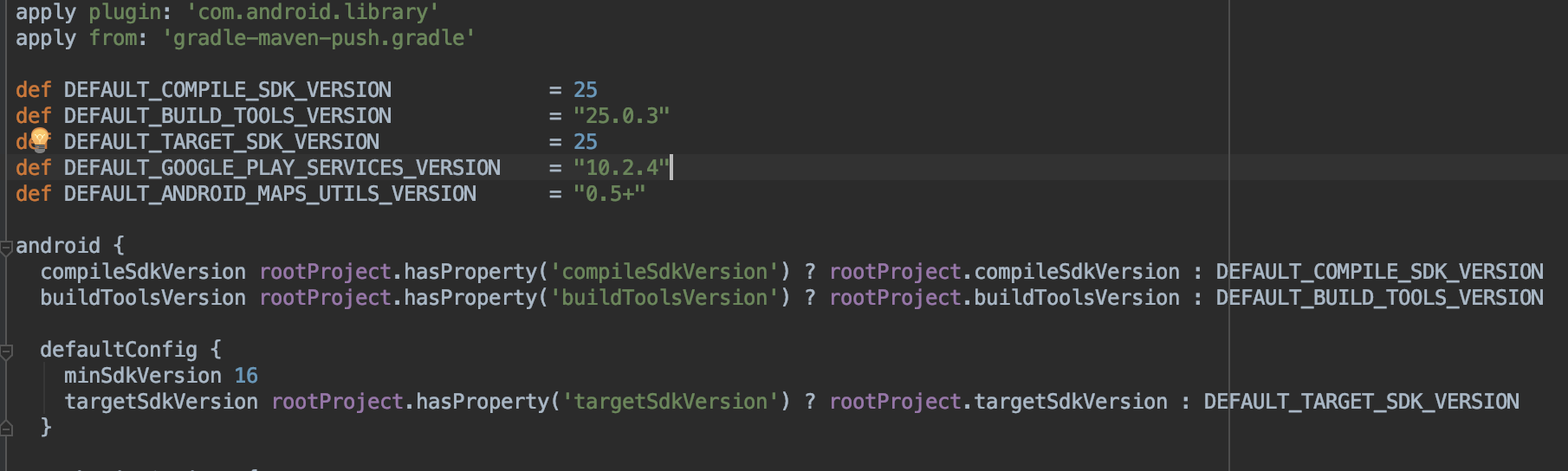
as the error says,
../../build.gradle:47: A newer version of com.google.android.gms:play-services-base than 10.2.4 is available: 16.0.1
../../build.gradle:48: A newer version of com.google.android.gms:play-services-maps than 10.2.4 is available: 16.0.0
but i already have these lines
implementation 'com.google.android.gms:play-services-base:16.0.1'
implementation 'com.google.android.gms:play-services-maps:16.0.0'
would you be so kind to suggest any thoughts on what to try next?
maybe is that because i wrote exclude that is
 implementation (project(':react-native-maps')) {
        exclude group: 'com.google.android.gms', module: 'play-services-base'
        exclude group: 'com.google.android.gms', module: 'play-services-maps'
    }
let me try to remove exclude and see what happens.
Edit: well same error. even i removed exclude. i guess its not relevent to appcenter now. about logs of crashing i couldn't figure it out and last time when i solved it i just moved on development. so i don't know if i will be able to collect for you guys. so Sorry about that logs. Thank you so much for your help either way. please you can close this issue.
yeomann
on 15 Nov 2018
Do you actually use Firebase core? It was mentioned earlier in the thread only for push. If yes, don't exclude group, if that was added as part of the confusion in my earlier answers, please remove. Same for messaging.
Regarding:
/Users/zzz/xxxx/node_modules/react-native-maps/lib/android/build.gradle: Error: All com.android.support libraries must use the exact same version specification (mixing versions can lead to runtime crashes). Found versions 27.1.1, 24.0.0. Examples include com.android.support:animated-vector-drawable:27.1.1 and com.android.support:support-v4:24.0.0 [GradleCompatible]
Add the following lines to dependencies in app/build.gradle:
implementation 'com.android.support:appcompat-v7:27.1.1'
implementation 'com.android.support:support-v4:27.1.1'
And remove any exclude rule you have from app/build.gradle, excluding is only useful to solve lint errors within a library itself, not your app (doing that can cause runtime crashes at app level).
guperrot
on 15 Nov 2018
Do you actually use Firebase core
well i just wants to use firebase for push notifications nothing else. but i guess from https://rnfirebase.io/docs/v5.x.x/installation/android seems writing firebase-core is necessary.
and regarding com.android.support:appcompat-v7 and com.android.support:support-v4
i was using your suggestions
implementation "com.android.support:appcompat-v7:${rootProject.ext.supportLibVersion}"
implementation "com.android.support:support-v4:${rootProject.ext.supportLibVersion}"
i will try with fixed versions now. thank you
yeomann
on 15 Nov 2018
thanks for suggestion of
implementation 'com.android.support:appcompat-v7:27.1.1'
implementation 'com.android.support:support-v4:27.1.1'
but same shit error
> Task :react-native-maps:lint
Ran lint on variant release: 7 issues found
Ran lint on variant debug: 7 issues found
Wrote HTML report to file:///xxxx/node_modules/react-native-maps/lib/android/build/reports/lint-results.html
Wrote XML report to file:///xxxx/node_modules/react-native-maps/lib/android/build/reports/lint-results.xml


FAILURE: Build failed with an exception.

* What went wrong:
Execution failed for task ':react-native-maps:lint'.
> Lint found errors in the project; aborting build.

  Fix the issues identified by lint, or add the following to your build script to proceed with errors:
  ...
  android {
      lintOptions {
          abortOnError false
      }
  }
  ...

  Errors found:

  /Users/xxxx/node_modules/react-native-maps/lib/android/build.gradle: Error: All com.android.support libraries must use the exact same version specification (mixing versions can lead to runtime crashes). Found versions 27.1.1, 24.0.0. Examples include com.android.support:animated-vector-drawable:27.1.1 and com.android.support:support-v4:24.0.0 [GradleCompatible]
i will google some and stop disturbing you. for now closing the issue. as it seems to be related to maps now.
yeomann
on 15 Nov 2018
In node_modules/react-native-maps/lib/android/build.gradle you can use exclude group to solve lint error (this is a workaround, should file a bug against their library) safely as in your app/build.gradle you are adding it back explicitly.
guperrot
on 15 Nov 2018
Version 1.10.0 has been released with the fixes to adapt compileSdkVersion and targetSdkVersion and buildTools to the hosting application.
guperrot
on 22 Nov 2018
Related issues
 henrikra
·
10Comments
henrikra
·
10Comments
 matthargett
·
7Comments
matthargett
·
7Comments
 v0lume
·
5Comments
v0lume
·
5Comments
 divyamakkar26
·
7Comments
divyamakkar26
·
7Comments
 KingAmo
·
8Comments
KingAmo
·
8Comments
Most helpful comment
@guperrot i tried to get log using some apps using play store. but unable to get logs. although out of curiosity after adding
com.google.gms.googleservices.GoogleServicesPlugin.config.disableVersionCheck = trueand havingwith
i created the released version again and this time app is opened without crashing on run time. i have no idea how. maybe
com.google.gms.googleservices.GoogleServicesPlugin.config.disableVersionCheck = truethis line did the trick now idea. i will try your above suggestion and update you.right now its 3:17 in morning and my eyes are closing because of sleep. i will get rest and update you about the correct fix.
I appreciated your kindness and the help very much 💯 ❤️