Appcenter-sdk-react-native: IOS Build Fails with AppCenter/MSAppCenter.h' file not found in AppCenterReactNativeAnalytics. Lexical or Preprocessor Issue Group
Description
Please describe the issue you are facing or a feature you would like to be added to the SDK.
Repro Steps
Please list the steps used to reproduce your issue.
- Follow steps to install app center Then Link manually. event did pod repo update.
1.a.) As well copied framework [Appcenter,AppcenterAnalytics, AppcenterCrashes] in Vendor/Appcenter folder.
When I open react-native project in Xcode to build , having below error.
Lexical or Preprocessor Issue Group
AppCenter/MSAppCenter.h' file not found in AppCenterReactNativeAnalyticsWhen I run react-native run-ios . get following Error
_node_modules/appcenter-analytics/ios/AppCenterReactNativeAnalytics/AppCenterReactNativeAnalytics.m:21:9: fatal error: 'AppCenter/MSAppCenter.h' file not foundimport
^~~~~~~~~~~~~~~~~~~~~~~~~1 error generated
* BUILD FAILED *
The following commands produced analyzer issues:
Analyze Base/RCTModuleMethod.mm normal x86_64
(1 command with analyzer issues)
The following build commands failed:
CompileC src/app/ios/build/Build/Intermediates.noindex/AppCenterReactNativeAnalytics.build/Debug-iphonesimulator/AppCenterReactNativeAnalytics.build/Objects-normal/x86_64/AppCenterReactNativeAnalytics.o AppCenterReactNativeAnalytics/AppCenterReactNativeAnalytics.m normal x86_64 objective-c com.apple.compilers.llvm.clang.1_0.compiler
(1 failure)_Details
Which SDK version are you using?
- e.g. 1.6.0
- Which OS version did you experience the issue on?
- e.g. iOS 11
- What device version did you see this error on? Were you using an emulator or a physical device?
- e.g. iPhone X physical device
- What third party libraries are you using?
- example
- Run the following command and paste the output below:
react-native info
Environment:
OS: macOS High Sierra 10.13.5
Node: 9.8.0
Yarn: 1.7.0
npm: 5.6.0
Watchman: 4.9.0
Xcode: Xcode 9.4.1 Build version 9F2000
Android Studio: Not Found
Packages: (wanted => installed)
react: 16.3.1
react-native: 0.54.2 => 0.54.2
- If you're developing for React Native iOS, run the following command and paste the output below:
pod --version
1.5.3
- Please enable verbose logging for your app using
[MSAppCenter setLogLevel: MSLogLevelVerbose];before your call to[AppCenterReactNative register];(or any other SDK registration). For Android, useAppCenter.setLogLevel(android.util.Log.VERBOSE);before yourSoLoader.initcall. Include the logs here:
 swapneeld
All 22 comments
Hi @swapneeld,
If you are using CocoaPod in your project we strongly recommend the automatic integration of the SDK instead of the manual integration.
If you still want to stick with your manual integration then there is probably a linking issue in Xcode with the native App Center iOS frameworks. We'll double check that the AppCenter framework is correctly linked in your app Xcode:
- Select your app target, click the "General" tab, expand "Linked Frameworks and Libraries"...you should see AppCenter there.
- Click the "Build phase tab", expand "Link Binary With Libraries"...you should see AppCenter there.
- Click the "Build Settings" tab, Look for the "Framework Search Paths" setting...the path there should point to where the AppCenter.framework file is on your repo.
Let me know the status of your integration.
 iamclement
on 6 Jul 2018
iamclement
on 6 Jul 2018
Hi @clpolet
I have tried Automatic integration of SDK.
I see below error.
_src/app/node_modules/appcenter-analytics/ios/AppCenterReactNativeAnalytics/AppCenterReactNativeAnalytics.m:21:9: fatal error: 'AppCenter/MSAppCenter.h' file not found
import
^~~~~~~~~~~~~~~~~~~~~~~~~
1 error generated.
* BUILD FAILED *
The following build commands failed:
CompileC src/app/ios/build/Build/Intermediates.noindex/AppCenterReactNativeAnalytics.build/Debug-iphonesimulator/AppCenterReactNativeAnalytics.build/Objects-normal/x86_64/AppCenterReactNativeAnalytics.o AppCenterReactNativeAnalytics/AppCenterReactNativeAnalytics.m normal x86_64 objective-c com.apple.compilers.llvm.clang.1_0.compiler
(1 failure)
Installing build/Build/Products/Debug-iphonesimulator/app.app
An error was encountered processing the command (domain=NSPOSIXErrorDomain, code=2):
Failed to install the requested application
An application bundle was not found at the provided path.
Provide a valid path to the desired application bundle.
Print: Entry, ":CFBundleIdentifier", Does Not Exist
Command failed: /usr/libexec/PlistBuddy -c Print:CFBundleIdentifier build/Build/Products/Debug-iphonesimulator/app.app/Info.plist
Print: Entry, ":CFBundleIdentifier", Does Not Exists_
swapneeld
on 7 Jul 2018
I am having below error now - AppCenter/AppCenter.h' file not found
src/app/node_modules/appcenter/ios/AppCenterReactNative/AppCenterReactNative.m:19:9: fatal error: 'AppCenter/AppCenter.h' file not found
import
^~~~~~~~~~~~~~~~~~~~~~~
1 error generated.
* BUILD FAILED *
The following build commands failed:
CompileC /src/app/ios/build/Build/Intermediates.noindex/AppCenterReactNative.build/Debug-iphonesimulator/AppCenterReactNative.build/Objects-normal/x86_64/AppCenterReactNative.o AppCenterReactNative/AppCenterReactNative.m normal x86_64 objective-c com.apple.compilers.llvm.clang.1_0.compiler
(1 failure)
Installing build/Build/Products/Debug-iphonesimulator/app.app
An error was encountered processing the command (domain=NSPOSIXErrorDomain, code=2):
Failed to install the requested application
An application bundle was not found at the provided path.
Provide a valid path to the desired application bundle.
Print: Entry, ":CFBundleIdentifier", Does Not Exist
Command failed: /usr/libexec/PlistBuddy -c Print:CFBundleIdentifier build/Build/Products/Debug-iphonesimulator/app.app/Info.plist
Print: Entry, ":CFBundleIdentifier", Does Not Exist
swapneeld
on 7 Jul 2018
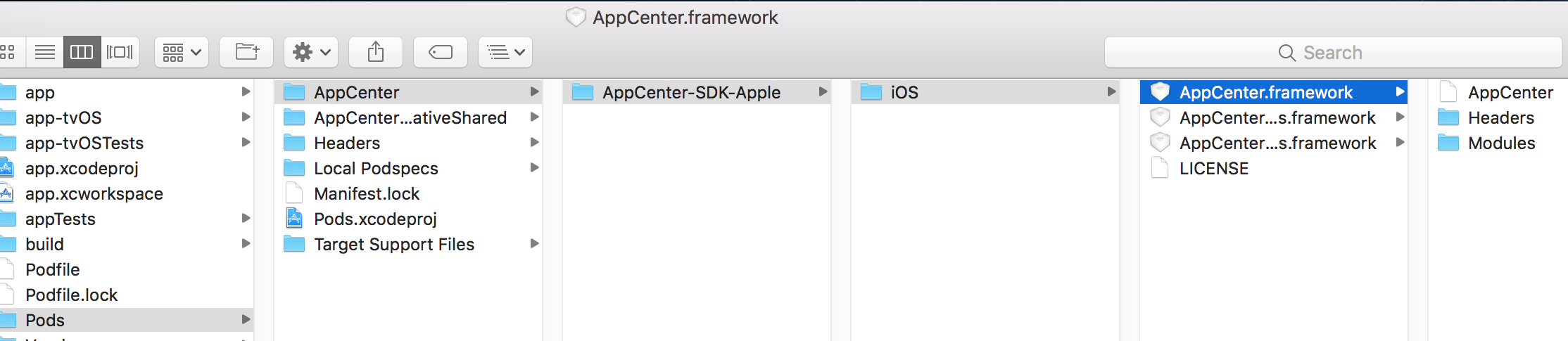

THIS is my xCode Integration ..and having 'AppCenter/MSAppCenter.h' file not found
import after using CocoPods
swapneeld
on 7 Jul 2018
Hey @swapneeld,
This looks like a local caching issue to me. Can you try this?
rm -rf ~/.rncache
react-native run-ios
 ElektrojungeAtWork
on 10 Jul 2018
ElektrojungeAtWork
on 10 Jul 2018
@TroubleMakerBen no it is not getting resolved. Still Same error. I have pinged you on Skype from my alias. can we connect to get this issue resolved please
swapneeld
on 11 Jul 2018
@swapneeld I've pinged you, I need access to your project to understand what's going on as we can't repro this with our sample projects.
ElektrojungeAtWork
on 12 Jul 2018
@swapneeld I struggled with the exact same problem I fixed it like this:
- Close XCode
- Stop Node Bundler if running
- Go to your project folder and run
yarn remove appcenter appcenter-analytics appcenter-crashes ... - Now run again
yarn add appcenter appcenter-analytics appcenter-crashes ... - Then
react-native link - Reopen XCode
- Clean Project
- Build Project
And then miracle ! It compiles ! At least for me...
Hope this helps
 erwan-lcs
on 18 Jul 2018
erwan-lcs
on 18 Jul 2018
I'm closing this issue as we haven't heard from you. Feel free to get in touch again here (reopen the issue) or get in touch through Intercom (blue button in the AppCenter portal).
ElektrojungeAtWork
on 20 Jul 2018
@TroubleMakerBen I'm running into this issue as well. I did the automatic linking and everything seems to be in the right spot in the xcode project. I've also followed @erwan-lcs method. Any ideas what would be causing this?
 spencewine
on 16 Aug 2018
spencewine
on 16 Aug 2018
@spencewine You are mentioning the xcode project, are you sure that you opened the workspace instead of the project?
ElektrojungeAtWork
on 16 Aug 2018
@TroubleMakerBen sorry, I meant the xcode workspace, not project, my bad.
spencewine
on 16 Aug 2018
@spencewine Thx for confirming. We often see that people opening the Xcode workspace but the project.
Now about your issue. I get that you are running into AppCenter/MSAppCenter.h' file not found when you are trying to compile your project but apart from that, it's really hard to understand which steps you tried/didn't try, which SDK version you are using, which npm version, etc.
Can you describe provide us with more informationl here or through our Intercom – once you log in on the App Center portal, there's a blue button that will connect you with us.
Best,
Benjamin
No matter where you respond, please follow our template below:
Description
Please describe the issue you are facing or a feature you would like to be added to the SDK.
Repro Steps
Please list the steps used to reproduce your issue.
1.
2.
Details
- Which SDK version are you using?
- e.g. 1.5.0
- Which OS version did you experience the issue on?
- e.g. Android 8.1.0, iOS 11
- What device version did you see this error on? Were you using an emulator or a physical device?
- e.g. Google Pixel 2 emulator, iPhone X physical device
- What third party libraries are you using?
- example
- Run the following command and paste the output below:
react-native info
Place output here
- If you're developing for React Native iOS, run the following command and paste the output below:
pod --version
Place output here
- Please enable verbose logging for your app using
[MSAppCenter setLogLevel: MSLogLevelVerbose];before your call to[AppCenterReactNative register];(or any other SDK registration). For Android, useAppCenter.setLogLevel(android.util.Log.VERBOSE);before yourSoLoader.initcall. Include the logs here:
ElektrojungeAtWork
on 16 Aug 2018
Hello. I get the exact same error when I try to build the iOS RN project at the https://appcenter.ms, but I'm not getting it when I build it on my local machine! The git repo is up to date with all files commited and pushed. I just removed the cocoapods from the git repo because it was a PITA to keep syncing the framework pod files. I'm reading the docs but I can't find any extra steps to install the Pod files when building at https://appcenter.ms. Will update here if I find a solution.
 clytras
on 19 Sep 2018
clytras
on 19 Sep 2018
Hey @clytras,
Just want to check have you checked in Pods folder into git. If Pods folder is not checked in, you might see this error when building in App Center portal but not locally.
Btw, we use this GitHub repository for SDK specific issues. In case you have an issue with App Center Build, please use the blue intercom chat button at the bottom right corner of the portal to contact our support.
Thanks.
 dhei
on 19 Sep 2018
dhei
on 19 Sep 2018
Hello @dhei,
Yes, I finally got the Pods directory back to git and the problem solved, App Center compiles everything and the process finishes successfully now, thank you.
Yes I know this is about the SDK specific issues, I just commented here because I was getting the exact same error.
My problem is now solved, thanks again.
clytras
on 21 Sep 2018
Hi, for this error, follow main instructions and in my case, I put these code at the top of Podfile
pod 'AppCenter/Crashes', '~> 1.12.0'
pod 'AppCenterReactNativeShared', '~> 1.11.0'
pod 'AppCenter/Analytics', '~> 1.12.0'
and run pod install again, then it works.
Seem Microsoft doesn't mention about config at the podfile in their document.
 duytq94
on 19 Mar 2019
duytq94
on 19 Mar 2019
The pods are added or updated automatically by running react-native link, that is why the docs are not mentioning it.
 guperrot
on 19 Mar 2019
guperrot
on 19 Mar 2019
@guperrot seem it doesn't add them, at least in my case.
duytq94
on 20 Mar 2019
@duytq94 If you have repro for that case please file a separate issue with the necessary details so we can look at the issue and fix it.
guperrot
on 20 Mar 2019
We are also facing this issue. It seems to appear on x86-64 machines if that makes any sense. I had no issue getting everything running on a new Macbook but we could not make it work on Macbook Airs.
 AdamZaczek
on 3 Apr 2019
AdamZaczek
on 3 Apr 2019
@AdamZaczek There are a few issues mentioned above. I'm really not sure which one you have. Also, the original one was closed due to a lack of response with details for reproduction/investigation.
Please open a new issue and fill out the template.
 MatkovIvan
on 4 Apr 2019
MatkovIvan
on 4 Apr 2019
Related issues
 matthargett
·
7Comments
matthargett
·
7Comments
 CyberMew
·
4Comments
CyberMew
·
4Comments
 thomasgazzoni
·
5Comments
thomasgazzoni
·
5Comments
 BrianTheArcane
·
6Comments
BrianTheArcane
·
6Comments
 v0lume
·
5Comments
v0lume
·
5Comments
Most helpful comment
@swapneeld I struggled with the exact same problem I fixed it like this:
yarn remove appcenter appcenter-analytics appcenter-crashes ...yarn add appcenter appcenter-analytics appcenter-crashes ...react-native linkAnd then miracle ! It compiles ! At least for me...
Hope this helps