Appcenter-sdk-dotnet: PlayStore build with DistributionPlay contains Microsoft.AppCenter.Distribute.Android.Bindings.dll
Description
We have received a warning from Google about Microsoft AppCenter SDK (Distribution?) in one of our products. According to the latest changes in Google Play policy - I think Google didn't like the Distribution Package.
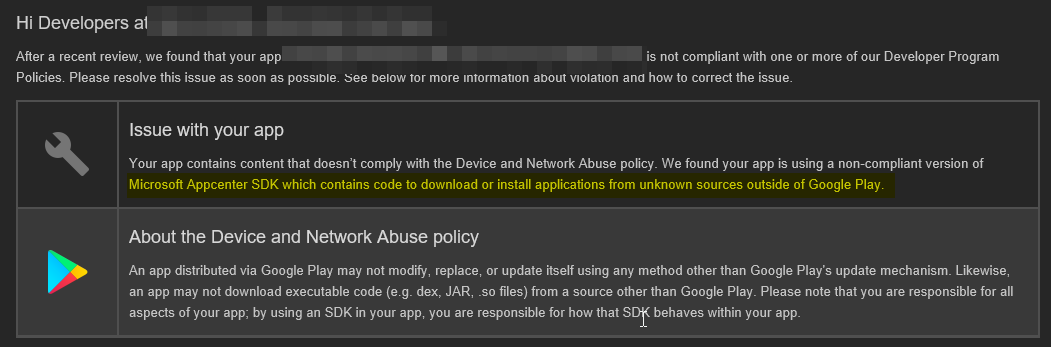
The published version has been built using DistributionPlay NuGet package variant, as it is described here https://docs.microsoft.com/en-us/appcenter/sdk/distribute/android#prepare-your-google-play-build
After a short research, I've found that Microsoft.AppCenter.Distribute.Android.Bindings.dll from Microsoft.AppCenter.Distribute package is still included in the released .apk file. That happening because of the main Xamarin.Forms project based on .NET Standard consumes regular Microsoft.AppCenter.Distribute while the Android project consumes faked Microsoft.AppCenter.DistributePlay package, so the APK contains both dll's - one from the fake NuGet package and one from the real one.
That can be easily re-checked by decompiling the next dlls:
(don't forget to decompress dlls by using this tool)
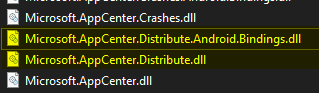
Microsoft.AppCenter.Distribute.dll - contains dummy code from Microsoft.AppCenter.DistributePlay
Microsoft.AppCenter.Distribute.Android.Bindings.dll - from the regular Microsoft.AppCenter.Distribute NuGet package;
Repro Steps
Repo with examples + fixed NuGet, see readme.
https://github.com/bondarenkod/appcenter_distribution_play_issue
OR
- Create a project basic Xamarin.Forms template (skip iOS project);
- Add Microsoft.AppCenter.Distribute packages into both projects (.net standard project, and android one)
- Init the AppCenter
- Switch to release mode
- Create an Archive for the Android project.
- Open apk file as a zip folder
- Navigate to ..apk../assemblies/ directory
I've developed a small fix. We just need to include faked assembly not only for the android project but for .NET Standard project also.
https://github.com/microsoft/appcenter-sdk-dotnet/compare/develop...Barvy:issue1515
Details
- What is your app platform (Xamarin.Android or Xamarin.iOS or UWP)?
- Xamarin.Forms, Android.
- If using Xamarin.Forms or if using portable/shared code to call our SDK APIs, are you using shared project, PCL code or .NET standard code for the application? Which .NET standard version or which PCL profile?
- .NET Standard 2.0 / 2.1
- Which SDK version are you using?
- 4.2.0
- Which OS version did you experience the issue on?
- NA
- What device version did you see this error on? Were you using an emulator or a physical device?
- NA / Device Build
- What third party libraries are you using?
- NA
- Please enable verbose logging for your app using
AppCenter.LogLevel = LogLevel.Verbosebefore your call toAppCenter.Start(...)and include the logs here:
- NA
 bondarenkod
All 2 comments
Hi! Thanks for getting in touch with us!
I left some comments in your contribution PR.
 AnastasiaKubova
on 20 Apr 2021
AnastasiaKubova
on 20 Apr 2021
The fix has been released in the 4.3.0 version of App Center SDK. Please update the App Center SDK to the latest version and let me know if this issue still persists.
AnastasiaKubova
on 23 Jun 2021
Related issues
 james1301
·
9Comments
james1301
·
9Comments
 InquisitorJax
·
7Comments
InquisitorJax
·
7Comments
 warpedgeoid
·
8Comments
warpedgeoid
·
8Comments
 poumason
·
3Comments
poumason
·
3Comments
 MisterJimson
·
3Comments
MisterJimson
·
3Comments